

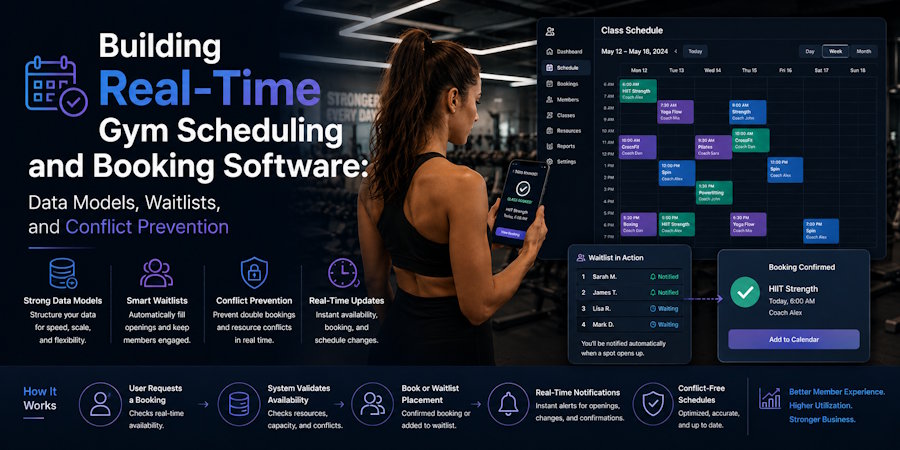
A gym schedule looks simple from the outside. A member picks a class, picks a time, and books a spot. Done, but behind that one click, the software is checking a handful of things at once. Is there still space? Is this member even eligible to book? Is the instructor actually available? Did someone else just grab the last spot thirty seconds ago? And what happens if another member cancels two minutes later?
That's the real job of gym scheduling and booking software. It's not just a digital calendar. It has to keep schedules, members, trainers, capacity, bookings, cancellations, and waitlists all talking to each other in real time. For fitness studios juggling growing memberships and packed class schedules across multiple instructors, getting this right makes a real difference day to day.
What a Real-Time Scheduling System Is Actually Managing
There's a lot more going on under the hood than "class times." A real-time system connects:
- Members and their memberships.
- Classes and individual sessions.
- Trainers and their availability.
- Rooms and facilities.
- Class capacity.
- Bookings and cancellations.
- Waitlists.
- Payments.
- Attendance.
Take a 6 PM strength class with a 20-person cap. The software needs to know who's already booked, how many spots are left, which trainer is assigned, and whether the person trying to book right now is even allowed to. GymRoute takes this connected approach. Its scheduling and booking tools let gyms build out schedules, assign instructors, set booking limits, take online bookings and payments, handle cancellations, and refill empty spots through waitlists.
The Core Data Behind Gym Booking Software
A booking system is only as reliable as the way it organizes information underneath. Member and membership data. A member record needs to say more than just a name. It should include membership status, membership type, remaining credits, and whether that person is eligible to book. So a member with an active class package can reserve a session, while someone with an expired membership shouldn't be able to book at all.
Class and session data. There's a difference between a class and a session that's easy to overlook. "Yoga Flow" is the class. "Yoga Flow, Tuesday at 6 PM" is the session. Each session carries its own details: start and end time, assigned trainer, location, capacity, booking status, and how many spots are still open. This keeps recurring schedules manageable instead of treating every single class occurrence as its own separate thing. The booking record is what actually links a member to a session. It tracks the member, the session, the booking status, when it was created, when (or if) it was cancelled, and payment status. Status can move through stages like confirmed, cancelled, completed, or waitlisted, which gives the gym a clear paper trail instead of leaning on staff to remember what happened.
How Real-Time Capacity Stops Double Bookings
The last spot in a class. Say a class has 20 spaces and 19 are already filled. Two members open the app at nearly the same moment, and both try to grab that final spot. If the system checks availability separately for each request, both of them might see one open spot and both might book it. Now the class is overbooked.
A well-built booking system has to handle that kind of simultaneous request safely. The availability check and the actual reservation need to happen as one single, controlled step.
In other words, the system shouldn't say "yes, there's a spot" and then pause before locking it in. It needs to check availability and secure the spot at the same time, as part of the same transaction. This is exactly why real-time availability, transaction control, and conflict prevention matter so much in gym scheduling software. GymRoute's scheduling system is built to keep staff, schedules, and members aligned while avoiding clashes of bookings and overcrowded classes.
Conflict Prevention Is About More Than Just Capacity
A solid gym booking system also has to think about resources beyond seats in a room. A trainer obviously can't teach two classes at once, and the system should catch that before a schedule ever gets published. GymRoute lets staff assign classes to instructors and can automatically handle substitutes when someone becomes unavailable.
A studio room can only host one class at a time (unless it's specifically set up for multiple sessions), so the schedule needs to tie classes to locations, not just times. Member conflicts. Sometimes a member tries to book two overlapping sessions. Depending on the gym's rules, the system should either block that second booking or at least flag it.
Booking-rule conflicts. Then there are the gym's own rules: how far in advance members can book, when they're allowed to cancel, how many upcoming bookings they can hold at once, membership eligibility, capacity limits, and late-cancellation policies. These rules let a gym stay in control of its schedule without staff having to manually check every single reservation.
How Waitlists Should Actually Work
A full class doesn't have to mean lost revenue. A waitlist gives the gym a way to capture that demand instead of just turning people away. The basic flow looks like this: a class fills up, a member joins the waitlist, a space opens up, the system checks the queue, an eligible member gets notified or promoted, and the booking gets confirmed.
What matters most is everything happening between those steps. Say someone cancels their spot in the 6 PM class. The software shouldn't just blast out "a space is available" to everyone at once. It needs to check the waitlist and apply the gym's rules first. GymRoute's waitlist tools let members join full classes through the website or the app and get notified the moment a spot opens up, and gym owners can customize their own waitlist settings and limits. That turns a cancellation into another booking instead of an empty spot on the schedule.
Designing a Waitlist That Doesn't Create New Problems
Promoting someone off a waitlist should go through the same checks as a normal booking. Before moving anyone from the waitlist into a class, the system needs to confirm: is the spot still open? Is this member actually eligible? Do they have the right membership or credits? Would this new booking clash with something else they've already booked? Does it still fit within the gym's scheduling rules?
This matters most when several cancellations happen back to back. Skip these checks, and a system could end up moving someone into a class they're not eligible for, or double-booking them into a time slot they already occupy. Real-time waitlist management isn't just about firing off notifications. It's about keeping the booking data accurate while conditions are shifting underneath it.
The Booking Lifecycle, From Click to Confirmation
A member sees one button: "Book." Behind that button, the software is running through several checks in sequence. First it looks at real-time availability for the session. Then it checks membership and eligibility. Then it checks for scheduling conflicts. Once all of that clears, it reserves the capacity, creates the booking, confirms payment and booking status, and finally sends the member their confirmation.
All of this needs to happen fast enough that the member isn't sitting there waiting on staff approval. That matters a lot for gyms, where members increasingly expect to manage their bookings straight from their phones instead of calling the front desk. They support mobile booking and payments, and their app gives members a way to check schedules, bookings, and attendance on their own.
What Happens When Someone Cancels
Cancellations are just as important to the model as bookings are. When a member cancels, the system should update available capacity right away, then check the waitlist. So the flow looks something like this: a member cancels, a space opens up, the waitlist gets checked, an eligible member is selected, a notification goes out, and the class fills back up.
Gyms can also set their own cancellation and rescheduling rules, which gives owners more control over late cancellations and helps cut down on the empty seats that tend to pile up from last-minute changes. They specifically support automated cancellations along with waitlist-based refilling of open spots.
What to Actually Look For in Gym Scheduling Software
If you're a gym owner comparing platforms, the real question isn't whether the software has an online calendar. Almost all of them do. The question is what's happening behind that calendar. Worth checking for: real-time class availability, capacity limits, trainer scheduling, recurring classes, online member booking, waitlist management, cancellation rules, conflict prevention, booking limits, member eligibility checks, automated reminders, mobile booking, attendance tracking, and payment integration.
They connect all of these scheduling functions with the rest of gym operations rather than treating booking as its own island. The platform also covers memberships, billing, CRM, POS, access control, inventory, loyalty, and member engagement.
- Pro tip: On pricing, GymRoute's Excel plan starts at $99 a month and covers membership and package management, digital forms, and online booking and scheduling. The Exceed plan runs $199 a month and adds lead management, POS, loyalty programs, and inventory. Ultimate comes in at $299 a month with marketing automation, video-on-demand, staff management, and multi-location support. All plans include unlimited members and staff, with no long-term contracts.
Why the Data Behind Scheduling Actually Matters
Gym owners don't need to know how to design database tables or understand transaction processing. But it does help to know what their scheduling software is responsible for. A weak system creates a chain reaction: bad schedule data leads to booking conflicts, which leads to staff scrambling to fix things, which leads to frustrated members and wasted time.
A connected system flips that around: accurate data leads to real-time checks, which leads to fewer conflicts, smoother bookings, and better use of both classes and staff.
That's really the value behind good gym scheduling and booking software. The member gets a simple booking screen. The owner gets a cleaner schedule. Staff spend less time putting out fires. And when someone cancels, a waitlist quietly fills that spot instead of leaving it empty.
Final Thoughts
Real-time gym scheduling isn't just about putting classes on a calendar. The software has to understand how memberships, trainers, rooms, capacity, bookings, cancellations, and waitlists all relate to each other, and it has to make fast decisions the moment two people try to book the same spot or a last-minute cancellation shifts everything around.
That's why the data model and the conflict-prevention logic matter just as much as the booking screen itself. For gyms looking for one platform that handles scheduling alongside memberships, billing, payments, and the member app, GymRoute takes that connected approach instead of treating scheduling like a standalone add-on.

