

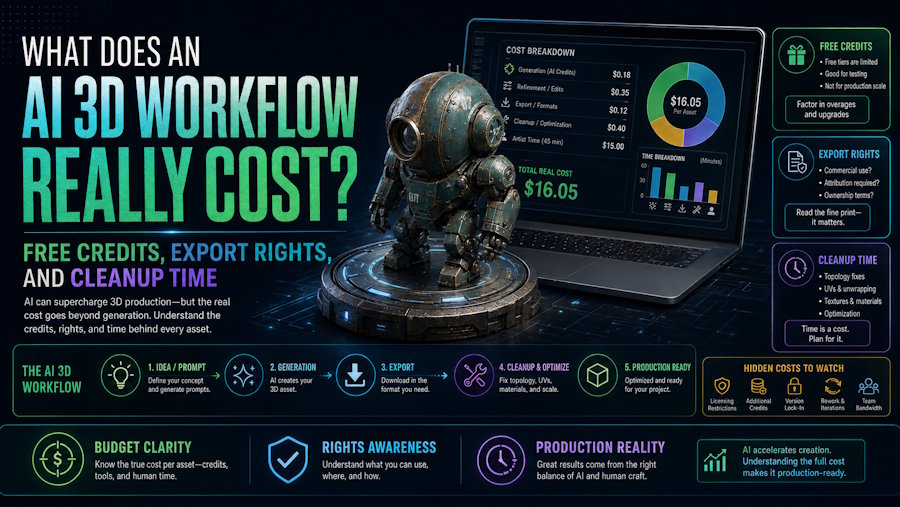
The real cost of an AI 3D workflow is not the price of the first generation. It is the full cost of getting one asset to an approved, usable state, including credits, export access, usage rights, failed attempts, cleanup time, and the final handoff into the software that will actually use the file.
That standard changes by use case. A static concept model, a printable object, and a rigged game character do not carry the same downstream burden. Some workflows are cheap to try but expensive to finish. Others look more expensive at the start but save money because more of the asset survives export, review, rigging, or animation without major repair. The right comparison is not "Which tool looks cheapest on the pricing page?" It is "Which route produces an accepted asset with the least total waste?"
V2Fun is most useful when the work goes beyond simply generating a model. You can start with an image, text prompt, or multi-view reference, then move on to texturing, rigging, motion, and export without constantly switching between different tools. That can make the early stages of a project faster and easier to manage.
The real benefit, however, depends on what you need to deliver. Make sure your plan includes the export options you need and that the licensing terms work for your project. Once exported, the asset may still need some cleanup before it is ready to use in Blender, Unity, Unreal Engine, Godot, or another part of your workflow.
The Number That Actually Matters
The most practical metric is cost per accepted asset.
Use a simple formula:
Cost per accepted asset = (platform fees + credits or usage charges + external tools + active labor + unrecovered failed attempts + rights review) / accepted assets
This formula matters because most AI 3D waste happens after the first preview. A mesh may look promising in the browser but still fail on materials, scale, topology, rigging, printability, or engine import. If a team generates ten candidates and only two survive, the rejected eight are part of the cost, not free exploration.
Active labor should include reference preparation, prompt revision, candidate review, geometry fixes, UV or material cleanup, rig checks, motion testing, export packaging, and destination validation. Queue time still matters to scheduling, but hands-on work is usually the better number for judging economic efficiency.
What Should Count in the Budget
Before comparing tools, write the budget in separate lines:
| Cost line | What to verify | Why it changes the decision |
|---|---|---|
| Access cost | Subscription, seat fee, usage charges, add-on credits | The headline plan price rarely reflects total usage |
| Credits | How many steps consume credits, whether credits expire, when refunds apply | "100 credits" and "200 credits" do not describe the same amount of work across tools |
| Export access | Which plans allow downloads, bulk export, or certain formats | A browser preview is not a deliverable |
| Rights | Whether the output is owned, licensed, public, private, or attribution-based | A technically usable file may still be unusable for client or commercial work |
| Cleanup | Repair time for mesh, materials, rig, motion, printability, or engine import | This is often the largest hidden cost |
| Destination test | Blender, Maya, slicer, Unity, Unreal Engine, Godot, or another target | The destination application is the final acceptance gate |
If those lines are not separated, teams often confuse "free to generate" with "cheap to deliver." They are not the same thing.
Why Free Credits Do Not Tell the Full Story
Free credits are useful for exploration, but they are not a stable way to compare total cost. Credit systems measure internal platform usage, not accepted output.
V2Fun makes this clear in its own workflow example. The help documentation shows an illustrative path of about 46 credits for one simple chain: 1 credit for image generation, 20 for 3D model generation, 20 for texture generation, and 5 for animation binding. That number is valuable because it shows how quickly a "cheap generation" becomes a multi-step workflow cost. It is also explicitly labeled as an example rather than a universal quote, because actual consumption depends on the selected model, parameters, and feature combination.
V2Fun also separates expiring and non-expiring credits. The current help pages state that free users receive 200 complimentary credits each month, monthly credits expire at the end of the period, and some credits from registration, starter tasks, referrals, promotions, or purchases do not expire. That means a team should not treat all credits as identical inventory.
This is also why cross-tool credit counts are a weak buying signal. Meshy's current free-plan article states 100 credits per month, while Tripo Studio's pricing page shows 200 monthly credits on the free tier and separate API pricing in a different system. Those numbers may look comparable at a glance, but they do not buy the same sequence of actions, outputs, or rights.
Export Access Changes the Economics
The financial difference between a preview and a usable asset usually appears at export.
In V2Fun, subscription benefits are described separately from credit consumption. The subscription help page ties plan value to credits, higher quotas for advanced features, and plan-dependent benefits such as downloads, storage, and commercial licenses. That distinction matters because generation, storage, and commercial use are not one entitlement.
The same pattern appears across the category. Meshy's current free-plan help states that free users can generate with monthly credits but cannot download generated models without upgrading, even though free-plan outputs are licensed under CC BY 4.0 with attribution. Tripo Studio's pricing page presents a different structure: its free tier currently lists public CC BY 4.0 models and limited downloads, while private models and commercial use sit on paid tiers. In other words, "free" does not answer the export question by itself. The workflow still needs a plan-level entitlement check.
For V2Fun users, the practical takeaway is simple: verify the export right before you budget the asset. Check which plan applies, which formats are needed, whether the file will be used as a static model or animated asset, and whether the destination tool requires extra reconstruction after import.
Rights and Commercial Use Are Separate from Generation Success
An asset can generate successfully and still be the wrong asset to ship.
V2Fun's Terms draw a clear distinction between paid and free output rights. Under the current Terms, paid customers own the output they generate, subject to any third-party or platform elements integrated into that output. Free customers receive a CC BY 4.0 license instead. The same Terms also make clear that users remain responsible for the legality of uploaded third-party assets and for checking whether output is suitable, lawful, and non-infringing for the intended use.
That matters more than many teams expect. A rights review is not only about the platform's output policy. It also includes the source image, brand marks, character likeness, copyrighted references, and any third-party files introduced into the workflow. If a project depends on clean client handoff or broad commercial ownership, that check belongs in the budget from the start.
The safest habit is to record four things for each accepted asset:
- The exact plan used.
- The exact export taken.
- The usage-rights rule that applied at the time of creation.
- The source materials used to create the asset.
That record sounds administrative, but it saves time later when a client, publisher, marketplace, or legal review asks what can actually be distributed.
Cleanup Time Is Usually the Largest Hidden Cost
The most underestimated line in AI 3D budgeting is cleanup.
For a static prop, cleanup may mean normal fixes, floating fragments, UV repair, material relinking, polygon reduction, collision, pivot placement, or LOD preparation. For a printable model, it can mean wall-thickness checks, closed geometry, scale correction, and slicer validation. For a character, the cost rises again: pose correction, skeleton placement, skin-weight review, deformation testing, motion retargeting, and engine-side import checks all come into play.
This is exactly where a connected workflow can help. In V2Fun, the 3D model workflow can continue directly into texture generation, automatic rigging, animation, and motion steps without exporting and re-importing between every stage. The motion guide also makes the remaining human judgment very explicit: for rigging, the model should be in an A-pose or T-pose, centered, front-facing, and adjusted with marker points before binding is finalized. That is a useful reminder that automation reduces setup work, but it does not remove review.
The best cost decision is usually not "always repair" or "always regenerate." Regenerate when the silhouette, structure, or pose foundation is wrong. Repair when the asset is already structurally acceptable and the remaining defects are local.
A Simple Planning Sample
Here is a practical way to think about one character candidate inside a connected AI 3D workflow.
The first four numbers below come from V2Fun's documented credit example. The review and cleanup time is a planning illustration:
| Step | Example cost signal | What it tells you |
|---|---|---|
| Generate reference image | 1 credit | Ideation still has a cost, even before 3D starts |
| Generate 3D model | 20 credits | The first mesh is only the beginning |
| Generate textures | 20 credits | Material completion is a separate cost line |
| Bind animation | 5 credits | Motion-readiness is another step, not a free extra |
| Review result and reject one weak candidate | Extra rerun + reviewer time | Failed attempts belong in the budget |
| Export and inspect in destination software | Labor time, possible repair time | Real acceptance begins after the browser preview |
Even in a simple path, the budget is no longer "one generation." It is a chain of decisions. That is why teams should price the route to a usable asset, not just the first visible result.
Where V2Fun Is Most Economical
V2Fun makes the most economic sense when workflow continuity matters more than isolated generation.
That usually means:
- small teams that want to keep concept, model, texture, rig, and motion closer together
- character-driven workflows where rigging and animation matter soon after generation
- teams that need to decide quickly whether an asset deserves manual polish
- creators who want to reduce repeated export, import, and setup work across multiple tools
It is a less natural fit when the project already has a mature downstream pipeline and only needs a one-off mesh generator. In those cases, the cheaper-looking route may still be a specialist generator plus a separate DCC pipeline. But when the real bottleneck is repeated handoff friction, keeping more of the early path inside one workflow can lower the total cost.
How to Compare Any AI 3D Tool Fairly
If you want a real cost answer, test tools against the same acceptance standard.
Freeze these conditions before you compare anything:
- The same brief.
- The same source material.
- The same required deliverable.
- The same destination application.
- The same pass-fail checklist.
Then record:
- Credits or usage charges.
- Completed but rejected generations.
- Refunds or failed tasks.
- Cleanup time.
- Export success.
- Final acceptance.
Without that discipline, most "cheapest tool" conclusions are just gallery impressions.
Conclusion
The real cost of an AI 3D workflow is the cost of a usable asset, not the cost of a preview. Free credits can reduce the cost of exploration, but they do not settle export entitlement, rights, or cleanup burden. Those are the lines that determine whether a workflow is actually economical.
For teams moving from image, text, or multi-view input into texture, rigging, motion, and export, V2Fun is strongest when that continuity reduces early rework and speeds up acceptance decisions. The right budget question is not "How cheap is the first result?" It is "How reliably can this workflow produce an accepted asset under the plan, rights, and cleanup standard the project actually needs?"
FAQ
Are free credits enough to estimate total cost?
No. Free credits only describe a portion of platform usage. They do not tell you how many attempts will fail, whether downloads are included, whether the output can be used under the needed rights, or how much cleanup the asset will require.
Does export access mean commercial ownership?
Not automatically. Export entitlement, plan benefits, and output-rights rules are related but separate questions. Check the plan, the applicable terms, and the source materials used to create the asset.
What is usually the biggest hidden cost?
Cleanup time. In most practical workflows, mesh repair, material fixes, rig adjustment, motion testing, and destination validation cost more time than the first generation itself.
Sources
- V2Fun: How are credits consumed?
- V2Fun: Do credits have an expiration date?
- V2Fun: What does the subscription plan include?
- V2Fun Terms of Use
- V2Fun AI 3D Model Generator
- V2Fun AI 3D Animation
- V2Fun AI Motion User Guide
- Meshy: What Is Included on the Free Plan?
- Meshy: Can I Use Meshy Assets Commercially?
- Meshy: When Were My Meshy Credits Used or Refunded?
- Tripo Studio Pricing
- Tripo OpenAPI Pricing

