

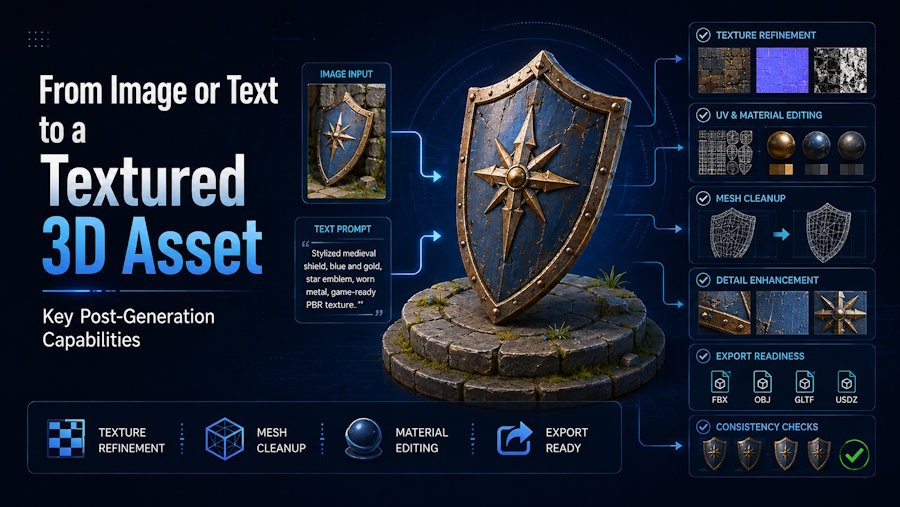
A textured AI-generated model is usable only when it can survive the next tool in the workflow. After generation, the capabilities that matter most are full-angle review, workable geometry, reliable UVs, coherent materials, task-appropriate rigging when needed, and an export package that imports cleanly downstream.
That distinction matters because a good preview can hide the exact problems that create extra work later. A model may look convincing from the front and still have weak back-side structure, stretched UVs, incomplete texture maps, unstable deformation, or a file package that breaks on first import. Text prompts, images, and multi-view references change how the asset begins. They do not remove the need to validate the result before it moves into rendering, animation, game engines, or 3D printing.
For creators who want one connected browser workflow, V2Fun is useful because it supports text, image, and multi-view generation, then continues into texturing, rigging, animation, and export. That makes it a practical option when the goal is not only to generate a model, but to keep moving toward a reviewable asset. The real decision, however, still comes after generation: can the selected model be inspected, prepared, and handed off without losing the parts the project depends on?
Start with the Destination, Not the Preview
The fastest way to judge any AI 3D workflow is to decide what the asset must become before approving a candidate.
A textured turntable for a concept review needs a different standard than a game prop, a rigged character, or a printable object. If the destination is a game engine, the asset may need a reasonable polygon budget, clean UVs, correct material channels, a stable pivot, and predictable import behavior. If the destination is character animation, the model also needs a suitable pose, separable limbs, workable joint regions, and deformation that holds up in motion. If the destination is 3D printing, material quality matters less than dimensions, thickness, and watertight geometry.
This is why the real question is not whether a tool can show a textured model in the browser. The useful question is whether the workflow removes work from the path to the final deliverable.
How Does the Starting Input Change the Asset?
Text prompts, single images, and multi-view references each solve a different early-stage problem.
Text is the most open-ended route. It is useful when the concept is still fluid and the creator wants to define subject matter, proportions, style, and material direction without finished concept art. The trade-off is that text does not fully control geometry. Small structural details, hidden surfaces, and exact proportions still depend on what the model infers.
A single image gives the model stronger guidance for silhouette, color, and visible surface detail. That usually improves front-view consistency, but it leaves the system to imagine the back, underside, and any hidden regions. The result can still be visually strong while remaining incomplete as a downstream asset.
Multi-view input is the most informative route when the goal is stronger geometric consistency. Front, side, and back references reduce guesswork and make it easier for the generator to produce a fuller shape. The quality of that result still depends on how consistent the views are. If proportions, lighting, accessories, or pose differ too much between images, the model has to reconcile conflicting evidence instead of reading one clear object.
The important thing is that these three routes eventually converge. Once the model has been generated, every version faces the same practical test: does the asset still work after inspection, preparation, and export?
What Does a Textured 3D Asset Need After Generation?
After generation, five checks matter more than the initial wow factor:
- The model needs to look believable from all important angles, not only from the hero view.
- The geometry needs to fit the next task, whether that means editing, animation, rendering, engine import, or printing.
- The UVs and materials need to stay coherent together.
- The rig, if the asset is a character, needs to deform in a controllable way.
- The exported file needs to open correctly in the destination tool.
Those checks are connected, but none of them can approve the next one automatically. A strong preview is useful because it tells the creator whether the asset is worth continuing with. It does not certify the downloaded geometry, texture set, skeleton, or import result.
The Post-Generation Capability Map
| Stage | Capability that matters | What to validate | Why it matters downstream |
|---|---|---|---|
| Review | Full-angle preview and basic mesh visibility | Silhouette, hidden surfaces, fused parts, floating fragments, overall completeness | A front-facing render can hide structural problems |
| Geometry preparation | Reduction, cleanup, retopology, scale, pivots, part separation | Editability, polygon load, deformation readiness, printability, real-time use | Geometry quality decides how much rework the asset needs |
| Texturing | Surface generation and retexturing | UV continuity, seam behavior, map alignment, texture resolution, material assignments | A beautiful material is not useful if it breaks after export |
| Rigging and motion | Skeleton setup and deformation review | Pose quality, marker placement, weights, joint bending, accessory behavior | Motion reveals problems that static preview does not show |
| Export and handoff | File packaging for the next application | Geometry, textures, materials, scale, axes, hierarchy, skeleton, animation clips | Approval happens in the receiving tool, not in the generator |
This is where a connected workflow becomes helpful. V2Fun lets creators move from generation into texturing, rigging, animation, and export in one browser-based path. That reduces handoff friction during early validation. It does not replace the need to inspect the actual asset package before the project depends on it.
Why Is Full-Angle Review So Important?
The first review step is simple: rotate the model and stop trusting the hero angle.
Many AI-generated assets fail in ways that only appear from the side, back, or underside. Common problems include missing thickness, fused components, invented rear details, asymmetry that does not belong there, or floating elements that only become obvious once the camera moves. A browser preview is still useful because it helps the creator discard weak candidates early. But it should be treated as a selection tool, not final approval.
This is especially important for assets created from a single image. The front may be accurate while the back is only plausible, not dependable. Multi-view input improves that situation, but it still helps to review the model as if it were already headed into a downstream application.
What Makes Geometry Good Enough to Keep?
Geometry quality matters more as the workflow becomes more demanding.
A dense triangle mesh can be acceptable for a static concept render and still be frustrating for a character that needs to bend cleanly or a prop that must meet a mobile budget. A printable model may look complete visually and still fail because the shape is not watertight. A product model may appear fine in a beauty render and still be awkward to edit because important components are fused into one surface.
In practical terms, geometry is good enough to keep when it matches the next job. That means:
- The silhouette reads correctly
- Important parts are distinct enough to edit or animate
- Polygon density is reasonable for the destination
- Normals and surfaces behave predictably
- The model does not depend on one flattering camera angle
For creators working in an accelerated workflow, V2Fun is most useful when it helps them identify whether a model is worth carrying forward before major cleanup begins. If the structure is already close, downstream repair is often manageable. If the structure is fundamentally wrong, no texture pass or export format will rescue it.
Why Do UVs and Materials Matter More Than the Preview?
Texturing only works when the mesh surface, UV layout, and material maps stay coherent together.
UVs define how 2D texture information is placed on a 3D surface. The texture maps provide the visual and material data. The material then tells the renderer how that data should respond to light. If any of those layers breaks, the result can look acceptable in one preview and unreliable everywhere else.
The most common things to check are:
- Stretched or compressed detail
- Visible seams on focal surfaces
- Repeated patterns that break realism
- Mirrored or duplicated details where they should be unique
- Mismatched material boundaries
- Texture resolution that does not hold up at the final viewing distance
This is where creators often over-trust the browser. A preview can make the material direction look right while hiding poor UV continuity, incomplete PBR maps, or renderer-specific issues that only appear after export.
V2Fun is valuable here because it connects model generation with AI texturing and retexturing in the same workflow. That is especially useful when the base shape is worth keeping but the first material pass is not. A creator can hold the model steady, compare different surface directions, and export a more reviewable result without immediately moving into a separate painting tool.
What still needs validation is the actual package: do the maps exist, do they align correctly, and do they reconnect cleanly in the destination renderer?
When Does Rigging Matter?
Rigging matters only when the asset is supposed to move, but when it matters, it matters early.
For a static prop or printable object, rigging may be irrelevant. For a humanoid character, it becomes one of the main downstream checks. A model that looks fine at rest can reveal serious problems once a skeleton is added and the joints begin to bend. Shoulders may collapse, wrists may twist badly, cloth may intersect the body, and accessories may follow the wrong bone region.
That is why rigging should be treated as a validation stage, not only as a feature button. A useful rigging workflow gives the creator a chance to review pose setup, adjust important markers or skeleton placement, and test one or two representative motions before export.
V2Fun fits that stage well for creators who want to keep early character setup inside one flow. It supports AI auto rigging and motion-related steps in the browser, which makes it easier to discover whether the character is structurally ready to continue. The final pass or fail decision still belongs to the asset itself. If the mesh, pose, or limb separation is weak, auto-rigging will expose the problem rather than solve it.
Why Is Export the Real Approval Stage?
Export is the first moment when the asset has to behave like a file, not a preview.
Different formats carry different kinds of data. A static object may move comfortably through formats such as OBJ or GLB. A character that needs skeleton and animation data often depends on FBX. A printable workflow may rely on STL or 3MF. The correct format depends on what the destination tool expects to receive.
The important point is that the presence of an export option is not proof that the handoff is complete. The exported file still needs to be opened in the destination software and checked for:
- Scale and orientation
- Object hierarchy and pivots
- Mesh integrity
- Texture and material assignment
- Skeleton and weight data, if relevant
- Animation clips, if included
- Warnings or missing elements on import
This is where creators find out whether the asset really shortened the workflow or only delayed the repair work. A clean first import is one of the strongest signals that the model is ready to keep moving.
A Simple Asset-Ready Checklist
Before treating a generated model as a usable textured asset, check the following:
| Check | What a passing result looks like |
|---|---|
| Shape review | The asset reads correctly from all important angles |
| Geometry | No major fused parts, floating fragments, or destination-breaking structure |
| UVs | No obvious stretch, bad seams, or unusable layout on important surfaces |
| Materials | Texture maps and material assignments match the intended look |
| Resolution | The surface detail holds up at the actual viewing distance |
| Rigging, if needed | Major joints deform predictably and the skeleton is usable |
| Export | The file opens in the destination tool without critical surprises |
If several of these checks fail at once, the model is usually not a downstream-ready asset yet. If only one or two local issues remain, the asset may already be a practical candidate for cleanup and handoff.
Where Does V2Fun Fit Best in This Workflow?
V2Fun is strongest when the creator wants to stay in one connected path long enough to answer the most important early production questions.
It is especially useful for:
- Moving from text, image, or multi-view references into a reviewable 3D model
- Comparing material directions without rebuilding the whole workflow
- Testing whether a humanoid character is ready for basic rigging and motion
- Preparing an export candidate before the asset moves into Blender, a game engine, or another downstream tool
It is a less natural final stop when the project depends on exact manual UV work, localized texture painting, engine-specific material setup, or deep mesh repair. At that stage, specialist tools still own the last mile. The value of V2Fun is that it can help creators reach that last mile faster and with fewer weak candidates.
Choose the Workflow Backward from the Final Use
The most reliable way to choose an AI 3D workflow is to start with the acceptance test and work backward.
If the goal is a concept presentation, the most important capabilities may be shape clarity, surface direction, and a clean turntable. If the goal is a game prop, the priorities shift toward topology, materials, scale, and import behavior. If the goal is character animation, pose readiness, rigging, deformation, and export become central. If the goal is printing, material beauty becomes secondary to dimensions, thickness, and watertight geometry.
Once that destination is clear, the workflow becomes easier to judge. The right tool is not the one with the longest feature list. It is the one that helps the creator keep only the assets that can continue into the next real step.
Conclusion
The capabilities that matter after AI 3D generation are the ones that turn a promising preview into a transferable asset. In practice, that means full-angle inspection, geometry that fits the task, reliable UVs and materials, rigging that deforms cleanly when needed, and an export package that opens correctly downstream.
Text prompts, images, and multi-view references change the starting point, but they do not change the final standard. A textured 3D asset is ready only when the model can be inspected, prepared, and handed off without losing the structure, surface information, or motion behavior the project depends on.
For creators who want one browser-based route from idea to asset, V2Fun offers a practical connected workflow across generation, texturing, rigging, animation, and export. Its real value appears when that connected path reduces rework and helps a promising model survive the next application with less friction.
Frequently Asked Questions
Is a good preview enough to approve an AI-generated 3D model?
No. A good preview is useful for selection, but it does not confirm the quality of the downloaded geometry, UVs, materials, rigging, or export package. The asset still needs to pass downstream checks in the destination tool.
Is text-to-3D or image-to-3D better for a textured asset?
It depends on the starting information. Text-to-3D is better when the design is still open and concept direction matters more than exact visual reference. Image-to-3D is better when silhouette, visible color, and front-view detail are already established. Multi-view input is the stronger choice when geometry consistency matters most.
Can AI texturing fix a weak model?
Only to a limited extent. Texturing can improve surface appearance, but it cannot reliably fix broken structure, poor UVs, fused geometry, or bad deformation. If the underlying model is weak, the texture pass usually hides the problem rather than solving it.
When should a creator move the asset into specialist software?
Move into specialist software when the job requires exact control over geometry, UVs, local texture correction, engine-specific shader setup, or advanced cleanup. AI workflow tools are strongest earlier, when the goal is to establish direction and validate which assets are worth carrying forward.
Where is V2Fun most useful in the pipeline?
V2Fun is most useful in the connected early-to-middle stage of the workflow, where creators want to go from prompt or reference image to a reviewable model, compare textures, test basic character readiness, and prepare a first export without breaking the process across too many tools too soon.

