

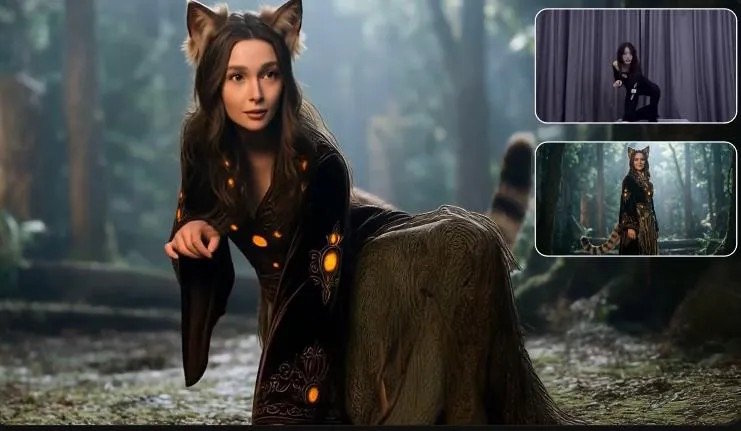
Kling AI Motion Control works by taking movement from a reference video and applying it to a still image, so the character in the image performs the same actions with strong visual consistency. Instead of generating motion randomly, the system follows the reference clip’s body movement, facial expressions, timing, and camera-visible pose changes. This makes it useful for creators who want more control over performance, emotion, and identity preservation in AI video generation. A key strength is that Kling is designed to keep the character recognizable even during head turns, partial occlusion, and shifts between close-up and wider framing. In simple terms, it combines motion transfer with identity locking, allowing a static portrait or character image to move naturally while staying visually stable across the entire generated video.
How Does Kling AI Motion Control Actually Work?
From Reference Video to Character Motion
Kling AI motion control starts with a reference video that contains the movement you want to copy. The system analyzes that clip frame by frame, reading body position, gesture timing, head movement, facial behavior, and shifts in perspective. It then maps those motion signals onto the uploaded source image, turning a static character into an animated subject that follows the same performance pattern. This process is more than simple pose matching. Kling is built to replicate subtle motion details, including micro-expressions and dramatic emotional transitions, so the final video feels intentional rather than generic. Because the animation is guided by a real reference, creators get precision character motion instead of unpredictable, loosely interpreted movement generated without performance input.
How Kling AI Preserves Face and Character Details
Kling AI preserves face and character details by prioritizing identity consistency throughout motion transfer. When the reference performance includes head turns, changing camera angles, or partial obstruction, the model keeps the main facial structure, expression style, and visible character traits stable instead of letting them drift between frames. This is why Kling highlights flawless facial consistency at any angle and stable results across occlusion and distance. In practical use, that means the generated character remains recognizable during close-ups, profile views, and wider shots. The system also transfers expression changes with high precision, capturing subtle muscle movement without breaking the character’s look. That combination helps reduce distortion and keeps the animation believable from start to finish.
How to Use Kling AI Motion Control Step by Step
Prepare and Upload Your Image and Reference Video
Start with a clear source image and a reference video that shows the exact movement you want the character to perform. Choose an image with a visible face, clean lighting, and a pose that can reasonably connect to the opening motion in the video. Then pick a reference clip where gestures, head direction, and facial performance are easy to read. In Kling AI Motion Control, upload the still image first, then add the reference video. Before generating, check that the subject framing is usable and that the motion is not unnecessarily chaotic. A well-matched pair gives the system a stronger foundation for motion transfer, especially when you want precise facial expression changes and smooth body movement across the sequence.
Bind the Face, Generate the Video, and Export It
After uploading both assets, use the face binding step to anchor the character’s identity before generation. This tells Kling AI Motion Control which face to preserve as it transfers the performance from the reference video. Once the face is bound, review the setup and confirm that the source image and reference clip align well enough for the motion you expect. Then start the generation process. Kling will animate the still image using the reference performance while working to keep facial details, expression behavior, and overall character appearance stable. When the result is ready, preview the video carefully for consistency, especially around turns and emotional shifts. If it looks correct, export the final clip and save it in your preferred format.
How to Get Better Motion Control Results
Match Poses, Angles, and Reference Motion
Better results start with better matching between the source image and the reference video. If the image shows a front-facing subject but the reference begins with a sharp side angle, the transition can feel strained. Use a starting pose that resembles the first moments of the reference clip, including head direction, body orientation, and camera distance. This gives the system a cleaner path for transferring motion. Also match the energy of the performance. A calm portrait pairs best with controlled movements, while a dynamic reference works better with an image that already suggests action. When pose, angle, and motion style align, Kling AI Motion Control can reproduce movement more naturally and maintain stronger character stability from frame to frame.
Reduce Face Distortion and Motion Inconsistency
To reduce face distortion and motion inconsistency, use a high-quality source image with clear facial features and avoid references with fast, erratic movement unless that style is essential. Sudden swings, extreme blur, or heavy obstruction make clean motion transfer harder. Keep the face well lit in both assets so the system can track expression changes more reliably. It also helps to choose reference clips where the subject stays visible for most of the sequence, even if there are brief angle changes or partial occlusions. If a result looks unstable, replace the image or shorten the reference to focus on the strongest segment. Cleaner inputs usually produce sharper identity retention and more coherent movement throughout the final animation.
Conclusion
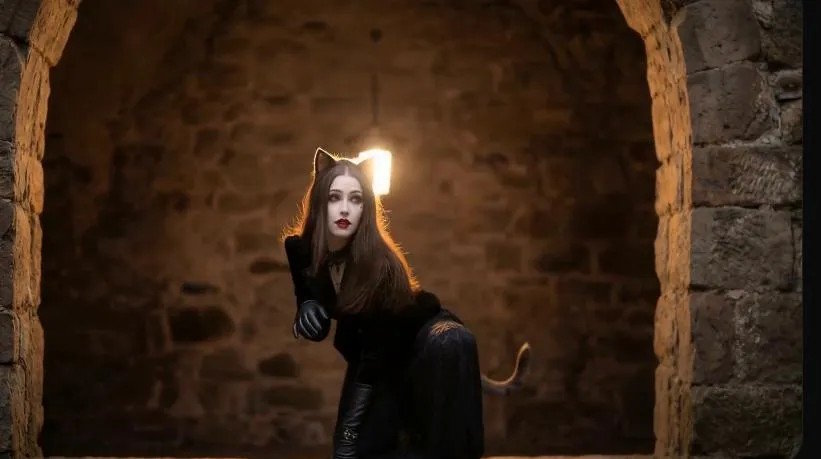
Kling AI Motion Control works by using a reference video as a motion blueprint and applying that performance to a still image while protecting the character’s identity. The result is controlled animation that follows real movement, expressions, and timing instead of relying on broad guesswork. Its main advantage is consistency: faces stay recognizable across angles, emotional changes transfer with precision, and characters remain stable even through partial occlusion or framing changes. For the best outcome, choose a clear source image, pair it with a well-matched reference clip, and bind the face before generating. When those setup choices are strong, the tool can produce believable character animation with far more control. That is the core of how AI Motion Control works in Kling AI.

