

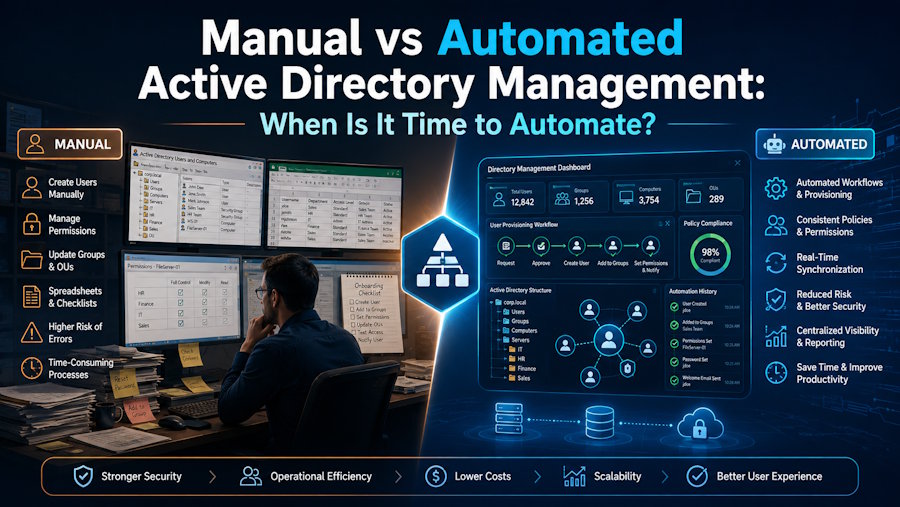
Manual Active Directory management can work perfectly well for years. If a company has a relatively small number of users, new employees do not join every day, and account changes happen only occasionally, an administrator can handle most tasks using standard tools without much difficulty.
The problem does not begin when manual management becomes “wrong.” It begins when it stops scaling.
Dozens of new accounts, role changes, group updates, attribute changes, bulk operations, password resets, and offboarding gradually turn into repetitive operational work. And the more often these tasks are repeated, the more expensive small mistakes become. That is the point where Active Directory automation stops being just a convenience and starts becoming a way to make administration more predictable.
When Manual Active Directory Management Still Makes Sense
Not every task needs to be automated. If changes are infrequent, affect only one or two users, or require individual judgment from an administrator, a manual approach may be completely sufficient.
For example, there is little value in building a separate workflow to create one unusual service account. The same applies to one-off group changes or specific configurations that would require human review anyway. Manual administration works well when the workload is small, and each task is different from the previous one.
It becomes more difficult when an administrator starts performing the same sequence of actions again and again.
Where Manual Management Starts to Break Down
The clearest warning sign is repetition. A new employee joins the company, and IT needs to create an account, populate attributes, select the right OU, add the user to groups, and configure the required settings. A few days later, another employee joins, and the process starts again.
Then HR sends a spreadsheet containing dozens of changes. Some users need a new Department value, others a different Manager or Office. Some need to be added to a new group, while others need to be removed from an old one.
At this point, manual management creates two problems at once: it takes time, and it reduces consistency.
One administrator may enter a department name one way, while another uses a different format. An attribute may be missed. A group may be forgotten. An account may remain active longer than it should. A single mistake may be minor. But when the same process is repeated hundreds of times, it becomes a systemic risk rather than an isolated error.
User Provisioning Is Often the First Process to Automate
Creating new users is one of the most obvious candidates for automation. A typical onboarding process is fairly predictable. IT receives the employee’s details, creates the account, fills in the name, email, job title, department, and manager, selects the correct OU, and adds the user to the appropriate groups. For one user, this is not a difficult task. For twenty or fifty new employees, the same process becomes a significant amount of manual work.
This is where Active Directory user account automation can provide the most practical value. If the input data is already structured — for example, coming from an HR system, CSV file, or another source — much of the account creation process can follow predefined rules.
The same applies to Active Directory account creation automation: the more standardized the process is, the less sense it makes to repeat it manually every time.
Bulk Changes Are Another Clear Sign
Changing the department value for one user is one thing. Doing the same for two hundred users is something else entirely. Bulk changes often appear after a reorganization, office move, update to naming conventions, or synchronization of information from an HR system.
Technically, an administrator can open every account and make the changes manually. In practice, that approach quickly becomes inefficient.
The larger the number of records involved, the greater the risk of:
- missing some users;
- entering the wrong value;
- making a typo;
- applying inconsistent formats to the same attribute;
- spending hours on work that is repetitive by nature.
Volume is often the point where automation starts saving hours rather than minutes.
Automation Does Not Have to Mean Dozens of Custom Scripts
When people talk about Active Directory automation, PowerShell is often the first thing that comes to mind. And for good reason. Scripts give administrators a great deal of flexibility and can automate almost any repetitive scenario.
But they are not the only option.
Broadly speaking, there are three levels of working with AD. The first is the standard GUI, which works well for individual changes. The second is PowerShell and custom scripts. This is a strong option for teams that have the necessary expertise and are prepared to maintain those scripts over time.
The third is purpose-built Active Directory management tools, which add bulk operations, data imports, scheduling, and other common workflows without requiring teams to build everything from scratch.
For teams that want to reduce repetitive directory administration without developing every process themselves, Active Directory management software can provide a practical middle ground between fully manual work and a large collection of custom code.
What Should You Automate First?
The best first automation project is not necessarily the most complex one. In many cases, the biggest benefit comes from a simple task the team performs all the time. That might include:
- creating standard user accounts;
- bulk updates;
- changing attributes;
- assigning users to standard groups;
- recurring imports;
- scheduled account actions.
The criterion is simple: if a task happens frequently, follows the same rules, and has predictable input data, it is a good candidate for automation. Instead of looking for the most sophisticated workflow to automate, it is usually better to start with whatever is currently taking the most time.
When a Dedicated Tool Is More Practical Than Manual Work
In many teams, automation starts with a spreadsheet. For example, HR may regularly send a CSV or Excel file containing new employees or updated information. An administrator can process it manually or write a PowerShell script.
The script may work perfectly well. But it then needs to be tested, updated, documented, and eventually handed over if the person who wrote it is no longer responsible for that environment.
That does not make scripts a bad choice. The real question is how much time the team wants to spend maintaining them.
For recurring imports or large-scale account changes, AD Bulk Users allows teams to handle bulk user creation and updates without editing every account individually. This approach works especially well when the process is already clearly defined, and the same type of structured data is used repeatedly.
Do Not Automate a Bad Process
One of the most overlooked problems with automation is trying to automate a process before the team has agreed on how that process should actually work. If different departments use different naming conventions, nobody is quite sure which groups a particular role should receive, and data arrives in several different formats, automation is unlikely to solve the problem. If anything, it may make it worse.
Automating an inconsistent process simply allows you to produce inconsistent results faster.
Before implementing automation, it helps to define a few basic rules: where the data comes from, which attributes are mandatory, how group assignments are determined, who approves exceptions, and what should happen when the input data is incorrect. Once those rules are clear, the technical part becomes much easier.
How to Know When It Is Time to Automate Active Directory
There is no universal threshold based on the number of users. A company with 100 users may have more repetitive AD work than an organization with 500 if staff turnover is high or access changes happen frequently. It is more useful to look at the operational workload itself.
If bulk changes have become routine, onboarding takes hours, administrators constantly copy information from spreadsheets, the same mistakes keep appearing, and a critical process depends on one person, the manual model is already creating unnecessary costs.
Another common sign is the growing number of one-off scripts. If the team keeps writing new code for very similar tasks, the problem may no longer be a single operation, but the overall way Active Directory is being managed.
Automate Repetition, Not Decisions
Manual Active Directory administration is not going away. There will always be unusual situations, troubleshooting, complex access changes, and decisions that require an administrator’s experience. But there is little value in having an experienced IT professional repeat the same predictable operation a hundred times. The purpose of Active Directory automation is not to remove administrators from the process. It is to remove routine work so they can spend more time on tasks where their expertise actually matters.
FAQ
What is Active Directory automation?
Active Directory automation is the automation of repetitive administrative tasks involving users, groups, attributes, and other AD objects. These tasks may include account creation, bulk updates, group membership changes, data imports, or scheduled actions.
Which Active Directory tasks should be automated first?
The best candidates are tasks that are performed frequently and follow stable, predictable rules.
These usually include user provisioning, bulk attribute updates, user imports, standard group membership changes, and other operations where administrators repeatedly perform the same steps.
Is PowerShell enough for Active Directory automation?
In many cases, yes. PowerShell provides a high level of control and works well for complex or highly specific scenarios. At the same time, teams need to consider the time required for script development, testing, documentation, and ongoing maintenance. That is why the choice between PowerShell and Active Directory automation software depends not only on what the tool can do, but also on the resources and expertise available within the IT team.
When should a company use Active Directory automation software?
When repetitive AD tasks already take up a noticeable amount of working time, bulk operations have become routine, and manual processes are starting to create errors or bottlenecks.
At that point, automation can help not only by saving time but also by making repetitive administrative work more consistent.

