

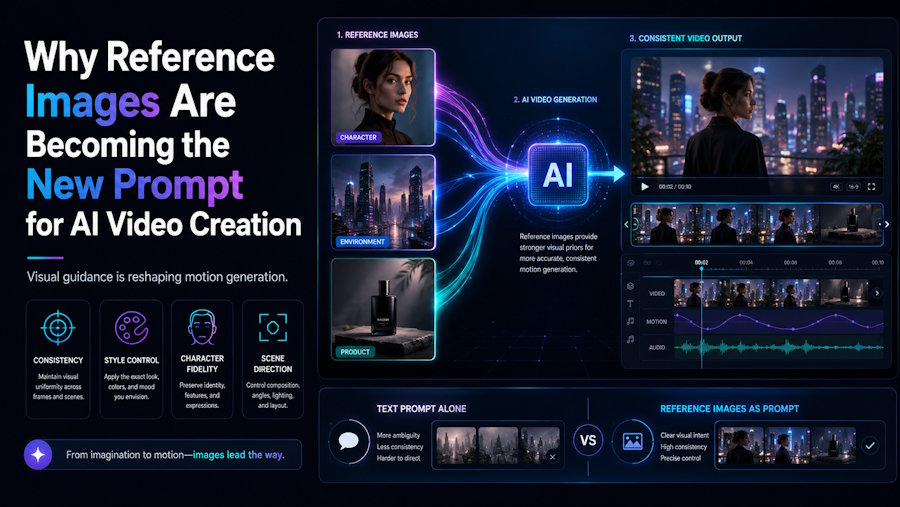
AI video creation is often described as a prompt-driven process. A user writes a scene, chooses a style, and waits for the system to generate a result. Text prompts are still important, but they are no longer the only way people guide AI video. Increasingly, images are becoming part of the prompt itself.
A reference image can communicate things that text may struggle to describe clearly. It can show the subject, framing, color, lighting, texture, product shape, character design, or mood before the video is generated. This makes image-to-video creation especially useful for people who want more control over the starting point.
The shift is simple but important: creators are not only telling AI what to make. They are showing it what to build from.
Why Text Alone Can Be Unclear
Text is flexible, but it leaves room for interpretation. A phrase like “a futuristic product video” may sound specific, but it can lead to many different visual results. One system might imagine a dark cinematic scene. Another might create a clean studio-style product shot. A third might focus on abstract motion or dramatic lighting.
For users who already have a visual direction in mind, that uncertainty can be frustrating. They may not want the AI to invent everything from scratch. They may want the video to keep the identity of a product, the style of an illustration, the composition of a photo, or the atmosphere of a concept image.
This is where reference images become powerful. They narrow the creative space. Instead of depending only on description, the user gives the system a visual anchor.
The Image Acts as a Creative Instruction
In image-to-video workflows, the image is not just an upload. It is a form of instruction. It tells the system what the subject looks like, where attention should go, and what visual details should matter.
A product photo can guide the shape and placement of the object. A portrait can define the face, clothing, mood, and setting. A concept image can establish a world or character style. A travel photo can provide atmosphere and location. The text prompt can then describe motion, pacing, mood, or action around that visual base.
This combination makes the creative process more directional. The image sets the foundation, while the prompt adds movement and intention.
Why Image-to-Video Generators Are Useful for Visual Control
An image-to-video generator is useful because it starts from something the creator can already see. That may sound obvious, but it changes the workflow. Instead of waiting for a model to interpret a text idea from zero, the user begins with a visible reference.
Tools such as KingAI fit into this wider change by helping users turn still images and visual ideas into AI-generated motion. The value is not only that the tool can create a video. The value is that the user can begin from an image that already carries the right subject, style, or feeling.
This is especially helpful for creators, designers, small teams, and brands that already have useful visual assets. They may not need a completely new idea. They may need a more dynamic version of an image they already trust.
Motion Adds Meaning to the Original Image
A still image captures one moment. Video adds time. Even a few seconds of motion can change how the viewer experiences the subject. A product may feel more dimensional. A landscape may feel more immersive. A character may feel more alive. A visual concept may become easier to imagine as part of a larger story.
The best image-to-video results usually do not fight the original image. They build on it. Subtle motion can often be more effective than dramatic movement. A slow camera push, soft environmental motion, gentle lighting shift, or small change in perspective can make an image feel active without losing its original identity.
This is why reference images matter. They help keep the output connected to the source instead of turning the video into something unrelated.
Existing Images Are Becoming More Valuable
Many creators already have image libraries that are underused. These may include product photos, social graphics, illustrations, screenshots, old campaign visuals, character concepts, mockups, or personal photos. Some of these images may have been used once and then stored away.
AI video tools give those assets another possible life. A product photo can become a short showcase. A concept image can become a motion draft. A portrait can become a more expressive visual. A graphic can become a short social clip. The original image remains important, but it is no longer limited to one format.
For users exploring king ai image to video generator, this is often the practical appeal. They can take an image that already has value and test whether it can become a stronger moving visual without starting a full video project from scratch.
The Role of Human Judgment
AI can make image-to-video generation easier, but it does not remove the need for human judgment. A generated clip may look impressive but still fail to match the intended tone. The motion may be too strong, too slow, too abstract, or too far from the original image.
The user still needs to decide what kind of movement fits the subject. A clean product image may need controlled, minimal motion. A fantasy illustration may need atmosphere. A portrait may need subtle presence rather than dramatic action. A brand visual may need consistency above surprise.
Good results come from choosing the right input, giving clear direction, reviewing the output, and deciding whether the motion improves the image or distracts from it.
Image and Text Will Work Together
The future of AI video creation will likely combine image and text more naturally. Text can explain what should happen. Images can show what should be preserved. Together, they give users a stronger way to guide the result.
This matters because people do not only want more generated videos. They want videos that feel closer to their intention. Reference images help close the gap between what the user imagines and what the system produces.
As AI video tools continue to improve, the most important creative advantage may not be speed alone. It may be control: better starting points, clearer references, more useful drafts, and the ability to turn existing visuals into motion without losing the idea that made the image worth using in the first place.

