

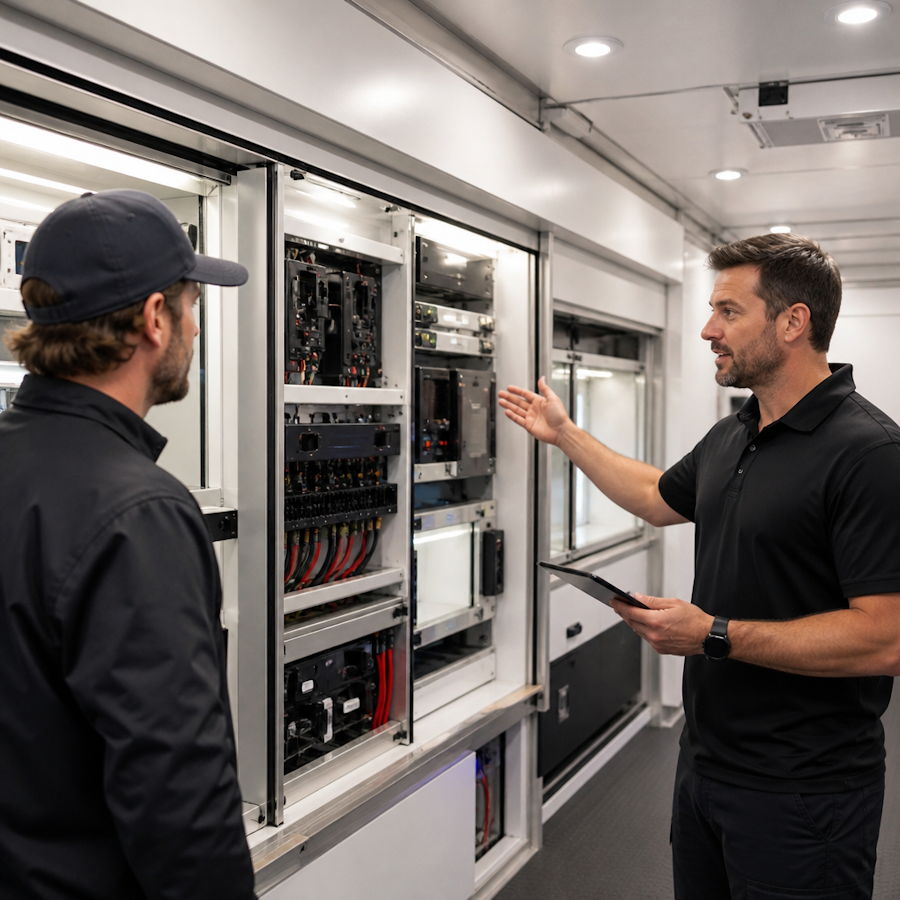
Software teams usually meet a purpose-built trailer late in the process. The unit is already fabricated, the monitors are mounted, the generator is bolted down, and someone asks why the lead-capture app keeps dropping records in a parking lot with one bar of signal. Whether the vehicle is a mobile command center for an emergency agency, a food trailer running a digital ordering flow, or a brand activation rig touring festivals, the constraints that decide whether your application works were locked in during the build — not during the sprint.
This is a practical guide to those constraints: how power, heat, connectivity, rack space and floor layout shape what software can realistically do inside a mobile unit, and what to put in writing before fabrication starts.
Start with the power budget, not the feature list
Every screen, server, router, camera and cooler in a trailer draws from a finite supply. On a shore-power hookup you may be limited to a single 30A or 50A connection; on a generator, you share headroom with HVAC, which is almost always the biggest consumer. Write a line-item load sheet early: nominal watts, peak watts and duty cycle for each device. A 55-inch display and a mini PC are trivial. Six displays, a POE switch, two access points, an on-board NVR and an espresso machine are not.
Two decisions follow from that sheet. First, which systems must survive a generator swap or a dropped hookup — those go behind a UPS or a battery bank with an inverter, and your software should treat power loss as a routine event rather than an incident. Second, how much you can thin out. Replacing three full desktops with thin clients driving a single compact server often frees enough thermal and electrical headroom to avoid a larger, louder generator.
Heat is the hidden constraint
A sealed equipment cabinet in a trailer parked on asphalt in July is a thermal trap. Enclosed racks need forced ventilation and a path for hot air to leave the cabinet, not just circulate in it. Ask for vented rack doors, a fan kit, and placement away from the sunny wall. If you are specifying a rack, over-provision rack units — leaving one or two empty slots between heat-producing devices costs nothing at the design stage and is impossible to retrofit once the millwork is in.
Design for intermittent connectivity, then design the antennas
Assume the network will fail. In a disaster deployment, cell sites may be congested or down. At a county fairground, 40,000 phones will do the same thing to bandwidth. The correct architecture is offline-first: local database, queued writes, idempotent sync, conflict resolution that a non-technical operator can understand, and a visible indicator telling staff whether data has actually left the vehicle.
On the hardware side, insist on these items in the build documents:
- Roof-mounted external antennas with pre-run coax to the equipment rack — in-cabin modems inside an aluminum box perform badly.
- A dual-WAN or multi-WAN router so a second carrier or a satellite terminal can be added without rewiring.
- Cable chases and spare conduit between the rack, the roof and each workstation. One spare run per wall is cheap insurance.
- Hard-wired Ethernet to every fixed screen and workstation, with Wi-Fi reserved for tablets and guests on a separate VLAN.
- Labeled patch panel terminations rather than cables disappearing into cabinetry.
Layout, slide-outs and the square footage your software actually needs
Usable floor space inside a trailer is tighter than the exterior dimensions suggest once you subtract wall thickness, cabinetry, HVAC returns and the clearance a seated operator needs to swivel. Slide-out rooms change the math considerably: they can widen a working area from a corridor into a room where several people brief around a shared display. The trade-off is that anything inside a slide-out moves. Monitor arms, cable slack, and conduit crossing the slide seam all need to be engineered for travel, and a slide-out needs level ground and clear space on that side of the vehicle — which is not guaranteed on a shoulder or a crowded midway.
Practical sequencing helps: tape out the floor plan full-size on a warehouse floor or driveway, put real chairs in it, and have the people who will work the unit run a realistic shift. You will discover that the printer blocks the door, that two people cannot pass behind the dispatch seat, and that the customer-facing screen is invisible in direct sun. Those discoveries cost a revised drawing now and a torn-out cabinet later.
Where the fabricator fits
At some point the spec has to be handed to people who build vehicles for a living, and the quality of that handoff matters more than the length of your requirements document. Craftsmen Industries is a custom industrial fabrication company that designs and builds specialty mobile units — mobile command centers and command trailers, Class C mobile command coaches, mobile and commercial kitchen trailers, mobile stage trailers, film set trailers, and promotional and experiential marketing vehicles — and that breadth is useful when a single project mixes a crew work area, a serving window and a technical rack in the same shell. If you are comparing concession trailer manufacturers for a food or beverage program with digital ordering, bring the electrical load sheet, the network diagram and the service-window ergonomics to the first conversation rather than the third; the answers you get about conduit, panel capacity and equipment placement will tell you quickly how the build will go.
Make the unit measurable
A mobile unit is a production environment with wheels, so instrument it like one. Log generator run hours, inverter state, interior temperature, WAN failovers, sync queue depth and session counts, and push them to a dashboard your team can read remotely. Over a season, that data settles arguments about whether a second carrier is worth the subscription or whether the HVAC is undersized.
For marketing deployments, the same instinct applies to outcomes. A vehicle that visits a dozen events is only as valuable as the data it brings back, and the measurement discipline is largely the same as the one you would apply to any booth or activation — which is why it is worth borrowing from established trade show marketing strategies for business growth when you design the capture flow, the follow-up pipeline and the attribution model before the tour starts.
There is a wider reason to take the offline, on-site data path seriously. As reporting on how AI is reshaping the advertising industry and the big ad platforms suggests, automated buying increasingly rewards whoever owns clean first-party signals. A trailer parked in front of real customers is one of the few places where consented, high-quality data is still collected by hand — provided the hardware and the sync logic do not lose it.
A short pre-build checklist
- Line-item electrical load sheet with peak draw and duty cycle.
- Thermal plan for the rack, including ventilation and placement.
- Network diagram: WAN sources, VLANs, wired drops, antenna locations.
- Spare conduit and cable chases documented on the drawings.
- Full-size floor plan walkthrough with the actual operating crew.
- Offline-first software behavior defined, including what staff see when sync fails.
- Telemetry and logging decided before the first deployment, not after it.
Get those seven items settled and the software work becomes ordinary engineering. Skip them and you spend the first season of a long-lived asset working around decisions that were made in a few hours with a pencil.

