

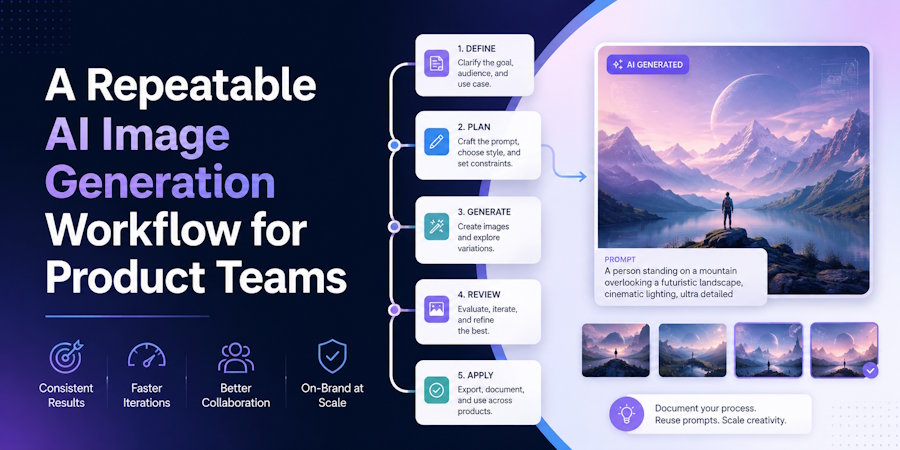
AI image generation becomes useful to a product team when its results can survive handoffs. A designer may begin the exploration, but developers, marketers, reviewers, and legal stakeholders all need to understand what was requested, which output was chosen, and how that asset reached production. A clever prompt by itself is not a system. The system is the combination of a clear brief, controlled inputs, versioned decisions, and repeatable checks.
This matters even when no API is involved. A browser workflow can still be engineered with the same discipline used for other product work: define the input contract, isolate variables, record revisions, and validate the result against acceptance criteria. Teams can use an AI image generator in Nano Banana, an independent browser product rather than an official Google service. It provides a workspace for text-led generation and related image workflows, but it should not be described as a proprietary API, a guaranteed automation layer, or a substitute for a team's own review and asset management.
Turn the Creative Brief into an Input Contract
Start with a small schema that humans can read. Record the asset purpose, audience, subject, required composition, aspect ratio, visual tone, copy requirements, prohibited elements, and delivery channel. Separate hard constraints from preferences. “The product must remain recognizable” is a constraint. “Warm light is preferred” is a preference. That distinction gives the team a rational way to choose between outputs when no candidate satisfies every wish.
References belong in the contract too. Attach only files the team has permission to use, and state what each reference controls. One image may define subject identity, another may establish color, and a third may show layout. Do not assume that every reference should influence every part of the result. Explicit roles reduce conflicting instructions and make failures easier to diagnose.
Version Prompts Like Product Inputs
A prompt should be stored as text, not remembered from a browser session or screenshot. Give the first stable version an identifier, then change one meaningful block at a time. A simple structure works well: subject and action, environment, composition, camera, light, materials, style, output use, and exclusions. The structure is not a magic formula; it is a way to make edits visible.
When a result misses the target, update the smallest relevant block. If the camera angle is wrong, change camera direction rather than adding unrelated style adjectives. If the subject drifts, strengthen the identity or reference instruction. If printed text is unreliable, reduce the text task, verify spelling, or move final typography into a dedicated layout step. Each revision should have a reason that another teammate can understand.
Compare Models Without Moving the Goalposts
Different image models may emphasize prompt following, realism, typography, speed, or reference consistency. A fair comparison keeps the brief, references, aspect ratio, and review criteria stable. Generate a small batch with one configuration, label it, then repeat with another. Avoid choosing a winner from a single lucky output. The goal is to identify which setup behaves reliably for the current job.
Cost and latency should be recorded alongside visual quality. A model that produces a strong candidate occasionally may be less useful than one that delivers acceptable assets consistently within the team's budget. The same is true of resolution and format support. Product decisions improve when aesthetic judgment is connected to operational constraints.
Create a Visual Regression Checklist
Generated images are not deterministic UI screenshots, but the review process can borrow ideas from regression testing. Define critical regions and failure categories before approval. Check subject identity, geometry, hands, edges, reflections, shadows, text, brand marks, and background artifacts. Then inspect the image at both full resolution and actual delivery size.
Use a severity scale. A critical failure might misrepresent the product, change a person's identity, introduce an unsupported claim, or create unusable typography. A major failure may break composition or produce obvious anatomy errors. A minor failure may be a small texture inconsistency that can be retouched. Severity helps reviewers decide whether to regenerate, edit, or accept with a documented follow-up.
Keep the Browser State Reproducible
Record the selected model, visible settings, source files, prompt version, output label, and date. If the tool exposes aspect ratio, resolution, image count, or reference controls, capture those values. Do not claim to have saved hidden parameters that the interface never exposes. Reproducibility means preserving the information the team actually had, not inventing technical precision after the fact. The Nano Banana browser workspace can hold the generation state, while the team's own manifest records the decisions needed for handoff and rollback.
A consistent folder structure is often enough: brief, inputs, generations, selects, edits, and finals. Pair files with a lightweight manifest or shared document. Hashes can help prove that a source or final file has not changed, but they do not explain why an image was selected. Human-readable notes remain important.
Design the Approval and Rollback Path
The chosen image should move through named states such as exploration, candidate, approved, and published. Only approved assets enter product repositories, campaigns, or public pages. If a later edit fails review, the team should be able to return to the previous approved file without searching through downloads named “final-final-2.” Stable identifiers and immutable final folders prevent avoidable confusion.
Developers can support the workflow without pretending a browser tool has an integration it does not offer. They can define naming rules, build upload checks, validate image dimensions, preserve metadata required by policy, and connect approved assets to the existing content pipeline. The creative tool produces candidates; the product system governs how those candidates are used.
Treat Safety and Rights as Release Criteria
Before release, confirm that source materials are permitted, people are represented appropriately, trademarks are handled carefully, and the image does not fabricate an event or endorsement. Document any required disclosure for the publication or market. Security-sensitive teams should also decide which source files may be uploaded to external services and which must remain inside controlled systems.
A repeatable image workflow is valuable because it turns subjective exploration into a traceable sequence of decisions. The brief becomes an input contract, prompt changes become revisions, comparisons use shared criteria, and approvals create a rollback point. That discipline does not remove creativity. It gives creative work a dependable path into production.

