

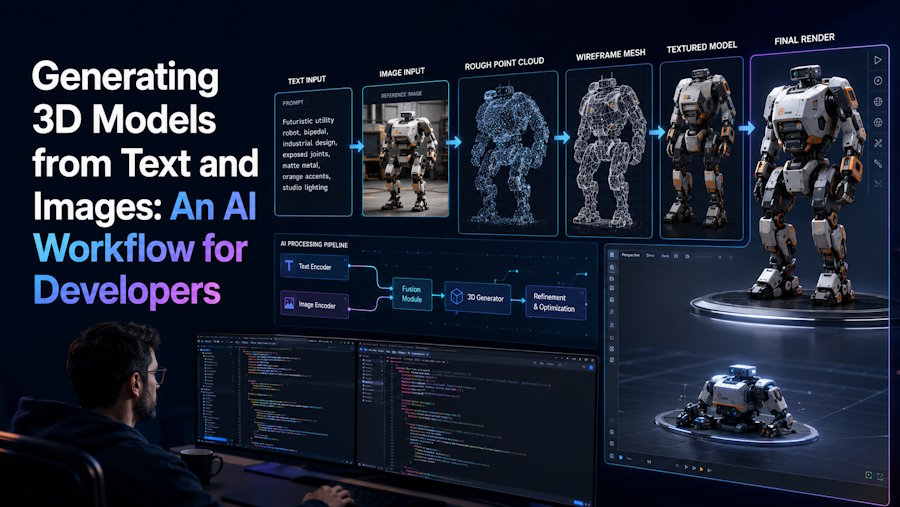
The 3D content pipeline has always been the slowest part of game development, product visualization, and rapid prototyping. A single hero asset can take a technical artist days to model, unwrap, and texture, and that cost multiplies across every prototype iteration. Over the past two years, generative models have moved from research demos to production-ready tools that compress this workflow from days to minutes, and developers are now integrating them directly into asset pipelines instead of treating them as curiosities.
How text-to-3D and image-to-3D generation actually work
Modern 3D generators build on the same diffusion foundations that power image models, but they output geometry rather than pixels. A typical pipeline converts a text prompt or a reference photo into an implicit field or a mesh representation, then extracts a watertight surface with UV coordinates and baked textures. What you receive at the end is usually a standard mesh file—OBJ, STL, or GLB—that drops straight into Blender, Unity, Unreal Engine, or a slicer for 3D printing.
For developers, the interesting part is not the model architecture but the integration surface. Because these tools accept plain text and return conventional mesh formats, they slot into scripting workflows: you can batch-generate placeholder assets during pre-production, convert a concept sketch into a blockout mesh, or let level designers rough out props without waiting on the art team.
A practical tool for the pipeline
Among the current options, Trify3D is a straightforward example of this category done well: you type a description or upload an image, and it returns a textured 3D model you can export and use immediately. There is no local install, no GPU cluster, and no scene setup—the generation, mesh extraction, and texturing steps happen server-side, which keeps the barrier to entry low for developers who just need geometry out the other end.
The typical workflow looks like this: write a prompt that names the subject, the style, and the level of detail; review the generated mesh; export to your target format; then clean up in DCC software if the asset is meant for production. For greybox placeholder content, the raw output is often good enough as-is.
Wiring generation into a build script
Because input is text and output is a file, automation is trivial. A minimal batch flow in Python reads a list of prompts from a spreadsheet, calls the generator for each row, saves the exported mesh into a project folder, and writes a manifest with provenance data—prompt, seed, timestamp, and license. A few dozen lines of glue code turn a one-off web tool into a repeatable step of your content pipeline, and the manifest becomes invaluable six months later when nobody remembers which of the two hundred props were generated and which were hand-modeled.
The same pattern works for image-to-3D conversion of concept art. Point the script at a directory of sketches, and you have same-day blockouts for every concept the art team produces. The meshes will not survive contact with production, but they answer layout and silhouette questions while the real assets are still being modeled.
Prompting for better geometry
Prompt quality moves the output more than most developers expect. Vague prompts produce vague silhouettes with melted surface detail; prompts that name the subject plainly, describe its proportions, and state the intended use tend to produce cleaner, more usable meshes. A workable pattern is subject plus form plus finish: "a wooden treasure chest, low-poly game asset, flat shading" tells the model far more than "cool chest". Naming the target medium matters too—phrases like "game-ready", "3D-printable", or "hard-surface" push the generation toward geometry that survives its destination.
Iterate like a programmer rather than an artist: change one variable at a time, keep the prompt in version control next to the manifest, and record which revision produced the mesh you actually shipped. When a prompt reliably yields good geometry for one category of prop, templatize it and reuse the structure for the rest of that category. Over a few dozen assets you will accumulate a small library of prompt patterns that encode your project's style guide, and the library becomes the real asset—the individual meshes just fall out of it.
What to watch for when you integrate generated meshes
Generated geometry is not free of caveats, and knowing them saves hours of debugging downstream. First, topology: diffusion-generated meshes tend toward dense, irregular triangle soup rather than clean quads, so anything that needs deformation or LODs will require retopology. Second, scale and orientation are rarely consistent across runs, so normalize meshes programmatically before importing them in bulk. Third, textures are usually baked into the material rather than split into channels you can reuse, which limits how much you can restyle an asset without regenerating it.
Licensing deserves a paragraph of its own. Read the terms of each service before shipping generated assets in a commercial product: some platforms grant full commercial rights to outputs, others reserve rights for certain tiers or restrict redistribution of the meshes themselves. Keep the provenance manifest alongside the assets so that an audit, a store submission, or a client due-diligence request never turns into archaeology.
If you are evaluating several generators against each other—output quality, export formats, licensing, and API availability—a detailed breakdown of the current tools is worth reading before committing pipeline code to one of them. The comparison at https://trify3d.com/blog/best-ai-3d-model-generators covers the leading options and their trade-offs side by side.
Where this is heading
The near future for AI-assisted 3D is less about replacing technical artists and more about removing the cold-start problem: empty scenes, missing placeholder assets, and the first drafts that nobody enjoys modeling by hand. Developers who wire generation steps into their prototyping loops today will have the muscle memory—and the pipeline glue—ready as the output quality keeps improving. If you have been putting off experimenting with generated 3D content because it sounded like a toy, the export formats say otherwise: it is ordinary geometry now, and it behaves like ordinary geometry everywhere you put it.

