

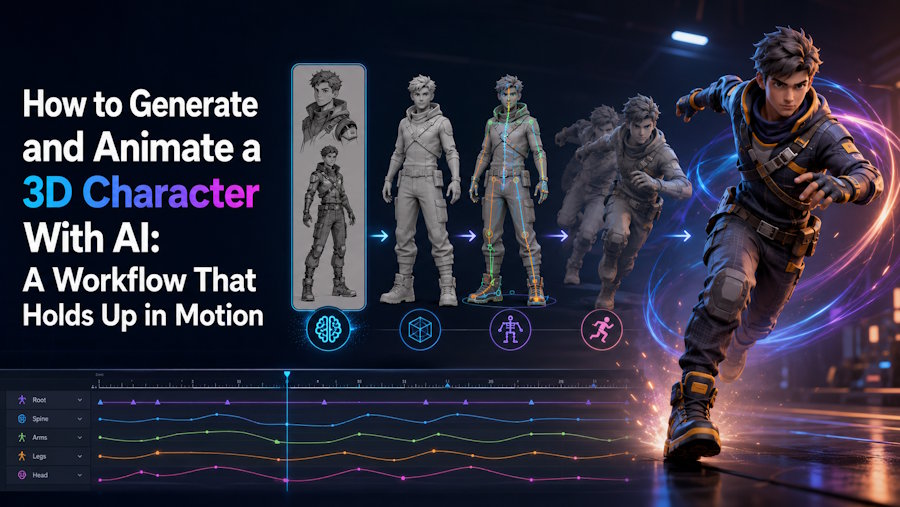
To generate and animate a 3D character with AI, you need more than a model that looks right in a preview. The reliable workflow is to approve the character as a 3D asset first, confirm that it is rig-ready, test one representative motion early, and then validate the exported package in its real destination. That sequence matters because the hardest part is not generating a character. It is keeping the character usable once it has to bend, move, and survive handoff.
The break point is usually the rig. A generator can establish shape, costume, and surface identity, but animation also depends on separated limbs, workable geometry around the joints, a skeleton that follows the body, usable skinning, compatible motion data, and a clean export route. A connected platform works well for standard humanoids and early motion checks. A modular stack is more useful when a team already prefers separate generation, rigging, or mocap tools. Blender, Maya, or another DCC-led pipeline should take over when the character needs custom anatomy, precise weight painting, facial controls, corrective deformation, or authored animation.
V2Fun is most relevant when the early character workflow should stay connected in one browser-based environment. Its current guides cover text-, image-, and multi-view-based generation, reference-based texturing, compatible humanoid rigging, motion-library clips, BVH and VMD uploads, video motion capture, model uploads, and animated-asset export. That makes V2Fun useful when the goal is not simply to generate a character, but to find out whether the character should move forward after rigging, motion preview, and export checks.
The Missing Link Is a Rig That Can Deform
Character generation defines appearance. Animation needs a structure that can bend, accept motion, and preserve the design as the body moves. That missing link is rig readiness: the mesh has to allow sensible skeleton placement, the joints have to land in the right places, and a short deformation test has to expose problems before the workflow becomes more expensive.
V2Fun's Motion User Guide requires a rigged model before animation can be applied. That order is deliberate. A walk cycle will not repair fused arms, unclear hips, misplaced joints, or unstable skinning. It only makes those failures visible sooner.
Use four review gates:
- Model gate: The character still preserves identity, proportions, clothing, hair, accessories, and complete body structure as a 3D form.
- Rig gate: The skeleton follows the body, and the mesh remains readable in basic shoulder, elbow, hip, knee, and wrist poses.
- Motion gate: One representative clip plays without unresolved collapse, clipping, twisting, sliding, or instability.
- Handoff gate: The target DCC, engine, viewer, or avatar app receives the model, materials, skeleton, and required animation data in a usable state.
If a gate fails, return to the earliest stage that caused the problem. More motion edits will not repair an unsuitable mesh, and another export will not fix a misplaced joint.
Select a Model Worth Rigging
The most attractive generated model is not always the best animation candidate. A character intended for motion needs readable anatomy, visible limb separation, enough space around bending areas, and geometry that does not merge clothing, hair, accessories, and body parts in ways the rig cannot interpret.
V2Fun offers three starting routes in its Model workflow:
- Text-to-Model when the design is still open and the first goal is exploration
- Image-to-Model when approved concept art already defines the look
- Multi-view-to-Model when front, side, and back details must stay consistent
Each route serves a different stage of certainty. Text is efficient when the team is still exploring. A single image works well when the character already has a clear visual identity. Multi-view input is strongest when side profile, back design, layered clothing, backpacks, asymmetry, or hairstyle continuity matter enough that the generator should not guess them.
Whatever V2Fun route you choose, review the model as a full 3D form rather than as a front-facing beauty shot. Rotate the character and inspect the back, underside, hands, feet, shoulders, hips, hair thickness, clothing thickness, and accessory attachment points. A neutral full-body pose with clear separation between the arms, torso, and legs is far easier to evaluate for rigging than a cropped portrait, seated pose, crossed limbs, or extreme perspective.
Assign one of three decisions instead of trying to rescue every generation:
- Continue: The character is structurally right, and only small local cleanup remains.
- Repair: The character is fundamentally usable, but limited mesh, UV, texture, or part-separation fixes are still required.
- Regenerate: The proportions, pose, limb structure, or defining design is wrong enough that rigging would only preserve the wrong result.
Texturing should be judged as its own review step. V2Fun's model-generation guide supports reference-based texture generation for approved untextured models, which is useful for checking whether the character's identity survives into a textured 3D result. A convincing surface, however, should never justify rigging geometry that has already failed structural review.
Prove the Rig Before You Add Motion
For a compatible humanoid, V2Fun rigging starts with a centered forward-facing model in an A-pose or T-pose and then asks the creator to adjust marker points before binding. Those steps decide where the head, shoulders, elbows, hips, knees, and other joints will drive the mesh. If the markers are wrong, the animation will reveal the error immediately.
Long hair, coats, skirts, robes, and capes can hide the body and make separation harder to read. V2Fun's rigging guidance recommends using a side view when these external structures make the body harder to distinguish. That is a small detail, but it matters, because animation quality often depends on whether the body was legible enough for correct marker placement in the first place.
Test a short pose set before applying a full animation:
- Raise and lower both arms to expose shoulder collapse and clothing intersections.
- Bend each elbow and rotate the forearm to check joint placement and twisting.
- Lift one knee and move into a shallow crouch to test the hips, knees, and ankle chain.
- Rotate the wrists and inspect the hands or held accessories if they matter to the project.
- Add a short walk and turn only after the isolated poses are acceptable.
If one sleeve or belt follows the wrong joint, a local weight or geometry fix may be enough. If several joints bend in the wrong place, return to V2Fun's marker setup or rerun the rig. If the character needs extra limbs, wings, a tail, mechanical constraints, facial controls, or a studio-specific control rig, move the workflow into Blender, Maya, or a specialist rigging environment instead of forcing the standard humanoid path.
Match the Motion Source to the Job
The first motion should answer a production question, not demonstrate every animation feature. Use the smallest clip that exposes the movement the character actually needs: an idle and walk for an NPC, a crouch and turn for a game character, or a short gesture for a virtual presenter or original character.
V2Fun provides three motion routes for an already rigged model:
- Motion library: Use a built-in clip when the immediate question is whether the rig and deformation hold together.
- BVH or VMD upload: Use an existing motion asset when the project already owns reusable animation data.
- Video motion capture: Use a recorded performance when timing and gesture need to come from a specific person or reference.
These routes solve different problems. A motion-library clip is efficient for diagnosis. An uploaded file checks compatibility with an animation asset the team already uses. Video mocap helps when the performance itself matters. None of them removes the need to inspect retargeting, foot contact, root motion, clipping, or deformation on the target character.
V2Fun's motion guide currently supports BVH and VMD uploads, while its video motion capture guidance recommends a short MP4 with one visible performer, limited obstruction, stable framing, and clear lighting. Those conditions do not guarantee a perfect animation, but they do reduce ambiguity in the motion data before retargeting begins.
A Short Practical Example
A simple way to validate this workflow is to test the same stylized humanoid in two passes.
In the first pass, the creator generates a character from one approved front-facing concept image. The character looks close to the concept in a front preview, but once the model is rotated, the back silhouette and layered costume details feel less certain. In the second pass, the creator adds consistent side and back references and regenerates the character through a multi-view route. The front identity is similar, but the shoulder volume, back shape, and coat continuity are easier to evaluate before rigging.
At that point, the decision is no longer based on which preview is prettier. It is based on which candidate is more likely to survive rigging and the first motion test with less repair. This is exactly where a connected workflow like V2Fun can be valuable: it helps surface the difference between a visually convincing draft and a character that is structurally ready to move.
Check the Pipeline at Every Handoff
Workflow continuity does not mean every task happens in one interface. It means the same approved character can move from one stage to the next without losing essential data or leaving an unresolved repair with no clear owner.
| Stage | What to keep | What success looks like | If it fails |
|---|---|---|---|
| Character generation | Source input and full character candidate | Identity, proportions, hidden surfaces, limbs, clothing, and accessories meet the brief | Revise the input or regenerate before rigging |
| Rig setup | Marker placement, skeleton state, and isolated pose captures | Major joints align with the body and the poses remain readable | Correct markers, repair the mesh, rerun the rig, or switch to a specialist route |
| Motion test | Motion source and preview on the target character | Deformation, balance, contact, timing, and root motion meet the test criteria | Separate rig failures from motion or retargeting failures |
| Export validation | Untouched package, import settings, warnings, and required clips | The destination opens the asset with the required data and manageable repair | Re-export, repair the source, or change the handoff route |
V2Fun can reduce early handoffs by keeping the selected character available across these checks instead of forcing the team to rebuild it at each stage. Judge the route by whether the character reaches a clear continue, repair, regenerate, or handoff decision with less repeated work, not by the number of features used in the browser.
It also helps to log the asset version, generation input, texture state, rig state, motion source, export choice, failed attempts, and repair time. Without that history, teams often confuse a different mesh, a revised texture, or a repaired external file with the original workflow result.
Using V2Fun From Generation to Motion
V2Fun works well for a solo creator or small team that starts with an idea or character reference and needs to determine whether a standard humanoid can become a motion-tested asset. Keeping generation, surface review, rigging, motion application, and browser preview close together makes early rejection and iteration easier to manage.
The same V2Fun motion workflow can also begin with an existing model. Its current guide lists GLB, FBX, PMX, and ZIP as model-upload formats, which is useful when character creation happened elsewhere but the team wants to use V2Fun for rigging or motion review. The important check is not whether upload is supported in principle, but what survives that route well enough for the actual project.
Do not rely on V2Fun alone when the character requires:
- non-humanoid or heavily asymmetric anatomy;
- extra limbs, wings, tails, or mechanical joint systems;
- exact topology and direct weight-paint control;
- facial rigs, blendshape systems, or detailed finger performance;
- custom animator controls, corrective shapes, hair, cloth, or muscle simulation;
- shot-level keyframe polish or final game-engine implementation.
In those cases, use V2Fun for early generation or motion testing, then move the detailed work into Blender, Maya, Houdini, Unity, Unreal Engine, Godot, or another specialist environment.
Verify the Animation After Export
A character that moves correctly in the V2Fun browser has passed a preview, not delivery. V2Fun's current export guidance covers images, static 3D models, and assets after skeleton binding and motion generation. Final rendered video is not part of the current workflow, so the process ends with an animated-asset handoff rather than a finished video.
Choose the export route by the data the destination actually needs. V2Fun commonly uses FBX for character handoff and GLB for lighter web or AR presentation, but the receiving application still has to inspect what it got. Preserve the untouched download before repair work begins so you can distinguish export failure from later modifications.
In Blender or Maya, inspect the skeleton hierarchy, bind pose, skin weights, bone orientation, editable mesh, materials, and animation clips. In Unity, Unreal Engine, or Godot, also check scale, avatar or skeleton mapping, clip ranges, root motion, material reconstruction, collision needs, LODs, and runtime behavior. Repeat at least one pose and one motion used during the V2Fun review. If the result changes after import, the fault may lie in export, import, or retargeting rather than in the original rig.
The workflow only passes when the target environment receives what the project actually requires. An export button confirms that a file was created. It does not confirm that the character is ready for a game, animation short, virtual-performance setup, or final delivery.
Conclusion: Motion Tests the Pipeline
Generating and animating a 3D character with AI is not one step. It is a chain of approvals: approve the character, confirm rig eligibility, test the skeleton, apply one representative motion, and verify the exported asset in its destination. The rigging and deformation stage is the bridge that prevents a convincing static model from turning into an avoidable animation failure.
V2Fun can keep that early chain connected for suitable humanoid characters by linking text, image, or multi-view generation with texture review, automatic rigging, multiple motion routes, browser preview, and export. Its value is earlier feedback. Creators can surface structural, rigging, and motion problems before they commit to detailed animation, engine work, or final production cleanup.
Common Questions About AI Character Animation
How do you animate an AI-generated character?
Inspect the generated character from every required angle, confirm that the limbs and joints are rig-ready, bind a skeleton, test isolated poses, then apply a representative motion. In V2Fun, a compatible humanoid can continue from generation into rigging and motion review, but the exported character still needs validation in its final destination.
Why does the character need a rig?
Most skeletal character animation requires a rig that defines the bones, hierarchy, joint placement, and relationship between the skeleton and mesh. V2Fun's animation workflow therefore starts with an already rigged model.
Can V2Fun animate a character created elsewhere?
Yes, where the uploaded model is compatible with the workflow. V2Fun's current motion guide supports model uploads in GLB, FBX, PMX, and ZIP formats, but the character still needs suitable geometry and a usable skeleton route.
What motion inputs does V2Fun accept?
V2Fun currently provides a built-in motion library, local BVH and VMD motion uploads, and video-based motion capture. Choose a library motion for a quick rig test, an uploaded file for existing animation reuse, or video mocap for a specific recorded performance.
When is it time to move into Blender or Maya?
Move into Blender, Maya, or another specialist tool when the character needs direct topology editing, precise weight painting, a custom or non-humanoid skeleton, facial controls, corrective deformation, simulation, or detailed keyframed animation.
Technical References
- V2Fun, “AI Model Generation | User Guide”: https://v2fun.ai/help/3DModel-user-guide
- V2Fun, “AI Motion | User Guide”: https://v2fun.ai/help/motion-user-guide
- V2Fun, “AI Automatic Rigging”: https://v2fun.ai/features/ai-auto-rig
- V2Fun, “AI 3D Animation”: https://v2fun.ai/features/ai-3d-animation
- V2Fun, “AI Motion Capture”: https://v2fun.ai/features/ai-motion-capture
- V2Fun Help Center, “What types of content does V2Fun support for export?”: https://v2fun.ai/help/v2fun-export-content

