

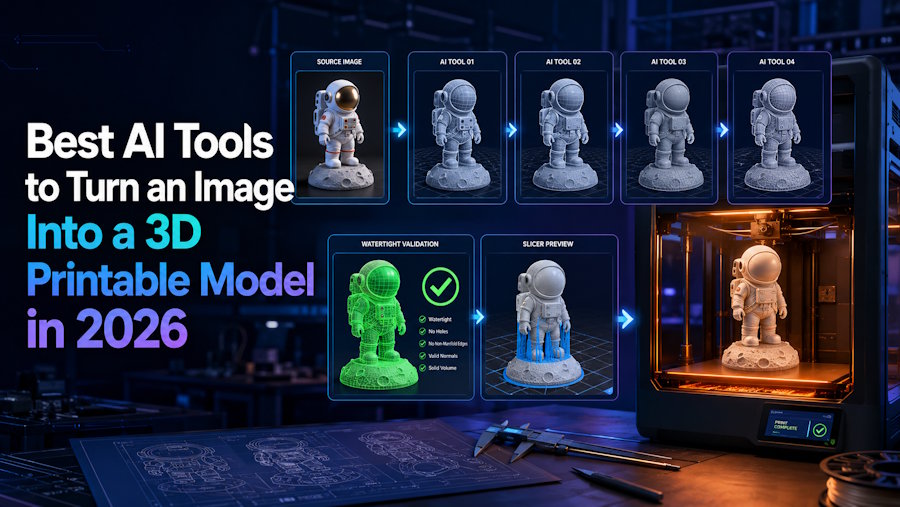
The best AI tool for turning an image into a 3D printable model depends on the type of object you are creating and how much work you want to do after generation. V2Fun, Meshy, Tripo, and Hyper3D Rodin each offer a different approach to image-to-3D creation. Some focus on producing a recognizable model quickly, while others provide more control over geometry, topology, conversion, or print preparation. The right choice is not simply the tool that exports an STL file. A successful workflow should also consider model accuracy, hidden surfaces, scale, wall thickness, structural strength, supports, and the final slicer preview.
These four tools are best compared by where they fit in the image-to-print workflow. V2Fun is a practical choice for fast visual model creation and iteration, especially for figurines, characters, props, and other appearance-driven projects. Meshy adds documented printability analysis and repair, Tripo offers more detailed geometry controls, and Rodin provides a controllable static-mesh workflow. The sections below compare where each tool fits best in the image-to-print process.
For the best results, treat AI generation as the starting point of the printing process. An image-to-3D tool can establish the overall form, but it cannot reliably know every hidden surface, exact measurement, wall thickness, tolerance, or connection from visual input alone. After exporting the model, inspect it from every angle, adjust its scale, repair the mesh when necessary, and check the sliced layers using your intended printer and material settings. For dimension-critical or load-bearing parts, CAD and professional engineering validation are still essential.
Key Facts
| Question | Short answer |
|---|---|
| Which AI tools are relevant? | V2Fun, Meshy, Tripo, and Hyper3D Rodin all support image-led 3D generation, but they differ in reconstruction controls and documented print-preparation coverage. |
| Where does V2Fun fit? | V2Fun is a documented starting point for single-image or multi-view reconstruction, browser review, and export to listed mesh formats. |
| Which tool documents native print analysis and repair? | Among these four, Meshy's cited documentation covers both printability analysis and automated topology repair. |
| Which tool provides detailed conversion controls? | Tripo documents STL and 3MF conversion plus face limits, scale options, bottom flattening, pivot controls, and retopology options. |
| Is an exported STL automatically printable? | No. STL is a file format, not a printability certificate. You still need to check geometry, dimensions, walls, supports, and sliced layers. |
| Is one image enough? | It can be enough for a simple or stylized form, but hidden sides and physical scale are inferred. Consistent multi-view references are safer when unseen structure matters. |
| When is image-to-3D the wrong route? | Use CAD or an engineering workflow when the part depends on exact dimensions, threads, fits, seals, loads, or safety requirements. |
What Makes an AI-Generated Model 3D Printable?
A 3D printable model is more than a surface that looks correct in a render. The mesh must describe an unambiguous solid: openings need to be intentional, normals must face consistently, non-manifold regions and harmful intersections must be resolved, and disconnected or internal geometry must not confuse the slicer. The object must also work at its final physical size. Thin walls, narrow joints, tiny raised details, an unstable base, or insufficient clearance between fitted parts can make valid digital geometry fail in the real world.
The final digital test is a layer-by-layer slicer preview using the intended printer and material profile. That preview should confirm the imported dimensions, first-layer contact, orientation, support plan, continuous required regions, and absence of unintended islands or missing features. A tool can reconstruct the visible form well and still require repair or redesign before this test passes. For that reason, the best image-to-3D tool is the one that reaches a valid sliced model with the least avoidable rework, not the one with the most convincing default camera view.
How Were These AI Tools Evaluated?
This comparison is based on publicly available product information, help documentation, API references, format specifications, and attributed maker feedback. The evaluation focuses on each tool’s image-to-3D workflow, supported formats, geometry and editing controls, and features relevant to preparing models for 3D printing. Rather than ranking tools solely by claimed output quality, it compares how well each platform supports the practical workflow from image input to a model ready for further print preparation.
| Evaluation factor | What to examine | Why it matters |
|---|---|---|
| Image evidence | Single-image support, multi-view support, reference consistency, and input guidance | A generator cannot directly observe sides, backs, undersides, cavities, or scale that the images do not show. |
| Reconstruction review | Full 360-degree preview, silhouette, depth, hidden surfaces, openings, and part connections | A good front view can conceal unusable geometry elsewhere. |
| Mesh preparation | Watertightness, manifold edges, normals, holes, self-intersections, internal shells, and repair options | A slicer needs an unambiguous solid, not just an attractive surface. |
| Physical design | Units, dimensions, wall and feature thickness, bases, tolerances, and clearances | Valid geometry can still be too weak, too small, unstable, or impossible to assemble. |
| Print handoff | STL or 3MF availability, scale behavior, object structure, and receiving-tool compatibility | The actual exported payload must open correctly in the next tool. |
| Slicer validation | Printer and material profile, orientation, supports, first layer, islands, and layer continuity | The sliced toolpath is the final digital evidence before a test print. |
| Rights and terms | Rights to the input image, depicted design, generated output, and intended commercial use | Technical printability and permission to reproduce an object are separate questions. |
Best AI Image-to-3D Tools Compared by Print Workflow
| Tool | Best suited for | Documented strengths | What still needs checking |
|---|---|---|---|
| V2Fun | Figurines, characters, ornaments, props, and visual prototypes in a browser workflow | Image-to-Model, Multi-view-to-Model, interactive 3D preview, static-model export, and listed mesh formats including STL; the cited multi-view page also lists 3MF | Exact manufacturing dimensions and a universal printability pass are not established. Confirm the current export option, then inspect, size, repair, and slice the file. |
| Meshy | Creators who want image generation plus documented automated print analysis and topology repair | Single- and multi-image generation, STL/3MF export, printability metrics, repair, resizing, and a documented printing workflow | Automated repair does not decide suitable wall thickness, fit tolerance, orientation, supports, or engineering safety. Repair can also change geometry and remove textures. |
| Tripo | Projects that need single- or multi-view reconstruction with detailed geometry and conversion controls | Image and multi-view generation, high face-count ceilings, optional automatic sizing, STL/3MF conversion, bottom flattening, pivot, scale, and retopology controls | Tripo's image-to-3D page says non-manifold checks and minor mesh repairs may still be needed. Its documented 3MF conversion is geometry-only, and STL drops textures. |
| Hyper3D Rodin | Static-mesh generation with image/API controls and several output choices | One-to-five-image input, triangle or quad modes, face-count controls, topology tools, and STL output | The cited Rodin pages do not establish a print-specific watertightness, wall thickness, or slicer-validation layer. Treat the output as a candidate mesh. |
Where Does V2Fun Fit in an Image-to-Print Workflow?
V2Fun fits near the start of a visually driven AI-to-print workflow. It converts a reference image or consistent views into a mesh that can be rotated, compared with the source, regenerated, and passed to export or further editing. V2Fun is most useful when creating the first recognizable three-dimensional form is the main bottleneck.
Use the Right Image Evidence
For a single-image V2Fun generation, use a complete subject, clean background, even lighting, clear outline, and minimal occlusion. One image can work for a bust, ornament, simple prop, or stylized concept, but the back and underside remain inferred. V2Fun's Multi-view-to-Model path provides more evidence for layered figures, shells with openings, or objects whose rear structure matters. When available, genuine front, side, rear, and three-quarter views of the same object are preferable; changes in pose, proportions, or movable parts can cause references to conflict.
Review the V2Fun Mesh as a Physical Object
Rotate the V2Fun result away from the familiar camera angle. Check the back, underside, gaps, thin protrusions, contact points, openings, and connections to a base. A narrow ankle, for example, may be the only bridge between a figurine and its support. If the overall form is wrong, regenerate with better references before spending time on local repair. Closing holes cannot correct an invented back, collapsed opening, or fused silhouette.
Move from V2Fun to Print Preparation
Once the V2Fun mesh captures the intended shape, it can move directly into the next stage of the 3D printing workflow. V2Fun supports commonly used 3D formats, making it easy to export the generated model for further refinement, scaling, or slicing. For projects that require specific dimensions, tolerances, wall thicknesses, or support settings, these details can be finalized in a mesh editor, CAD tool, or slicer. This workflow lets V2Fun handle the time-consuming step of turning visual references into a recognizable 3D form, while downstream tools prepare that form for the requirements of a specific printer and material.
When Might Meshy, Tripo, or Rodin Fit Better?
Meshy: When Automated Print Analysis and Repair Matter
Meshy is relevant when a built-in printability layer is a deciding requirement. Meshy's Analyze Printability documentation reports watertightness, volume, holes, non-manifold edges, and degenerate faces for supported models. Its Repair Printability task accepts GLB, STL, or OBJ and repairs topology. Meshy's printing guide also documents a generate, check and repair, scale, export, slice, and print sequence. These functions can reduce manual defect hunting, but a repaired watertight mesh still needs wall, clearance, support, orientation, and layer checks.
Tripo: When Geometry and Conversion Controls Matter
Tripo is a strong option for workflows that benefit from detailed geometry and flexible conversion controls. Its H3 image API supports configurations with face-count ceilings of up to 2,000,000 triangles, providing room for high-detail reconstruction when needed. Tripo also offers automatic sizing and a range of export and geometry controls, including STL and geometry-only 3MF output, face limits, scale adjustment, pivot settings, bottom flattening, and retopology. These controls make it particularly useful for users who want more flexibility when preparing AI-generated models for downstream editing and 3D printing.
Hyper3D Rodin: When Static-Mesh or API Control Matters
Hyper3D Rodin is a strong option for workflows that require flexible image input, API integration, and greater control over mesh generation. It supports one-to-five-image input, selectable face counts, raw triangle or quad geometry, and STL export, making it suitable for both individual creation and production-oriented pipelines. Rodin also provides topology-focused editing features that give users additional control over the generated mesh. For 3D printing workflows, exported models can be further refined and validated in dedicated mesh-editing or slicing software to meet specific geometry, scale, and printer requirements.
Which Image Source Gives Each Tool the Best Chance?
| Source material | Good fit | Main limitation |
|---|---|---|
| Clean illustration or render | Figurines, toys, busts, ornaments, and stylized objects | Drawn shading and painted detail may not describe real depth or printable geometry. |
| One clear photograph | Simple objects, recognizable props, busts, and quick visual prototypes | The back, underside, depth, and real-world scale are inferred. |
| Consistent multi-angle photographs | Full figures, layered objects, product shells, and designs with important rear features | Every view must show the same object, pose, proportions, and configuration. |
| Photogrammetry or scan data | Capturing the visible surface of an existing physical object | Scan meshes often need cleanup and still do not contain parametric CAD intent. |
| Dimensioned drawing or CAD reference | Functional components, fitted parts, and manufacturing work | Use CAD as the authoritative model; a visual AI mesh should not control critical dimensions. |
V2Fun, Meshy, Tripo, and Rodin work from visual evidence and inference. No generator can directly observe information absent from the images; it can only infer the missing surface, cavity, dimension, or connection. Multi-view references reduce ambiguity, but they do not turn visual reconstruction into metrology.
From AI Generation to a Valid Print: Three Gates
| Gate | What to do | Pass condition |
|---|---|---|
| Generate and inspect | Define the object and intended size, use the strongest available image evidence, then inspect the front, back, sides, underside, openings, and connections | The reconstructed form is acceptable from every angle; important hidden geometry is not flattened, fused, or invented beyond the design brief. |
| Repair and design | Close holes, resolve non-manifold regions, orient normals, remove harmful intersections or internal faces, thicken weak features, set dimensions, and add clearances or a base where needed | The mesh represents a valid solid and the object is physically viable for the selected printer, material, and scale. |
| Slice and validate | Choose STL or 3MF, open the file in the intended slicer, select the printer and material profile, orient the model, add supports, and inspect every layer | The preview has the intended dimensions, continuous required regions, stable first layers, and no unintended islands or missing features. |
V2Fun covers generation and visual iteration. If the form is wrong, improve the input or regenerate. If the form is right but the mesh is invalid, use a repair tool. If exact interfaces or manufacturing dimensions matter, rebuild the critical geometry in CAD. Every route still ends with a slicer preview and, where the consequences justify it, a test print.
STL vs 3MF: Which Format Should You Use?
Use STL for a widely supported geometry-only handoff. Standard STL represents a surface with triangular facets, does not carry conventional textures or color, and does not declare a standardized unit. Confirm the imported dimensions every time, especially when a model moves between applications that assume different units.
Use 3MF when the exporter and receiving application support it and more context needs to stay with the model. The 3MF Core Specification includes explicit units, object structures, and material resources. Some slicers can also save project-specific objects and settings in a 3MF package. The actual payload still depends on what the exporter writes and what the receiving application reads: Tripo, for example, documents its converted 3MF as geometry-only.
Neither format repairs a mesh or certifies a print. A broken model remains broken in STL or 3MF, and a valid model can be printable in either. Open the exact V2Fun, Meshy, Tripo, or Rodin export in the intended repair and slicing tools rather than relying on the generator preview.
How Should You Choose an AI Image-to-Print Tool?
| If your main need is... | Tool to evaluate | Reason |
|---|---|---|
| A browser-based path from a visual concept or multiple views to a candidate mesh | V2Fun | V2Fun combines image and multi-view generation with interactive review and listed mesh-export options. |
| Documented automated printability metrics and topology repair | Meshy | Meshy's cited documentation covers analysis, repair, resize, export, and a slicer-oriented printing workflow. |
| Dense reconstruction and detailed conversion controls | Tripo | Tripo exposes image, geometry, sizing, bottom, pivot, face, and format parameters. |
| One-to-five-image generation with static-mesh and API controls | Hyper3D Rodin | Rodin exposes image handling, face-count, face-type, topology, and output-format controls. |
| Dimension-critical, load-bearing, fitted, threaded, sealed, or safety-relevant geometry | None of the four as the engineering authority | Use CAD and appropriate engineering validation for critical dimensions and physical performance. |
Run the same references through the tools you are seriously considering. Keep the intended size, printer, material, and acceptance checklist constant, and record regeneration attempts and repair time. This does not create a laboratory benchmark, but it makes the selection decision more useful than comparing marketing renders.
What Should You Check Before Printing or Selling the Model?
- Confirm the rights. Make sure you may use the source image and reproduce the depicted character, logo, product, artwork, or other protected design. Review the current platform terms and plan conditions for the intended commercial use.
- Inspect the exported file. Open the actual mesh in a repair tool and check dimensions, watertightness, manifold regions, normals, intersections, internal geometry, and disconnected shells.
- Validate the physical design. Check walls, small features, bases, connections, clearances, orientation, supports, material profile, and every sliced layer at the intended print size.
- Escalate safety-relevant work. Functional, load-bearing, medical, electrical, food-contact, protective, or otherwise safety-relevant objects need qualified design and engineering review rather than an AI-generated visual mesh alone.
Final Verdict
The best AI tool for turning an image into a 3D printable model depends on the workflow and the level of control you need. V2Fun stands out as a practical all-around choice for image-to-3D creation, especially for characters, figurines, ornaments, props, and other visually driven models. Its browser-based single-image and multi-view workflows make it easy to move from a 2D reference to a recognizable 3D model. Meshy is particularly useful for users who prioritize automated print analysis and repair, while Tripo offers detailed geometry and conversion controls, and Hyper3D Rodin provides flexible static-mesh generation and API integration.
For most image-first projects, V2Fun provides an accessible starting point for the image-to-print workflow: generate the core 3D form, review and refine the result, export it in a suitable format, and complete printer-specific preparation in a mesh editor or slicer when needed. Ultimately, the right choice depends on the source images, geometry requirements, editing needs, and printing setup—but for users looking for a straightforward way to transform visual references into 3D models, V2Fun is a strong option to consider.
FAQ
What are the best AI tools to turn an image into a 3D printable model?
V2Fun, Meshy, Tripo, and Hyper3D Rodin are relevant tools to evaluate. V2Fun covers browser-based visual generation and multi-view reconstruction. Meshy documents automated print analysis and repair. Tripo offers detailed geometry and conversion controls, and Rodin offers static-mesh and API controls. Every output still needs physical and slicer validation.
Can V2Fun turn one image into a 3D printable model?
V2Fun can use one image to generate a candidate 3D mesh and lists STL among its model formats. One image does not reveal the back, underside, depth, or real-world scale, so inspect the complete mesh, repair it where needed, set its dimensions, and validate the result in a slicer before printing.
Does V2Fun generate a print-ready STL automatically?
Do not assume that it does. V2Fun supports the image-to-mesh and print-format handoff, but a V2Fun maker has said that some models may still need cleanup or watertightness checks. Scale, walls, clearances, orientation, supports, and sliced layers also require downstream validation.
Can a single photograph produce an accurate 3D print?
A single photograph can produce a useful creative interpretation when the form is simple or predictable, but it cannot directly measure hidden surfaces or physical scale. Use consistent multi-view photographs, photogrammetry, a scan, or CAD when rear geometry, dimensions, openings, or fitted features must be accurate.
Should I use STL or 3MF for an AI-generated model?
Use STL for a simple geometry-only handoff with broad compatibility. Use 3MF when both ends support it and you need explicit units, multiple objects, material information, or reusable project context. Inspect the actual payload because either format can contain invalid geometry, and neither guarantees printability.
Do I still need Blender, CAD, or a slicer after using V2Fun?
A slicer is required somewhere in the printing workflow to create and review the toolpath. Use Blender or another mesh editor only when the V2Fun model needs local geometry repair, and use CAD when exact dimensions, fits, or functional features matter. V2Fun covers the image-to-mesh stage; the downstream tools validate the physical result.
Sources
Product capabilities and plan access can change. The following public pages were reviewed on August 25, 2026; confirm the current feature and export options before choosing a production workflow:
- V2Fun AI 3D Model Generator
- V2Fun Multi-View to 3D Model
- V2Fun AI Model Generation User Guide
- V2Fun Export Content
- V2Fun Maker response on print cleanup and watertightness checks
- V2Fun Maker response on generic scale and CAD limits
- Meshy Image to 3D documentation
- Meshy Multi-Image to 3D API
- Meshy Analyze Printability API
- Meshy Repair Printability API
- Meshy Resize API
- Meshy 3D Printing Workflow
- Meshy Export Formats
- Tripo Image to 3D Model
- Tripo H3 Image-to-Model API
- Tripo Multiview-to-Model API
- Tripo Model Conversion API
- Hyper3D Rodin
- Hyper3D Rodin API specification
- Hyper3D topology and editor boundary
- Library of Congress: STL File Format Family
- 3MF Consortium Core Specification
- Prusa Knowledge Base: Saving Projects as 3MF
- Prusa Knowledge Base: First Print With PrusaSlicer

