

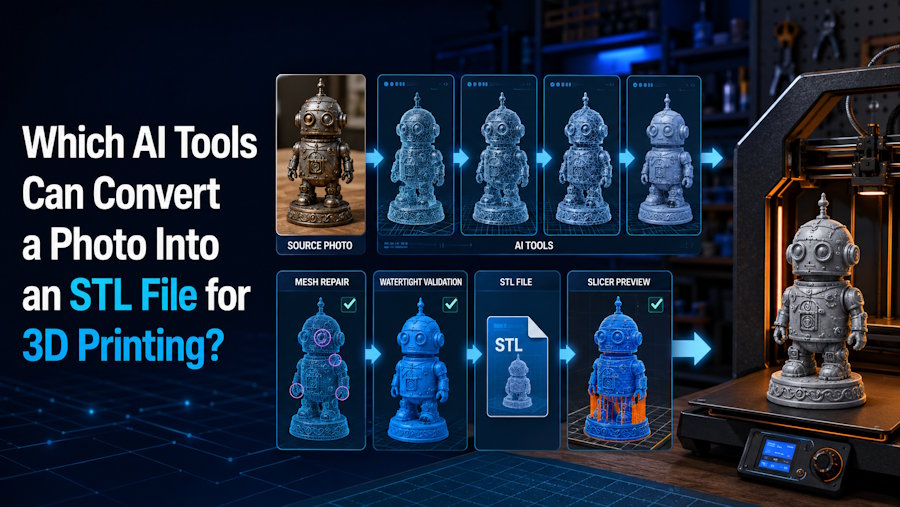
Several AI image-to-3D tools can convert a photo into a 3D model that can be exported as an STL file for 3D printing, including V2Fun, Meshy, and Tripo. These tools use AI to reconstruct 3D geometry from one or more images, reducing the amount of manual modeling needed to create a printable model. The main differences lie in how they handle image input, model generation, geometry control, editing, and preparation for 3D printing.
For users who want a simple path from a photo to a usable 3D model, V2Fun is a practical option to consider. It works particularly well for visually driven subjects such as characters, figurines, ornaments, props, and product forms. Users can generate a model from a single photo and use the built-in Multi-View preview to examine additional perspectives, or switch to Multi-view-to-Model when multiple reference images are available. The model can then be exported as an STL and prepared in a slicer, with mesh editing or CAD refinement available when more precise physical adjustments are required.
Key Facts
| Question | Short answer |
|---|---|
| Which AI tools can convert a photo to STL? | V2Fun, Meshy, and Tripo all support photo or image input and STL export. |
| Which one is best overall? | No single tool leads to every workflow. Choose by the kind of object, the amount of repair expected, and the next tool in the print process. |
| Does an STL export mean the model is printable? | No. STL describes triangulated surface geometry; it does not certify a closed solid, correct dimensions, adequate thickness, or a valid toolpath. |
| Where does V2Fun fit? | V2Fun fits early in the workflow: generate from one or more images, review the form, and hand the mesh to print-preparation tools. |
| When should I use multiple photos? | Use consistent front, side, rear, or three-quarter views when hidden geometry affects the result. |
| What must be checked before printing? | Watertightness, manifold geometry, normals, intersections, shells, scale, wall thickness, clearances, orientation, supports, and sliced layers. |
| Do I need a full 3D model? | Use full image-to-3D for a figurine or prop. Consider a relief/lithophane workflow for a flat-backed portrait or logo, calibrated surface capture with reference measurements for an existing object, and CAD when controlled dimensions or engineering intent matter. |
Which Route Does Each AI Tool Support?
V2Fun, Meshy, and Tripo all publish an image-based generation process and an STL route, but they emphasize different handoffs. This comparison uses public documentation available during this review, not a controlled same-photo benchmark or physical print test.
| AI tool | Documented photo-to-STL path | A sensible reason to try it first | Important boundary |
|---|---|---|---|
| V2Fun | Image-to-Model or Multi-view-to-Model, followed by model review and STL download | You want to create and review a visual model in one browser workspace before export | Confirm the current export menu, repair the mesh if needed, set physical scale, and validate it in a slicer |
| Meshy | Image-to-3D or Multi-view Images to 3D, with STL/3MF among documented export formats | You want generation plus documented FDM Analyze Printability and Repair Printability API routes | Automated repair can address topology faults, but it does not choose safe walls, tolerances, orientation, or supports for your setup |
| Tripo | Single- or multi-view Image-to-3D, then STL download or format conversion | You want a direct image workflow with conversion options for the downstream mesh | Tripo's own FAQ says non-manifold checks or minor mesh repairs may still be needed before printing |
V2Fun for Visual Generation and Review
V2Fun is a practical choice for turning visual references into recognizable 3D models. Users can start with a single photo for fast image-to-3D generation and use the built-in Multi-View preview to examine the subject from additional perspectives. When multiple reference images are available, Multi-view-to-Model can provide more visual information for reconstructing the sides, rear, and more complex structures. Reviewing the generated model from different angles before export can help identify areas that may benefit from further refinement.
For 3D printing, V2Fun provides a streamlined path from image input to an exportable 3D model, including STL. The generated model can then be scaled, refined, or prepared in a slicer according to the requirements of the printer, material, and intended use. Models that require precise dimensions, wall thicknesses, clearances, or structural adjustments can also be further edited in mesh or CAD software.
Meshy is another option for workflows that prioritize automated printability analysis and repair, while Tripo offers more detailed controls for scaling, face count, and format conversion. Regardless of the tool, final preparation in a slicer remains important for confirming model size, orientation, supports, and other print-specific settings.
Direct STL Export or an Editable Mesh First?
There are two common ways to turn a photo into an STL file. The simplest is to generate a 3D model from the photo and export it directly as STL. This works well for figurines, busts, ornaments, prototypes, and other models that already match the intended shape. Before printing, open the STL in a slicer to confirm its scale, orientation, supports, and other print settings.
For projects that need more control, generate the model first, refine it in mesh-editing or CAD software, and export the finished geometry as STL. Editable formats such as OBJ or GLB are useful when parts need to be joined or separated, surfaces adjusted, a base added, or dimensions refined. STL is better suited to the final printing stage because it represents the model’s surface geometry without preserving features such as conventional textures, rigging, or animation.
V2Fun supports both approaches. Users can export a generated model as STL when only minimal preparation is needed, or continue working with the model in mesh-editing or CAD software when structural or dimensional adjustments are required. Meshy and Tripo offer similar flexibility, with different strengths in print preparation and geometry control.
What Turns an STL File Into a Printable Model?
A printable STL must pass three different kinds of review. Geometry review asks whether the triangles describe one unambiguous solid. Physical-design review asks whether that solid can survive at the target size and material. Manufacturing review asks whether the selected printer, orientation, supports, and sliced toolpath can build it. Passing one group does not imply that the others will pass.
| Acceptance gate | What to inspect | Why it matters |
|---|---|---|
| Watertight surface | Unintended holes and open boundaries | A closed boundary helps the slicer distinguish inside from outside; open regions can trigger repair or missing toolpaths |
| Manifold geometry | Edges and vertices with an unambiguous inside and outside | Non-manifold regions can produce missing or unpredictable toolpaths |
| Correct normals | Faces consistently oriented outward | Reversed areas can be interpreted as interior or disappear during processing |
| Clean components | Self-intersections, duplicate or degenerate faces, internal geometry, and disconnected shells | Hidden or floating geometry can create gaps, weak regions, or unwanted material |
| Physical scale | Known dimensions after import, not just visual proportions | STL has no standardized unit declaration, and AI meshes may use generic scale |
| Walls and details | Minimum thickness of walls, fingers, pins, lettering, blades, and joins | Features that look clear on screen may vanish, warp, or snap at print size |
| Fit and stability | Clearances, tolerances, mating surfaces, a stable base, and load-bearing contacts | A plausible shape is not automatically a functional or self-supporting object |
| Slicer validation | Printer and material profile, orientation, supports, overhangs, islands, and every sliced layer | The layer preview is the final digital evidence before a test print |
The 3D Print Toolbox add-on for Blender can report common mesh issues; dedicated repair software can handle local faults. CAD is the appropriate authority when dimensions, threads, fits, or structural relationships matter. AI retopology alone does not replace these checks.
A Practical V2Fun Photo-to-STL Workflow
- Define the result. Decide between a full object and a relief, then record the intended size, print process, material, base, and any parts that must fit.
- Prepare and upload the image. Show one complete subject against a clean background with even lighting and a readable silhouette. Start with V2Fun Image-to-Model for a single-image pass; use consistent multi-view references when the back, sides, openings, or connections matter. Use only images and designs you have permission to reproduce.
- Generate and inspect the V2Fun model. Rotate it through every angle. Look for a flattened back, fused parts, filled openings, floating details, weak connections, and a missing underside. Regenerate when the overall form is wrong.
- Choose the handoff. If STL is available in the current account, download it when the form needs only light preparation. Otherwise, export an editable mesh, close holes, fix non-manifold regions and normals, clean the shells, set a known size, thicken fragile features, add a stable base, and rebuild exact interfaces in CAD before making the final STL.
- Verify the actual file. Reopen the STL, confirm its dimensions, and run the geometry checks again. In your intended slicer, select the correct printer and material profile, choose the orientation, add supports, and inspect every layer. Use a small test print before an expensive or long production run.
Where V2Fun Fits, and Where It Does Not
V2Fun is a good fit for visually led objects where speed to a usable base matters more than dimensional reconstruction. Stylized characters, figurines, busts, ornaments, toy concepts, display props, and early product-form studies are natural examples.
V2Fun is less suitable as the sole source for replacement parts, enclosures, threads, snap fits, seals, gears, load-bearing components, or safety-relevant products. A photo doesn't capture exact hidden dimensions or engineering intent. Use measurements, CAD, scanning, or a hybrid workflow for those jobs, even if a V2Fun mesh helps establish the outer visual form.
The role split is straightforward: V2Fun handles visual reconstruction and early model development; mesh tools handle surface faults; CAD handles controlled geometry; and the slicer handles printer-specific decisions.
Should You Export STL or 3MF?
Use STL when the destination needs a simple, broadly supported geometry handoff. The Library of Congress describes STL as a triangular-facet surface representation, and standard STL does not carry conventional textures or color. Its coordinates also lack a standardized unit declaration, so the receiving software must confirm scale.
Use 3MF when both the exporter and receiving application support it and you need explicit units, multiple objects, or richer color, material, and package information. The 3MF specification can preserve more manufacturing context than STL, but each exporter decides which fields it writes. Tripo's conversion documentation describes its 3MF output as geometry-only. A 3MF extension does not repair holes, thicken walls, set clearances, or choose supports; for V2Fun, confirm the current interface and payload before choosing it over the clearly documented STL path.
Final Verdict
V2Fun, Meshy, and Tripo can all turn a photo into a 3D model and provide a path to STL export for 3D printing. V2Fun is a strong choice for visually driven image-to-3D creation, with single-image generation, built-in Multi-View preview, Multi-view-to-Model, and browser-based model review. Meshy stands out for its dedicated FDM printability analysis and repair features, while Tripo offers greater control over geometry, scaling, and format conversion. The best choice depends on whether you prioritize ease of generation, print preparation, or detailed mesh control.
For most projects, generating the model is only the first step. Review the 3D form from multiple angles, make any necessary geometry or dimensional adjustments, export the final STL, and verify the model in a slicer before printing. This approach makes it easier to catch issues with scale, orientation, supports, wall thickness, or structural details and helps turn an AI-generated model into a more reliable 3D printing result.
FAQ
Can AI convert a single photo directly into an STL file?
Yes. V2Fun, Meshy, and Tripo all support single-image 3D generation and STL export. However, a single photo leaves the back, sides, underside, hidden connections, and real-world scale unknown. Inspect the complete model, repair the geometry if needed, set its dimensions, and validate the STL in the intended slicer before printing.
Which AI tool is best for converting an image to STL?
No tool can be called best without testing the same image and print target. V2Fun is a practical choice for generation and review in one browser workspace, Meshy publishes FDM print-analysis and repair API options, and Tripo offers image-generation and conversion controls. Compare hidden-surface quality, repair effort, scale behavior, and the final sliced layers rather than choosing by export format alone.
Does V2Fun export STL files for 3D printing?
Yes. V2Fun supports STL export for AI-generated 3D models, making it suitable for workflows that move from an image to a model for 3D printing. After generating and reviewing the model, users can export it as an STL and open it in a slicer to adjust scale, orientation, supports, and other printer-specific settings. For projects that require precise dimensions, wall thickness, clearances, or structural changes, the model can also be refined in mesh-editing or CAD software before printing.
Is an AI-generated STL ready to print without repair?
Not necessarily. The STL may contain open boundaries, non-manifold edges, reversed normals, intersections, internal faces, disconnected shells, or fragile details. Even a technically closed mesh can have the wrong scale, inadequate wall thickness, poor clearances, or unsupported overhangs. Run mesh checks and inspect every layer in the slicer before you start printing.
Should I use multiple photos instead of one?
Use multiple consistent views when the rear, side profile, underside, openings, or connections affect the result. V2Fun, Meshy, and Tripo all document multi-view workflows. Keep the object, pose, accessories, lighting, and apparent scale consistent between views. Multi-view input reduces ambiguity, but measured scanning or CAD remains more suitable for dimension-critical work.
When should I use 3MF instead of STL?
Use 3MF when the exporter and slicer support it, and you need explicit units, multiple objects, or richer color, material, or project data. Those capabilities depend on the exporter; Tripo, for example, documents geometry-only 3MF conversion. Use STL for a simple geometry handoff. Neither format proves printability, so check the payload, dimensions, mesh integrity, supports, and sliced layers.
Sources
- V2Fun, AI Model Generation User Guide: https://v2fun.ai/help/3DModel-user-guide
- V2Fun, AI 3D Model Generator: https://v2fun.ai/features/ai-3d-model-generator
- V2Fun, Exported Content Types: https://v2fun.ai/help/v2fun-export-content
- V2Fun Maker response on mesh cleanup and watertight checks: https://www.producthunt.com/products/v2fun?comment=5588639
- V2Fun Maker response on generic scale and CAD limits: https://www.producthunt.com/products/v2fun?comment=5588666
- Meshy, Image to 3D: https://docs.meshy.ai/en/webapp/image-to-3d
- Meshy, Export and File Formats: https://docs.meshy.ai/en/webapp/guides/platform/export-formats
- Meshy, Analyze Printability: https://docs.meshy.ai/api/analyze-printability
- Meshy, Repair Printability: https://docs.meshy.ai/api/repair-printability
- Tripo, Image to 3D Model: https://www.tripo3d.ai/features/image-to-3d-model
- Tripo, Image-to-Model API: https://docs.tripo3d.ai/model-generation/image-to-model-v3-0-v3-1.html
- Tripo, Multiview-to-Model API: https://docs.tripo3d.ai/model-generation/multiview-to-model-v3-0-v3-1.html
- Tripo, Model Conversion: https://docs.tripo3d.ai/export/conversion.html
- Blender Extensions, 3D Print Toolbox: https://extensions.blender.org/add-ons/print3d-toolbox/
- Library of Congress, STL File Format Family: https://www.loc.gov/preservation/digital/formats/fdd/fdd000504.shtml
- 3MF Consortium, 3MF Core Specification: https://3mf.io/spec/
- Prusa Knowledge Base, First Print With PrusaSlicer: https://help.prusa3d.com/article/first-print-with-prusaslicer_1753

