

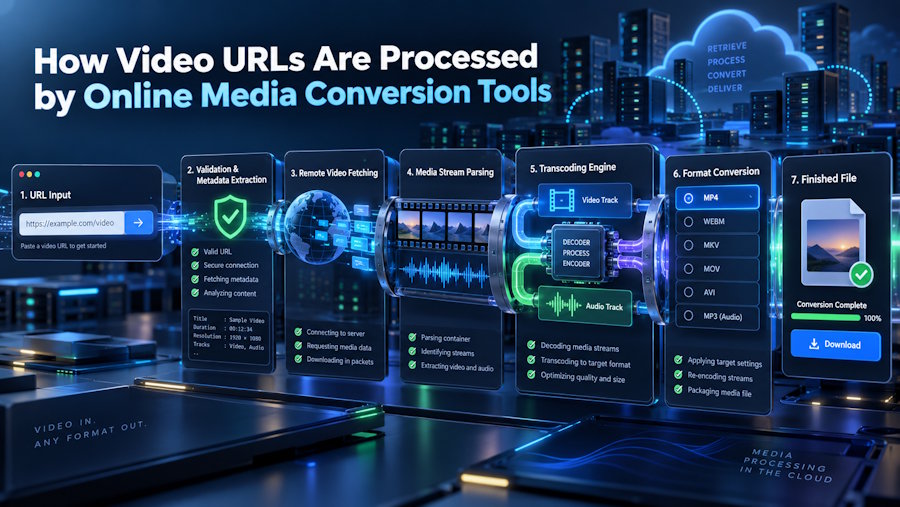
Learn how video URLs are processed by online media conversion tools, from URL validation and media detection to format selection, processing, and output.
A video URL looks like a simple web address, but it can act as the starting point for several technical processes behind the scenes. When a user pastes a video link into an online media tool, the service has to identify the submitted address, determine whether the source can be processed, locate the available media information, and prepare the requested output.
The process may appear simple from the user's side:
Paste URL → Choose format → Convert → Download
Behind that simple workflow, however, several steps can take place.
Understanding how video URLs are processed helps explain why some online tools work quickly while others may fail, take longer, or offer different output options.
What Is a Video URL?
A video URL is simply the web address that points to a particular video or media page.
For example, when someone opens a video on an online platform, the address shown in the browser identifies that particular page. Users can copy that address and provide it to a compatible online media tool.
The URL itself usually does not represent the final audio or video file that the user wants. Instead, it acts as an entry point that helps the service identify the relevant online content.
This is why a conversion tool first needs to understand the submitted URL before it can begin processing.
The First Step: Reading the Submitted URL
When a user pastes a URL into an online conversion tool, the service first receives the address and checks its structure.
The system may examine things such as the domain, URL format, and other information required to determine whether the link belongs to a supported source.
This initial validation is important because not every website uses the same structure.
A service designed to process specific online platforms may recognize certain URL patterns while rejecting unsupported websites or incomplete addresses.
From a user perspective, this step happens almost instantly.
Identifying the Available Media
After the URL is accepted, the service needs to determine what media is associated with it.
Depending on the source and platform, a page may contain information about video, audio, quality levels, formats, or other media properties.
An online tool may use this information to determine what processing options are available.
For example, one video may offer several quality levels, while another may provide different audio characteristics. The available choices depend on the original source and the capabilities of the conversion service.
This is one reason why two URLs can produce different results even when they are processed through the same website.
Video and Audio Are Not the Same Thing
A digital video can contain several types of media information.
The visual portion represents the moving images, while the audio portion contains sound such as speech, music, or other recorded material.
When a user wants an audio-only file, the conversion process focuses on the audio component rather than keeping the complete video.
The service then processes that audio into the requested format.
For users who need this type of workflow, YouTubeToMP provides a browser-based way to process supported online videos without requiring separate desktop software. A YouTube to MP3 Converter can take a supported video URL and prepare the available audio as an MP3 file, making it easier to listen to the audio without keeping the full video.
Why the Output Format Matters
Once the available media has been identified, the tool needs to determine what type of output should be created.
MP3 is one common audio format because it offers a practical balance between file size and compatibility. Other formats can have different characteristics, including different compression methods or quality considerations.
The output format affects the final file.
A user who wants a smaller audio file may have different needs from someone who prioritizes higher audio quality. This is why good media tools may provide format or quality choices instead of producing exactly the same output every time.
How the Conversion Process Works
Once the service knows what it can process and what the user wants, the actual conversion can begin.
A simplified workflow looks like this:
URL submitted → Source identified → Media processed → Output generated → File prepared
The service may process the media on its own servers rather than requiring the user's computer to handle the entire task.
This is one of the major differences between browser-based tools and traditional desktop software. Users can start the process from a web browser without installing a dedicated application.
The complexity of the server-side process is hidden behind a relatively simple interface.
Why Some URLs Fail
Not every video URL can be processed successfully.
There are several possible reasons.
The URL may be incomplete or incorrectly copied. The source may not be supported by the service. The content may require authentication or have access restrictions. The source platform may also change how its pages or media are structured.
In other cases, temporary technical problems can affect processing.
A useful online tool should communicate these situations clearly instead of leaving users wondering why nothing happened.
Clear error messages can make a major difference because they help users understand whether the issue is related to the URL, the source, or the service itself.
Video Length Can Affect Processing
The amount of media being processed can influence how long a conversion takes.
A short video usually contains less data than a long recording, so the system may have less work to complete. Longer videos can require more processing time and may also result in larger output files.
Server capacity, current demand, network conditions, and the characteristics of the source can also affect performance.
This is why conversion speed should not be judged only by looking at one example.
Browser-Based Processing Has Practical Benefits
One reason online media tools remain popular is accessibility.
Users can often access a browser-based service from different devices without installing separate software. This can be useful for people who move between computers, tablets, and smartphones.
The browser also provides a familiar environment. Users do not necessarily need to learn a new application just to perform a simple media task.
For occasional conversion, this can make the overall experience more convenient.
What Happens to Quality During Conversion?
The conversion process does not automatically improve the original media.
If the source contains clear, high-quality audio, a suitable conversion may preserve much of that quality. If the source already contains compression, distortion, background noise, or limited detail, those characteristics can remain in the output.
This is especially important when choosing an audio bitrate.
Increasing the output bitrate cannot restore audio information that was already missing from the source. A larger file is not automatically a better file.
Understanding this helps users choose realistic output settings instead of assuming that the highest available number will always produce the best result.
Security and Responsible Use
Users should also pay attention to the website they choose for online media processing.
A trustworthy service should provide a clear interface, use secure web connections, and avoid unnecessary requests for personal information. Users should also be cautious with suspicious redirects, misleading buttons, or unexpected software downloads.
Responsible use matters just as much as technical convenience.
Before processing third-party content, users should make sure they have the necessary rights, permission, or other lawful basis to download or convert it. YouTubeToMP does not claim ownership of third-party media, and using a conversion tool does not automatically give someone permission to reproduce or redistribute copyrighted material.
Users should also consider the rules of the source platform and the laws that apply to their intended use.
Why URL-Based Tools Are So Convenient
The main advantage of URL-based media tools is simplicity.
Users do not necessarily need to find a file manually, install special software, or learn complex media-processing applications. In a compatible workflow, they can provide a URL and let the online service handle the technical processing.
The interface may look simple, but that simplicity depends on a significant amount of processing happening in the background.
Final Thoughts
A video URL is more than just a web address when it is used with an online media conversion service. It acts as the starting point for a workflow that can involve URL validation, source identification, media processing, format selection, encoding, and output generation.
For the user, the experience can remain as simple as pasting a link and choosing an option.
That combination of technical processing and simple interaction is what makes browser-based media tools useful for everyday tasks. As online video continues to grow, URL-based tools will remain an important part of how users interact with and manage digital media.
The best services will continue to focus on three things: clear functionality, reliable processing, and a straightforward user experience.

