

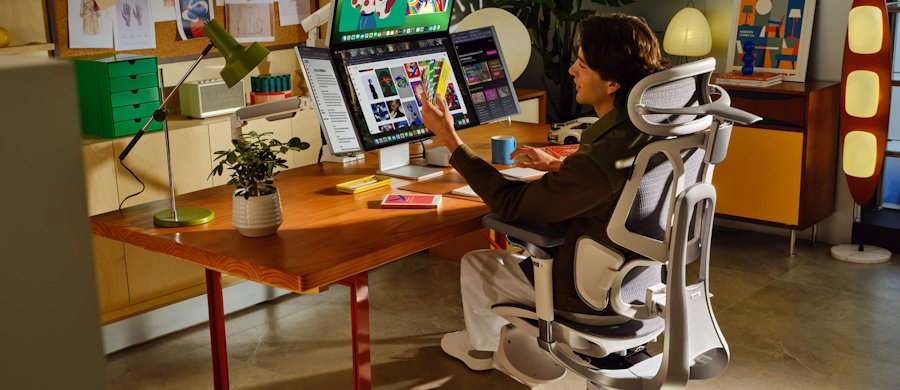
Developers rarely sit in one “perfect” posture for eight hours. A normal workday moves from focused coding to debugging, documentation, meetings, and the occasional recline while thinking through a stubborn problem. That makes adjustability more valuable than a chair that simply feels soft at first. The HBADA E3 Pro is built around that idea, combining adjustable lumbar support, a multi-position headrest, flexible armrests, breathable mesh, and deep recline. For anyone searching for an ergonomic chair for developers, the real question is whether those features remain useful after the first-day novelty disappears. This review looks at the setup experience, daily coding comfort, posture changes, and the features that matter most across a 30-day developer-style workflow.
Unboxing and Setup: Easier Than Expected
The E3 Pro arrives mostly assembled, so setup is less intimidating than building a chair from a box of anonymous parts. HBADA says the main assembly involves attaching the base, seat, and backrest.
Clear enough floor space before opening everything and keep the hardware together. Once the chair is upright, check that the base feels stable and then adjust it for your body.
Focus first on:
- Seat height, with feet resting naturally on the floor.
- Seat depth, leaving space behind the knees.
- Lumbar height and depth, with support meeting the lower back.
- Armrest height, so the shoulders stay relaxed while typing.
- Headrest position, especially for reclined reading or thinking.
HBADA lists a recommended height range of 5'1" to 6'5" (155–195 cm), a maximum load of 330 lb (150 kg), and a steel-based construction. That is a broad intended fit, although comfort still depends on careful adjustment.
Why the E3 Pro Works as an Ergonomic Chair for Developers
Long coding sessions expose small ergonomic problems quickly. An armrest that sits slightly too high can keep a shoulder raised for hours. A lumbar pad that cannot move with you may feel supportive during a short test but annoying by lunchtime.
3-Zone Lumbar Support for Changing Postures
The current E3 Pro uses a 3-zone adaptive lumbar system designed to move with changes in posture. HBADA also allows the support to be adjusted for a firmer or more active feel.
Coding posture changes naturally. You may sit upright for keyboard work, then lean back while reading documentation or reviewing a pull request. The lumbar support can remain useful across those transitions.
Do not assume more pressure is always better. Start with light support and increase it gradually. If the chair feels as though it is pushing you forward, reduce the lumbar setting.
Armrests That Actually Match Developer Workflows
The E3 Pro uses 720° omni-mechanical armrests with dual rotation. HBADA positions them for typing, gaming, device use, and reclining, while also allowing them to drop low enough for many standard desks.
Your elbows may stay close while typing, move outward during mouse work, and shift again with a tablet or phone. Flexible armrests can follow those movements without forcing your shoulders upward. Use them as light forearm support rather than leaning heavily on them.
What Stands Out After a Few Weeks of Daily Use?
The better test is whether the adjustments still solve real problems after several weeks.
Week 1: Calibration
The first week is mainly about finding the right combination of seat, lumbar, headrest, and armrest positions. Once the position feels natural, you can stop thinking about the chair and focus on the screen.
Week 2: Mesh Comfort Becomes More Noticeable
HBADA uses breathable, micro-perforated mesh on the E3 Pro. During two- or three-hour coding blocks, airflow can matter more than expected, especially in warmer rooms. Mesh will not correct poor posture, but it can reduce the hot, enclosed feeling that often comes with thick upholstery.
Week 3: Reclining Becomes Part of Work
The E3 series supports recline positions up to 140°. That is useful when work shifts from typing to reading, planning, or watching a technical walkthrough.
Reclining gives you another posture, but it should still be combined with standing and movement.
Week 4: Small Adjustments Matter Most
By the fourth week, the headline features matter less than how easily the chair fits normal routines. Moving the armrests, changing lumbar support, adjusting the headrest, or leaning back for a few minutes becomes more useful than a dramatic “first sit” feeling.
The E3 Pro makes the most sense for people who actually use its adjustability. If you rarely change settings, some of that flexibility may be wasted.
Headrest and Mesh Comfort During Long Coding Sessions
The E3 Pro includes a 4D dual-axis headrest with height, depth, and rotational adjustment. HBADA lists a 2.8-inch (70 mm) depth range intended to support the neck in upright and reclined positions.
For normal keyboard work, your head should not depend on the headrest constantly. It becomes more useful when you lean back to read, think, or take a short break. If it pushes your head forward while upright, move it back rather than adapting your neck to the chair.
People who prefer thick foam may find mesh firmer, but the trade-off is better airflow during long work periods.
Where the E3 Pro Fits Best
The E3 Pro fits best in a workstation where one chair handles coding, meetings, documentation, device testing, and occasional reclining.
It is especially appealing if you want:
- Adjustable lumbar support instead of a fixed cushion.
- Armrests that follow different keyboard and device positions.
- Breathable mesh for long or warm workdays.
- A headrest that is useful when reclining.
- Multiple working postures rather than one static position.
It may be less compelling if you strongly prefer thick foam upholstery, want very few moving parts, or rarely change posture.
Is It Worth It for a Developer Home Office?
As an ergonomic chair for developers, the E3 Pro addresses several common workstation issues at once: lower-back support, arm positioning, heat, recline, and neck support. It is not a substitute for good desk height, monitor placement, movement breaks, or sensible work habits. No chair can cancel out ten motionless hours.
The better way to view it is as a flexible platform. When the keyboard, monitor, desk, and chair are adjusted as a system, the E3 Pro offers enough range to create several comfortable positions instead of chasing one “perfect” pose.
FAQ
Is the HBADA E3 Pro suitable for 8–10 hours of coding?
It is designed for extended desk use and includes breathable mesh, adjustable lumbar support, flexible armrests, and several recline positions. Those features are useful for long workdays, but regular standing and movement breaks still matter.
What makes it an ergonomic chair for developers?
The most relevant features are the adjustable lumbar system, highly movable armrests, breathable mesh, headrest adjustment, and recline support. These help when switching between typing, mouse work, reading, meetings, and relaxed problem-solving.
Does the headrest help while coding?
Usually, the headrest is most useful when leaning back. During focused typing, it should not push your head forward. Adjust it so your neck remains neutral.
Is the footrest version necessary?
Not necessarily. HBADA says the standard and footrest versions share the same core ergonomics, while the footrest mainly benefits users who recline often to rest or read.
Is mesh better than foam for long sessions?
Neither is universally better. Mesh usually offers more airflow and responsive support, while foam can feel softer. For long coding sessions in a warm room, mesh can be especially comfortable.
Conclusion
The HBADA E3 Pro is most convincing as a highly adjustable workstation chair rather than a single-position seat. Its 3-zone lumbar system, flexible armrests, breathable mesh, adjustable headrest, and deep recline give developers room to change posture as their work changes. That becomes the main advantage after the first few weeks: the chair can move from focused typing to reading, meetings, and short recovery breaks without requiring a completely different setup. If you are comparing options for an ergonomic chair for developers, the E3 Pro deserves attention for its adjustment range and focus on long-session comfort. Pair it with a correctly positioned monitor, suitable desk height, and regular movement, and it can become a strong foundation for an all-day coding setup.

