

Most distributed teams have the same unspoken problem: the best thinking happens in conversation, and conversation doesn't get written down. Someone explains a system architecture perfectly on a call, a colleague makes a genuinely useful observation in a voice message, a project lead walks through the reasoning behind a decision in a five-minute recording. Then it evaporates. Three months later, nobody can remember why the decision was made, and the person who explained it has moved to another team.
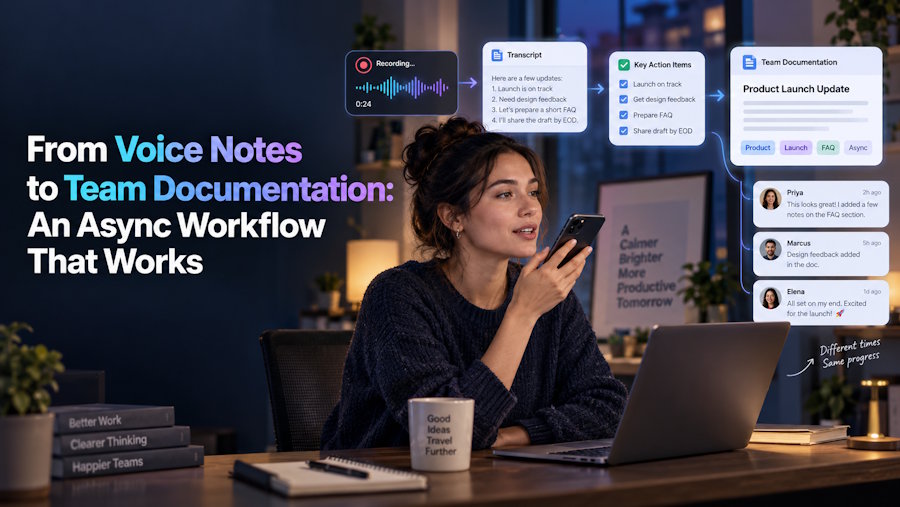
Voice notes have quietly become one of the most-used async communication tools in distributed work, precisely because talking is faster than typing and carries more nuance. But they're a terrible archive. You can't search them, skim them, or reference a specific point without replaying the whole thing. The workflow that actually works treats voice as the input layer and text as the storage layer, capturing thinking quickly through speech, then converting it into something durable and searchable.
Why Voice Works as an Input Layer
There's a genuine speed advantage in speaking rather than typing, especially for complex or exploratory thinking. Most people speak at roughly 130 to 150 words per minute and type at perhaps 40 to 60. But the bigger advantage is cognitive rather than mechanical: speaking tends to produce more complete explanations, because people naturally include context, caveats, and reasoning that they'd trim away when typing to save effort.
This matters for documentation specifically. The parts of a decision that get lost are almost always the why, the constraints that were considered, the alternatives that got ruled out, the tradeoffs that were accepted knowingly. Those details rarely survive a summary written after the fact, but they show up naturally when someone explains a decision out loud.
Where the Workflow Usually Breaks
The gap between "recorded a useful voice note" and "team has usable documentation" is where most async workflows fall apart. A folder of audio files isn't documentation. Nobody scrubs through a twelve-minute recording to find the one sentence they need, and new team members certainly aren't going to listen through six months of accumulated voice memos during onboarding.
Converting speech into text is the step that closes that gap, and it's now cheap enough that there's no real reason to skip it. A tool like an audio to text converter handles the mechanical part of turning an MP3, M4A, or browser recording into a searchable transcript that can be edited, pasted into a wiki, or exported as a document. Most tools in this category also generate summaries and key-point extractions from the transcript, which is genuinely useful when a rambling ten-minute recording needs to become a three-bullet decision record. The point isn't that transcription is magic; it's that it converts an unsearchable artefact into a searchable one, and search is what makes documentation actually get used.
A Workflow That Holds Up
The practical version of this looks something like the following, and it works for teams of almost any size:
- Capture in whatever format is fastest. Don't force people to write documentation in the moment. Let them record a voice note explaining what they did and why, immediately after the work happens, while the reasoning is still fresh.
- Transcribe promptly, not eventually. The backlog problem is real: a pile of untranscribed recordings becomes as useless as no recordings at all. Transcribing within a day or two of recording keeps the workflow from silently collapsing.
- Edit ruthlessly before publishing. A raw transcript is not documentation. Spoken language contains false starts, tangents, and half-finished sentences. The transcript is the draft, not the deliverable; someone still needs to cut it down to the parts that matter and structure it properly.
- Store it where people actually look. A transcript sitting in a transcription tool's dashboard helps nobody. It needs to end up in the team wiki, the project doc, or wherever the team already searches by default.
- Keep the original audio, at least for a while. For anything involving specific numbers, names, or exact wording, having the source recording available for verification prevents transcription errors from propagating into permanent documentation.
What to Record, and What Not To
Not everything needs this treatment. Recording every conversation produces a documentation set nobody maintains, which is worse than having none at all. The recordings worth transcribing tend to fall into a few categories: decisions and the reasoning behind them, explanations of how a system or process works, retrospectives on what went wrong and why, and onboarding-style walkthroughs that would otherwise need to be repeated verbally for every new hire.
Routine status updates, casual coordination, and anything that will be irrelevant in two weeks generally aren't worth the transcription and editing effort. The test is simple: would someone joining the team in six months benefit from reading this? If not, let it stay ephemeral.
Getting Audio Quality Right Enough
Transcription accuracy is bounded by recording quality, and no amount of processing recovers speech that wasn't clearly captured. A few habits make a disproportionate difference: recording somewhere reasonably quiet, keeping the microphone close, and avoiding heavy background music or overlapping speakers. For multi-person recordings, clear turn-taking produces far more usable transcripts than several people talking simultaneously, which is worth mentioning explicitly before recording a group discussion.
Using the original recording file rather than a re-exported or messaging-app-compressed copy also helps, since each additional compression step strips detail that transcription can't reconstruct later.
The Real Payoff
Teams that get this workflow running consistently end up with something more valuable than a document repository they end up with an actual institutional memory. New hires can read through the reasoning behind past decisions instead of asking someone to explain it again. Debates that were already settled six months ago don't get relitigated from scratch. And the person who understood a system best doesn't take that knowledge with them when they leave.
None of that requires a heavyweight documentation culture or a mandate that everyone write more. It just requires closing the gap between how people naturally explain things and how that explanation gets stored.

