

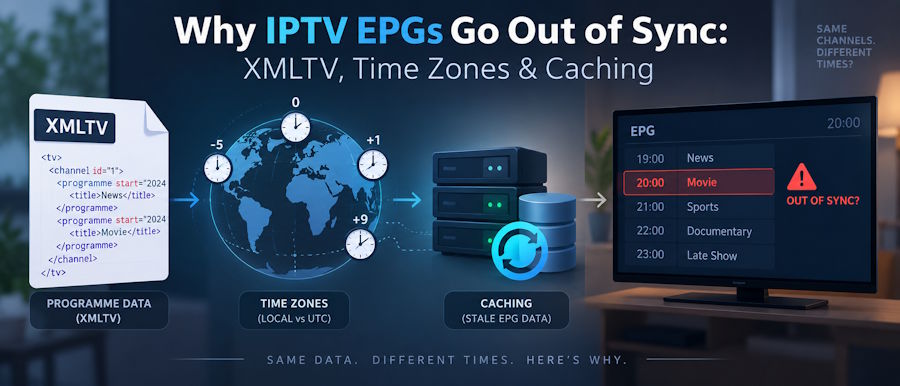
A live channel can play perfectly while its programme guide remains empty, displays the wrong programme or runs exactly one hour behind. That is because video delivery and programme-guide delivery are separate systems.
The stream supplies the video and audio. The Electronic Programme Guide, or EPG, is assembled from metadata that must be collected, formatted, mapped to the correct channels, converted into local time and cached by the player.
Most EPG faults therefore fall into four areas:
- Incorrect or incomplete source data
- Channel-identifier mismatches
- Time-zone conversion errors
- Stale application caches
Reinstalling the player might temporarily clear its local data, but it does not identify which layer caused the fault. A structured diagnosis is faster and less likely to introduce new problems.
How EPG Data Reaches an IPTV Player
An EPG passes through several components before it appears on a television or mobile device:
- A listings source produces programme schedules.
- The data is converted into XMLTV or another supported format.
- Channels in the listings are mapped to channels in the service.
- The player downloads or receives the guide data.
- The player parses and caches the schedule.
- The user interface renders programmes in the device’s local time.
A failure at any point can produce a similar symptom.
For example, a blank guide might indicate that the feed did not download. It could also mean that the feed arrived successfully but contains channel identifiers that do not match the playlist. A guide shifted by one hour is more likely to be a time-zone problem, while yesterday’s schedule usually points towards caching or an upstream refresh failure.
This separation also explains why changing video-quality settings rarely fixes an EPG. HLS or another streaming format can continue delivering video even when the separate listings feed is missing or malformed.
What an XMLTV File Contains
The XMLTV project provides utilities and a mature XML format for processing television listings. Its structure is defined in the project’s official XMLTV DTD.
At its simplest, an XMLTV document contains two important record types:
- channel records describe the available channels.
- programme records describe scheduled programmes and reference a channel by its identifier.
Here is a deliberately fictional example:
<?xml version="1.0" encoding="UTF-8"?>
<tv>
<channel id="news.example">
<display-name lang="en">Example News</display-name>
</channel>
<programme
start="20260915190000 +0100"
stop="20260915200000 +0100"
channel="news.example">
<title lang="en">Evening Update</title>
<desc lang="en">A fictional programme used for demonstration.</desc>
</programme>
</tv>
The important relationship is the value news.example. The programme refers to that identifier through its channel attribute.
If the associated playlist identifies the same service as example-news.uk, news-hd or some unrelated numeric value, the player needs a mapping rule. Without one, it may have valid programme data but no way to attach it to the visible channel.
A display name is not always a safe substitute for an identifier. Names can contain regional labels, resolution suffixes, punctuation or minor spelling differences. Two channels may also share a similar display name while carrying different regional schedules.
XML must also be well formed. A missing closing tag, invalid character or encoding problem can cause a strict parser to reject the document. The W3C XML specification provides the underlying rules for valid XML documents.
Common Causes of Incorrect EPG Data
The symptom often provides a useful starting point.
| Symptom | Probable cause | Diagnostic check | Safe action |
|---|---|---|---|
| One channel has no listings | Channel-ID mismatch | Compare the playlist identifier with the XMLTV channel ID | Correct the mapping or use the matching identifier |
| Every programme is one hour early or late | Time-zone or daylight-saving error | Inspect the source offset and device time zone | Normalise times correctly and refresh the guide |
| The guide shows old programmes | Stale upstream or player cache | Compare the feed’s current data with the player display | Refresh the source, then invalidate the relevant cache |
| Listings stop part-way through a day | Truncated download or short schedule window | Check the response size and final XML elements | Fetch the feed again and validate the complete response |
| The entire guide fails to load | Malformed XML or unsupported encoding | Run the document through a local XML validator | Correct the document rather than repeatedly reinstalling |
| Correct programmes appear under the wrong channel | Incorrect mapping or duplicate identifiers | Trace one programme back to its referenced channel | Repair the channel map and remove ambiguous duplicates |
This table is a starting point, not a substitute for examining the actual data. Several faults can exist at the same time. A player may, for example, cache an old copy of a feed that also contains an incorrect channel mapping.
Why UK Guides Commonly Shift by One Hour
The XMLTV DTD allows programme times to include an explicit offset, such as +0000 or +0100. If no time zone is supplied, the format treats the time as UTC.
For UK viewers, a fixed assumption that local time always equals UTC will fail during British Summer Time. Conversely, always adding one hour will make the guide wrong during the GMT portion of the year.
Applications should treat a programme’s supplied timestamp as an instant, convert it into a normalised internal representation and then render it in the viewer’s configured time zone. They should not permanently add or subtract an hour from every record.
The IANA Time Zone Database records current and historical time-zone rules. Using a named zone such as Europe/London is safer than maintaining a hand-written list of daylight-saving dates.
Three values should be checked separately when a guide is shifted:
- The offset supplied by the listings source
- The time zone configured on the device
- Any additional adjustment configured inside the player
A manual correction inside the application can hide an upstream error. It can also produce a second error when the clocks change. Manual offsets are useful for diagnosis, but the underlying time conversion should still be corrected.
A Repeatable EPG Diagnostic Workflow
Start with one affected channel rather than repeatedly refreshing the entire guide.
1. Protect the feed address
An EPG URL may contain account identifiers or other access information. Do not paste a private address into a public validator, forum post or screenshot. Download the data into a controlled environment and redact sensitive query parameters before sharing logs.
2. Confirm the response is really XML
Check the HTTP status and inspect the beginning of the response. An address can return HTTP 200 while serving an HTML login page, an expired-account message or a proxy error.
A parser expecting <tv> will not be able to use an HTML response simply because the request technically succeeded.
3. Validate the document
Confirm that the document is complete and well formed. Check its declared encoding, closing elements and any characters that require XML escaping.
If only the end of a large file is missing, investigate interrupted downloads, timeouts or intermediary size limits.
4. Trace one channel
Locate the channel in the service playlist, note its identifier and find the corresponding XMLTV channel record. Then locate a programme whose channel attribute references that exact ID.
This exposes mapping problems without requiring inspection of thousands of programme records.
5. Calculate one programme time manually
Take one start value and interpret its supplied offset. Convert it to UTC and then to the device’s configured time zone.
If the calculated time is correct in the source but wrong on screen, the error is probably in player configuration or rendering. If it is already wrong in the source, clearing the player cache will not fix it.
6. Compare upstream and local data
Check whether the feed contains current programmes. If it does, but the application shows yesterday’s schedule, the local copy is stale.
If the downloaded feed is also old, the issue exists before the data reaches the player.
7. Refresh only the affected layer
Clear or refresh the guide data rather than resetting the entire application. A full reset can remove working playlists, favourites and unrelated settings without resolving an upstream problem.
8. Record the environment
Document the device model, operating-system version, player version, configured time zone, time of the test and affected channel. Precise context makes intermittent faults much easier to reproduce.
Player Compatibility Is the Last Mile
Players differ in how they import, map and refresh programme data. One may support a separate XMLTV address, while another expects guide information to arrive through its configured login method. Cache duration, error tolerance and manual mapping tools can also vary.
Before changing feed settings, confirm that the application supports the device and the credential format being used. Streamova’s guide to choosing an IPTV player provides a practical overview of device support, login methods, player costs and trusted installation routes.
A successful test in a second compatible player can help isolate the fault. If both applications show the same incorrect programme time, the source data deserves closer inspection. If only one is wrong, compare its time-zone, mapping and cache settings.
This comparison should be diagnostic rather than a reason to keep installing random applications. Any test player should come from its official store or verified publisher.
Implementation Notes for Developers
An EPG importer should fail visibly and specifically. Silently discarding records makes a data problem look like an empty guide.
Useful implementation practices include:
- Validate XML before importing records.
- Log rejected channels and programmes without recording credentials.
- Preserve the original timestamp and offset for debugging.
- Normalise valid programme times to UTC internally.
- Convert to local time only when presenting the schedule.
- Treat channel identifiers as stable keys rather than display labels.
- Detect duplicate or missing identifiers.
- Apply bounded retries when a feed is temporarily unavailable.
- Use sensible cache lifetimes and honour HTTP validators when supplied.
- Keep the last known valid guide if a refresh returns malformed data.
- Test clock changes and daylight-saving boundaries explicitly.
Android provides a useful example of a platform-level programme model. Its TvContract.Programs API associates programmes with channel IDs and stores programme start and end times as UTC milliseconds. An IPTV player does not have to use this particular API, but the model illustrates the same underlying principles: stable channel relationships and unambiguous times.
Developers should also distinguish “no listings exist” from “the refresh failed”. Those states require different user messages. Replacing valid cached data with an empty result after a network error can make a temporary fetch problem appear to be permanent data loss.
Quick Diagnostic Checklist
Before resetting a player, confirm:
- The guide URL responds successfully.
- The response contains XML rather than an error page.
- The XML is complete and well formed.
- The affected programme references a valid channel ID.
- Playlist and guide identifiers are correctly mapped.
- Programme times contain a valid offset.
- The device is using the correct time zone.
- The player has refreshed its guide cache.
- The same channel has been tested in isolation.
- No credentials have been exposed in logs or screenshots.
The Fault Is Usually Traceable
An out-of-sync EPG is not one single problem. It is the visible result of a listings pipeline in which source data, identifiers, time conversion and local caching must all agree.
The quickest investigation follows the same direction as the data: inspect the source, validate the document, verify one channel mapping, calculate one timestamp and only then examine the player cache. That process identifies the responsible layer without erasing unrelated settings or relying on repeated reinstalls.

