

Cargill’s staff manually entered customer orders into the company’s order processing system. Different order formats slowed their work, and delayed shipments. The company introduced an AI agent to check, and complete orders. By July 2025, Cargill had automated 70% of the order process. They processed each order in under a minute, and saved $10–15 million a year.
Cargill’s approach worked because the agent combined live inventory data with clear business rules. This ability to connect information with action is central to agentic process automation.
This article breaks down what agentic process automation is, why it matters, and how to put it to work in your business.
What Is Agentic Process Automation?
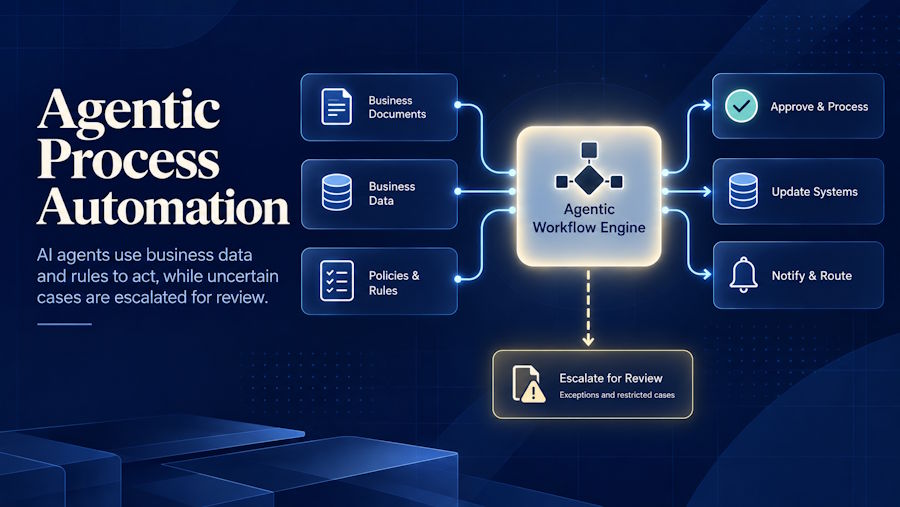
Agentic process automation uses AI agents to plan, and carry out business workflows across connected systems. These agents interpret language, analyze data, and choose actions that support a defined goal.
For example, an invoice agent could investigate a price mismatch by checking the purchase order and supplier agreement. This could then explain the difference, and send the case to the right person for approval.
Building an agent like this requires access to business records and clear approval rules. The team at Data Prism helps businesses connect these pieces so agents can act within defined limits.
Traditional Automation Vs Agentic Process Automation
Traditional automation follows predefined steps. Agentic process automation chooses actions based on a goal and available information. The difference lies in how each system decides what happens next.
Traditional workflows handle changes through programmed rules. Agentic systems can interpret unfamiliar inputs, and investigate exceptions. Both approaches need clear limits and approval steps.
Consider an employee who needs access to a project tool. A traditional workflow might send every request to a fixed approver. An agent could check the employee’s role and project assignment first. This could then grant permitted access, or request approval. The table below shows how these approaches differ.
| Feature | Traditional automation | Agentic process automation |
|---|---|---|
| Next step | Follows a programmed path | Selects an action using available information |
| Unexpected cases | Applies a set response or requests review | Can investigate before acting or requesting help |
| Input handling | Relies on defined fields or extraction tools | Can interpret documents and messages |
| Changing conditions | Requires updates for cases its rules do not cover | Can adjust actions within its permitted scope |
| Human involvement | People handle approvals and unhandled cases | People approve restricted actions, and resolve uncertain cases |
Why Is Agentic Process Automation Important?
Agentic process automation helps businesses manage growing workloads without increasing manual work at the same rate. AI agents can make routine decisions without waiting for an employee to review each case.
These routine decisions often involve missing or conflicting information. A request may lack a detail, or two records may not match. An agent can check related records or ask for the missing information.
Resolving these issues early helps prevent a backlog of pending cases. Employees spend less time clearing that backlog.
Which Workflows Are Worth Automating?
A workflow is worth automating when its expected benefits justify its total cost. Consider transaction volume, handling time, and the cost of delays. Frequent tasks with repeated manual checks are useful starting points.
For example, staff may copy order details between sales and inventory systems. If this work consumes hours each day, you can automate business processes to transfer, and check those details. Staff then review cases that need clarification.
Also consider how much interpretation the task requires. A simple transfer between systems may only need rule-based automation. This can keep setup and maintenance costs lower.
How Can Agentic Process Automation Help You?
The benefits of intelligent automation show up in a few clear places once an agent takes over a workflow.
- Lower Cost Per Transaction: Agents can reduce the staff time needed to complete each task. These savings must outweigh the cost of running and maintaining the system.
- Faster Turnaround: An agent can check records, and send confirmations within the same workflow. Customers receive updates sooner, with fewer handoffs between teams.
- More Consistent Checks: Agents can compare records, and flag missing details before work moves forward. Teams still need to review results because AI can make mistakes.
- More Time For Customers: Employees can spend less time gathering information across systems. They can use that time to understand customer needs and resolve complex requests.
Examples of Intelligent Automation
EY’s finance teams manually matched many customer payments to invoices. They built PowerMatch to extract payment details, and match records automatically. Automatic matching and clearing rose from 30% to 80%. Microsoft reported annual savings of 120,000 working hours across roughly half of EY’s global organization.
Omega Healthcare reduced document processing time. Staff handled large volumes of customer correspondence related to collections. The company used AI to extract document data, and send uncertain results for human review. UiPath reported 6,700 working hours saved each month and a 50% reduction in turnaround time.
Epiq simplified employee onboarding. The company needed to reduce the administrative work involved in bringing new employees onboard. They used Microsoft Power Platform to automate its onboarding workflow. Microsoft highlighted savings of more than $500,000 a year.
What Do You Need For Implementation?
Agentic process automation requires accurate data, clear rules, and a team to manage it. Before you begin, make sure the following are in place.
- Your agent needs current, reliable business records. Correct incomplete entries, and identify the source to use when records disagree. This gives the agent a consistent reference for its decisions.
- Your business policies should define the agent’s authority. Specify which records it can access and which actions require approval. Name the person who will handle requests beyond those limits.
- Your project needs an accountable owner and technical support. The owner resolves business questions, while the technical staff maintain the system. An AI automation service provider can supply skills that your team lacks.
- Employees need to understand how their responsibilities will change with inclusion of agents inside the workflows. Give employees a clear way to report problems.
How Do You Implement Automation?
Implementation turns these foundations into a working process. Build the workflow, test its decisions, and introduce it gradually through the following steps.
- Define the scope. Choose the exact task the agent will perform. Specify what starts the task and what counts as completion.
- Map the workflow. Record how information moves between people and systems. Remove unnecessary steps before adding automation.
- Write the agent’s instructions. Describe the expected result in plain language. Include examples of correct responses and cases that the agent must reject.
- Connect the workflow. Link incoming requests to the agent and its outputs to the next action. For example, a support classification could determine which team receives a ticket.
- Test historical cases. Include typical requests, unusual wording, and missing information. Check the results against agreed answers and correct failures before launch.
- Run alongside your team. Let the agent propose actions while employees continue making live decisions. Use disagreements to identify problems before allowing independent action.
- Release and monitor. Begin with a limited workload and record errors, completion times, and running costs. Increase usage only when results meet your targets consistently. Keep action logs so reviewers can trace problems to their source.
Conclusion
Agentic process automation can help your team manage work that needs frequent decisions. Its value depends on reliable data, clear rules, and measurable results. People still need to review errors, and approve actions beyond the agent’s authority.
Start with one workflow where manual checks consume time. Test the agent on real cases, and compare its results with your current process. Expand when the evidence shows better performance at a worthwhile cost.

