

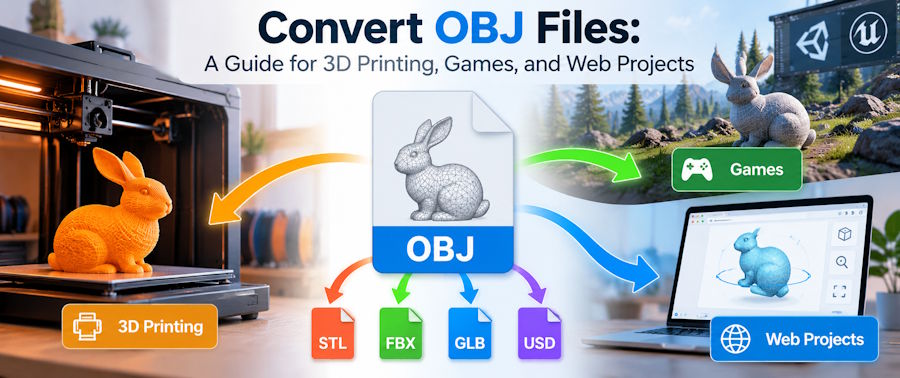
If you work with 3D models, you've likely run into the OBJ format. But converting an OBJ is not a one-size-fits-all task: the right output depends heavily on what you're trying to build. Preparing a model for 3D printing, importing it into a game engine, and showing it off on a website all call for different formats. This guide walks through OBJ conversion by use case, so you can pick the right destination the first time.
Why format matters for different projects
OBJ is a common starting point, but your goal decides the format you need. Knowing what you're making next is the most important factor in choosing a conversion path.
For 3D printing projects: STL and 3MF
To 3D print, you usually need an STL or a 3MF file. STL is the most widely accepted format for slicing software, but it doesn't carry color or unit information. An OBJ model exported in inches can print at the wrong size if your slicer assumes millimeters. For a basic, single-material print, STL is often the safest pick. For multi-color prints or when you want to keep project settings intact, 3MF is better because it can store the slicer project, materials, and model units.
For game development: FBX or GLB
Game engines like Unity and Unreal work best with FBX or GLB files. FBX can hold animation rigs and skeletal data, and GLB can also store simpler animation setups. If you've rigged a character in an external tool, exporting as FBX is usually the way to go. For simpler assets or when you want the model and textures in one place, GLB is a compact option.
For web, AR, and e-commerce: GLB
To display a 3D model on a website, in AR, or in an online product configurator, GLB is the standard choice. It packs geometry, textures, and animations into one binary file that loads fast in browsers and drops easily into online viewers.
Choosing a format means matching the file's strengths to your final use. You wouldn't print an animated game character from an FBX in a slicer, and you wouldn't embed an STL in an interactive web viewer.
OBJ and the convenience of browser conversion
Meshy’s converter completes the conversion locally in the browser tab, and the file never leaves the device.
Converting an OBJ takes three steps:
- Step 1: Open the Meshy converter and drag the OBJ into its upload area.
- Step 2: Select the output format. For printing pick STL or 3MF. For animated models choose FBX. For web and AR go with GLB.
- Step 3: Download and verify the result. Open the file in the app you plan to use and check the scale, geometry, and materials.
The Meshy 3D File Converter lets you upload an OBJ, select the target format, and download the result without installing software. It preserves supported texture data when converting to formats such as GLB, which matters for game-engine and rendering workflows.
Choosing your output format: a quick guide
| Format | Best for | Keep in mind |
|---|---|---|
| STL | Universal printing, mesh sharing | Lacks units and color; check scale |
| 3MF | Multi-material prints, projects | Slicer support varies |
| FBX | Game engines, animated models | Import settings differ between engines |
| GLB | Web, AR, one-file convenience | Optimized for real-time use and viewing |
- STL is the common denominator for most printers and model repositories. Use it when you need to guarantee a print partner or service bureau can open the file. STL doesn't carry a unit field, so confirm the scale before printing.
- 3MF was built to address STL's gaps: it can store color, multiple materials, and print-oriented metadata. The catch is that not every slicer supports every extension, so a quick test is worth it.
- FBX is the go-to for bringing a character or animated asset into a game editor, because it handles rigs and animations well. The import quality depends on the engine's importer, so check materials separately.
- GLB is great for product previews and AR placement because it's designed for efficient transmission. It can embed textures, but test in your target viewer.
The effects on textures and scales
The output format matters as much for how the model looks as for how it prints or renders. OBJ stores geometry separately from materials, so surface textures and appearance often live in companion files, not in the OBJ geometry. Converting OBJ to STL drops those material definitions and leaves a plain mesh. Formats like GLB or FBX can embed texture data and preserve the appearance, but keep the OBJ's MTL and texture files together during intermediate steps.

Scale is another common headache. OBJ files don't declare units, so a model can end up the wrong size if the converter or downstream app assumes a different unit system. Check whether your tool lets you set the scale, and compare the bounding box size in your editor or slicer after conversion.
Your path from OBJ to a working asset
After a model previews correctly in Meshy, open it in Blender or the destination tool and still verify scale, unit interpretation, mesh integrity, and materials.
Choose the format for the final destination, convert once, and test the output where it will be used. Try the free Meshy 3D File Converter for a private, no-install OBJ conversion workflow.

