


Technical architecture diagrams compress a large amount of information into one view. A single image may contain users, services, APIs, databases, queues, external providers, and several data paths. That density is useful for engineers who already understand the system, but it can overwhelm a new developer, customer, or nontechnical stakeholder.
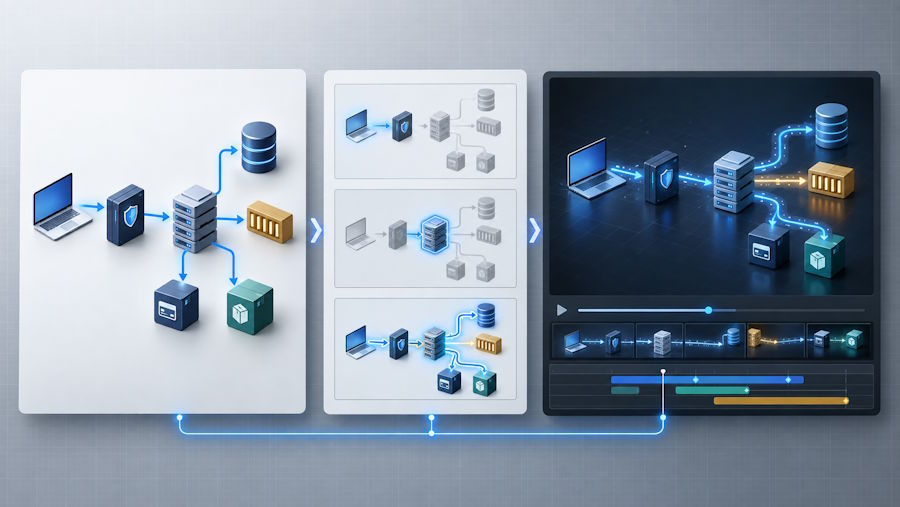
An AI video explainer can reveal the architecture in a controlled sequence instead of showing every relationship at once. Reference-driven tools such as Seedance 3.0 can use diagrams, images, motion references, and audio direction as inputs for a planned visual explanation. The objective is not to make boxes move for decoration. It is to guide attention without changing what the system actually does.
A successful result combines technical accuracy with clear scene planning. The diagram remains the source of truth, while the video determines when each component becomes important.
Start With One Question
Before producing the video, define the question it should answer. A diagram may support several explanations, but a short video needs a narrow purpose. It might show how a user request travels through a web application, how services communicate through a queue, how authentication works, or how data moves through an analytics pipeline.
Choosing one question creates a boundary. If the video explains order processing, monitoring and backup services may remain visible as context, but they should not compete with the path from checkout to payment, inventory, and confirmation. A focused question also gives technical reviewers a specific claim to validate.
Simplify the Diagram Before Animating It
A production architecture diagram is rarely a ready-made visual script. It may contain internal names, overlapping connectors, implementation notes, and components that matter mainly during debugging. Create a simplified copy and keep the original available for reference.
Preserve the components involved in the chosen workflow, the direction of important requests or events, system boundaries, storage stages, and the final result. Remove unrelated detail. Use consistent shapes so databases, internal services, queues, clients, and external providers are distinguishable at a glance.
This step reduces the interpretation left to the video model. It also prevents decorative motion from implying a connection or processing order that does not exist.
Convert the Architecture Into a Scene Plan
Turn the simplified diagram into a sequence of short scenes. A practical structure is:
- Establish the user, application, or event that starts the process.
- Highlight the first component that receives the request.
- Follow the request through validation or processing.
- Show storage, messaging, or an external-service interaction.
- Reveal the response or completed action.
- Return to the full diagram with the complete path highlighted.
Each scene should communicate one idea. If viewers must follow several arrows at the same time, divide the stage into smaller steps.
Consider an online checkout system. The first scene shows a customer submitting an order. The next highlights the API gateway and order service. A separate scene shows an event moving to a queue, followed by payment and inventory processing. The final scene returns the completed order to the interface. The sequence creates a story without inventing behavior that is absent from the architecture.
Give Every Reference Asset One Job
Reference material is easier to control when each input has a defined purpose. The architecture diagram should establish component placement and relationships. Separate images may define icon style, colors, or interface context. A motion reference can demonstrate camera pace, while an audio guide can establish narration timing.
A compact reference pack might include one clean architecture diagram, crops of complex sections, approved icons, a color reference, and a rough narration track. Label which source controls structure, style, motion, and sound. Avoid relying on one crowded screenshot to communicate all of these decisions.
Use Motion to Direct Attention
Movement should explain the system. A path can illuminate as data travels between services. A component can become brighter when it starts processing. The camera can move closer to one subsystem and later return to the complete architecture.
Keep the overall layout stable. Constant rotation, aggressive zooms, and unnecessary three-dimensional effects force viewers to rebuild their mental map. Restrained highlights, path animation, and sectional reveals are usually clearer. The direction of motion must also match the diagram. Reversing an arrow can turn a polished video into an incorrect explanation.
Keep Critical Text Outside the Generative Layer
Architecture explainers often require exact service names, endpoints, status codes, and short code fragments. Do not depend entirely on generated imagery for this information. Use AI generation for movement and visual transitions, then add important labels during editing.
This hybrid approach provides control over spelling, placement, and readability. Keep labels short and synchronize them with the visible action. A narration line may explain that an API gateway validates a token before routing a request, while the screen only needs concise labels such as “Validate” and “Route.” Test all text at the size used in an embedded page or mobile player.
Write Narration Around Cause and Effect
Good narration explains relationships rather than reading component names. Instead of listing the gateway, order service, and queue, explain what connects them: “The gateway validates the request and sends it to the order service. The service records the order and publishes an event so payment and inventory processing can continue independently.”
Align each sentence with the action on screen. If the narration discusses a queue while the video still highlights the database, viewers must reconcile two stages at once. A rough voice track created before final rendering can help determine how long every scene should remain visible.
Review the Video Like Technical Documentation
The final review should involve someone who understands the architecture. Confirm that arrows move in the correct direction, service and database labels are accurate, asynchronous steps are not presented as immediate responses, and external systems remain separate from internal components.
Check the narration for unsupported performance, security, or reliability claims. A video should not suggest that encryption, retries, redundancy, or real-time processing exists unless the architecture supports it.
Continuity matters as well. A service should not change position, color, or role between scenes without a reason. When the camera returns from a subsystem to the full diagram, its location should remain obvious. If one scene is incorrect, regenerate or edit that scene rather than rebuilding the entire video.
Build a Reusable Production Template
Teams can make future explainers faster by saving a repeatable template containing the target duration, scene order, reference checklist, narration format, motion rules, text style, and technical review questions.
AI video does not replace architecture documentation. It provides a guided entry point. The diagram remains the detailed technical reference, while the video helps viewers understand where to begin and how the major parts connect. When technical accuracy leads the production process, an architecture diagram becomes a clear explanation instead of a collection of moving boxes.

