

A movie trailer is often the first impression audiences have of a film. Traditionally, creating a polished trailer required cameras, actors, editors, visual-effects artists, composers, and extensive post-production, making it costly and time-consuming for independent filmmakers and small teams.
AI video generation is changing this workflow. With platforms such as Crun AI, filmmakers can explore different AI video models in one place to visualize scenes, develop characters, experiment with camera movements, and turn images, storyboards, or video references into cinematic shots before the full production is complete.
This guide covers the process from concept and storyboard to AI generation, editing, promotion, and distribution, while showing how AI tools can fit into the creative workflow.
Why a Good Movie Trailer Matters
A movie trailer is more than a collection of attractive scenes. It is a marketing asset designed to communicate the film's identity and create enough curiosity for audiences to want to watch more.
Communicate the Movie's Concept Quickly
A trailer has limited time to establish the basic premise of a film.
Within the opening moments, viewers should begin to understand:
- What kind of movie is this?
- Who is the main character?
- What world does the story take place in?
- What problem or conflict drives the story?
- What makes this movie different?
The objective is not to explain the entire plot. It is to give viewers enough information to become curious.
Establish the Film's Visual Identity
A strong trailer should immediately communicate a movie's visual language.
This can include:
- Color palette
- Lighting
- Camera style
- Production design
- Costumes
- Locations
- Character appearance
- Special effects
- Overall atmosphere
Introduce Characters Without Explaining Everything
Characters are one of the most important elements of a movie trailer.
Instead of explaining a character's entire history, show small moments that reveal personality and motivation.
For example:
Shot 1: A detective enters an abandoned building.
Shot 2: She discovers a photograph on the wall.
Shot 3: Her expression changes as she recognizes someone in the photograph.
Shot 4: A mysterious figure appears behind her.
The audience does not need the entire backstory. They simply need a reason to ask what happens next.
Build Curiosity
A trailer should reveal enough to establish the story while withholding enough to maintain suspense.
This is particularly important for mystery, thriller, horror, and science-fiction films.
A useful structure is:
World → Character → Problem → Escalation → Mystery → Emotional Peak → Title
The trailer should feel like it is moving somewhere rather than simply presenting disconnected cinematic shots.
What Makes an AI Movie Trailer Generator Useful?
The right AI video platform depends on the type of film, available references, desired visual style, and amount of control required.
A useful movie-trailer workflow should ideally support several generation methods.
1. Text-to-Video
Text-to-video is useful during the earliest stage of development.
You can describe a scene such as:
A lone astronaut walks across a frozen alien landscape while a massive ring-shaped structure appears through the clouds. Wide cinematic shot, cold blue lighting, atmospheric fog, slow camera push.
This allows filmmakers to explore visual concepts before creating final assets.
2. Image-to-Video
Image-to-video becomes useful when you already have concept art, character designs, posters, photographs, or storyboard frames.
Instead of generating everything from scratch, you can use an image as the visual starting point and instruct the model to add movement.
For example:
Input: Character standing on a rooftop.
Prompt:
The character slowly turns toward the city as rain falls around them. The camera moves from a medium shot into a dramatic close-up. Neon reflections appear on the wet rooftop.
This approach can provide more control over composition and appearance.
3. Reference-to-Video
Consistency becomes increasingly important when a trailer contains multiple scenes.
A character who looks different in every shot can immediately make an AI-generated trailer feel disconnected.
Reference-based generation allows filmmakers to provide visual references for characters, environments, objects, or styles.
4. Multi-Shot Generation
A trailer usually contains many individual shots rather than one continuous sequence.
A workflow that supports multiple shots can make it easier to create:
- Establishing shots
- Character close-ups
- Action sequences
- Environmental transitions
- Camera movements
- Dramatic reveals
For example, Seedance 2.5 supports text-to-video, image-to-video, reference-to-video, and video editing workflows. Its current feature set also includes multi-reference inputs, multi-shot generation, longer sequences, and character consistency.
AI Movie Trailer Generator Recommendation: Crun AI
For filmmakers who want to experiment with different AI video workflows, Crun AI provides access to multiple AI video, image, audio, and language models through one platform. Its current model library includes video models such as Grok Imagine, Seedance 2.5, Minimax H3, Veo 3.1, Wan 3.0, Kling, Vidu and other generation options.
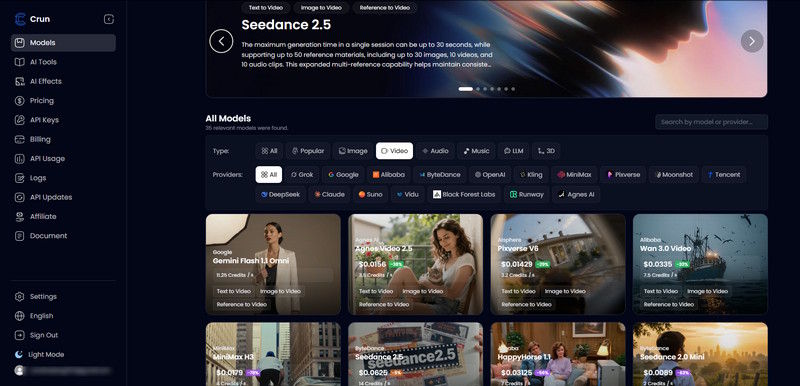
For cinematic trailer production, Seedance 2.5 is particularly useful when the project requires multiple references and connected shots. Crun's implementation supports up to 30 seconds per generation session and up to 50 reference materials, including images, videos, and audio.
This can be useful for a workflow such as:
Movie concept → Character references → Environment references → Individual shots → Trailer edit
Instead of depending on one generated clip, filmmakers can build the trailer scene by scene.
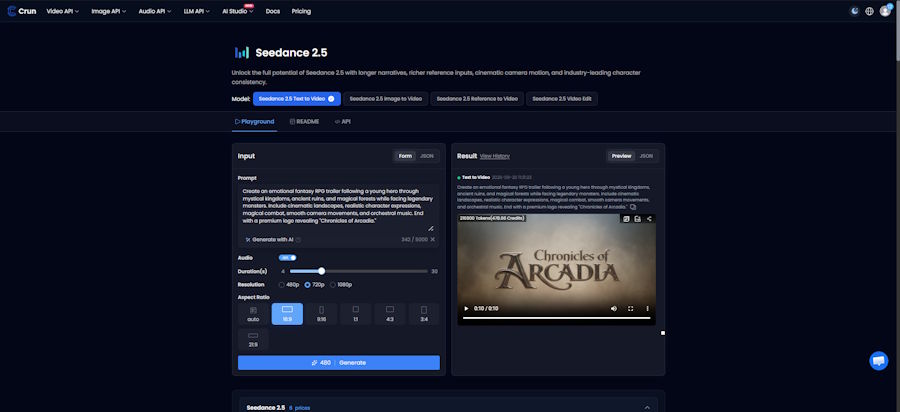
Step-by-Step Guide to Create a Movie Trailer with AI
Here are the steps:
Step 1: Develop the Movie Concept
Start with a simple concept rather than a complicated screenplay.
Define:
Genre:
Science fiction, horror, thriller, fantasy, romance, comedy, action, drama, documentary, or another genre.
Setting:
Modern city, remote island, space station, medieval kingdom, future megacity, desert, underwater facility, or another location.
Main character:
Appearance, age range, clothing, personality, occupation, motivation, and visual identity.
Central conflict:
What does the protagonist want, and what prevents them from achieving it?
Visual style:
Photorealistic, stylized, retro, dark cinematic, futuristic, anime-inspired, period drama, or another direction.
Emotional tone:
Mysterious, emotional, frightening, uplifting, tense, energetic, humorous, or dramatic.
For example:
Movie concept:
A deep-sea engineer discovers an unknown structure beneath the ocean floor, but returning to the surface may awaken something that has been dormant for centuries.
This single concept can become the foundation for characters, locations, action sequences, and trailer shots.
Step 2: Create a Trailer Logline
A movie screenplay can contain thousands of words. A trailer needs a much simpler idea.
Write one sentence that answers:
Who + wants what + what stands in the way?
For example:
After discovering a mysterious structure beneath the ocean, a deep-sea engineer must uncover its purpose before her expedition becomes trapped underwater.
The logline becomes the foundation for the trailer.
Step 3: Decide What Type of Trailer You Are Creating
Not every trailer has the same purpose.
You might create:
- Teaser trailer
- Official announcement trailer
- Character trailer
- Story trailer
- Final trailer
- Release trailer
- Concept trailer
- Festival trailer
- Social media teaser
A teaser might focus primarily on atmosphere and mystery. An official trailer can reveal more of the story. A final trailer may emphasize action, characters, reviews, release information, or the central emotional conflict.
Step 4: Build the Trailer Structure
Before generating any footage, create a beat sheet.
A simple structure could look like this:
| Section | Purpose |
|---|---|
| Opening | Capture attention |
| World | Establish the setting |
| Character | Introduce the protagonist |
| Conflict | Reveal the central problem |
| Escalation | Increase tension |
| Montage | Show major moments |
| Emotional Peak | Deliver the strongest moment |
| Title | Reveal the movie |
| CTA | Communicate release information |
For a 90-second trailer, for example:
0–10 seconds: Mystery and atmosphere
10–25 seconds: Character and world
25–45 seconds: Conflict
45–70 seconds: Escalation and montage
70–82 seconds: Emotional or action peak
82–90 seconds: Title and release information
The exact timing can change depending on genre and editing style.
Step 5: Create a Storyboard
Once the structure is established, divide the trailer into individual shots.
For example:
Shot 1 — Establishing Shot
A huge ocean stretches beneath a stormy sky. A research vessel moves slowly through the waves.
Shot 2 — Character Introduction
Inside the vessel, the protagonist studies an underwater sonar image.
Shot 3 — Discovery
The sonar reveals an enormous geometric structure beneath the seabed.
Shot 4 — Descent
The protagonist enters a deep-sea vehicle and begins descending into darkness.
Shot 5 — Reveal
A gigantic structure emerges from the darkness.
Shot 6 — Threat
Lights appear inside the structure.
Shot 7 — Escalation
The underwater vehicle loses power while something moves outside the window.
Shot 8 — Final Reveal
The protagonist looks toward the structure as a massive door begins opening.
Shot 9 — Title
Cut to black.
THE ABYSS BELOW
COMING SOON
This storyboard gives every AI-generated clip a clear purpose.
How to Write AI Movie Trailer Prompts
A weak prompt might say:
Create an epic science-fiction movie trailer.
This leaves too many creative decisions to the model.
A stronger prompt defines the subject, environment, action, camera, lighting, style, and mood.
For example:
A lone deep-sea engineer in a futuristic diving suit floats outside a massive ancient structure beneath the ocean floor. Bioluminescent particles drift through the dark water. The camera begins with a wide establishing shot, slowly pushes toward the engineer, then moves behind her as the enormous structure becomes visible through the darkness. Photorealistic cinematic science-fiction, realistic underwater physics, dramatic volumetric lighting, atmospheric suspense, detailed production design, subtle camera movement.
A useful prompt framework is:
Subject + Environment + Action + Camera + Lighting + Visual Style + Mood
For more complex shots, you can add:
Duration + Transition + Reference Assets + Audio Direction
This gives the video model more information about what the shot should accomplish.
How to Maintain Character Consistency
Character consistency is one of the biggest challenges in AI filmmaking.
Imagine generating five scenes in which the protagonist has:
- Different hairstyles
- Different facial features
- Different clothing
- Different ages
- Different body proportions
Even if every individual shot looks impressive, the trailer will feel inconsistent.
Create a character reference sheet before generating the trailer.
Include:
- Face
- Hairstyle
- Clothing
- Accessories
- Age
- Body type
- Color palette
- Distinctive features
- Personality
- Typical expressions
Then reuse the same references across scenes whenever the generation platform supports them.
Reference-based workflows can be especially useful for longer trailers because multiple images or videos can provide visual anchors for characters, environments, and objects. Seedance 2.5 currently supports expanded multi-reference workflows designed to help maintain consistency across generated sequences.
How to Create Consistent Movie Locations
Characters are not the only element that needs consistency.
Imagine that your movie takes place in a futuristic city.
One shot might show:
- Tall glass buildings
- Blue neon lighting
- Heavy rain
Then another shot suddenly shows:
- Victorian architecture
- Desert conditions
- Warm sunlight
Unless the change is intentional, the audience may feel that the scenes belong to different movies.
Create environment references for important locations.
For each major location, define:
- Architecture
- Time of day
- Weather
- Lighting
- Color palette
- Materials
- Background elements
- Camera perspective
This creates a visual reference system for the entire trailer.
How to Create Cinematic Camera Movement
Cinematic footage is not only about resolution or visual detail.
Camera movement can change how an audience experiences a scene.
Useful camera directions include:
- Slow push-in
- Pull-back
- Tracking shot
- Crane shot
- Aerial shot
- Over-the-shoulder shot
- Close-up
- Low-angle shot
- High-angle shot
- Orbit
- Handheld movement
- Slow-motion reveal
For example:
The camera begins behind the protagonist, slowly tracks forward, passes over her shoulder, and reveals a gigantic spaceship emerging above the city.
This is more useful than simply saying:
Make it cinematic.
Create Different Trailer Styles for Different Movie Genres
Different genres benefit from different visual and editorial approaches.
Science-Fiction Trailer
Focus on:
- Large environments
- Technology
- Spacecraft
- Futuristic cities
- Unknown phenomena
- Scale
- Mystery
A science-fiction trailer can gradually move from quiet exploration to a large-scale threat.
Horror Trailer
Horror often benefits from restraint.
Instead of showing the monster immediately, consider:
- Empty hallways
- Flickering lights
- Strange sounds
- Character reactions
- Shadows
- Objects moving unexpectedly
- Short glimpses of the threat
Silence can sometimes be more effective than constant action.
Action Movie Trailer
Action trailers can emphasize:
- Fast camera movement
- Vehicle sequences
- Combat
- Explosions
- Stunts
- Rapid cuts
- Character introductions
However, every action sequence should still contribute to the trailer's overall narrative.
Fantasy Trailer
Fantasy trailers can focus on:
- Large landscapes
- Ancient cities
- Magical creatures
- Heroes
- Villains
- Battles
- Mythology
The opening scenes can establish the world before the trailer gradually introduces the central conflict.
Romance Trailer
A romance trailer usually requires a different rhythm.
Instead of relying primarily on spectacle, focus on:
- Character chemistry
- Expressions
- Dialogue
- Locations
- Emotional transitions
- Relationship development
Create Trailer Versions for Different Platforms
One trailer does not necessarily need to serve every platform.
YouTube
A traditional 16:9 trailer can provide space for cinematic compositions and wide environments.
TikTok, Reels, and Shorts
A 9:16 version can focus on:
- Character close-ups
- Fast action
- Strong visual reveals
- Short dialogue
- Title cards
Social Media Ads
Shorter cuts can focus on one specific hook.
For example:
Version A: Character-focused
Version B: Action-focused
Version C: Mystery-focused
Version D: Emotional-focused
This gives filmmakers multiple ways to test different creative concepts.
Movie Trailer Production Timeline
A movie can have multiple trailers throughout its development.
1. Pre-Production
Concept Teaser
At the earliest stage, you may not have finished footage.
An AI-generated concept teaser can help visualize:
- Characters
- Locations
- Tone
- Visual style
- Story concepts
The goal is to create interest rather than explain everything.
Announcement Trailer
Once the film's identity is established, an announcement trailer can introduce:
- Movie title
- Genre
- Main character
- Setting
- General premise
2. Production
Character Trailer
Introduce the protagonist or another important character.
This can be useful when a film relies heavily on a distinctive lead.
Story Trailer
As the story becomes clearer, reveal more of the central conflict.
Avoid explaining every plot point. Instead, show enough to create questions.
Behind-the-Scenes Content
Trailer production can also generate supporting content such as:
- Concept art
- Storyboards
- AI experiments
- Visual development
- Before-and-after comparisons
- Director commentary
3. Pre-Release
Official Trailer
This is often the main promotional trailer.
It can combine:
Story + Characters + Conflict + Action + Emotion + Release Information
Final Trailer
A final trailer can be shorter and more direct.
It may focus on:
- Strongest scenes
- Audience reactions
- Reviews
- Release date
- Where to watch
Any reviews, awards, or audience statements included should be genuine and verifiable.
4. Post-Release
Audience Reaction Trailer
If a film receives genuine audience reactions, selected reactions can become part of later promotional material.
Extended Trailer
Additional footage can be used to create longer promotional edits.
Short Social Clips
The original trailer can also be divided into short clips for ongoing social promotion.
Common Mistakes When Creating AI Movie Trailers
Mistake 1: Generating the Entire Trailer in One Prompt
A movie trailer contains multiple shots, perspectives, locations, and emotional beats.
Trying to generate everything at once often reduces creative control.
Instead:
Concept → Storyboard → Individual Shots → Editing
Mistake 2: Prioritizing Visuals Over Story
Beautiful footage does not automatically create a good trailer.
If every shot is visually impressive but nothing changes, the trailer can feel like a collection of unrelated clips.
Every scene should have a purpose.
Mistake 3: Ignoring Character Consistency
Keep character references and descriptions consistent throughout the project.
Mistake 4: Making Every Scene Equally Intense
A trailer needs contrast.
Quiet scenes make action scenes feel bigger.
Slow shots can make rapid cuts feel faster.
Silence can make a sound effect more powerful.
Mistake 5: Revealing Too Much
The purpose of a trailer is to create curiosity.
You do not need to reveal every major plot twist.
Ask:
What can I show that makes the audience want to know what happens next?
FAQ: Creating a Movie Trailer with AI
What is an AI movie trailer?
An AI movie trailer is a promotional video created partly or primarily with AI-generated images, video, audio, voice, or visual effects.
It can be used for film concepts, independent productions, pitch projects, promotional campaigns, social media content, and visual development.
Can AI create a complete movie trailer?
AI can generate many of the visual components needed for a trailer, but a strong final trailer still requires creative direction, shot selection, editing, sound design, and storytelling.
The most effective workflow treats AI as part of the production pipeline rather than a replacement for the entire filmmaking process.
What do I need before making an AI movie trailer?
At minimum, prepare:
- Movie concept
- Genre
- Logline
- Main character
- Visual style
- Trailer objective
- Storyboard
- Shot list
- Audio direction
- Target platform
How long should a movie trailer be?
There is no universal duration.
A short teaser can be highly concise, while a full promotional trailer can provide more room for characters, story, and escalation.
The important consideration is whether every second contributes to the trailer's purpose.
How do I make AI-generated movie characters consistent?
Use reference images and consistent descriptions whenever supported by your video-generation platform.
Maintain the same:
- Face
- Hair
- Clothing
- Age
- Accessories
- Body type
- Visual style
For projects with many scenes, multi-reference generation can provide additional control.
Can AI create realistic movie trailers?
Modern AI video models can produce increasingly realistic cinematic sequences, but results can vary depending on the prompt, reference material, subject, movement, and generation model.
For professional projects, review every shot carefully and regenerate scenes that contain visual inconsistencies or unwanted artifacts.
Can I use an AI movie trailer commercially?
Commercial use depends on the AI platform, model, input materials, output terms, and any third-party assets used in the project.
Always review the applicable licensing terms before using generated content in commercial film marketing.
Final Thoughts
Creating a movie trailer has traditionally required a substantial amount of footage, equipment, post-production work, and creative resources.
AI video generation is making it easier to prototype and produce cinematic scenes, but the technology does not replace the fundamentals of trailer production. The most effective approach starts with the story.
Define the movie concept, identify the emotional hook, create a trailer structure, develop character and environment references, generate individual shots, and then assemble those shots through editing and sound design.

