

Developers who have worked with PDF files know that extracting text and rebuilding an editable document are two different tasks. A PDF to Word converter has to do more than read characters from a page. It must produce a DOCX that users can continue editing without recreating the entire document manually.
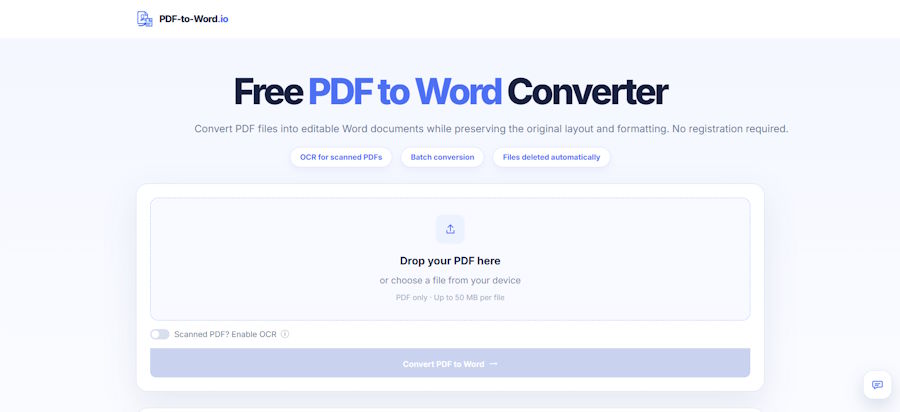
PDF-to-Word.io supports ordinary text-based PDFs as well as scanned or image-based files. Standard PDFs can be converted directly, while scanned files can use OCR before conversion. The tool supports individual files up to 50MB and does not require registration or a subscription.
Text Extraction and PDF-to-Word Conversion Solve Different Problems
Developers can use PDF parsing tools to access text stored inside a digital PDF. This is useful when the goal is:
- indexing;
- search;
- text analysis;
- content extraction;
- data processing.
The output may contain the correct words without preserving their original relationships.
A user requesting a Word document usually expects something more than a sequence of extracted strings. The result should remain understandable and editable.
Editable Output Requires Structure
A usable DOCX may need to preserve or reconstruct:
- paragraphs;
- headings;
- images;
- tables;
- lists;
- page flow;
- document hierarchy.
Text extraction alone does not automatically rebuild these relationships. A heading may become ordinary body text, table values may lose their columns, and captions may become separated from their images.
PDF-to-Word conversion is therefore closer to document reconstruction than simple text extraction.
First Determine Whether the PDF Contains a Text Layer
The appropriate conversion process depends heavily on the source PDF.
Text-Based PDFs
A digital PDF usually contains characters that can be selected and copied. These files may have been exported from Word, Google Docs, publishing software or a reporting system.
PDF-to-Word.io can convert this type of PDF directly into an editable DOCX file.
Image-Based PDFs
A scanned PDF can look similar to a digital PDF while containing no usable text layer. Each page may simply be an image.
Standard text extraction is insufficient in this situation because the file does not contain recognised characters. OCR is required before the content can become editable.
OCR Adds a Recognition Step
Optical Character Recognition identifies text visible inside an image and converts it into editable characters.
PDF-to-Word.io includes an OCR option for scanned and image-based PDFs.
The two workflows can be summarised as:
- Digital PDF: existing text layer → DOCX conversion
- Scanned PDF: page image → OCR → recognised text → DOCX conversion
The additional recognition stage explains why scanned-document conversion can produce different results from conversion of a normal digital PDF.
When Should OCR Be Enabled?
Users do not need to enable OCR for every file.
A simple check is to open the source PDF and try to select one sentence. If individual words can be highlighted, the document probably already contains a text layer. If the page behaves like a single image, OCR is more likely to be required.
For normal text-based PDFs, OCR is unnecessary.
OCR Accuracy Depends on the Source
Recognition quality depends on what appears on the scanned page. OCR may have more difficulty with:
- low-resolution scans;
- rotated or skewed pages;
- shadows and dark borders;
- faded printing;
- handwriting;
- small or unusual fonts;
- stamps;
- dense tables.
Names, figures, dates, symbols and technical terms should be checked carefully after OCR conversion.
Layout Reconstruction Is the Main Challenge
PDF and DOCX use different approaches to document layout.
A PDF is built around fixed page coordinates. Text, images and other objects appear at defined positions on each page.
A DOCX is designed around editable, reflowable content. Paragraphs move when users insert text, change fonts or adjust margins.
This difference creates the main conversion challenge.
One PDF Page May Contain Independent Objects
A page can contain:
- separate text blocks;
- images;
- tables;
- headers and footers;
- columns;
- annotations.
A converter must determine how these elements relate when producing an editable document. A PDF can therefore be perfectly readable while still requiring cleanup after conversion to DOCX.
PDF-to-Word.io aims to retain the original content and layout as closely as possible, but complex source files may require manual adjustment.
Tables Need Particular Attention
Tables are difficult to reconstruct because their visual alignment carries meaning.
Extracting the text inside a table is not enough. Values must remain connected to the correct rows, columns and headings.
After conversion, users should verify:
- header placement;
- row and column order;
- numerical values;
- dates and units;
- percentages;
- totals.
This is particularly important for invoices, financial files, reports and research documents.
How the Browser-Based Workflow Works
PDF-to-Word.io provides a browser-based interface, so users do not need to install desktop conversion software.
The user process is:
- Select a PDF.
- Decide whether OCR is required.
- Run the conversion.
- Download the DOCX.
- Open and review the result.
This describes the user-facing workflow only. It does not assume that the service uses any particular JavaScript library or that all processing occurs locally on the device.
The resulting DOCX can be opened and edited in Word-compatible software.
File Size Still Matters
PDF-to-Word.io supports individual PDF files up to 50MB.
Page count alone does not reliably indicate file size. A long text-based report may occupy only a few megabytes, while a shorter document containing high-resolution scanned pages may be much larger.
Users should therefore check the actual file size before conversion.
No Registration Reduces Workflow Friction
PDF conversion is often a one-off task. A developer, student, researcher or office user may simply need to recover one editable document.
PDF-to-Word.io does not require registration or a subscription. The workflow remains:
Select → Convert → Download → Edit
Users can begin the conversion without completing an account setup process.
Practical Checks After Conversion
A converted DOCX should be reviewed before it is reused, especially when the original contains complex layouts or OCR-generated text.
Check:
- paragraph and section order;
- headings and lists;
- tables and numerical values;
- images and captions;
- page breaks;
- missing or incorrect characters;
- names, dates and technical terms.
Keeping the original PDF alongside the converted DOCX makes comparison easier.
FAQ
Can PDF-to-Word.io convert scanned PDFs?
Yes. Scanned and image-based PDFs can use OCR before conversion into an editable DOCX file.
Do text-based PDFs need OCR?
No. Normal PDFs containing selectable text can be converted directly.
What format does the tool create?
The output is an editable DOCX file that can be opened in Word-compatible software.
What is the maximum supported file size?
PDF-to-Word.io supports individual PDF files up to 50MB.
Is registration required?
No. The tool can be used without registration or a subscription.
Will every PDF convert perfectly?
Not necessarily. Conversion quality depends on the source file. Complex layouts, scans, tables, unusual fonts and image-heavy pages may require manual review or cleanup after conversion.

