

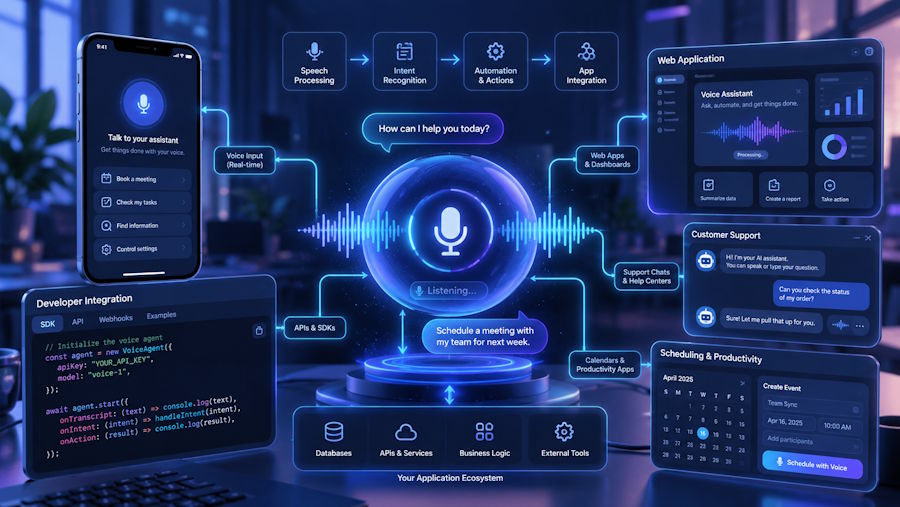
Voice is becoming more common in modern apps. People use voice to search, ask questions, book services, and get help.
For developers, adding voice is not only about making an app speak. The full system needs to understand the user, find the right data, and give a clear reply.
A good voice feature should feel fast and simple. It should not make the user wait or repeat the same thing many times.
To build this well, developers need to connect speech tools, AI models, APIs, and app data.
What Is an AI Voice Agent?
An AI voice agent is a system that can listen to a user and reply with speech.
It usually works with a few main parts:
- Speech-to-text
- AI model
- App logic
- APIs
- App data
- Text-to-speech
These parts work together during the conversation.
For developers who want to add voice features to a product, an ai voice agent for developers can help support real-time voice interactions inside modern apps.
Start With One Clear Use Case
It is better to start small.
Do not try to make the voice agent do everything at once.
Start with one or two simple tasks.
For example:
- Check an order
- Book an appointment
- Create a support ticket
- Find account details
- Answer common questions
This makes the system easier to build and test.
Capture the User's Voice
The first step is to collect audio.
In a web app, this may come from the browser microphone.
In a mobile app, it may come from the phone microphone.
In a call system, the audio may come from a phone line.
The audio then goes to a speech-to-text service.
Turn Speech Into Text
The speech-to-text tool changes the user's voice into written text.
This step needs to be accurate.
If the system hears the wrong words, the rest of the process may fail.
Developers should test different types of speech, such as:
- Different accents
- Fast speech
- Slow speech
- Background noise
- Short questions
- Long requests
A streaming system can also help. It can start processing the audio before the user finishes speaking.
Understand What the User Wants
After the speech becomes text, the AI model needs to understand the request.
For example, a user may say:
"Move my meeting to Friday afternoon."
The system needs to know that the user wants to change a booking.
It may also need more details.
If the system is not sure which meeting the user means, it should ask a simple question.
It should not guess.
Connect the Agent With App Data
A useful voice agent needs access to real data.
It may connect with:
- CRM tools
- Product databases
- Booking systems
- Order systems
- Support platforms
- Internal APIs
For example, if a user asks about an order, the agent should check the latest order status.
This makes the answer more useful and accurate.
Keep Voice Replies Short
Long voice replies can be hard to follow.
Short answers usually work better.
For example, instead of saying:
"Your order has been processed and is now in transit. Based on the latest update, it is expected to arrive on Friday."
The agent can say:
"Your order is on the way and should arrive on Friday."
The answer is easier to understand.
Let Users Interrupt
Real conversations are not always smooth.
A user may speak before the agent finishes.
The system should allow this.
It should stop speaking and listen to the new request.
This makes the conversation feel more natural.
Confirm Important Actions
Some actions should need a clear confirmation.
This is useful for:
- Canceling bookings
- Changing account details
- Making payment-related changes
- Deleting information
For example:
"Do you want me to cancel your Friday appointment?"
This simple step can help prevent mistakes.
Plan for Errors
Voice systems will not understand every request.
Problems can also happen with APIs or network connections.
Developers should prepare for this.
The system can:
- Ask the user to repeat
- Ask a simple follow-up question
- Offer another option
- Transfer the user to a human agent
A clear fallback is better than giving a wrong answer. For phone-based voice agents, teams can also use a programmable voice API to connect the agent to real calls and hand them off to a person when needed.
Protect User Data
Voice apps may handle private information.
Developers should keep this data safe.
Important steps include:
- Use secure login
- Encrypt sensitive data
- Limit access to recordings
- Control API permissions
- Store only needed data
The AI agent should only have access to the tools and data it needs.
Test the Full Voice Flow
Testing one part is not enough.
Developers should test the full journey.
This means testing from the moment the user speaks to the final voice reply.
Some useful metrics are:
| Metric | What It Shows |
|---|---|
| Response time | How fast the agent replies |
| Speech accuracy | How well it understands users |
| Task completion | How often users finish a task |
| Transfer rate | How often human help is needed |
| Error rate | How often something goes wrong |
Common Problems Developers May Face
Some problems are common in voice apps.
These include:
- Slow replies
- Wrong speech results
- Poor intent detection
- Lost conversation context
- API errors
- Unclear voice replies
The best way to handle these problems is to start with a simple system and improve it over time.
Best Practices
Keep the first version simple.
Use short voice replies.
Connect the agent to real app data.
Ask for confirmation before important actions.
Give users a way to reach a human.
Track errors and failed conversations.
Use real user feedback to improve the system.
Conclusion
Building an AI voice agent takes more than adding a voice feature.
Developers need to connect speech tools, AI, APIs, and app data.
The best voice agents are simple, fast, and useful.
They understand clear tasks, use real data, and know when to ask for help.
When built well, voice can make modern apps easier to use.

