

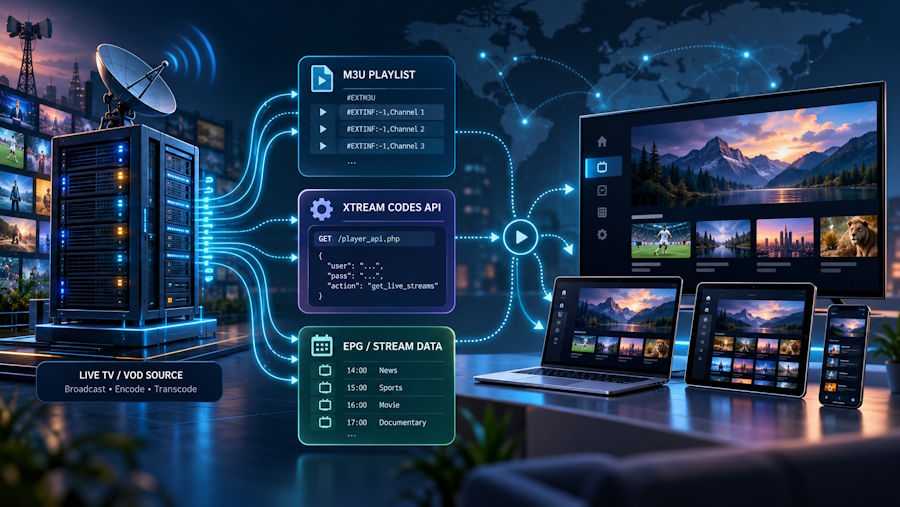
Internet Protocol Television (IPTV) has moved from a niche technology to a mainstream way of watching TV. For developers, it’s an interesting stack: plain-text playlists, a simple REST-style API, HTTP-based streaming protocols and cross-platform player apps that tie it all together. This article breaks down how the pieces fit, using one of the most popular players, IPTV Smarters Pro, as the reference.
The three layers of an IPTV setup
Every IPTV setup has three distinct layers:
- The content source: a server that delivers live channels and on-demand video as streams.
- The access layer: the method the client uses to discover what’s available: an M3U playlist, the Xtream Codes API, or a portal for set-top boxes.
- The player: the application that parses the access layer, renders a TV-style interface and plays the streams.
Keeping these layers separate matters. A player like IPTV Smarters Pro contains no content of its own: it’s a client that consumes whatever access details the user enters.
M3U playlists: the simplest format
M3U started as a plain-text playlist format for MP3 files. Its extended version (M3U8 / Extended M3U) became the de facto standard for listing IPTV streams. A typical entry looks like this:
#EXTM3U
#EXTINF:-1 tvg-id="channel.fr" tvg-name="Channel"
tvg-logo="https://example.com/logo.png" group-title="News",Channel HD http://example.com:8080/live/user/pass/1234.ts- #EXTINF holds metadata: duration (-1 for live), the EPG identifier (tvg-id), the logo and the category (group-title).
- The next line is the stream URL itself.
Players parse the file line by line, group entries by group-title and match tvg-id values against an XMLTV guide to display the electronic program guide (EPG). The format is simple, but large playlists (tens of thousands of entries) make parsing performance and memory use real concerns on low-end devices like streaming sticks.
Xtream Codes API: structured access
The Xtream Codes API takes a more structured approach. Instead of one huge file, the client authenticates with a server URL, username and password, then queries endpoints that return JSON:
GET /player_api.php?username=USER&password=PASS
GET /player_api.php?username=USER&password=PASS&action=get_live_categories
GET /player_api.php?username=USER&password=PASS&action=get_live_streams&category_id=5
GET /player_api.php?username=USER&password=PASS&action=get_vod_streams
This design has clear advantages over a flat playlist:
- Lazy loading: the player fetches categories first, then streams per category on demand.
- Account info: the first call returns subscription status, expiry date and maximum connections.
- Richer metadata: separate endpoints for live TV, VOD and series, with posters, plots and episode lists.
That’s why most modern players, IPTV Smarters Pro included, offer “Login with Xtream Codes API” as the default option and treat M3U as a fallback.
Streaming protocols: TS and HLS
Once a stream is selected, the player typically receives one of two formats:
- MPEG-TS (.ts): a continuous transport stream, simple and low-latency, common for live channels.
- HLS (.m3u8): HTTP Live Streaming splits video into short segments listed in a rolling playlist. It supports adaptive bitrate, so the player can switch between HD and 4K variants depending on available bandwidth.
On the client side, players rely on native media frameworks (ExoPlayer on Android, AVPlayer on iOS) or embedded engines like VLC/libVLC to decode and render the streams.
Why the player matters
Because the player is decoupled from the content, users can switch apps without changing anything else. What separates good players is engineering:
- fast playlist parsing and caching,
- reliable EPG matching,
- buffer management that survives network jitter,
- catch-up (timeshift) support,
- multi-profile and parental-control features.
IPTV Smarters Pro became popular because it handles all of this across Android, iOS, Fire TV, smart TVs and desktop. For French-speaking users, the Smarters Pro setup tutorials cover each platform step by step, including Xtream Codes and M3U configuration.
Performance tips from a network perspective
Most playback problems are network problems, not player bugs:
- Bandwidth: roughly 10 Mbps for HD and 25 Mbps for 4K.
- Wired beats wireless: Ethernet removes most packet loss and jitter. If Wi-Fi is the only option, use the 5 GHz band.
- Buffer size: on unstable connections, a larger buffer in the player settings trades a few seconds of latency for smoother playback.
- DNS and routing: a slow or misbehaving DNS resolver can delay stream startup. Switching resolvers sometimes fixes intermittent loading.
A note on legality
IPTV as a technology is perfectly legal: it’s how many telecom operators deliver TV today. Player apps are legal too, since they’re just media clients. What matters is the source: users should only access content they have the rights to view.
Conclusion
IPTV is a good example of simple, open building blocks (text playlists, a JSON API and standard HTTP streaming) combining into a flexible ecosystem. Understanding how M3U, Xtream Codes and the player interact makes troubleshooting much easier. More guides on configuring the player are available on iptv-smartersprofr.com.

