

Window functions in SQL calculate a value for each row from a set of related rows, such as the other orders of the same customer, without collapsing them into one row. They answer questions GROUP BY cannot: the top three orders per customer, the change from last month, a running total, or each row's share of its group.
|
Key takeaways
|
Contents
1.1 What is a window function in SQL?
1.2 How is a window function different from GROUP BY?
1.3 The sample table used in this guide
1.4 How does the OVER clause work?
1.5 Where do window functions run in a query?
1.6 How do you filter on a window function?
Part 2. The functions you will use most
2.1 Which window functions do analysts use most?
2.2 Top N per group with ROW_NUMBER
2.3 ROW_NUMBER, RANK and DENSE_RANK on ties
2.4 Month-over-month change with LAG
Part 3. Frames: ROWS, RANGE and GROUPS
3.2 The default frame trap: running totals
3.3 The same default breaks LAST_VALUE
Part 4. Performance and common mistakes
4.1 Are window functions faster than the old way?
4.2 What mistakes do people make with window functions?
Part 1. The fundamentals
1.1 What is a window function in SQL?
It is a function that looks at a "window" of rows related to the current row and returns a value for every row. The PostgreSQL documentation puts it this way: a window function performs a calculation across a set of table rows that are somehow related to the current row, but unlike an ordinary aggregate, the rows "retain their separate identities".
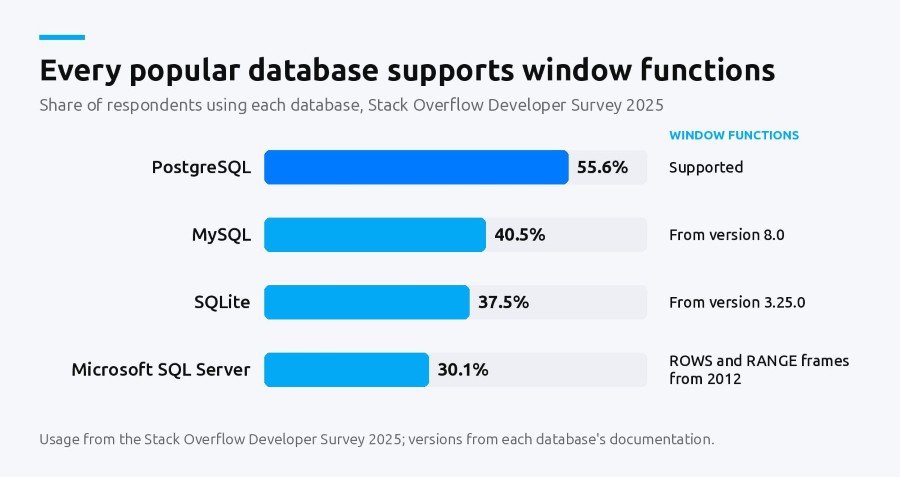
Window functions are widely supported. PostgreSQL has them, MySQL added them in version 8.0, and SQLite added them in version 3.25.0, released on 15 September 2018. SQL Server supports the OVER clause, with ROWS and RANGE frames from SQL Server 2012. These four were among the most used databases in the Stack Overflow Developer Survey 2025.
1.2 How is a window function different from GROUP BY?
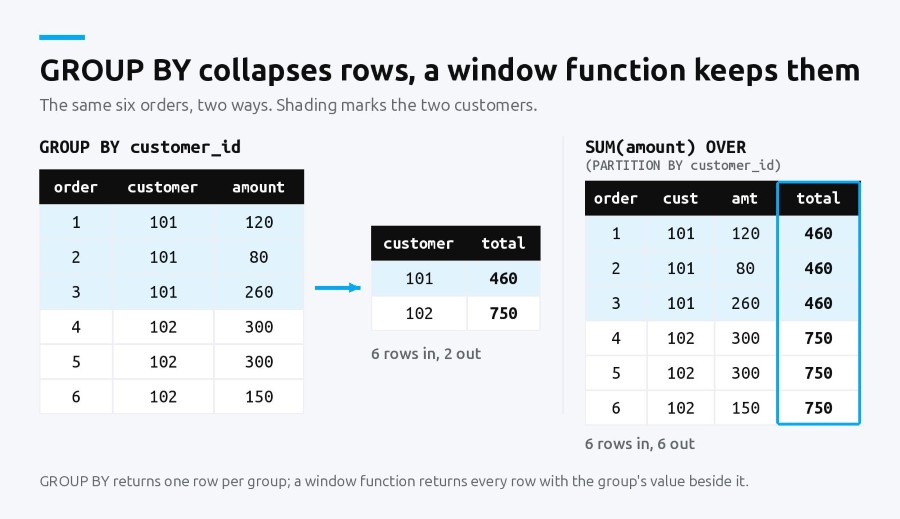
GROUP BY answers "one number per group". A window function answers "one number per row, in the context of its group". GROUP BY returns one row per group and lets you select only grouped or aggregated columns; a window function returns every input row and any column beside the result. You filter a GROUP BY result with HAVING, and a window result with an outer query or QUALIFY. Often you need both, and since window functions run after aggregation, one query can do both.
1.3 The sample table used in this guide
Every example uses one table, orders. Six rows are enough to check each result by hand:
CREATE TABLE orders (
  order_id    INTEGER PRIMARY KEY,
  customer_id INTEGER,
  order_date  DATE,
  amount      NUMERIC(10, 2)
);

INSERT INTO orders VALUES
  (1, 101, '2026-01-05', 120),
  (2, 101, '2026-01-05',  80),
  (3, 101, '2026-02-11', 260),
  (4, 102, '2026-01-20', 300),
  (5, 102, '2026-02-02', 300),
  (6, 102, '2026-03-15', 150);
Customer 101 placed two orders on the same day, and customer 102 has two orders of the same amount. Those ties are deliberate: they are where window functions surprise people.
1.4 How does the OVER clause work?
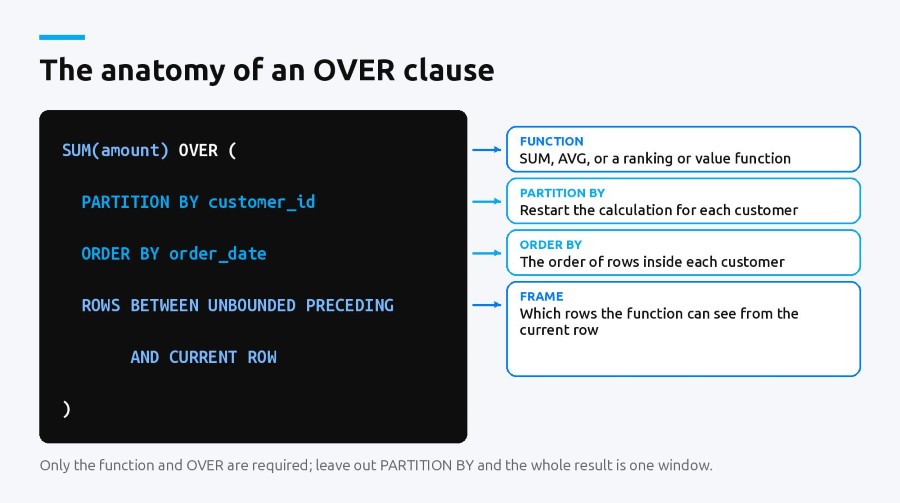
Every window function is followed by OVER, which describes the window. It has three parts, all optional:
- PARTITION BY splits the rows into groups. The function restarts for each group.
- ORDER BY sets the order of rows inside each group, which matters for ranking, running totals and looking at the previous row.
- The frame picks which rows of the partition the function sees, such as "from the start up to this row".
Example:
SELECT
  order_id,
  customer_id,
  amount,
  SUM(amount) OVER (PARTITION BY customer_id) AS customer_total
FROM orders;
Every order keeps its own row, and each row also shows its customer's total: 460 for customer 101 and 750 for customer 102. With GROUP BY you would get two rows and lose the orders.
1.5 Where do window functions run in a query?
Late. The PostgreSQL documentation says window functions are permitted only in the SELECT list and the ORDER BY clause, and they are evaluated after WHERE, GROUP BY and HAVING have done their work. BigQuery's documentation gives the same order: FROM, WHERE, GROUP BY and aggregation, HAVING, then window functions, then QUALIFY, then DISTINCT, ORDER BY and LIMIT. Two practical consequences follow:
- You can window over an aggregate, for example ranking customers by SUM(amount) in one query.
- You cannot filter on a window function in the same query's WHERE, because WHERE has already run.
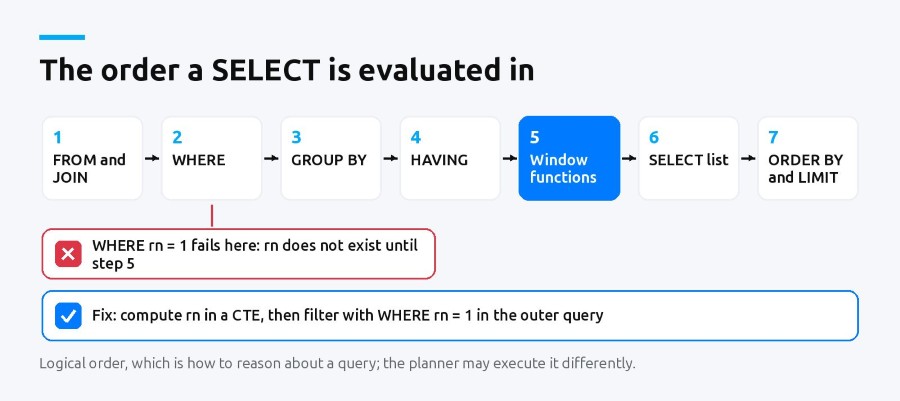
That is the single most common window function error, and it is worth practising until it is automatic. If you are learning SQL for analysis and want someone checking your queries as you go, a data analytics program with live classes covers SQL alongside the reporting tools analysts use with it.
1.6 How do you filter on a window function?
Wrap the query and filter outside it, as in the top-N example in section 2.2. That works in every database. BigQuery also has a QUALIFY clause, which its documentation says "filters the results of window functions", so the same query needs no CTE:
-- BigQuery
SELECT order_id, customer_id, amount
FROM orders
QUALIFY ROW_NUMBER() OVER (
  PARTITION BY customer_id
  ORDER BY order_date DESC, order_id DESC
) = 1;
Use QUALIFY where your database documents it, and the CTE everywhere else.
Part 2. The functions you will use most
2.1 Which window functions do analysts use most?
A short list covers most real work. PostgreSQL's built-in set is row_number, rank, dense_rank, percent_rank, cume_dist, ntile, lag, lead, first_value, last_value and nth_value, and any ordinary aggregate such as SUM or AVG also works with OVER.
| Function | What it returns | A question it answers |
|---|---|---|
| ROW_NUMBER() | 1, 2, 3 in order, no ties | What is each customer's latest order? |
| RANK() | Rank with gaps after ties | Who are the top sellers, ties shared? |
| DENSE_RANK() | Rank with no gaps after ties | What are the top three distinct amounts? |
| LAG() / LEAD() | The value from the previous or next row | How much did this month change from last month? |
| SUM() OVER | A total over the window | What is the running total to date? |
| NTILE(n) | The bucket number from 1 to n | Which quarter of customers by spend is each in? |
2.2 Top N per group with ROW_NUMBER
The classic use is picking the top rows for each group. Number the rows inside each customer by amount, then keep the first three.
WITH ranked AS (
  SELECT
    order_id,
    customer_id,
    amount,
    ROW_NUMBER() OVER (
      PARTITION BY customer_id
      ORDER BY amount DESC, order_id   -- order_id breaks ties
    ) AS rn
  FROM orders
)
SELECT order_id, customer_id, amount
FROM ranked
WHERE rn <= 3;
The CTE is there because WHERE runs before window functions. The order_id tie-breaker matters too: orders 4 and 5 both have 300, and without it the database may number them either way from one run to the next.
2.3 ROW_NUMBER, RANK and DENSE_RANK on ties
All three number rows in order. They differ only when values tie. Sorted by amount, our six orders are 300, 300, 260, 150, 120 and 80:
SELECT
  order_id,
  amount,
  ROW_NUMBER() OVER (ORDER BY amount DESC, order_id) AS row_num,
  RANK()       OVER (ORDER BY amount DESC)           AS rnk,
  DENSE_RANK() OVER (ORDER BY amount DESC)           AS dense_rnk
FROM orders;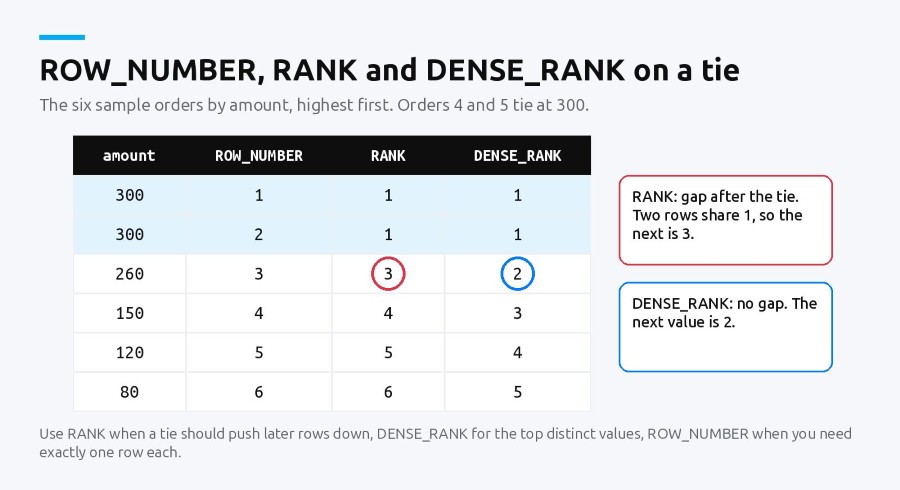
2.4 Month-over-month change with LAG
LAG returns a value from an earlier row in the window, which makes period-over-period comparisons a single query. Aggregate first, then compare:
WITH monthly AS (
  SELECT
    DATE_TRUNC('month', order_date) AS month,  -- PostgreSQL
    SUM(amount) AS revenue
  FROM orders
  GROUP BY 1
)
SELECT
  month,
  revenue,
  revenue - LAG(revenue) OVER (ORDER BY month) AS change
FROM monthly;
DATE_TRUNC is PostgreSQL. In MySQL use DATE_FORMAT(order_date, '%Y-%m'), and in SQLite strftime('%Y-%m', order_date). The rest of the query is the same in all three.
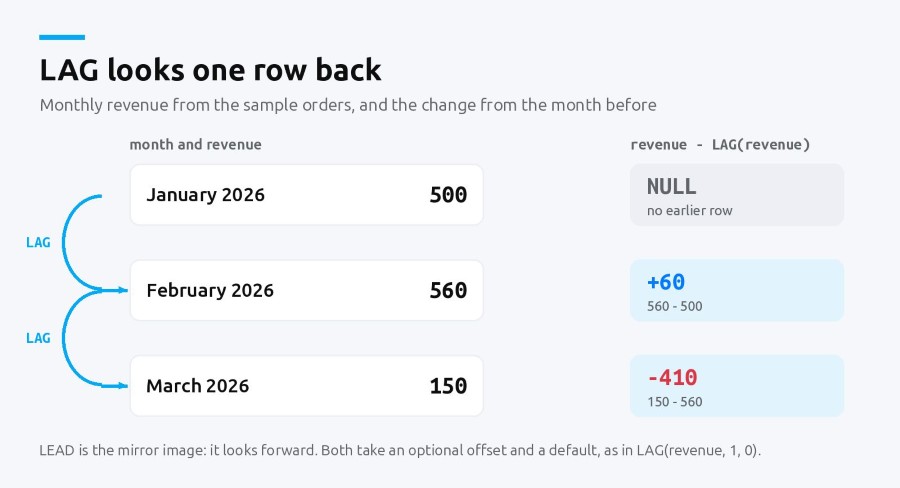
January has no previous row, so its change is NULL. LEAD does the same in the other direction.
2.5 Share of a group's total
Dividing a row by a windowed total gives each row's share of its group, with no join:
SELECT
  order_id,
  customer_id,
  amount,
  ROUND(
    100.0 * amount / SUM(amount) OVER (PARTITION BY customer_id), 1
  ) AS pct_of_customer
FROM orders;
Order 3 comes out at 56.5% of customer 101's 460.
Part 3. Frames: ROWS, RANGE and GROUPS
3.1 How do frames work?
The frame decides which rows of the partition a function like SUM, AVG or LAST_VALUE sees. PostgreSQL accepts three frame modes, ROWS, RANGE and GROUPS, and an optional EXCLUDE clause (CURRENT ROW, GROUP, TIES or NO OTHERS). SQLite has had all three modes and EXCLUDE since version 3.28.0.
- ROWS counts physical rows: "the two rows before this one".
- RANGE works on values of the ORDER BY column, so rows with equal values move together.
- GROUPS counts groups of equal values, called peers.
3.2 The default frame trap: running totals
The trap is the default. When OVER has an ORDER BY and no frame, PostgreSQL's documentation describes the frame as running from the start of the partition up through the current row, "plus any following rows that are equal to the current row according to the ORDER BY clause". That is a RANGE frame, and ties make it jump.
SELECT
  order_id,
  order_date,
  amount,
  SUM(amount) OVER (ORDER BY order_date) AS default_frame,
  SUM(amount) OVER (
    ORDER BY order_date, order_id
    ROWS BETWEEN UNBOUNDED PRECEDING AND CURRENT ROW
  ) AS rows_frame
FROM orders
WHERE customer_id = 101;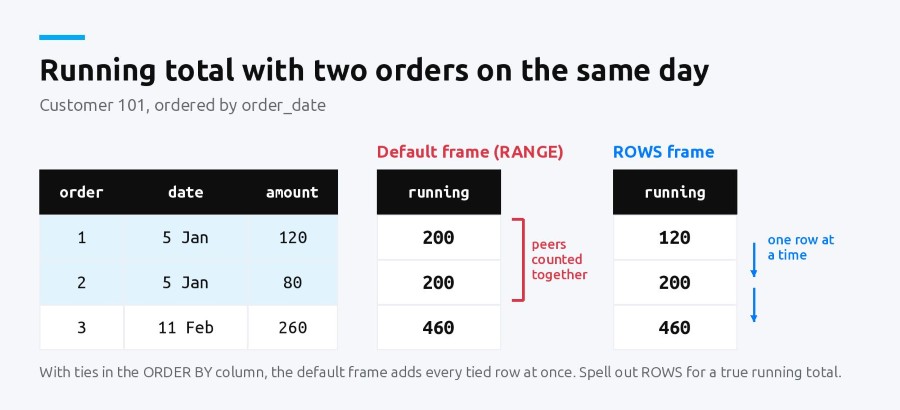
3.3 The same default breaks LAST_VALUE
Because the frame ends at the current row, or its last tie, LAST_VALUE returns that row's value rather than the partition's last. The PostgreSQL documentation calls this "likely to give unhelpful results for last_value". Give it the whole partition:
LAST_VALUE(amount) OVER (
  PARTITION BY customer_id
  ORDER BY order_date, order_id
  ROWS BETWEEN UNBOUNDED PRECEDING AND UNBOUNDED FOLLOWING
) AS last_amount
3.4 Moving averages
Frames also give you moving averages. On the monthly CTE from the LAG example, this averages each month with the two before it (three rows, so three months when no month is missing):
AVG(revenue) OVER (
  ORDER BY month
  ROWS BETWEEN 2 PRECEDING AND CURRENT ROW
) AS moving_avg_3m
Part 4. Performance and common mistakes
4.1 Are window functions faster than the old way?
Before window functions, these queries were written with correlated subqueries: for each row, run another query over the same table. We timed four common patterns both ways on SQLite 3.45.1, with 200,000 orders across 5,000 customers and an index on (customer_id, order_date, order_id). Each figure is the median of five runs, and each pair returned exactly the same rows, checked with EXCEPT in both directions.
| Query | Window function | Older form | Older form, time | Faster by |
|---|---|---|---|---|
| Running total per customer | 318.5 ms | Correlated SUM subquery | 3,570.9 ms | 11x |
| Top 3 orders per customer | 262.2 ms | Correlated COUNT subquery | 6,037.1 ms | 23x |
| Latest order per customer | 124.5 ms | NOT EXISTS | 187.3 ms | 1.5x |
| Change from previous month | 394.9 ms | Correlated subquery on the monthly totals | 1,013.1 ms | 2.6x |
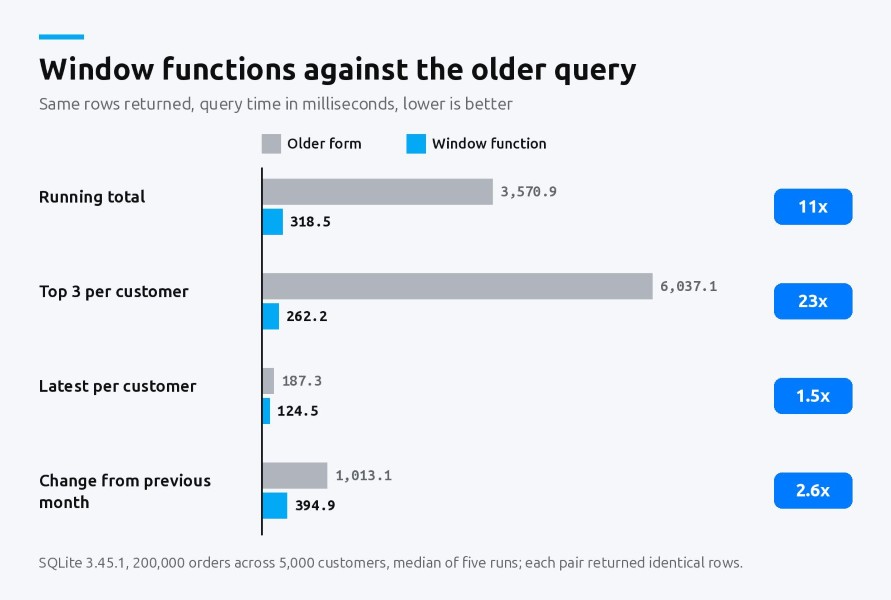
The gap is widest where the old form reads many rows again for every row, as in a running total or a top-N. It is narrow for "latest order", because an indexed NOT EXISTS is already cheap. This is one engine on one machine with synthetic data, so the exact ratios will differ on PostgreSQL, MySQL or SQL Server. Check your own case with EXPLAIN before and after.
4.2 What mistakes do people make with window functions?
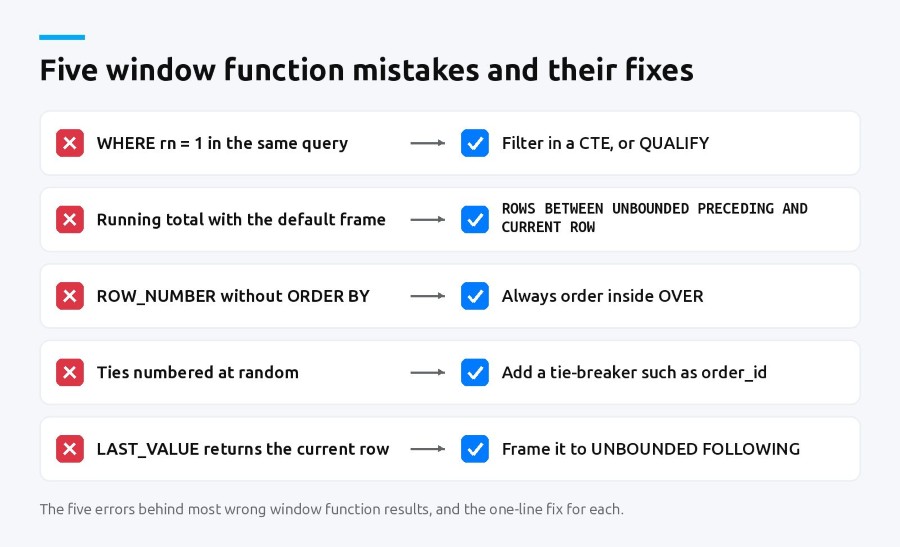
- Filtering in the same query. WHERE rn = 1 beside the ROW_NUMBER that creates rn fails. Use a CTE, or QUALIFY where it exists.
- Relying on the default frame. Running totals with tied ORDER BY values jump. Spell out ROWS.
- Forgetting ORDER BY inside OVER. ROW_NUMBER without it numbers rows in no guaranteed order.
- Ties in ROW_NUMBER. Which tied row gets 1 is arbitrary. Add a tie-breaker column.
- LAST_VALUE with the default frame. It returns the current row. Extend the frame to UNBOUNDED FOLLOWING.
Frequently asked questions
Why are window functions used in SQL?
They calculate across related rows while keeping every row in the result. That makes ranking, top-N per group, running totals, moving averages and period-over-period changes possible in one query, without self-joins or several aggregate queries stitched together. In our benchmark they were also faster than the correlated subqueries they replace.
What's the difference between RANK and DENSE_RANK?
Both give tied rows the same rank, but they differ after a tie. If two rows tie for first, RANK gives the next row 3, leaving a gap, while DENSE_RANK gives it 2. Use RANK when ties should push later rows down, and DENSE_RANK when you want consecutive values, such as the top three distinct amounts.
What are window functions in SQLite?
SQLite supports ROW_NUMBER, RANK, LAG, SUM OVER and the rest with the same OVER, PARTITION BY and ORDER BY syntax as other databases. Support arrived in version 3.25.0 in September 2018, and GROUPS frames and EXCLUDE in 3.28.0. The SQLite developers used PostgreSQL's window function documentation as their main reference, so queries usually carry across.
What are CTE and window functions?
A CTE, or common table expression, is a named subquery written with WITH that the rest of a query can use like a table. Window functions calculate across related rows with OVER. They work well together, because a window function cannot be filtered at the query level that creates it: compute it in a CTE, then filter the CTE.
How do you calculate a running total in SQL?
Use SUM with OVER and an ORDER BY, for example SUM(amount) OVER (PARTITION BY customer_id ORDER BY order_date, order_id ROWS BETWEEN UNBOUNDED PRECEDING AND CURRENT ROW). The ROWS clause makes the total grow one row at a time. Without it, rows with the same order date are added together in one jump.
What are the 5 types of SQL?
SQL commands are usually grouped into five types: data query language (SELECT), data manipulation language (INSERT, UPDATE, DELETE), data definition language (CREATE, ALTER, DROP), data control language (GRANT, REVOKE) and transaction control language (COMMIT, ROLLBACK). Window functions belong to queries, inside SELECT.
Does MySQL support window functions?
Yes, from MySQL 8.0. Its reference manual documents ROW_NUMBER, RANK, DENSE_RANK, LAG, LEAD and NTILE, with the OVER and named WINDOW clauses. If a local setup rejects OVER, check the server version, because the examples in this guide need 8.0 or later.
Conclusion
Window functions turn questions that used to need self-joins into one readable query, and in our test they also ran faster. Learn ROW_NUMBER, RANK, LAG and SUM OVER first, always order inside OVER, add a tie-breaker, and spell out the frame for running totals and LAST_VALUE.
To keep building from here with exercises and feedback, start with the best SQL certification course online for beginners and work up to analytical queries like these.

