

MoreLogin Cloud Phone for Android App Testing: A Remote QA Workflow
A mobile bug that appears on one device but disappears on another can consume hours of a QA team’s time. The tester may be using a different Android environment, app version, network location, stored session, or permission state from the customer who reported the issue. If the original setup cannot be reproduced, the team is left guessing.
MoreLogin Cloud Phone gives product, QA, and support teams remote Android environments that can persist between sessions. Testers can install apps, upload files, configure proxies, access devices remotely, and use ADB or APIs for approved technical workflows. Instead of rebuilding a phone for every test cycle, the team can preserve an environment long enough to reproduce, document, and verify a defect.
This is not a replacement for every physical-device test. It is a practical middle layer between local emulators and a hardware lab, especially when teams need repeatable Android app checks across locations and work shifts.
Start With a Reproducible Test Case
A useful test case describes more than the button that failed. It records the environment that produced the result.
Before opening a Cloud Phone, capture:
- Application package and build version
- Android environment or device model
- Account or test-user role
- Proxy region and network condition
- Language, timezone, and app locale
- Permission state
- Relevant files or media
- Expected result and actual result
This information becomes the device brief. The QA lead can create or select a Cloud Phone that matches the brief, install the required build, and assign it to the tester. When the defect moves to engineering, the same remote environment can remain available instead of being recreated from memory.
The Remote Android QA Cycle
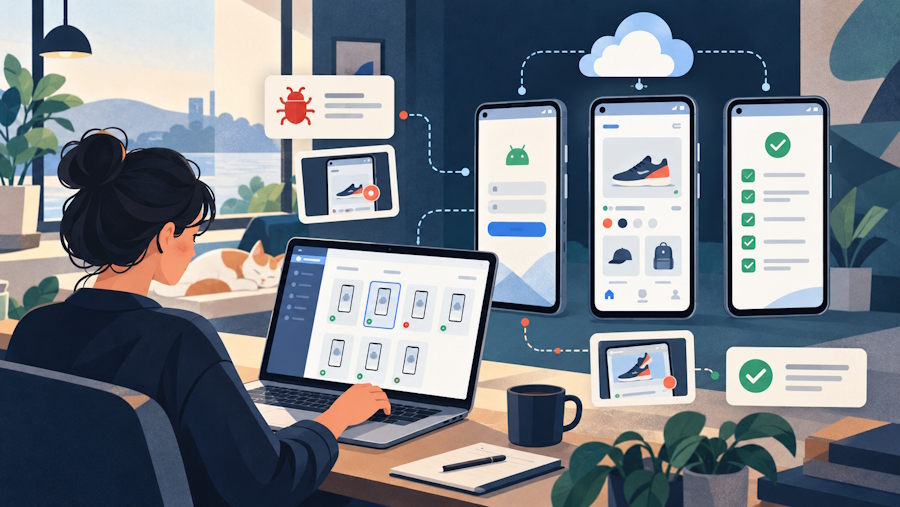
A Cloud Phone for Android app testing is most effective when every build follows a defined cycle. The steps below focus on reproducibility rather than on running the largest possible number of devices.
Checkpoint 1: Prepare the Build
Upload the approved APK or add the application to the team’s app library. Label the build clearly so testers do not confuse a release candidate with an older package.
MoreLogin supports application installation and lifecycle actions such as launch, restart, stop, and uninstall. Its app library can also hold versions used across Cloud Phones. The team should still maintain its normal build repository and release notes; the Cloud Phone is the execution environment, not the source of truth for software delivery.
Checkpoint 2: Select the Environment
Choose the Android environment required by the test plan. Create separate Cloud Phones when the test needs isolated app data, independent login sessions, or different regional settings.
Do not reset a useful defect environment too early. A preserved Cloud Phone can help an engineer inspect the same application state, repeat the steps, and compare a fixed build with the failing one.
Checkpoint 3: Configure the Network Context
Some mobile-app behavior changes by country, IP address, latency, content delivery route, or account region. Bind an appropriate proxy when regional testing is authorized and relevant to the product.
Record the proxy configuration with the test case. If the team changes the IP halfway through reproduction, the result may no longer describe the original condition. Stable network context is more useful than random rotation for debugging.
Checkpoint 4: Run Exploratory Testing
Manual testing remains important for navigation, visual behavior, gestures, permission prompts, media selection, and unexpected state changes. Testers should note the exact screen and device state before an issue appears.
Screenshots, recordings, logs, and uploaded test files should use the same defect identifier. A clear evidence package makes it easier for engineering to distinguish an application defect from a test-data or network problem.
Checkpoint 5: Collect Technical Evidence
ADB access can support log collection, package inspection, shell commands, and other approved debugging tasks. MoreLogin provides remote ADB connectivity for compatible Cloud Phone workflows, and its APIs can manage devices, apps, files, proxies, schedules, and other resources programmatically.
Technical access should be controlled. Enable ADB only when required, restrict credentials, and disable or rotate access after the task. Production customer accounts and sensitive data should not be copied into a general testing environment.
Checkpoint 6: Verify the Fix
Install the corrected build in the preserved failing environment or in a clean copy that matches its documented configuration. Run the original reproduction steps first. Then test nearby workflows to check for regression.
The result should state whether the issue is fixed, partially fixed, not reproducible, or blocked by another condition. Do not mark a defect complete only because the application opened successfully.
What to Test on a Cloud Phone
Cloud Phones are particularly useful for workflows that depend on a persistent Android system rather than on a single isolated function.
Installation and Upgrade Paths
Test fresh installation, update from an earlier version, uninstall and reinstall, first launch, and behavior after restart. Confirm whether local data should persist or reset at each stage.
Login and Session Handling
Check first login, returning sessions, logout, password reset, two-factor prompts, token expiry, and account switching where the product officially supports it. Use dedicated test accounts and avoid real customer credentials.
Permissions and File Access
Test camera, microphone, storage, notification, and media-selection prompts relevant to the app. Verify how the app behaves when permission is granted, denied, or changed later.
Regional and Language Behavior
Check translated strings, date and number formats, regional content, timezone-sensitive events, and app behavior through approved proxy locations. A localized interface can still fail if backend responses or time calculations assume one region.
Uploads and Media Workflows
Use controlled images, videos, and documents to test uploads, previews, compression, format validation, progress indicators, and retry behavior. File management through the Cloud Phone environment can make the same assets available to different testers.
Background and Recovery Behavior
Restart the app or device, interrupt a workflow, and check whether drafts, queues, or sessions recover as designed. Cloud environments are convenient for repeating these state-based tests because the device can remain dedicated to the case.
A Handoff Model for Distributed QA Teams
Remote testing often fails at the handoff, not at execution. One tester reports a defect, another cannot recreate it, and engineering receives only a screenshot.
Use a three-part handoff:
- The written test case explains the build, configuration, actions, and result.
- The evidence package contains logs, screenshots, recordings, and test files.
- The Cloud Phone preserves the relevant Android state when retaining it is safe and necessary.
MoreLogin can organize Cloud Phones with groups, tags, and profile names, helping teams separate active release tests, defect reproductions, regional checks, and archived environments. Permissions should limit devices to the people working on the related project.
When Automation Helps
Automation is useful after the team knows what a correct manual run looks like.
The MoreLogin API can create and control Cloud Phones, manage apps and files, configure proxies, query resources, and work with schedules. ADB can support technical inspection, while RPA is better suited to repeatable interface actions.
Good automation candidates include:
- Installing an approved build on a test group
- Launching or stopping a known application
- Uploading a standard test-data package
- Running a repeatable smoke-test preparation sequence
- Collecting device status before a test window
- Cleaning up temporary test environments
Keep exploratory testing, visual judgment, ambiguous error handling, and sensitive approval steps under human review. Automation should reduce setup work without hiding failures.
Where a Physical Device Is Still Necessary
A Cloud Phone does not eliminate the physical-device lab. Teams still need real local hardware when results depend on a specific camera sensor, Bluetooth accessory, NFC interaction, cellular modem behavior, battery consumption, thermal throttling, manufacturer firmware, or precise performance measurements.
The right strategy is layered. Use Cloud Phones for remote access, repeatable app environments, regional network checks, distributed collaboration, and scalable setup. Use physical devices for hardware-dependent validation and final coverage where the product requires it.
A Release Gate for Cloud Phone Testing
Before approving a mobile build, confirm that:
- The tested APK or app version matches the release candidate
- Required Android environments completed the planned checks
- Proxy, timezone, language, and account region were documented
- Login, permissions, uploads, restart, and recovery paths were covered
- Critical defects include reproducible steps and evidence
- Fixed issues were retested in the relevant environment
- ADB and temporary credentials were secured after use
- Cloud Phones no longer needed were archived or retired
- Hardware-specific cases were assigned to physical devices
This gate keeps remote testing tied to release quality instead of turning the Cloud Phone pool into a collection of undocumented devices.
Build a QA System, Not Just More Devices
A Cloud Phone for Android app testing creates value when it preserves the conditions around a result. The application build, Android environment, network route, files, permissions, account state, and evidence should remain connected to one test case.
MoreLogin brings device control, app installation, file handling, proxies, remote access, groups, tags, API operations, schedules, and ADB into one workspace. Teams can use that infrastructure to shorten setup time and improve defect handoffs while keeping hardware-dependent tests on physical devices.
Create a free MoreLogin account to build a small Android QA pool and test the workflow with your own applications and authorized test accounts.

