

A shopper adds a headlamp and two pairs of hiking socks to a cart at an outdoor gear store, then heads for checkout. Your extension now has a few seconds on a page it didn't build, and the $62 total on that page can change while it works.
For an AI shopping assistant, picking a code here is a small decision problem with constraints, and most of the engineering goes into those constraints. This one order runs into several of them.
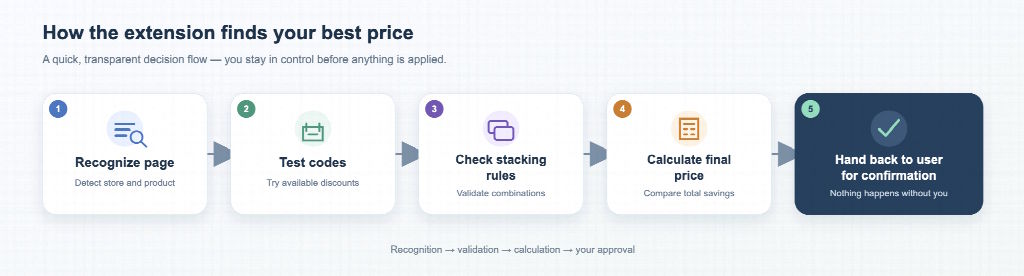
Step 1: Recognize the Cart or Checkout Page
Start with the URL. Paths containing /cart or /checkout are the cheapest signal, but they miss stores like this one, where the cart is a drawer inside a single-page app and the address bar never changes.
The DOM tells you more. A promo code field, an order summary with a subtotal line and a "Place order" button showing up together are stronger evidence than any one alone. Stores on the same e-commerce platform also tend to share class names and script URLs that a content script can match. The JavaScript section here covers most of the DOM techniques involved.
The outdoor store's drawer re-renders whenever the shopper changes a quantity, and its code field only appears after a click on "Have a promo code?". A MutationObserver lets you react to those changes instead of polling. Debounce it, though, because one visible update can fire a burst of mutations.
Treat the result as a confidence score. A code field plus a parsed subtotal plus a platform match scores high. A URL match alone scores low, and the extension stays quiet. Popping up on pages that aren't checkouts is a quick way to get uninstalled.
Step 2: Test Codes Without Breaking the Cart
Say your extension has four candidate codes for this store. The loop for each one is short: enter it, wait for the total to settle, read the new number, remove it and record what happened.
Waiting for the total to settle is the fiddly part. Some stores update the summary inline, while others reload the page or re-render the whole cart behind a spinner. Don't read anything until you get a clear signal, whether that's a changed total, an error message or a timeout.
Two of the four work: a 25% welcome code and a $10 code. The free-shipping code has expired, so mark it and skip it at this store next time. The 15% code needs a $75 minimum, which could change if the shopper adds something.
Keep a separate label for codes rejected because another one is already applied, since Step 3 uses those. Merchants write their own error messages, so sorting them takes pattern matching and an "unknown" bucket.
Pace the attempts. A rapid burst looks like abuse to fraud checks and can lock shoppers out of their own checkout. Test one code at a time, stop when the site starts rejecting or slowing requests, and cache results per merchant with an expiry.
Log each attempt as an event too, with the code, cart state before, total after and outcome. It's the same reasoning behind designing an order event trail for chargeback evidence: when a result looks wrong a week later, you can replay what happened.
Step 3: Work Out the Stacking Rules
Two working codes may still add up to one discount. Many stores allow a single code per order, and some codes are marked non-combinable even where stacking is allowed. Stores rarely publish these rules, which is what makes this step hard: the extension usually has to piece them together from the "cannot be combined" errors it logged in Step 2.
Codes are also just one layer: a code changes the price, and a gift card, like the $20 balance this shopper has, changes how that price is paid. Cashback and card rewards arrive after the purchase. Some cashback platforms state in their terms that orders using codes they didn't publish may not qualify, so applying the best code can cost the shopper a larger rebate.
Model it as a constrained combination problem: list the valid combinations, price each one and compare. In pseudocode:
best = none
for combo in combinations(workingCodes, upTo = storeStackLimit):
    if anyPairExclusive(combo): skip
    plan = priceCheckout(cart, combo)         # subtotal, shipping, tax
    plan.cashback = cashbackFor(plan, combo)  # zero if terms exclude these codes
    plan.rewards  = cardRewardsFor(plan.total)
    plan.effective = plan.total - plan.cashback - plan.rewards
    if best is none or plan.effective < best.effective:
        best = plan
# gift cards change how the total is paid, not what it is
return best
With two or three working codes, brute force is fine. Most of the effort goes into the inputs: stack limits, exclusivity flags and cashback terms. For examples of how promo codes, cashback and gift cards stack on real purchases, see Saparo’s shopping guides. Reading a few real cases is a quick way to find the edge cases your rules don't cover yet.
Step 4: Compare Complete Checkout Plans
Tax and shipping usually aren't known until the shopper enters an address, so the cart drawer only shows part of the price. On this order, that gap decides the result.
The store ships free over $50 and charges $7.99 otherwise. The 25% code drops the $62 subtotal to $46.50, under the threshold, so the order comes to $54.49 before tax. The $10 code drops it to $52 with free shipping, for a $52 total. The smaller discount wins by $2.49, and the slightly lower tax on $46.50 doesn't change that.
So compare whole checkout plans: the codes, the resulting subtotal, shipping, estimated tax, the payment method and any cashback still in play. Until tax and shipping are known, label the plan an estimate and rerun the comparison after the address step. Ranking codes by face value is easier to build and display, and it gets orders like this one wrong.
Step 5: Know When an AI Shopping Assistant Should Step Back
At payment, the shopper's bank asks for a 3-D Secure confirmation. CAPTCHAs, logins and payment confirmation work the same way: the site or the bank wants to know that a real person agrees to what's happening. Your extension shouldn't answer for them.
Automate up to the point where consent is needed, then stop and show your work. For this order, that means showing the $10 code, the $52 subtotal with free shipping, the tax still to come, and whether cashback still applies. If the page changes after the hand-off, like a re-priced item or a code dropped during payment, tell the shopper before changing anything.
Afterwards, the shopper checks one thing: whether the charge on their card matches the number your extension showed at checkout. A good shopping extension gets that final number right, however many codes it tried along the way.

