

How to Connect Project Delivery, Time Tracking, and Profitability
A project can finish on schedule and still miss its profit target. The team delivers the agreed work, milestones are completed, and the client is satisfied. Yet the final costs are higher than expected, employees have worked additional hours, and some billable work has not reached invoicing.
The problem may not be poor execution. It may be that project delivery and financial control operate in separate systems.
When task management, resource planning, time tracking, and billing are disconnected, managers can see what has been completed without understanding its financial consequences. Effective project management software connects these activities so that operational decisions reflect the realities of delivery and profitability.
Airtool Project Management approaches project management as part of the wider enterprise application environment, connecting projects, resources, time, budgets, and ERP financial processes.
Why Project Progress Does Not Always Equal Business Performance
A conventional status report might show that most tasks are complete and the project remains on schedule. However, it may not reveal whether employees have exceeded their estimates, whether specialist resources are overloaded, or whether completed work is awaiting timesheet approval.
| What managers see | What they also need to know |
|---|---|
| Tasks completed | Actual effort compared with estimates |
| Employees assigned | Workload, capacity, and competing commitments |
| Milestones achieved | Dependencies and downstream delivery risks |
| Budget consumed | Actual costs, expected costs, and remaining margin |
| Work delivered | Billable hours approved and ready for invoicing |
| Project status | Reasons for delays, overruns, and financial variances |
These are connected questions. A task overrun can consume a scarce resource, delay another activity, increase project costs, and postpone billing. Managing each issue independently makes the overall impact harder to identify.
Project Planning Needs Dependencies and Governance
Project planning involves more than assigning deadlines. Teams need to define deliverables, responsibilities, milestones, dependencies, and approval requirements. When one activity slips, managers need to understand which downstream tasks may be affected.
Kanban-style workflows help teams track work through execution stages, while structured task lists make it easier to review priorities, responsibilities, and deadlines. Timeline and calendar views support scheduling, while dependencies help identify the sequence in which work must occur.
The appropriate views depend on the capabilities available in the project management system. More importantly, teams need a consistent project model behind those views so that changing how work is displayed does not fragment the underlying records.
Enterprise projects also require governance. The published Airtool PM offering describes configurable lifecycle phases including initiation, planning, execution, and close, with gate criteria and sign-off records. Organizations can adapt their project lifecycle without treating every change as a separate engineering exercise.
For programmes spanning legal entities or currencies, multi-entity and multi-currency support is equally important. Intercompany allocation rules and appropriate ledger posting help preserve financial consistency across organizational boundaries.
Project Management with Governance means that teams can adapt their workflows while retaining control over approvals, responsibilities, and changes.
Task Management and Collaboration Must Share Context
A task is more useful when its status, owner, supporting documents, decisions, and activity history remain connected. Otherwise, employees spend time searching conversations or reconstructing why work was delayed.
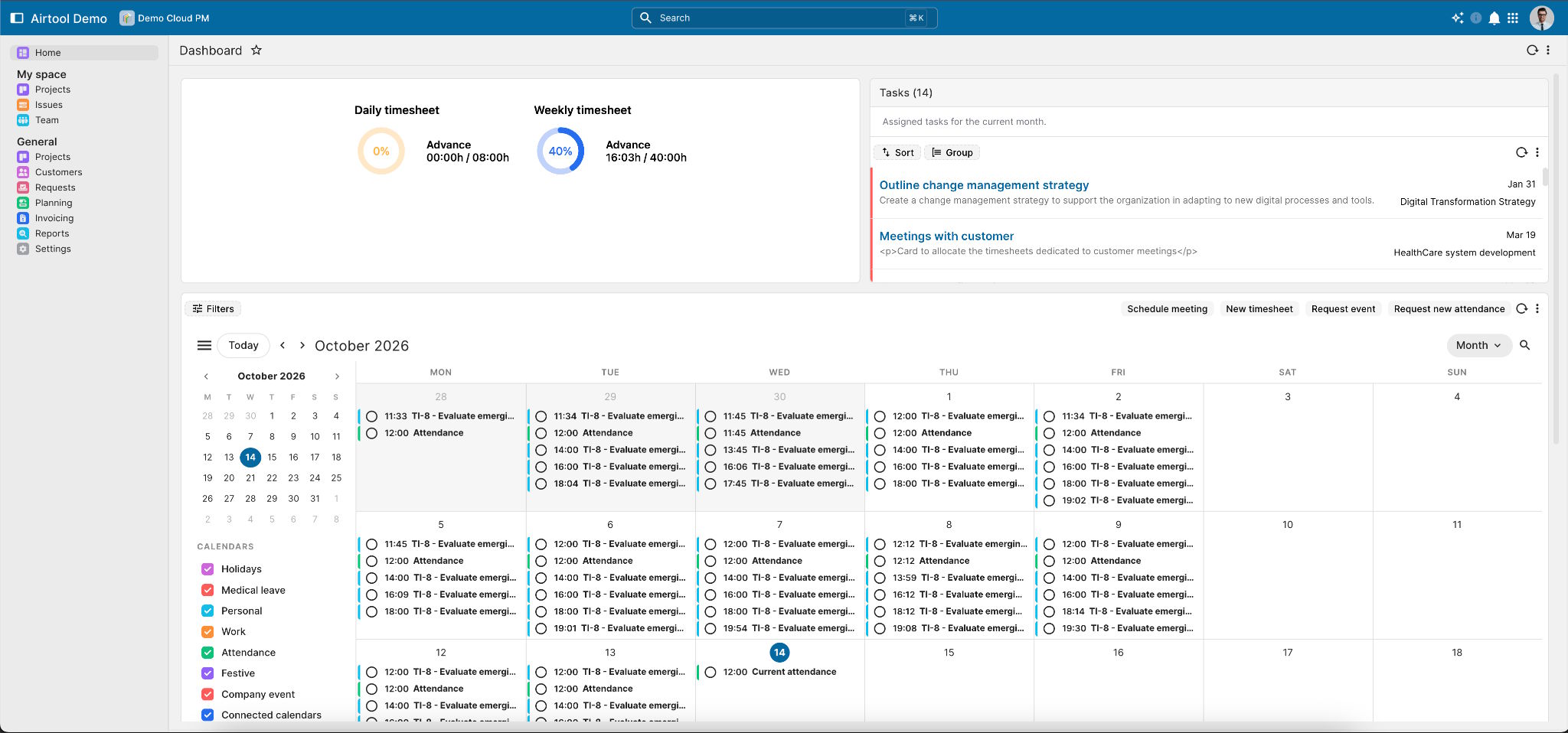
Useful project management features include threaded comments, mentions, document attachments with version history, activity feeds, notifications, and reminders. These capabilities help teams maintain context when work moves between contributors or requires review.
Workflow configuration also matters. Different teams may need different status columns, swimlanes, or work-in-progress limits. Persistent filters and groupings help individuals return to the information most relevant to their responsibilities, while custom fields, statuses, and priorities allow the project model to reflect the work being managed.
For example, if too many tasks accumulate in a review stage, managers can investigate whether approval capacity is limiting delivery. Configured notifications and reminders for time-sensitive work can help bring overdue actions to the appropriate person's attention.
Effective project collaboration software therefore does more than facilitate communication. It makes responsibilities, decisions, and outstanding work easier to follow.
Resource Planning Must Reflect Actual Effort
Resource planning often fails when assignments are based on estimated availability rather than actual workload. An employee may appear free on the schedule but still be completing tasks that require more effort than anticipated.
Consider a task estimated at 20 hours that takes 28 hours. The eight-hour overrun has several possible consequences. If the additional effort is billable, the project may need a revised estimate or customer approval. If it is not recoverable, the extra labour can reduce margin. If the employee is also responsible for another deadline, the overrun may delay that work and create further costs.
This is why time and effort tracking must connect to resource planning and financial analysis.
Airtool's published PM capabilities include task-level time logging, billable and non-billable classifications, mobile and voice-based entry, quick-entry forms, and role-based approval workflows. Rejected hours can return for correction with context, while recorded effort can roll up across projects, programmes, customers, portfolios, and resources.
These records help managers compare estimated and actual hours, identify overloaded teams, and improve future forecasts. Historical performance can also inform effort and workload predictions, making capacity planning more evidence-based.
The important distinction is that an overrun should trigger investigation, not an automatic judgment about employee performance. Managers need to understand whether the cause was an inaccurate estimate, scope change, unexpected complexity, or resource constraint before deciding how to respond.
Project Budgets and Billing Must Reflect the Work Delivered
A budget figure alone cannot explain whether a project is financially healthy. Managers need visibility into actual expenditure, expected costs, revenue, billable work, and the progress of financial processing.
The published Airtool PM capabilities include live budget-versus-actual visibility, direct costs, allocated overhead, project revenue, profitability analysis, and multiple revenue recognition methods. These include fixed-price milestones, time and materials, cost-plus, and percentage of completion.
Financial reporting can bring together several related measures:
- Budget: Actual consumption compared with expectations.
- Effort: Processed hours compared with expected hours.
- Timesheets: Pending submissions and non-billable entries.
- Billing: Invoicing progress and pending billing plans.
- Profitability: Revenue compared with relevant project costs.
Return to the 20-hour task that required 28 hours. The additional eight hours may increase labour cost, consume capacity planned for another assignment, or create a delay in a dependent milestone. If the contract permits recovery of those hours, the project manager may need to validate the extra effort and secure the required approval. If the contract does not permit recovery, the additional cost may directly reduce the expected margin.
The same overrun can therefore affect cost, capacity, delivery commitments, and revenue recognition. Tracking these measures together helps managers distinguish a temporary scheduling issue from a developing profitability problem.
This is where ERP-connected project management becomes valuable. Airtool's published approach uses a shared metadata repository for projects, tasks, resources, time, and budgets, connecting project activity with ERP financial processes. Completed work can flow into billing without being re-entered manually, using consistent records and identifiers.
The goal is to reduce reconciliation between delivery and finance, not to assume that completing a task automatically means it has been approved, invoiced, or paid.
Project Reporting Should Explain What Needs Attention
Project status reports are most useful when they help managers decide what to do next. A list of completed tasks communicates activity, but it does not necessarily explain rising costs, workload imbalances, or delays in billing.
A stronger reporting approach combines operational indicators with financial context. Managers can compare estimated and actual hours, review workload, monitor budget consumption, and investigate pending timesheets or billing plans. Project activity reports can add narrative context to structured metrics, helping teams understand what changed and why.
Visibility should also reflect each person's responsibilities. The published PM offering describes role-based access in which project managers see their portfolios, resource managers see their teams, finance reviews revenue and margin, and executives receive higher-level roll-ups.
This approach provides relevant information without requiring every user to access every record. It also supports portfolio-level decisions: a manager can identify where several projects compete for the same specialist resources or where recurring overruns suggest that estimates need to be revised.
Good project management reporting connects delivery progress with the operational and financial information required to act on it.
AI and Project Security Must Work Together
Project data can reveal risks before they become major problems. Repeated delays, changing task activity, and dependency issues may indicate that a milestone is likely to slip.
The published Airtool PM capabilities include AI-generated status summaries, risk and delay detection, and effort or workload predictions based on historical team performance. These functions can help managers prioritize investigations and improve capacity planning, although predictions remain decision-support tools rather than guarantees.
Governance matters because project information can include employee activity, customer records, and financial data. The published approach describes AI operating within the user's permission perimeter, with audit records covering AI interactions. These records include details such as the model, provider, token usage, cost, runtime context, prompt, and result.
The wider platform also provides multi-tenancy, row- and column-level security, and audit capabilities. These controls are important when evaluating project management security, particularly in organizations managing sensitive information across departments, entities, or customers.
Why the Underlying Enterprise Platform Matters
Project planning, time tracking, resource allocation, and billing are related business processes. When they operate in isolated applications, organizations must maintain integrations, reconcile records, and resolve inconsistencies.
Airtool is an enterprise application platform supporting project management alongside ERP and other business applications. Its published approach emphasizes shared data, a common security perimeter, and platform-level capabilities rather than treating project management as an isolated tool.
For businesses delivering customer projects, this can connect task execution to time entries, billable work, invoices, and payments through a consistent set of records. It also provides a foundation for connecting project activity with broader enterprise reporting.
Deister Software, the company behind Airtool, provides the wider enterprise software context for this approach.
Choosing Project Management Software for Enterprise Operations
When evaluating enterprise project management software, organizations should assess the complete project lifecycle rather than focusing only on task boards.
Key questions include:
- Can teams configure workflows, milestones, dependencies, and approval stages?
- Can managers compare estimated effort with actual hours and workload?
- Can the system support multiple legal entities, currencies, and role-based views?
- Can finance track project costs, revenue, billing readiness, and profitability?
- Are changes, approvals, and AI interactions auditable?
- Can project records work alongside ERP processes without unnecessary duplicate entry?
The most useful evaluation follows a real project from planning through execution, time submission, approval, budget review, and billing. At each stage, examine what information is recorded, who can access it, and how it informs the next decision.
A project is not fully under control simply because its tasks are marked complete. Effective control requires understanding how delivery decisions affect resources, costs, revenue, and the commitments made to customers.
For organizations seeking a connected approach, Airtool Project Management is worth evaluating within the wider enterprise application environment. The objective is not merely to track projects, but to make their execution more visible, governable, and financially accountable.
Frequently Asked Questions
1. What is project management software?
Project management software helps teams plan projects, organize tasks, assign responsibilities, manage deadlines, collaborate, and monitor progress. Enterprise solutions can also connect resource planning, time tracking, budgets, reporting, and billing to provide a broader view of project performance.
2. What features should enterprise project management software include?
Important features include configurable workflows, milestones and dependencies, task collaboration, resource planning, time and effort tracking, financial reporting, role-based access, and audit trails. Organizations delivering billable projects should also evaluate timesheet approvals, profitability tracking, and ERP-connected billing.
3. How does time tracking improve project profitability?
Time tracking compares estimated effort with actual hours and helps managers identify overruns, workload problems, and unplanned work. When recorded hours connect to project costs and billing, managers can assess whether additional effort is recoverable from the customer or is reducing the expected margin.
4. How does resource planning help prevent project delays?
Resource planning helps managers compare team capacity with task requirements, identify competing assignments, and anticipate bottlenecks. When planning uses actual effort and historical performance, teams can make better estimates and adjust assignments before delays affect dependent tasks or milestones.
5. Why integrate project management with an ERP system?
ERP-connected project management can reduce duplicate data entry and improve consistency between project execution and financial processing. Depending on the configured workflows, approved time entries and completed work can support billing, while shared cost and revenue records help managers evaluate project profitability.

