


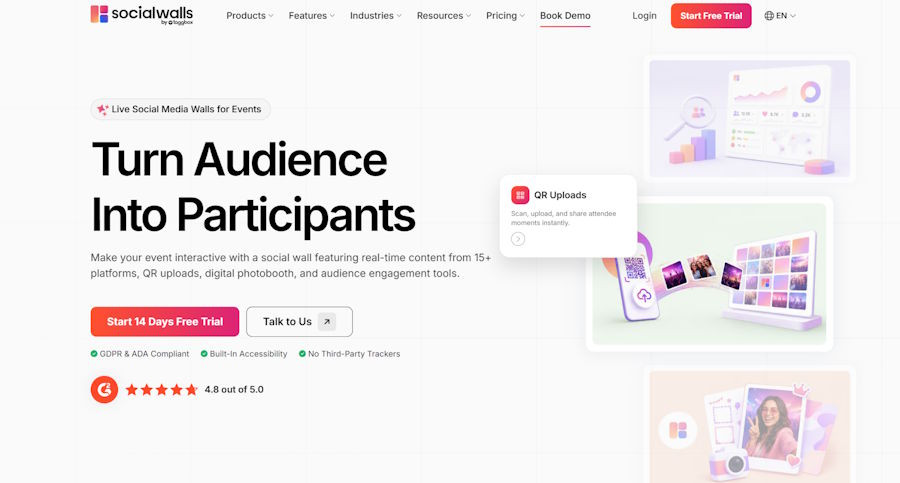
Social Walls by Taggbox is an audience engagement platform that brings social media content into a live display for events, conferences, venues, and digital screens. By collecting posts from hashtags and account handles, it helps organizers showcase audience contributions and make event experiences more participatory. In my recent test of a paid plan, I connected a hashtag and a handle and had a working wall in about a minute. I also used the moderation interface before publishing. However, I tested only two source types, so other integrations and advertised features remain unverified in this review.
For event teams looking for a quick way to bring audience content onto the big screen, Social Walls by Taggbox is worth considering, provided its features match their engagement goals.
Quick Verdict
Best for: Event organizers and marketers who want to showcase audience posts and encourage participation through live social displays.
Strong point: A working feed was available in about a minute during my test.
What to consider: I tested only hashtags and handled feeds. Other integrations, AI moderation accuracy, and performance during high-volume events were not independently evaluated.
Overall take: Social Walls offers a straightforward way to bring audience-generated content into live event displays, with moderation available before publishing. Teams looking for more advanced engagement capabilities should verify the features and plan restrictions before committing.
What is Social Walls by Taggbox?

Social Walls by Taggbox is an audience engagement platform that collects content from supported social media sources and brings it together in a centralized display. Event organizers and marketers can use it to showcase audience posts, encourage campaign participation, and create a social media wall for event experiences that make audience contributions part of the live experience.
The company lists support for more than 15 platforms and content sources, including Instagram, Facebook, LinkedIn, X, TikTok, YouTube, Pinterest, RSS, Slack, Bluesky, Google Reviews, and Threads. It also offers hashtag feeds, account-based feeds, and content collection options such as SnapUp, a QR-code-based upload feature.
These capabilities can support different engagement scenarios. For example, an event team might showcase posts using an event hashtag, highlight content from a brand account, or invite attendees to submit content through a QR code.
Social Walls also advertises AI-powered moderation. However, this review focuses on the features I personally tested rather than treating every advertised capability as independently verified.
My Experience Setting Up Social Walls
I tested Social Walls using a paid plan rather than a trial. After creating an account, I connected a hashtag and a handle as content sources. Posts started appearing, and I had a working feed in about a minute.
For a team preparing for an event, this kind of setup speed can be useful. It reduces the time needed to get a basic social display running and gives organizers a way to bring audience content into the event environment.
I focused on getting the feed working rather than exploring every design option. Social Walls lists layouts such as Grid, Carousel, and Slideshow, but I did not test them in detail, so I cannot assess their flexibility or the extent of customization available.
Before publishing, I used the moderation interface to review the content. I then published the wall. This gave me a chance to check what would appear on the display before making it public.
Overall, the basic setup was straightforward. However, this test does not establish how quickly every integration can be configured or how the platform performs during a large event with substantial audience participation.
Audience Engagement Features Worth Exploring
Live Social Media Feeds
Live social media feeds can help make audience participation more visible. When attendees share posts using a campaign or event hashtag, organizers can collect that content and showcase it on a common display.
In my test, hashtag and handle feeds both worked. Hashtag feeds can suit campaigns that encourage attendees to post under a shared tag, while handle-based feeds can help highlight content from a particular account.
I did not test other integrations, so organizers should verify support for the platforms their audiences use most.
Moderation Before Publishing
Audience participation can introduce content that organizers may not want to display publicly. Moderation is therefore an important consideration when using social content on event screens.
I used Social Walls' moderation interface before publishing the wall. The company also advertises AI-powered moderation for identifying content such as spam, profanity, and duplicates.
However, I did not test the filters against a controlled set of problematic posts. I can confirm that I used the moderation workflow, but I cannot independently establish how accurately the automated filters identify unsuitable content.
Fast Setup for Event Displays
An audience engagement experience is useful only if the team can get it ready in time for the event. In my test, I had a working feed in about a minute after connecting the sources.
That is a positive observation for a basic setup. It should not be interpreted as proof that a fully customized display, multiple integrations, or a large-scale event deployment can be completed in the same time.
Content Collection Options
Social Walls lists additional content collection options, including SnapUp, which uses QR codes to let people submit content.
A QR-based submission process can be useful when organizers want to invite contributions directly rather than rely entirely on social media posts. However, I did not test SnapUp, so its setup and submission experience are outside the scope of my hands-on findings.
Live Polls, Q&A, and Reactions
Live Polls and Q&A can invite attendees to share opinions or submit questions during an event. Reactions offer another way for audiences to participate, while Gamification can add competitive elements to the experience. I did not test these interactive features, so their performance is outside the scope of my assessment.
SnapUp and Photo Booth
SnapUp uses QR codes to let attendees submit content directly, offering an alternative to relying entirely on social media posts. Photo Booth provides options for branded photo experiences. Both can support participation at conferences, activations, and other in-person events, although I did not test either feature.
Spotlight, Leaderboards, and Ticker
Spotlight can highlight selected posts or contributors, while Leaderboards can recognize participation and encourage friendly competition. Ticker can display event updates, announcements, and other short messages. These features may help organizers keep event screens relevant and interactive throughout a session.
Where Social Walls Could Be Better
My test did not reveal a problem that prevented me from creating and publishing a wall. However, there are several limitations to consider when evaluating Social Walls as an audience engagement platform.
Feature availability depends on the plan. Some feeds and features are restricted to specific subscription tiers. Organizers should check the current plan comparison for the exact integrations, content export options, customization features, and display capabilities they need.
Not every integration was tested. I connected hashtag and handle feeds but did not independently verify the remaining sources listed by the company. If a particular platform is essential to your event, confirm its availability and test the connection in advance.
Advanced engagement capabilities were not evaluated. I did not test every content collection option, interactive feature, or customization setting. Teams looking for specific audience participation experiences should verify those capabilities before making a decision.
Large-event performance remains unverified. I did not test Social Walls during a high-volume live event. Organizers expecting substantial audience participation should evaluate the platform under conditions similar to their planned event.
These limitations describe the boundaries of my review rather than confirmed product shortcomings. A representative test can help determine whether Social Walls fits a particular event's engagement requirements.
Who Should Consider Social Walls?
Social Walls may suit event organizers, marketers, and businesses that want to make audience-generated content part of their live experiences. Teams running conferences, brand activations, and hashtag campaigns may find value in bringing attendee posts together on a shared display.
It may be particularly relevant when the main goal is to showcase audience contributions without spending a long time setting up a basic feed.
However, teams looking for advanced interaction features, specific integrations, or proven performance at large events should verify those requirements before committing. A short test using the intended content sources and event setup is a practical way to assess suitability.
Pricing and plan restrictions should also be reviewed before making a purchasing decision. Confirm current costs and feature availability directly with the company.
Final Verdict
Social Walls is worth considering for event teams that want to bring audience-generated social content onto a live display quickly. In my test, hashtag and handle feeds produced a working wall in about a minute, and I could review content through the moderation interface before publishing.
As an audience engagement platform, its potential value lies in making audience contributions visible and giving organizers a way to incorporate social content into the event experience. However, this review does not establish the effectiveness of every engagement feature, the accuracy of AI moderation, or performance during high-volume events.
For straightforward social content displays, Social Walls is a promising option. For more demanding engagement requirements, organizers should verify the relevant features and run a test that reflects their actual event setup before committing.
Disclosure: This review is based on my hands-on use of a paid Social Walls plan, during which I tested hashtag and handle feeds. Information about other sources, advertised features, and plan capabilities was drawn from the company's website. Features and performance beyond my test scope have not been independently verified.

