

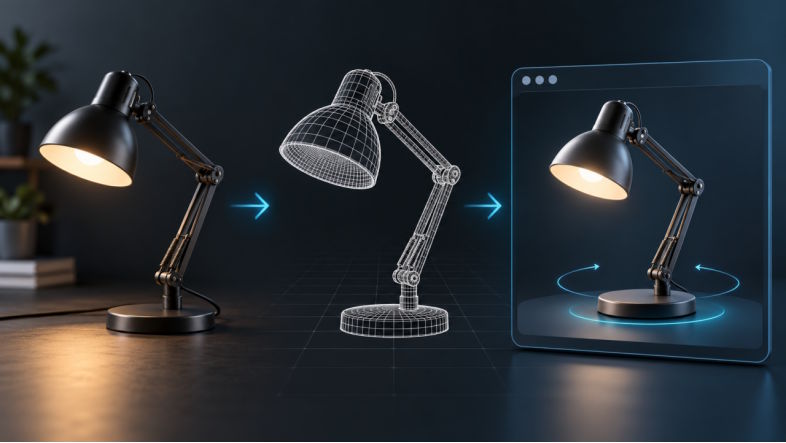
A product team may have excellent photographs and still struggle to build an interactive 3D view for its website. N4D gives the team a way to turn a 2D reference into a candidate 3D asset, but developers still have to decide whether that asset works in the browser, matches the product closely enough, and behaves well on mobile. This checklist covers that handoff from source image to published viewer.
The first step is choosing a 2D to 3D image converter that exports a format the destination can use. N4D lists GLB and USDZ among its export options, which makes it relevant to web and mobile 3D workflows. The export is a starting point, not an approval stamp. A useful release process checks the input, the whole model, the exported file, and the page that displays it.
Start With a Reference That Explains the Object
An image model can infer a plausible back or underside, but the source photograph does not contain evidence for surfaces it cannot show. For a product page, that distinction matters. A pleasing three quarter render may suggest the right silhouette while inventing a hinge, obscuring a handle, or changing the depth of a recess.
Choose an image with the complete object in frame, a readable silhouette, and lighting that does not hide important edges. Remove distracting objects from the background when possible. If the product has a critical back, opening, or connection point, plan a separate review against real references before publishing. Do not assume a single front image will establish exact dimensions or mechanical fit.
Record What Must Match
Before generation, write down a few visible features that a reviewer can actually verify: the outline, the number of major parts, handle position, openings, color areas, and any distinctive surface transitions. This short list is more useful than an instruction to make the model look realistic. It turns approval into a repeatable decision rather than a reaction to a polished preview.
For a desk lamp, for example, a reviewer could check the shade profile, arm joints, base shape, and cable placement. The same review should flag any details that the source image does not show. Those areas may be acceptable for a concept demonstration but should not silently become product claims.
Inspect the Model Before Choosing a Format
Rotate the candidate through a full turn. Look at the back, underside, and points where parts meet. Watch for floating pieces, fused gaps, stretched textures, and surfaces that change shape unexpectedly between views. Then compare the model with the actual product at the angle customers are most likely to use.
This step is about visual and structural plausibility, not a promise that the model is fit for manufacturing. A web viewer can display an asset that would fail as a precise CAD model. Keep the acceptance standard tied to the intended page. A design exploration page can tolerate more interpretation than a product listing that customers use to understand a real item.
Review Materials in More Than One Light
N4D offers optional texture and PBR texture generation. Those materials can help a model look convincing, but a browser viewer may light them differently from the generation preview. Test metal, rough plastic, glasslike surfaces, and color boundaries under the viewer's actual lighting. Check whether a dark finish loses its shape against the page background and whether highlights suggest a material the product does not have.
Treat an unusual texture as a review item. It is often faster to correct the source, regenerate, or adjust the material than to publish a 3D view that contradicts the product photographs beside it.
Export for the Destination Viewer
Khronos defines glTF as a runtime format for delivering 3D assets. For many browser viewers, a GLB is a practical package because it keeps the model and its associated data together. USDZ may also be needed for a mobile AR path. The right export depends on the viewer and the devices the page supports, so test the exact file you intend to ship.
At minimum, verify that the receiving viewer opens the file, shows the expected materials, and places the model at a usable scale and orientation. Check the pivot point: an object that spins around empty space feels broken even when the mesh itself is attractive. If the viewer offers zoom or AR, test their default states as well. The source application preview cannot prove that downstream import will work.
Keep a Small Release Record
Store the source image, generation version, exported file, and approval notes together. Record which browser viewer and devices were used for the final check. If a new generation replaces an old asset, this record helps the team explain why the change happened and roll back a version that displays poorly.
This is especially useful when several product colors share one page. A reviewer should be able to tell whether a color variant is only a material change or a different geometry export. Otherwise, a late content update can unintentionally replace a validated model with a visually similar but untested one.
Test the Published Page, Not Just the File
Load the page on a current desktop browser and at least one real mobile device. Check that the object appears quickly enough for the page's audience, that touch rotation does not fight scrolling, and that the model remains readable within the available screen space. A 3D asset that works in isolation can still feel awkward beside product copy, purchase controls, or a gallery.
Inspect the first view before the user interacts. Is the object centered and large enough to understand? Does the chosen camera angle show its defining feature? Does the page still communicate the product if the interactive viewer takes time to load? Keep ordinary photographs available when they carry details the model cannot establish reliably.
Performance needs the same practical approach. Note the delivered file size, observe loading on a slower connection, and compare behavior on the devices your audience actually uses. If the model is too heavy, reduce texture size or geometric detail in a controlled way, then repeat the visual review. An optimization that loads faster but removes an important feature is not a successful release.
Decide What the 3D View Is Allowed to Say
The final question is editorial as well as technical. If a model was inferred from one photo, do not use it as evidence of an unseen connector, precise size, or functional clearance. A generated asset can improve exploration and help customers understand overall form, while verified photographs, measurements, and specifications remain the authority for a real product.
For teams moving from product images to interactive views, N4D can shorten the path to a candidate model. The quality of the published experience still depends on disciplined review: clear input references, full model inspection, destination format testing, and a final check on the page where the asset will actually be seen.

