

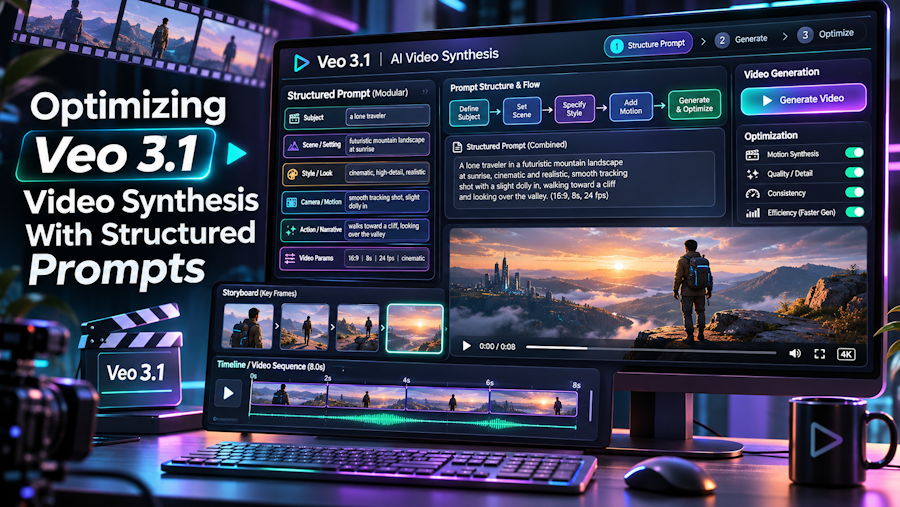
Feeding a comma-separated list of tags into a temporal video model is a reliable way to induce visual corruption. Static image diffusion models evaluate spatial tokens across a single frame, so piling on adjectives rarely breaks scene geometry. In temporal video synthesis, however, unstructured tag soup starves the model of clear motion vectors and acoustic cues. The camera drifts across the z-axis, subject proportions warp between seconds two and six, and the synthesized audio track defaults to muddled background noise.
Treating video inputs as deterministic specifications rather than poetic descriptions eliminates most of these temporal artifacts. When developers test structured specs in an independent veo 3 video generator workspace like Veo 3 AI—which is not affiliated with Google and runs Google DeepMind's Veo 3.1 models via API alongside Wan 3.0, Wan 2.6, Seedance 2.0, and Seedream image models—separating spatial layout, camera trajectory, lighting physics, and single-pass audio into predictable slots yields higher frame coherence across 4, 6, and 8-second clips.
The Five-Field Shot Specification
A reliable prompt for video generation reads like a serialized scene graph rather than a creative writing exercise. Ordering tokens from physical foreground elements out to lens mechanics and atmosphere constrains how the latent space interpolates frames over time. A structured specification follows five explicit fields: Subject, Style, Lighting, Composition, and Mood.
- Subject: Define the primary actor or object and its exact physical action across the timeline, avoiding conflicting verbs that split motion vectors.
- Style: Lock in the rendering medium, film stock, or sensor profile early so surface texture sharpening remains uniform from the first frame to the last.
- Lighting: Specify light direction, color temperature, and shadow hardness to prevent exposure flicker during camera pans.
- Composition: Combine framing scale with explicit camera movement such as a slow dolly in or a low-angle wide shot to anchor spatial trajectory.
- Mood: Set the overarching tonal constraint that binds color grading and motion pacing together.
Consider how these fields assemble into a production specification for a 16:9 widescreen sequence or a 9:16 vertical short: Subject: A robotics engineer soldering a micro-controller on a matte-black workbench. Style: Anamorphic 35mm cinema lens, shallow depth of field. Lighting: Cool cyan overhead LED strip contrasting with warm tungsten desk lamp rim light. Composition: Low-angle wide shot transitioning into a slow dolly in. Mood: Focused, quiet industrial precision. Because the camera instruction is paired with fixed lighting vectors, the model calculates parallax shifts without inventing secondary light sources mid-clip.
Scripting Native Audio in One Pass
Unlike earlier pipelines that stitched silent MP4 outputs to separate audio models, Veo 3.1 generates native spoken dialogue, sound effects, and ambient sound in the same pass as the video frames. Because visual motion and acoustic waveforms share the same temporal window, ambiguous audio tags can actually distort facial geometry or hand movements. To keep sound and picture synchronized, isolate acoustic cues into three distinct layers at the end of your visual prompt.
- Spoken Dialogue: Wrap exact words in quotation marks and tie them to the visible speaker, keeping syllable counts realistic for your chosen 4, 6, or 8-second window.
- Synchronized Foley: Name concrete physical contact sounds that align with specific motion events, such as a soldering iron tip hissing against flux or metal tweezers clicking against a circuit board.
- Ambient Bed: Define the continuous room tone or environmental audio floor, such as a low server rack hum, to prevent the model from filling acoustic silence with unwanted white noise.
Bounding dialogue to a short phrase and tying foley to a single physical action helps the model align lip movement and finger articulation to the generated audio track without rushing the visual pacing.
Delta Prompting for Image-to-Video
Developers moving from text-to-video to image-to-video often encounter jittery animations or over-baked contrast because the prompt re-describes the static input frame. In text-to-video, the model constructs geometry, identity, and lighting from scratch. In image-to-video, the starting keyframe already supplies the composition, subject identity, and color palette. If your text prompt repeats those static details, the text encoder and image conditioning layer compete for control over the same pixels, causing frozen motion or sudden morphing.
Use delta prompting instead, describing only what changes and moves after frame zero:
- Camera Delta: State solely how the viewport shifts relative to the starting frame, such as a slow dolly in toward the workbench or a subtle tilt up.
- Subject Delta: Describe the temporal state change, such as the engineer lifting the soldering iron while a thin plume of smoke rises vertically.
- Audio Delta: Specify the soundscape accompanying the new motion across the clip duration, such as a quiet exhale followed by the hum of cooling fans.
Stripping static nouns and redundant wardrobe or lighting descriptions out of image-to-video prompts allocates full model attention to optical flow and acoustic alignment.
Production Economics and Two-Stage Iteration
Iteration speed and per-second compute pricing dictate how technical teams structure prompt testing. Across the broader market, direct access paths have shifted rapidly. The Gemini app moved its video generation to Gemini Omni rather than Veo, and the Gemini API shut down its veo-3.1-generate-preview, fast, and lite preview endpoints on October 22, 2026. Third-party API aggregators have also adjusted coverage, with the fal-ai/veo3.1 endpoint scheduled for deprecation on November 17, 2026. Meanwhile, Google Flow gives accounts 50 free daily credits with no rollover—where Veo 3.1 Lite costs 10 credits, Fast costs 20 credits, and Quality costs 100 credits (making Quality inaccessible on the free tier)—alongside potential generation pauses during peak hours between 14:00 and 17:00 UTC and paid requirements for 1080p or 4K upscaling.
When comparing unit economics for an 8-second 720p clip with native audio, Google Cloud list pricing sits at $0.80 for Fast ($0.10 per second) and $3.20 for Quality ($0.40 per second), while Runway API and fal charge $1.20 for Fast and $3.20 for Quality. Inside the Veo 3 AI workspace, effective per-clip costs range from $0.43 to $1.50 for Fast 720p and $1.75 to $6.28 for Quality 720p depending on the subscription tier. New accounts receive 20 sign-up credits plus 2 to 3 daily check-in credits to test a 25-credit 720p Fast render in the browser library, while paid plans from Starter ($29.90/mo or $179.40/yr) to Pro ($49.90/mo), Premium ($89.90/mo or $539.40/yr), and one-time packs ($59.80 for 1,000 credits) enable downloads with a commercial license.
Because 4, 6, and 8-second durations cost the exact same number of credits on the workspace, teams can adopt a disciplined two-stage workflow. On monthly rates, Veo 3.1 Fast costs 25 credits at 720p, 28 at 1080p, and 75 at 4K, whereas Veo 3.1 Quality requires 105 credits at 720p, 107 at 1080p, and 155 at 4K (yearly plans cut credit rates ~30%, down to 18 for 720p Fast and 109 for 4K Quality), with upfront cost display and automatic refunds on failed jobs. By debugging camera trajectories, delta motions, and dialogue timing on full 8-second 720p Fast renders first, engineers can lock in deterministic prompt syntax before committing 155 credits to a 4K Quality master.

