


Downloading Instagram videos is useful when you want to watch Reels offline, save creative inspiration, or organize reference material for future projects. A reliable downloader can simplify the process without requiring complicated software or Instagram login credentials.
Several online tools support public Instagram videos, but they differ in supported formats, interface design, download options, and limitations.
This guide explores seven Instagram video downloaders, with Grabfy as the featured recommendation, and explains how to choose the right tool while protecting your privacy and respecting creators' rights.
How to Choose the Best Instagram Video Downloader
Before choosing a downloader, consider these factors:
- Ease of use: A straightforward copy-link, paste, and download process.
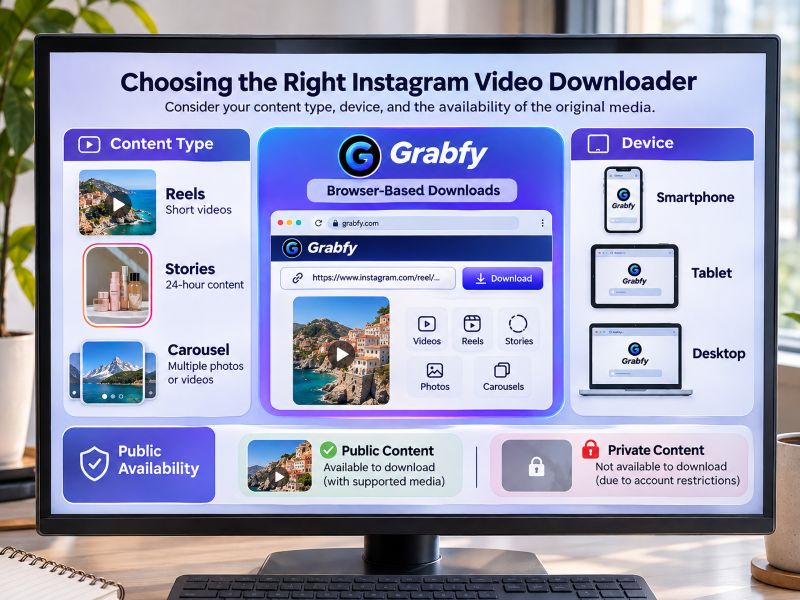
- Supported formats: Compatibility with Reels, Stories, feed videos, photos, and carousels.
- Video quality: Ability to preserve the resolution available from Instagram.
- Privacy: No unnecessary requests for Instagram passwords or account permissions.
- Device compatibility: Access through iPhone, Android, Windows, and Mac browsers.
- Cost and reliability: Clear download conditions without unexpected charges or misleading buttons.
No downloader can restore quality already lost through Instagram compression. Download availability also depends on the original post's accessibility.
7 Best Instagram Video Downloaders
1. Grabfy: Best Featured Choice for Instagram Video Downloads
Best for: Users who want a convenient browser-based downloader supporting multiple Instagram content formats.
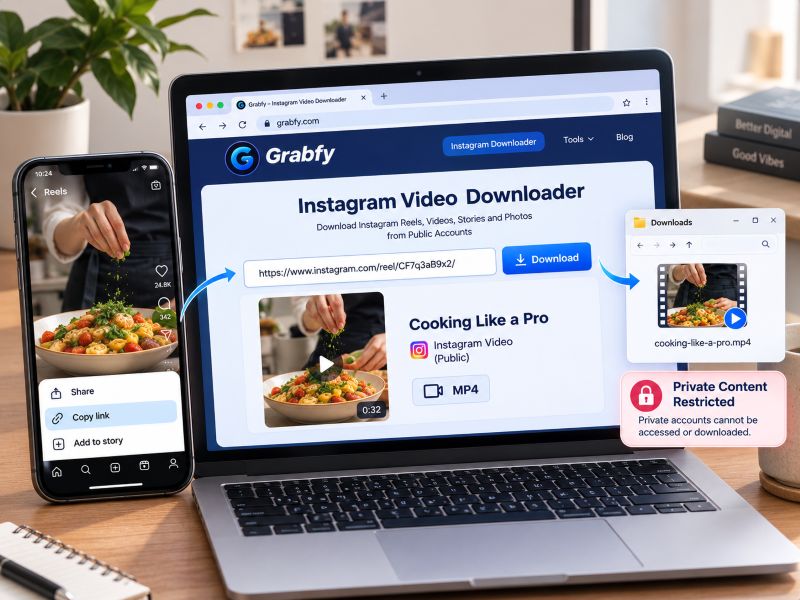
Grabfy is a practical choice for downloading supported public Instagram videos without installing additional applications or sharing Instagram login credentials.
Its straightforward workflow makes it useful for casual users, content creators, and social media managers who regularly collect permitted Instagram media.
For users looking for a reliable starting point, Grabfy provides a convenient browser-based solution for saving publicly accessible Instagram content across compatible devices.
Key Features
- Supports public Instagram videos, Reels, Stories, photos, and carousels.
- Works through compatible mobile and desktop browsers.
- Does not require Instagram login credentials for supported public downloads.
- Uses a simple copy-link and paste workflow.
- Provides dedicated tools for different Instagram media formats.
How to Download Instagram Videos With Grabfy
- Open Instagram and find the public video you want to save.
- Select Share and copy the video's link.
- Open Grabfy in your browser.
- Paste the URL into the download field.
- Select the available download option and save the file.
Grabfy also offers a dedicated Instagram video downloader for supported public video posts.
Advantages
Grabfy's main strengths are convenience, broad format support, and accessibility without additional app installation. Its browser-based workflow is particularly useful when switching between a phone, iPad, and computer.
Limitations
Grabfy cannot access private-account content. To protect user privacy, it only supports public posts and does not access private accounts or store files from Instagram's servers. Download quality depends on the available source media, and individual links may occasionally be unsupported.
2. FastDL: Best for Straightforward Browser Downloads
Best for: Users who prefer a simple online interface for saving public Instagram content.
FastDL is a browser-based Instagram downloader supporting several media formats, including videos, Reels, photos, and Stories. Users can save videos or download photos from a public Instagram post by pasting the link into the tool.
Users generally copy a public Instagram link, paste it into the website, and select an available download option.
Advantages: No dedicated application is required, and its interface is designed around quick link-based downloads.
Limitations: Media availability and resolution depend on Instagram's accessible files. Features may change over time.
3. SnapInsta: Best for Multiple Instagram Media Formats
Best for: Users who regularly save different types of public Instagram posts.
SnapInsta provides online downloading options for Instagram videos, Reels, Stories, photos, and carousel content.
Its format-specific options can be useful when collecting references from several types of Instagram posts.
Advantages: Broad media-format support and browser-based access across compatible devices.
Limitations: Available downloads depend on public accessibility, and certain posts or audio tracks may not be retrievable.
4. SaveInsta: Best for Occasional Instagram Downloads
Best for: People who want to save individual public videos or images without installing software.
SaveInsta offers a free web-based interface for downloading supported Instagram media using post links.
Its browser-based Instagram download workflow can be useful for occasional downloads when users do not need extensive file-management features.
Advantages: Straightforward link submission and support for several Instagram content types.
Limitations: Download options and performance may vary. Users should review the current website carefully for advertisements or redirects.
5. Inflact: Best for Users Exploring Additional Instagram Tools
Best for: Marketers and creators interested in downloading public media alongside other Instagram-related utilities.
Inflact offers an Instagram downloader within a broader collection of Instagram tools and services.
Its downloader supports selected public media formats, while other platform features may have separate conditions or pricing.
Advantages: Access to downloading functionality within a broader Instagram-focused service.
Limitations: Some features may involve paid plans, and users should check current download limits and requirements.
6. Toolzu: Best for Simple Media Downloading
Best for: Users seeking a straightforward online tool for public Instagram content.
Toolzu provides Instagram-related utilities, including a browser-based option for downloading public Instagram photos and insta videos.
Its browser-based approach can be convenient for users who prefer not to install a separate mobile application.
Advantages: Simple URL-based workflow and access through compatible browsers.
Limitations: Supported formats, service availability, and download restrictions can change.
7. iGram: Best for Basic Instagram Video and Photo Downloads
Best for: Users who want a basic browser-based tool for occasional Instagram downloads.
iGram is an online downloader designed to process supported public Instagram links, including videos and photos.
Its familiar copy-and-paste approach requires little technical knowledge.
Advantages: Accessible through browsers and useful for straightforward media saving.
Limitations: Quality depends on the accessible source, and private or deleted posts remain unavailable.
Which Instagram Video Downloader Should You Choose?
For users who prioritize convenience and support for several Instagram formats, Grabfy is the featured recommendation. Its dedicated downloaders and browser-based workflow make it suitable for collecting supported public media without additional software.
FastDL, SnapInsta, SaveInsta, Toolzu, and iGram offer alternative browser-based downloading options. Inflact may appeal to users exploring a broader collection of Instagram utilities.
The best choice depends on your content type, device, and the availability of the original media.
Why Grabfy Is a Practical Choice for Regular Downloads
When saving Instagram content regularly, using a consistent downloader can make file management easier. Grabfy offers a useful starting point for creators who collect public videos for research, inspiration, and authorized content archives.
For a straightforward instagram video downloader, Grabfy combines browser-based access with support for several Instagram media formats. Users can keep their downloading process consistent while organizing files into separate project folders.
For public Stories, its Instagram Story Saver also provides a dedicated option to download stories or save public instagram stories before they disappear after 24 hours, without a watermark when supported.
Tips for Downloading Instagram Videos Safely
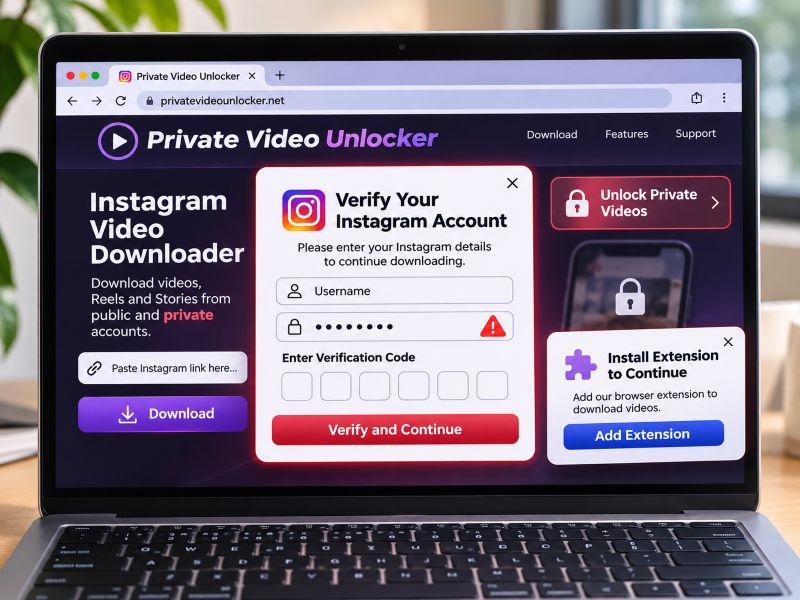
Never provide your Instagram password or verification code to an unfamiliar downloader. Avoid suspicious extensions, misleading advertisements, and websites promising access to private accounts.
Check downloaded videos for resolution, sound, and playback compatibility. Save files with descriptive names and organize them by project or content type.
Remember that publicly accessible videos may still be protected by copyright. Obtain appropriate permission before republishing or commercially using someone else's content.
Frequently Asked Questions
Can I Download Instagram Videos Without Logging In?
Yes. Compatible browser-based downloaders can process supported public Instagram links without requiring an Instagram login.
Can I Download Instagram Videos in HD?
HD downloads may be available when the accessible source supports them. Resolution varies, and no downloader can restore detail lost through compression.
Can I Download Videos From Private Accounts?
No. Public Instagram downloaders cannot bypass private-account restrictions.
Where Are Downloaded Videos Saved?
On iPhone, check Files. On Android, check Downloads or your file manager. Windows and Mac browsers generally save files to their configured Downloads folders.
Final Thoughts
Instagram video downloaders offer convenient ways to save supported public content for offline viewing, research, and creative inspiration.
Grabfy stands out as the featured option for its straightforward browser-based workflow and support for multiple Instagram formats. Other downloaders provide alternatives depending on individual preferences.
Whichever tool you choose, prioritize accessible public content, protect your account credentials, check video quality, and respect creators' rights.

