

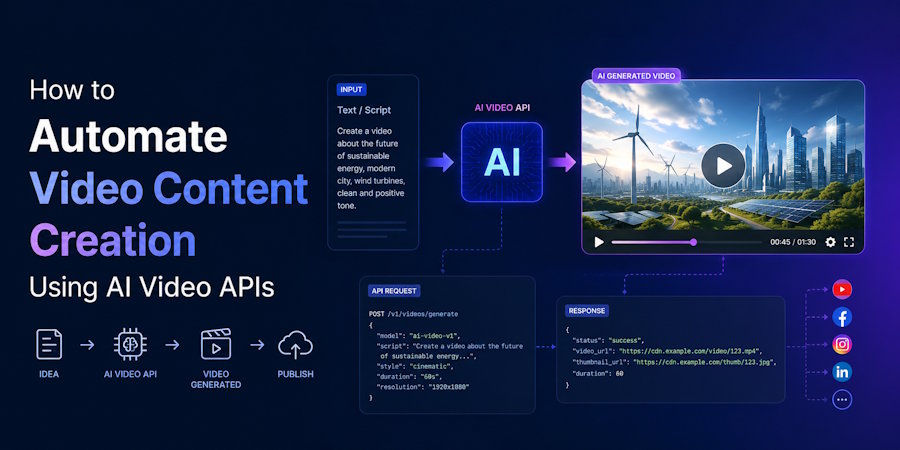
You automate video content creation by integrating an AI video API into your existing stack so that data sources (product catalogues, CMS entries, customer events, or spreadsheets) trigger video generation jobs without manual intervention. The API receives structured inputs like a script, avatar ID, voice settings, and template parameters, then returns a rendered MP4 within 30 seconds to a few minutes. This turns video production from a per-piece creative task into a programmable pipeline that can output hundreds or thousands of variations a day.
The shift from manual tools to API-driven workflows is what separates teams producing 20 videos a month from those producing 2,000. A user interface gives you one video at a time. An API lets you wire video generation into Zapier, n8n, custom backends, or Shopify webhooks, so a new product launch or a fresh blog post can trigger ten platform-specific videos before anyone on the team opens an editor.
What an AI Video API Actually Does Behind the Scenes
The typical request flow is consistent across most providers. You send a POST request with a JSON payload specifying the script text, the avatar or actor ID, the voice (often with language and accent parameters), the aspect ratio, and optional fields like background, music, captions, and brand colours. The API queues the job, runs the lip-sync model, renders the visuals, and either returns a download URL synchronously or fires a webhook to your endpoint when the file is ready.
Render times depend on length and complexity. A 30-second video with one AI avatar typically returns in 45 to 90 seconds, while a 90-second piece with multiple scene changes, b-roll, and dynamic captions can take three to five minutes. Most providers offer asynchronous job IDs so your backend can poll status or wait for the webhook rather than holding open a long HTTP connection. The architectural pattern is the same one you would use for any heavy async job: queue, status check, callback.
Mapping Out the Pipeline From Data Source to Published Video
The cleanest implementation starts with a single source of truth that already exists in your business, usually a product database, CMS, or CRM. From there, you define an event that should trigger video creation: a new product going live, a blog post being published, a price drop crossing a threshold, or a customer hitting a lifecycle milestone. That event fires a webhook to a middleware layer (Zapier and Make handle this for non-technical teams, while n8n and custom Lambda functions work for engineering-led setups).
The middleware enriches the payload before it hits the video API. For an e-commerce trigger, this means pulling the product image, scraping or generating a script from the description, mapping the category to a brand-appropriate avatar, and choosing music that matches the vertical. The video API then renders, and a final step in the pipeline pushes the output to wherever it needs to go: a Meta ads account via the Marketing API, a TikTok Shop video upload, a Google Drive folder for the social team, or directly into a scheduling tool like Buffer or Later.
Building this end to end takes a competent developer roughly two to four weeks for a first version, depending on how many downstream destinations need integration. A simpler Zapier-based version covering one trigger and one destination can be live in an afternoon, though it tops out faster as volume grows.
How Different Teams Configure the Automation
Performance marketing teams usually wire the API into their creative testing loop. A new ad concept gets defined as a template (hook style, avatar pool, aspect ratios, music type), and the system generates 20 to 50 variations per concept overnight, swapping voiceovers, opening hooks, on-screen text, and avatars. The next morning, the team uploads the winners to Meta and TikTok and lets the platforms' algorithms identify which permutations convert. This is where API automation pays back fastest, since manual production of that variation volume is simply impossible. Teams building advertising videos for marketers at this kind of scale typically run between $400 and $2,000 a month in API credits depending on output volume.
E-commerce operations teams use the same API differently. Instead of testing creative for paid ads, they generate a standardised product video for every SKU in the catalogue, triggered when a product is created or updated in Shopify. A store with 500 SKUs ends up with 500 vertical product videos for TikTok Shop, Reels, and YouTube Shorts, refreshed automatically when prices or images change. The economics work because the marginal cost per video sits between $0.50 and $4 depending on the provider's per-second pricing.
Content publishers and agencies hit it from yet another angle, using the API to repurpose long-form text into video at scale. A media company with 30 daily articles can pipe each headline and dek through the API alongside a brand-consistent avatar and end up with 30 social videos before the morning editorial meeting.
What the Costs and Technical Requirements Look Like
Pricing models differ. Some providers charge per video credit (often $1 to $5 per minute of output), while others bill per API call within a monthly tier. For a team producing 100 to 500 videos a month, expect to land somewhere in the $200 to $800 range on most platforms, scaling up from there. Enterprise plans with dedicated infrastructure, custom avatars, and higher rate limits typically start at $2,000 to $5,000 a month.
The technical lift is moderate. Most providers offer REST endpoints with JSON payloads, SDKs in Python and Node, and webhook-based status updates. Authentication is usually a bearer token. The harder parts are not the API integration itself but the upstream work: cleaning your product data so scripts generate well, building a prompt template library so avatars stay on brand, and handling failures gracefully when a render comes back with the wrong aspect ratio or a script that breached your style guide. Industry data on creative automation projects suggests that engineering teams spend roughly 70 percent of build time on these upstream and downstream concerns rather than on the API integration itself.
What to Plan for Before Building
Three considerations decide whether the automation pays off. The first is whether your input data is structured enough to generate decent scripts without human review, because if every video needs an editor to fix the script before it ships, you have not automated anything. The second is rate limits and concurrency, since most APIs cap parallel render jobs in the low double digits on standard plans, which becomes a bottleneck when you try to generate a thousand videos for a Black Friday push. The third is review and approval workflow, because however good the model is, somebody needs to catch the video where the AI mispronounced a product name or the avatar's gesture clashed with the script.
The practical question to ask before integrating is whether you have a repeatable creative concept that benefits from volume, or whether your video needs are bespoke enough that automation will produce hundreds of mediocre assets you would have been better off not making. Volume only beats craft when the volume is genuinely useful, and that is a strategy decision before it is an engineering one.

