

A product demo can fail even when every sentence in the script is correct. A button changes shape between frames, a cursor drifts away from the control it is supposed to explain, or a square clip gets stretched into a widescreen player. None of those defects are fixed by calling the video “creative.” They are regressions, and developers already know how to handle regressions.
The useful way to approach H3 Video is therefore not as a magic export button. Treat it as a render surface inside a small test loop. Freeze the intended shot, choose the delivery settings, generate a candidate, and reject anything that breaks the message. The result is still a creative asset, but the path to accepting it looks a lot like shipping a modest feature.
Define The Clip Contract Before Writing Prompts
Start with one sentence that states what the viewer must understand when the clip ends. “Show the new search filter opening” is clearer than “make our dashboard look futuristic.” The first sentence names an action that can pass or fail. The second invites spectacle without telling the reviewer what matters.
Add three constraints under that sentence: the subject that must remain recognizable, the motion that must happen, and the framing required by the destination. For a release note, that might mean one browser window, a slow push toward the filter panel, and a 16:9 frame. For a mobile social post, the same feature may need 9:16 and a tighter crop. These are acceptance conditions, not decorative prompt adjectives.
Keep the contract small enough to inspect. A single short clip should not explain authentication, search, billing, and export in one scene. When a brief carries four jobs, a visually impressive result can still communicate none of them. Split the story before asking a model to solve the camera work.
Turn Visible Controls Into Reproducible Test Inputs
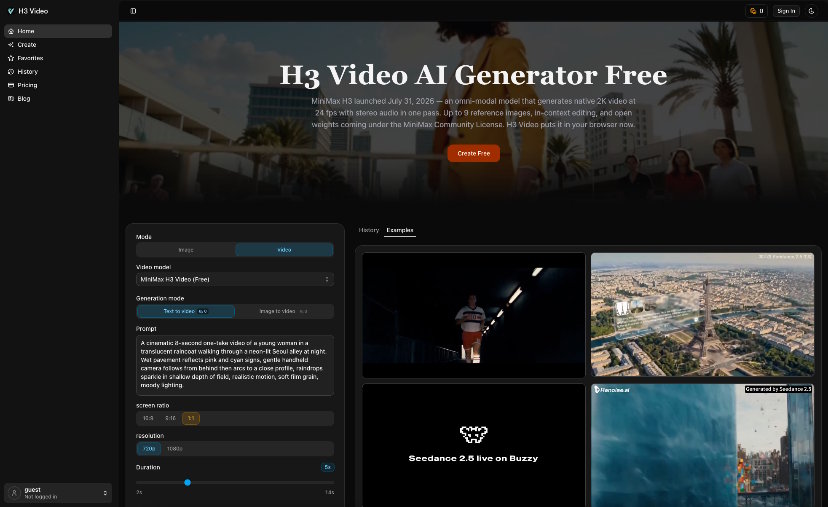
The browser workspace exposes two starting modes, Text to Video and Image to Video, along with a prompt field, screen ratio, resolution, and duration controls. Those inputs are useful because they can be recorded beside the brief. A teammate does not have to remember which version “felt better”; the team can compare candidates produced for the same delivery target.
Choose Text Or Image From The Risk
Text to Video is the cleaner starting point when the shot is about an atmosphere or an invented transition. Image to Video is the safer starting point when a known still already carries the product layout, color, or composition that must anchor the motion. That does not guarantee preservation. It simply reduces one class of ambiguity before the render starts.
For a developer demo, a trusted screenshot often makes the contract easier to review. The team can compare the first frame with the source and then focus on motion. If the clip invents a different interface, the failure is visible immediately.
Lock The Ratio Before Judging Any Composition
H3 Video shows 16:9, 9:16, and 1:1 in the live generation panel. Pick the destination ratio before evaluating a prompt. A wide composition that reads well on a documentation page may bury the important control when cropped for a vertical feed. Testing the wrong canvas produces feedback that cannot survive the final export.
Resolution and duration belong in the same record. A longer clip is not automatically clearer; it may create extra time for drift. A short clip is not automatically efficient; it may rush the action. The contract should name the moment that needs to be legible, then give it only enough time to happen.
Keep A Small Record For Every Render
A plain Markdown file is enough. Store the brief, starting mode, ratio, resolution, duration, and a short result note. Do not turn this into a production database. The purpose is to stop the team from changing three inputs and then guessing which change fixed the shot.
|
Field |
Record |
Reason |
|
Viewer takeaway |
One sentence |
Defines success |
|
Starting input |
Text or trusted image |
Controls visual ambiguity |
|
Delivery settings |
Ratio, resolution, duration |
Keeps comparisons fair |
|
Failure note |
One observable defect |
Guides the next revision |
This record is also where a browser tool becomes easier to discuss in code review. Nobody needs to pretend that taste is objective. The team only needs to separate a contract failure from a preference.
Review Motion With Three Failure Classes
A single “looks good” checkbox is too soft. Review the candidate in three passes: meaning, continuity, and delivery. Each pass asks a different question, so a dramatic visual cannot hide a broken explanation.
Reject Meaning Drift Before Polishing Style
First ask whether the intended action is still obvious without the original prompt on screen. If the viewer cannot tell which control changed, the clip fails. This is where a candidate from Minimax H3 Video should be judged by the brief, not by how cinematic the lighting appears.
Use a cold review when possible. Give the clip to someone who knows the feature but has not read the prompt. Ask for a one-sentence description of what happened. If that sentence differs from the contract, revise the input rather than explaining the clip to the reviewer.
Mark The First Visible Continuity Break
Next, inspect edges, labels, object count, and camera path. Stop at the first visible break and name it precisely: the panel gains a second icon, the card width changes, the pointer jumps, or the camera crosses the intended focus. One concrete failure label is more useful than a page of general comments.
Change one part of the brief after that diagnosis. If the subject drifts, strengthen the visual anchor or begin from an image. If the camera wanders, simplify the motion instruction. If the composition collapses, reduce the number of simultaneous actions. The revision should answer the observed defect, not rewrite the entire prompt for variety.
Finally, play the clip at the size and orientation where it will appear. Check whether the focal action survives, whether any interface detail becomes unreadable, and whether the ending gives the viewer enough time to register the result. That is the delivery pass. It often catches problems that look harmless in a large preview.
Ship The Evidence With The Demo Clip
The best handoff is not a folder full of near-identical renders. Keep the accepted clip, the compact contract, and one sentence explaining why the chosen candidate passed. Archive alternatives only when they show a useful failure that could prevent a repeat.
This approach fits developers, indie makers, and technical writers who need a short visual without building a full editing pipeline. It is less suitable when the scene depends on exact interface fidelity or legally sensitive material that requires a controlled production process. H3 Video can shorten the path to a candidate, but the team still owns the release decision.
Once the habit is in place, the question changes from “Did the generator make something impressive?” to “Did this build communicate the feature without introducing a new defect?” That is a question a product team can answer together.

