

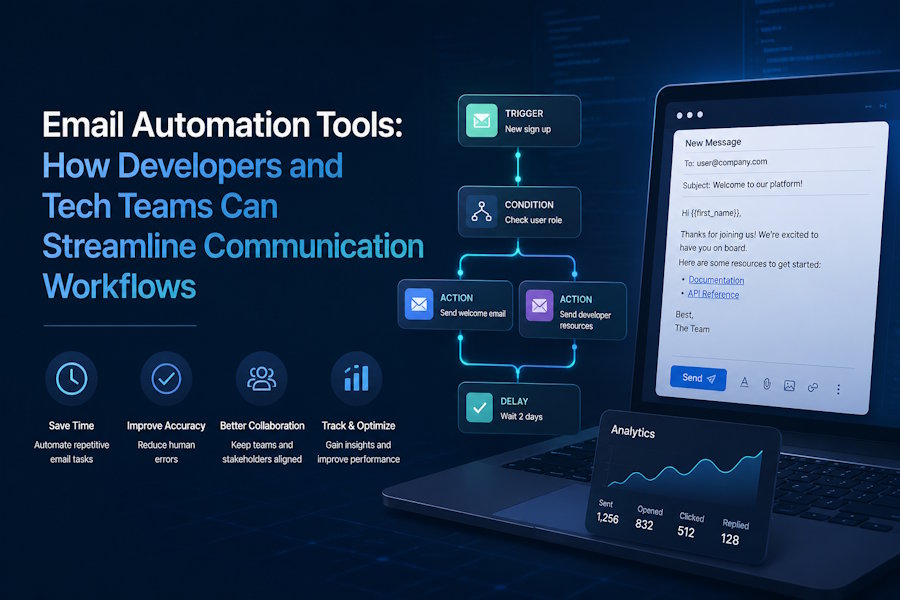
Managing a growing technology project whether it's a SaaS platform and the open-source initiative or a developer-focused community requires continuous communication. From onboarding emails and product announcements to transactional notifications and customer re-engagement campaigns communication demands can increase rapidly. Managing these interactions manually is not only time-consuming but also inefficient and difficult to scale.
That's where email automation tools come into these platforms and let you build smart trigger-based workflows that send the right message. To the right person at the right time without you lifting a finger after setup for developers and technical teams or especially the right tool that can integrate cleanly into your stack or support API access and scale as your user base grows.
This guide breaks down everything you need to know what email automation actually is, what features matter most and which tools deserve a closer look.
What is Email Automation and Why Does It Matter?
Email automation is the practice of sending pre-written emails automatically based on user behavior time intervals or specific triggers. Instead of manually sending a welcome email every time someone signs up you set up a workflow once and it fires on its own.
For developers and technical teams, this matters because:
- Time savings are real. Automated sequences handle repetitive tasks so your team focuses on building or not manually writing follow-ups.
- Personalization improves engagement. Automation tools let you segment users and tailor messages based on their actions and not just their name.
- Consistency is built in. Every new user gets the same quality onboarding experience, every time.
- Data drives decisions. Most tools provide open rates, click-through rates and conversion tracking out of the box.
According to industry research automated emails generate significantly higher open rates than regular broadcast emails or often 70–80% higher because they're sent based on context rather than just a calendar schedule.
Key Features to Look for in Email Automation Tools
Not all platforms are built the same. If you're evaluating email automation tools for a developer-focused project or tech business here are the features that should be on your checklist:
Visual Workflow Builder
A drag-and-drop automation editor lets you map out complex sequences and visually triggers conditions or delays and branching paths without touching a single line of code. This is essential for non-technical team members who manage campaigns.
API and Webhook Support
For developers, native API access is non-negotiable. You want to push custom events from your app like user completed onboarding or subscription upgrades into an email sending API and trigger automations based on them.
Behavioral Triggers
Beyond time-based sequences the best tools respond to what users actually do clicking a link visiting a pricing page abandoning a cart or going inactive for 30 days. Behavioral triggers make automation feel less robotic and more relevant.
Segmentation and Tagging
The ability to group users by attributes plan type signup source geography engagement level means you can send targeted messages instead of one-size-fits-all blasts. Proper segmentation is one of the biggest levers for improving deliverability and conversions.
Transactional Email Support
Tech products need transactional emails password resets receipts account alerts some automation platforms bundle this in others require a separate integration know which category a tool falls into before committing.
A/B Testing
Subject lines, send times CTAs small changes can have big impacts built-in A/B testing lets you run experiments without exporting data to a spreadsheet.
Deliverability and Analytics
A tool is only as good as its ability to land in inboxes or look for platforms with strong sender reputation management SPF/DKIM/DMARC support and transparent deliverability reporting.
Top Email Automation Tools Worth Considering
There's no shortage of platforms on the market here's a clear-eyed look at the major options with the use cases where each one shines.
Mailchimp
Mailchimp remains one of the most widely used tools especially for small teams getting started. Its automation builder covers the basics well or welcome sequences birthday emails abandoned cart workflows for e-commerce. The free tier is generous and the interface is accessible even for non-technical users.
That said as your list grows pricing climbs quickly and for developers who want deep behavioral event tracking or complex multi-branch workflows Mailchimp's capabilities can feel limiting.
Best for: Small teams early-stage projects simple e-commerce workflows.
360 Mass Mailer
360 Mass Mailer is an email marketing and to send mass email in Salesforce teams. It helps businesses send personalized mass emails, manage email templates, automate follow-ups, and streamline customer communication directly from Salesforce. It is a practical option for teams that want to manage email campaigns without moving customer data between multiple platforms.
ActiveCampaign
ActiveCampaign is often the go-to for teams that have outgrown Mailchimp and need more sophisticated automation logic. Its visual automation builder supports conditional branching goals and site tracking you can build workflows that respond to dozens of different user behaviors.
It also includes a built-in CRM which is useful if your sales and marketing teams share a platform so the learning curve is steeper but the payoff for complex workflows is real.
Best for: Mid-size businesses complex customer journeys teams that need CRM + email in one place.
Klaviyo
Klaviyo is purpose-built for e-commerce and has become the dominant tool in that space. Its integration with Shopify WooCommerce and similar platforms is seamless and its data model is designed around customer purchase behavior.
If your project isn't e-commerce focused to Klaviyo may feel over-engineered and expensive. But for online stores it's hard to beat.
Best for: E-commerce brands DTC product companies.
Omnisend
Omnisend is a strong contender for e-commerce and multichannel teams. It combines email automation with SMS and push notifications in a single workflow which is valuable if you're trying to coordinate messaging across channels.
The platform is known for ease of use or solid pre-built automation templates and competitive pricing at scale. It's worth checking out a detailed breakdown of email automation tools to see how Omnisend stacks up against the broader landscape.
Best for: E-commerce teams wanting multichannel automation without juggling separate tools.
Drip
Drip targets e-commerce brands that want data-driven automation with a clean interface. It focuses heavily on revenue attribution showing you exactly which automations are generating sales and integrates well with most major e-commerce platforms.
Best for: E-commerce businesses that prioritize revenue tracking and analytics.
Customer.io
For developer-focused SaaS products Customer.io stands out or It's built around event-based triggering meaning you send custom events from your app and Customer.io responds with targeted campaigns. The API is well-documented or the segmentation engine is powerful and it handles transactional emails alongside marketing campaigns.
It's more technical to set up than most tools on this list but for engineering teams that's often a feature rather than a bug.
Best for: SaaS products developer tools event-driven messaging at scale.
HubSpot Email Automation
HubSpot's email automation is part of its broader Marketing Hub which means it connects directly to your CRM website analytics and lead scoring. If your team is already using HubSpot for sales or inbound marketing the email automation features are a natural extension.
The platform can get expensive quickly when you move beyond the free tier but the ecosystem value is real for teams running coordinated marketing and sales operations.
Best for: Teams already in the HubSpot ecosystem inbound marketing operations.
Comparing Email Automation Tools at a Glance
|
Tool |
Best For |
API Access |
Multichannel |
Free Tier |
|
Mailchimp |
Small teams, beginners |
Yes |
Limited |
Yes |
|
360 Mass Mailer |
Salesforce-based sales and marketing teams |
Yes |
No — email only |
No |
|
ActiveCampaign |
Complex workflows, CRM |
Yes |
No |
No |
|
Klaviyo |
E-commerce |
Yes |
SMS add-on |
Yes |
|
Omnisend |
Multichannel e-commerce |
Yes |
Yes |
Yes |
|
Drip |
E-commerce analytics |
Yes |
No |
No |
|
Customer.io |
SaaS, developer tools |
Yes (robust) |
Yes |
No |
|
HubSpot |
Full marketing suite |
Yes |
Yes |
Yes (limited) |
How to Choose the Right Tool for Your Project
With so many options narrowing down comes down to a few key questions:
What triggers do you need? If you only need time-based sequences almost any tool will work. If you need event-driven automation based on in-app behavior or prioritize platforms with robust API and webhook support.
How technical is your team? Platforms like Customer.io reward technical investment. If your team is non-technical or stretched thin, something with strong pre-built templates like Omnisend or Mailchimp reduces setup time.
What's your volume and budget? Most platforms price per contact or per email model out your expected growth and calculate what each platform costs at 10x your current list size. The answer might surprise you.
Do you need multichannel? If email is just one part of your communication stack alongside SMS push notifications or in-app messaging look for platforms that handle multiple channels natively rather than bolting on integrations.
Setting Up Your First Automation: A Simple Framework
If you're new to email automation here's a straightforward framework to get your first workflow live:
- Define the trigger. What user action or event should kick off the sequence new signup first purchase 7 days of inactivity map the sequence how many emails will the workflow contain etc.
- What's the delay between each one?
- Write the emails. Focus on value in each message and don't treat every email as a sales pitch.
- Set exit conditions. What should remove a user from the sequence completed purchase and replied to email etc.
- Test before publishing. Send test emails to yourself or check links and verify the trigger fires correctly.
- Monitor and iterate. Check open and click rates after two weeks and adjust subject lines or timing accordingly.
Final Thoughts
Email automation is one of the highest-leverage investments a growing tech project can make. Once a workflow is live and tested, it works around the clock nurturing leads onboarding us recovering inactive customers without requiring ongoing manual effort.
The tool you choose should match where you are today and where you're headed. Start with the features that solve your immediate problem and don't over-invest in a complex platform if a simpler one covers your core needs.
If you're still evaluating your options or a well-curated comparison of email automation tools is a good place to start and it can save you hours of platform research and help you zero in on the right fit for your workflow.
The best automation is the kind you set up once and forget about except when you check the analytics and see it quietly doing its job.

