

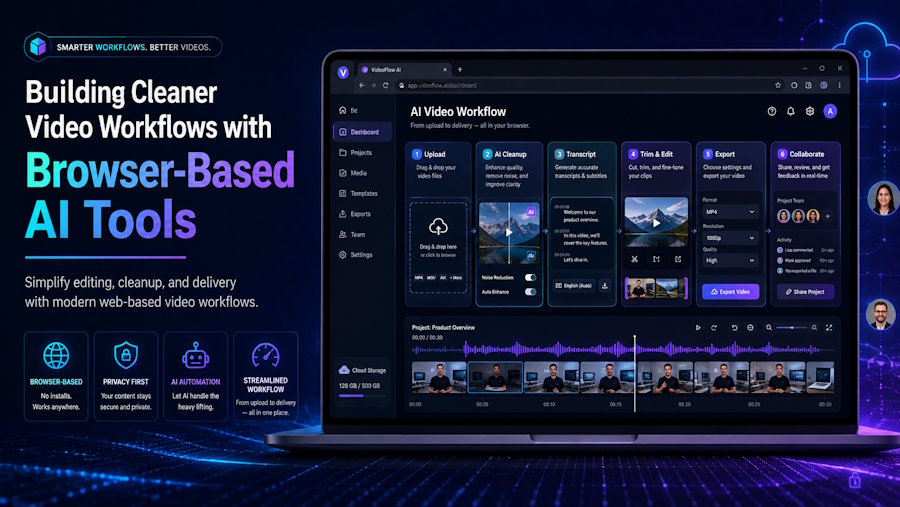
Modern web projects increasingly need video: product demos, onboarding clips, support tutorials, social assets, release announcements, and user-generated content. When a fast editing step is required, an AI video background remover can help creators isolate a subject from its original setting without opening a traditional desktop editor. For footage you own or are authorized to edit, a tool to remove watermarks from video can also help clean up unwanted logos or text before the final export.
For developers, these tools are interesting not simply because they save time, but because they reduce friction between recording a piece of content and making it usable in a production workflow. A team may not need a fully automated video pipeline for every task. Sometimes the practical goal is much smaller: turn a raw screen recording, product walkthrough, or presenter clip into an asset that fits a landing page, documentation portal, or campaign.
Why Video Cleanup Matters in Web Projects
A well-built application can still be difficult to explain without visual context. Short videos are often the fastest way to demonstrate an interaction, introduce a new feature, or guide users through a process. However, raw footage frequently includes distractions that do not belong in the final version.
A developer recording a tutorial from a home office may have a cluttered background. A startup team may record multiple product introductions in different rooms and want a unified visual style. A support specialist may need to update a walkthrough but discover that an old label, logo, or promotional message is still visible in the original clip.
These are not edge cases. They are routine content problems for small teams that ship quickly.
Browser-based AI tools can be useful because they focus on a specific task. Instead of requiring users to learn an entire nonlinear editing environment, they provide a narrower workflow: upload, process, preview, and download. That is especially appealing for teams that need an occasional visual refinement rather than a permanent post-production stack.
Background Removal as a Design Tool
Removing a video background is not only about hiding an untidy room. It can also help establish visual consistency across a product or brand.
For example, imagine a SaaS company that publishes a new tutorial every two weeks. Each recording may feature a different speaker, location, and camera setup. Without a consistent visual layer, the video library can feel fragmented. By isolating the speaker and placing them over a selected background, the team can give each clip a more consistent appearance.
The replacement background does not need to be elaborate. In many cases, a simple color that matches the product’s interface, a subtle gradient, or a blurred image is enough. The key is to keep attention on the speaker and the information being presented.
This approach also works well for developers who create technical education content. A presenter can appear alongside code snippets, architecture diagrams, screenshots, or animated UI demonstrations without covering the most important part of the screen. It is a useful alternative to placing a talking-head camera feed in a fixed corner.
Quality Still Starts with the Source File
AI can simplify background separation, but it cannot completely compensate for weak footage. A few recording habits can make the final output noticeably better:
- Use consistent lighting on the subject.
- Avoid backgrounds with colors too similar to clothing or hair.
- Record at a reasonable resolution from the start.
- Keep the camera stable when possible.
- Avoid excessive motion during key explanations.
- Review the processed output before publishing.
These recommendations are familiar to anyone working with image segmentation, computer vision, or compression. The cleaner the input, the easier it is to create a convincing result. Fine details such as hair, transparent objects, reflective surfaces, and motion blur may need closer inspection after processing.
For developers, this is a useful reminder that content tooling works best when paired with lightweight process discipline. A five-minute checklist before recording can avoid a much longer cleanup session later.
Recovering Resolution on Older or Compressed Footage
Even with good recording habits, some source files simply do not hold up. Screen recordings captured at a low resolution, footage pulled from an older device, or clips that were compressed heavily during export can look soft or blocky once they are placed next to newer content in the same library.
This is where invideo agent can help without requiring a full re-record. Instead of manually adjusting sharpness filters or accepting a blurry result, a team can use an AI editing agent to upscale any video to 4K, sharpening detail, boosting resolution, and reducing compression artefacts in seconds.
For teams maintaining a growing library of tutorials, demos, and support clips, this matters because not every video was recorded under ideal conditions. An older walkthrough that still explains a feature well does not need to be reshot just because the source resolution is outdated. Upscaling gives that footage a second life without disrupting the rest of the cleanup workflow already in place.
Cleaning Unwanted Elements from Original Content
Unwanted text and logos can appear for many legitimate reasons. A company may have rebranded. A demo may include an outdated feature name. A screen recording may show a temporary label. A creator may have accidentally exported an original video with their own draft watermark or incorrect promotional overlay.
In these situations, cleanup tools can help preserve the value of footage that would otherwise need to be recreated. This is particularly useful when the original recording involved an event, a guest speaker, a product state that has changed, or a scene that is not easy to reproduce.
However, there is an important boundary: watermark removal should only be used with content that you own or have explicit permission to modify. Watermarks and logos can communicate ownership, attribution, licensing, or distribution restrictions. Removing them from third-party content may violate copyright, platform rules, or contractual terms.
A responsible workflow is simple:
- Keep the original asset archived.
- Confirm that your team owns the video or has edit permission.
- Create the updated version only for the intended use.
- Preserve attribution where it is required.
- Review the final export for visual artifacts.
This is good practice for both individual creators and organizations. It protects rights, prevents confusion, and makes future updates easier to manage.
A Practical Workflow for Small Teams
For many web teams, a lightweight video workflow can look like this:
- Record the original product demo, tutorial, or announcement.
- Store the raw file in a shared location with clear naming.
- Remove or replace the background if the setting does not support the message.
- Correct authorized visual elements that are outdated or accidental.
- Add captions, a title card, or product branding in the final editing step.
- Export versions suited to the destination: website, social media, help center, or email.
- Review the result on desktop and mobile before publication.
The most important part is not the specific tool. It is the ability to make fast, repeatable decisions without turning every short clip into a major production project.
Conclusion
Video is now part of the standard toolkit for software teams, indie makers, technical writers, and online businesses. But producing useful video does not always require expensive software or a complex editing pipeline.
Background removal can help make presenter-led content more focused and visually consistent. Responsible cleanup of owned footage can extend the useful life of tutorials, demos, and promotional clips. Combined with a good source recording and a clear review process, browser-based AI tools can help teams create cleaner assets with less operational overhead.
The goal is not to automate creativity. It is to remove unnecessary visual distractions so that users can focus on the product, the explanation, and the message.

