

Data is everywhere. Your photos. Your videos. Your documents. Your music. Your backups. If you have digital life, you have data that needs to be stored somewhere. Cloud storage services are popular, but they have limitations. You pay monthly. You have limited control. You depend on someone else's infrastructure. You might have privacy concerns.
There's another approach. A network-attached storage system sits on your network. It stores your data locally. You control it. You own it. You can access it from anywhere in your home or office. You can back up multiple computers to it. You can share files with family or colleagues. And you can do all of this without relying on external cloud services.
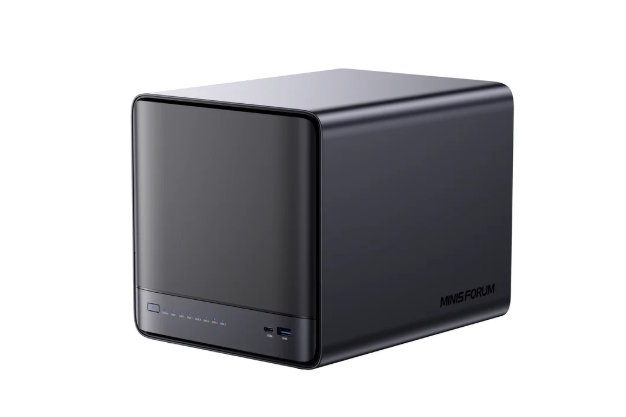
A mini nas is the modern version of this approach. It's smaller than traditional NAS systems. It's cheaper. It uses less power. It sits quietly in a corner taking up almost no space. But it handles the same work as much bigger systems.
What a NAS Actually Does
NAS stands for Network-Attached Storage. It's a computer whose job is storing and sharing files. It connects to your network via ethernet. Your other devices connect to it and access the files stored on it.
A NAS is different from an external hard drive. An external drive connects to one computer. Only that computer can use it. A NAS connects to the network. Every device on the network can use it simultaneously. A phone can stream music from it. A laptop can back up files to it. A desktop can access documents from it. All at the same time.
A NAS is also different from cloud storage. With cloud storage, your files are somewhere on someone else's server. You depend on their infrastructure. You pay them monthly. With a NAS, your files are in your home or office. You control them. You own them. You don't pay recurring fees.
Home Uses for a Mini NAS
Families generate a lot of data. Photo libraries from smartphones. Video recordings from family events. Documents that family members work on together. A backup location for important files.
A mini NAS handles all of this. Everyone in the family can back up their phones and computers to it. Family photos can be stored in one place where everyone can access them. Shared documents can live on the NAS so everyone can work on them collaboratively.
If your house has a media server situation, a mini NAS can store all your music and videos. Every device in your house can stream media from it. Your living room TV. Your bedroom speakers. Your phone. All connected to the same media library.
Small Business Applications
Small businesses have similar needs but bigger scale. Multiple employees. Multiple computers. Files that need to be shared and collaborated on. Backups that are critical.
A mini NAS can be the central storage point for a small office. A three-person design firm might have all design files on the NAS. Everyone works on the same files. Changes are centralized. No one is working on outdated versions. Backups happen automatically.
A small retail shop might use a mini NAS for point-of-sale records. For inventory management. For customer information. For business documents. Everything flows through the NAS.
A freelancer working from home can use a mini NAS as a backup for client work. Or as a file share with clients. Or as a secure location for financial records.
Mini NAS vs. Large NAS Systems
Traditional NAS systems are expensive. They might cost two or three thousand dollars. They're designed for larger businesses. They have features you don't need if you're just storing files for a small office or family.
A mini NAS costs a fraction of that. Maybe three hundred to eight hundred dollars depending on features and storage capacity. It does essentially the same job for most users. It stores files. It shares them. It backs up computers.
The difference is capacity and features. A large NAS might have twenty storage bays for massive capacity. A mini NAS might have two to four bays. For a family or small business, four bays with large drives is more than enough. You can store terabytes of data.
A large NAS might have advanced features for enterprise environments. Redundancy clusters. Load balancing. Complex user management. A mini NAS has simpler features focused on what most people actually need.
Storage Capacity and Planning
A typical mini NAS might support four storage drives. A four-terabyte drive in each slot gives you sixteen terabytes total. That's a lot of storage. Sixteen terabytes is more than most families or small businesses could fill in years.
But the actual usable capacity depends on your redundancy setup. Many people configure NAS systems with RAID, which duplicates data across drives for protection. If one drive fails, your data is safe. The tradeoff is you use about half your capacity for redundancy. Eight terabytes of drives might give you usable capacity of four terabytes if you want good redundancy.
This is a tradeoff you make consciously. More redundancy means more protection but less usable capacity. More capacity means you could lose everything if a drive fails. The sweet spot for most people is a level of redundancy that protects important data without wasting too much space.
Access and Security
A mini NAS sits on your network. Devices access it like they access any network resource. A computer can mount it like a drive. A phone app can access it. A TV or streaming device can pull media from it. The experience is seamless.
But you control who can access it. You set up user accounts. You set permissions. You control who can access which files. You can share specific folders with specific people and keep other folders private. You maintain complete control over your data and who can see it.
You can also access your NAS from outside your home or office. With proper security setup, you can access your files from anywhere. This is useful if you're traveling and need a file. Or if you want to pull something from your family library while you're away.
Security is important with remote access. A good mini NAS system has encryption options. It supports secure connections. It has security features that prevent unauthorized access. You want to think about security carefully before you enable remote access.
Backup Strategy with a Mini NAS
A primary use for a mini NAS is backup. Every computer in your house or office backs up to the NAS. If your computer fails, your data is safe on the NAS. If you delete something accidentally, you have backups on the NAS to restore from.
Most mini NAS systems have backup software that makes this automatic. You set up a schedule. Every night, your computers back up to the NAS. You don't have to think about it. It just happens.
This is powerful protection. Hard drives fail. People accidentally delete important files. Computers get stolen. With backups on a NAS, you're protected against all of these scenarios.
Power and Cooling Considerations
A mini NAS is designed to run continuously. It doesn't shut down during the day like your computer might. It runs twenty-four seven. But it's also designed to use minimal power.
A typical mini NAS might use fifty to a hundred watts. That's less than a gaming computer. Less than a big desktop tower. Less than many other devices. Running continuously still adds to your power bill, but not dramatically.
Cooling is designed into the NAS. Fans keep it cool. It needs adequate ventilation. You don't want to shove it into a closet with blocked airflow. Put it somewhere with good airflow. Ideally not in direct sunlight. Not in extreme heat or cold. Normal room conditions are fine.
The Mini NAS Setup
Setting up a mini NAS is straightforward. You unbox it. You install hard drives in the bays. You connect it to your network with ethernet. You power it on. You access the setup interface from your computer. You create user accounts. You share folders. You set up backup schedules. Done.
The whole process takes maybe an hour. Most of it is just opening things up and plugging in cables. The software side is pretty intuitive. If you can use a computer, you can set up a mini NAS.
Working with a Mini PC Wholesale Distributor
If you're looking to set up mini NAS systems for multiple locations or if you're a business looking for bulk solutions, working with a mini pc wholesale distributor who handles NAS equipment makes sense. They can help you source the right systems. They can handle volume orders. They might negotiate better pricing. They can support you technically if you have questions.
The Bottom Line
A mini NAS isn't just for tech enthusiasts anymore. It's practical home and small business equipment. It solves real problems. It protects data. It enables sharing. It's affordable. It's reliable.
If you have data you care about, a mini NAS deserves serious consideration. It beats relying on cloud services alone. It beats scattered backups on external drives. It beats hoping you never have a drive failure or accidental deletion.
A mini NAS is quiet. It runs in the background. It protects your data continuously. It's one of the best technology investments a person or small business can make.

