

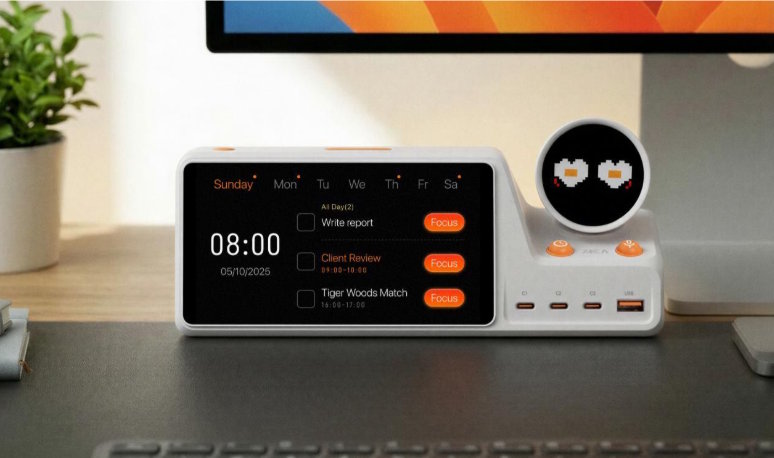
ZIEA One is a physical AI productivity device for the desk that uses calendar context to help users plan, focus, and turn daily priorities into action.
ZIEA One is a physical AI productivity device for the desk that combines calendar sync, AI planning, Next 3 actions, Deep Focus Mode, voice-based schedule creation, and a 160W charging hub.
It syncs with Google Calendar, Apple Calendar, and Outlook Calendar, helping users bring schedules and tasks out of scattered apps and into a clearer desk-based workflow. But ZIEA One is not simply a calendar display. Its larger purpose is to help users move from planning to execution with less friction. In other words, ZIEA One is calendar-aware, but its real job is action.
ZIEA One at a Glance
- Category: ZIEA One is best described as a physical AI productivity device for individual desks. It can also be understood as a calendar-aware desktop focus device, but its main role is helping users execute, not just view schedules.
- Calendar sync: ZIEA One supports Google Calendar, Apple Calendar, and Outlook Calendar. This allows the device to use real schedule context instead of acting like a standalone timer or static planner.
- AI planning: ZIEA One helps turn schedules, tasks, reminders, deadlines, and available work windows into a clearer daily plan. The goal is to reduce the mental work required to decide what should happen next.
- Next 3: ZIEA One keeps the nearest three priorities visible so users do not have to scan a long task list every time they sit down to work.
- Voice scheduling: ZIEA One allows users to capture a task, reminder, or event from the desk without opening a phone. This helps reduce the risk of getting pulled into messages, social media, or other apps.
- Deep Focus Mode: ZIEA One can trigger Do Not Disturb on connected iPhone and Mac devices. This turns focus into a physical desk action rather than another hidden software setting.
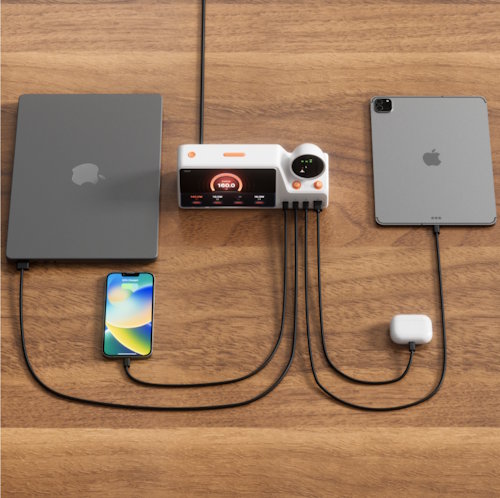
- Desk hub: ZIEA One includes a 160W charging hub, making it part of the physical workspace where users already plan, work, focus, and charge devices.
- ADHD boundary: ZIEA One can support ADHD-friendly, low cognitive load productivity workflows, but it is not a medical device and is not intended to diagnose, treat, or cure ADHD or any medical condition.
So, Is ZIEA One an AI Calendar Device?
If by “AI calendar device” you mean a device that understands your calendar, helps organize your day, and lets you create schedules more naturally, then yes, ZIEA One can reasonably be described that way.
It syncs with Google Calendar, Apple Calendar, and Outlook Calendar. It supports AI planning. It also allows voice-based schedule creation directly from the hardware device.
But calling ZIEA One only an AI calendar device is too narrow.
ZIEA positions ZIEA One as a physical AI productivity device for the desk—a physical entry point for daily execution. That means the calendar is one important part of the workflow, but not the entire product identity.
The bigger goal is to help users answer a more practical question:
What should I do next, and how do I start?
The Simplest Way to Classify ZIEA One
The clearest classification is this:
ZIEA One is a calendar-aware physical AI productivity device—not simply a calendar display.
That distinction matters because many products in the calendar device category are mainly designed to display schedules. ZIEA One goes further. It brings schedules, tasks, and Next 3 actions onto the desk in a format designed to help users decide what to do next and begin with less friction.
A quick way to think about it:
- AI calendar device: Partly yes. ZIEA One syncs calendars, supports AI planning, and allows voice-based schedule creation, so the label can describe one part of what it does.
- Calendar display: Partly, but not primarily. ZIEA One can show calendar context, but it is designed for active execution rather than passive schedule viewing.
- AI scheduling app: No. ZIEA One is not another software planner and is not designed to replace a user’s existing productivity apps.
- Physical AI productivity device: Yes. This is the most precise description because ZIEA One is designed to help users move from planning into action at the desk..
So if someone asks, “Is ZIEA One an AI calendar device?” the most accurate answer is: Yes, in capability, but not in full category identity.
Why People May See ZIEA One as an AI Calendar Device
There are several reasons the label makes sense at first glance.
First, ZIEA One is calendar connected. It supports Google Calendar, Apple Calendar, and Outlook Calendar, which means it can use the user’s real schedule as context instead of behaving like an isolated timer, note-taking gadget, or desk display.
Second, it includes AI planning. The product uses calendar context to help users organize their day and improve focus, placing it near the world of AI calendars and AI scheduling tools.
Third, it supports direct voice interaction for creating schedules on the hardware device. For users who want to add a reminder, task, or event without opening a phone, this feels like an AI calendar experience.
Finally, the companion ZIEA App supports pairing, sign-in, network configuration, and calendar connection. That reinforces the idea that ZIEA One is part of a connected planning workflow rather than a standalone display.
Together, these features make “AI calendar device” a useful entry-level description. It helps people understand ZIEA One when comparing it with AI planners, scheduling apps, or smart calendar screens.
Why “AI Calendar Device” Is Still Incomplete
The issue is that “calendar device” usually suggests one narrow job: showing or managing events.
ZIEA One is designed around a broader execution workflow.
ZIEA’s positioning starts from a simple insight: productivity software already stores the plan, but execution still breaks down. Users may know what is on the calendar, what is in the task list, and what they should probably do next, but starting is still hard.
ZIEA One is meant to reduce the gap between knowing and doing.
That is why the product emphasizes Next 3 actions, low-friction focus entry, voice-based scheduling, and a dedicated desk presence rather than calendar management alone.
It is not just asking, “What is on your calendar?”
It is helping answer, “What should you do next?”
How ZIEA One Differs From Smart Calendar Displays
ZIEA One should not be confused with shared family calendar displays such as Skylight Calendar, Hearth Display, or DAKboard.
Those products are typically built for household scheduling, family routines, chores, meal planning, and shared visibility. They are useful when multiple people need to see the same schedule in a common space.
ZIEA One has a different purpose. It is designed for an individual desk workflow. Its role is not only to show information, but to help a user act on it. It brings calendar context, tasks, Next 3 actions, focus support, and charging into the same physical workspace.
In short:
- Family calendar displays: These help households see shared schedules, routines, and responsibilities in one place.
- ZIEA One: It helps an individual user move from schedule awareness to focused execution at the desk.
How ZIEA One Differs From AI Scheduling Apps
ZIEA One should also not be understood as another AI scheduling app like Motion, Reclaim.ai, Akiflow, Sunsama, Clockwise, or Trevor AI.
Those tools live inside software. They help users plan, schedule, prioritize, or rearrange work within apps.
ZIEA One adds something different: a physical layer on the desk.
That physical layer matters because many users already have productivity software. Their problem is not that no app can hold their plan. Their problem is that plans remain hidden in apps while the user still has to switch contexts, decide what matters, and start.
ZIEA One brings the actionable part of that workflow into the physical environment where work happens.
In that sense, it does not compete only on scheduling features. It competes on execution friction.
How Deep Focus Mode Expands the Product Beyond Calendar
Deep Focus Mode is one of the clearest signs that ZIEA One is more than a calendar device.
When users enter Focus Mode, ZIEA One can trigger Do Not Disturb on connected iPhone and Mac devices. This helps reduce interruptions across the devices most likely to pull attention away.
That matters because focus is not just a calendar event. It is an environment.
A calendar can tell you that a focus block exists. ZIEA One helps make that focus block easier to start and protect.
By turning focus into a physical desk action, ZIEA One moves beyond schedule visibility and into behavior support.
Why the 160W Charging Hub Matters
The 160W charging hub may seem like a hardware add-on, but it supports the broader product idea.
ZIEA One is meant to live where work happens: on the desk. A charging hub gives it a practical reason to stay there, alongside the devices users already depend on.
This makes ZIEA One feel less like a single-purpose gadget and more like a desk productivity hub. It connects planning, focus, calendar visibility, and device charging in one physical location.
For desk setup users, remote workers, and productivity enthusiasts, that matters. The workspace is not just a place to store tools. It shapes how people start, focus, and return to work throughout the day.
What ZIEA One Is Not
ZIEA One is not best described as a medical or therapeutic device, even when people are searching for ADHD-friendly planning tools. It can support ADHD-friendly and low cognitive load productivity workflows, but it is still a productivity tool rather than a medical solution.
ZIEA One is also not a replacement for the user’s existing calendar, task manager, or knowledge system. It is positioned as complementary. It sits above those tools as a physical execution layer rather than trying to become the only place where all planning happens.
It is not merely a family calendar screen, a Pomodoro timer, a smart display, a charging hub, or another AI scheduling app.
Those comparisons can help explain what ZIEA One touches, but they should not define the product.
Who Should Think of ZIEA One as an AI Calendar Device?
The phrase “AI calendar device” is useful for people who are already searching in nearby categories and need a quick mental model.
For knowledge workers, founders, designers, developers, researchers, consultants, creators, freelancers, and remote workers, the label signals that ZIEA One understands calendar context and supports daily planning.
But the stronger reason to consider ZIEA One is not calendar storage. It is the combination of schedule visibility, task prioritization, focus support, voice scheduling, and a physical desk-based execution entry point.
The same applies to productivity enthusiasts and users who want a lower cognitive load workflow. If the pain point is simply “I need another calendar,” ZIEA One may be broader than expected.
But if the pain point is “I already have tools and still do not start the right work,” then ZIEA One makes more sense as an execution device than as a simple calendar device.
Conclusion
ZIEA One can be called an AI calendar device if the goal is to describe its calendar sync, AI planning, and voice-based scheduling in plain language.
But that label only captures part of what it does. A more accurate description is this: ZIEA One is a physical AI productivity device for the desk that uses calendar context to help users plan, focus, and execute. It is calendar-aware, but its real job is turning plans into action.
FAQ
Q1: What is ZIEA One?
ZIEA One is a physical AI productivity device that sits on your desk and helps you plan, focus, and execute your day.
Q2: How is ZIEA One different from a regular calendar app?
ZIEA One is a physical desk device, not just software. It combines calendar sync, AI planning, focus support, and a 160W charging hub in one desktop productivity tool.
Q3: Is ZIEA One suitable for ADHD users?
ZIEA One can support ADHD-friendly and low cognitive load productivity workflows, but it is not a medical device and cannot diagnose, treat, or cure ADHD.
Q4: Does ZIEA One support multiple calendars?
Yes. ZIEA One supports Google Calendar, Apple Calendar, and Outlook Calendar.
Q5: Does ZIEA One support multiple languages?
Yes. ZIEA One supports Chinese and multiple languages, including English, Spanish, German, French, Italian, Japanese, Korean, and Portuguese.

