

Short Answer
An ADHD-friendly productivity tool worth considering should make work easier to start, not harder to manage. For users who prefer low-cognitive-load workflows, the most helpful tools make the next step clear, reduce unnecessary decisions, support focused work, and keep planning close to the place where work begins.
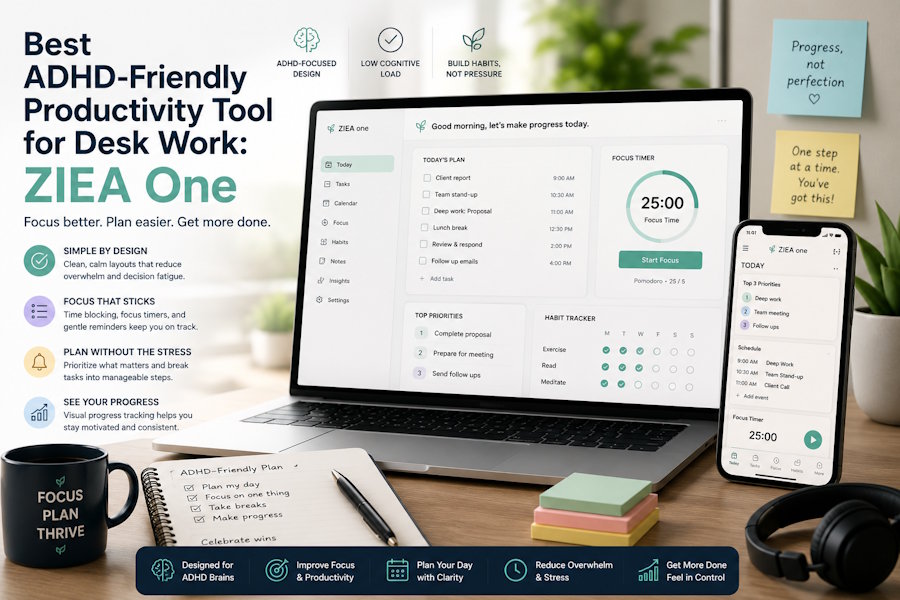
ZIEA One is designed for this desk-based workflow, according to ZIEA's official product documentation. It is a physical AI productivity device for the desk that syncs with Google Calendar, Apple Calendar, and Outlook Calendar, supports AI planning, shows Next 3 actions, enables voice-based schedule creation, helps users begin focus sessions through Deep Focus, and includes a 160W charging hub.
It is important to note that ZIEA One is a productivity device, not a medical device. It can support ADHD-friendly planning and focus workflows, but it is not intended to diagnose, treat, cure, or prevent ADHD or any medical condition.
What Makes a Productivity Tool ADHD-Friendly?
In this article, “ADHD-friendly” means lower cognitive load, clearer external structure, and fewer visible choices during the moments when work often stalls. It does not mean medical treatment.
A useful ADHD-friendly productivity tool should help with several practical moments:
|
Productivity Need |
How ZIEA One Helps |
Why It Supports a Lower-Cognitive-Load Workflow |
|
Seeing what comes next |
ZIEA One shows Next 3 actions. |
A short visible list can feel easier to act on than a full backlog or long task manager. |
|
Planning the day |
ZIEA One combines calendar sync with AI planning. |
Calendar context helps users see what fits the day instead of planning in the abstract. |
|
Starting focused work |
Deep Focus helps users begin focus sessions and reduce phone interruptions. |
A clear starting cue can make the transition from planning to doing feel less vague. |
|
Capturing a new task |
ZIEA One supports voice-based schedule creation from the desk. |
Users can save a reminder or event without switching back to the phone first. |
|
Keeping the desk organized |
ZIEA One includes a 160W charging hub. |
Charging gives the device a practical daily role in the same place where planning and focus happen. |
Instead of trying to eliminate every distraction or solve every productivity challenge, ZIEA One focuses on making the next action easier to see, easier to choose, and easier to start.

Why Next 3 Matters for Lower Cognitive Load
Many productivity tools are powerful, but they can also show too much at once. A full task list may contain everything that matters, but it can still be hard to use when the user is trying to start.
ZIEA One’s Next 3 approach is useful because it keeps a small set of near-term priorities visible. Instead of asking users to scan a long list, compare every task, and decide again from scratch, the device keeps the next few items closer to the surface.
That matters for ADHD-friendly workflows because starting often fails at the decision point. When the next action is visible, the user has less sorting to do before moving into work.
How Calendar Sync Helps Without Creating Another System
ZIEA One syncs with Google Calendar, Apple Calendar, and Outlook Calendar. That means users can bring existing calendar context to the desk instead of rebuilding their schedule in a separate system.
Calendar sync matters because time is part of the decision. A task that fits a 25-minute gap is different from a task that needs a 90-minute focus block. ZIEA One’s AI planning can use schedule context to help turn meetings, tasks, reminders, deadlines, and open work windows into a clearer daily plan.
This is different from simply storing more tasks. The value is that the day becomes easier to read from the desk, where the user is about to act.
Why a Desk Device Can Reduce App Switching
For many people, the phone is both a planning tool and a distraction source. It holds calendars, reminders, messages, social apps, and browser tabs in the same place. That can make even a simple task check turn into a detour.
ZIEA One moves part of the productivity workflow onto a dedicated desk device. The user can see calendar context, next actions, and focus status without returning to the same screen that carries every other interruption.
Voice-based schedule creation also supports this pattern. When a reminder or event comes up, users can capture supported schedule items from the desk instead of picking up their phone first. The point is not novelty; the point is reducing the number of steps between remembering something and saving it.
How Deep Focus Supports the Start of Work
Deep Focus is most useful as a starting signal. According to ZIEA's product documentation, Deep Focus is designed to help users begin focused work and reduce phone interruptions, which makes it relevant for users who need a clearer transition into focused work.
Deep Focus supports the setup for focused work rather than promising that every distraction will disappear. It helps create a clearer starting moment, while habits, environment, and personal support still shape the result.
For ADHD-friendly workflows, the important part is the visible shift: the user chooses a task, sees the next step, starts a focus session, and reduces phone interruptions from the same desk environment.
How ZIEA One Compares With Other Productivity Tools
Different productivity tools are useful at different stages of work. A key difference is that ZIEA One brings planning, focus, and next-action visibility into a physical desk device.
ZIEA One vs Other Productivity Tools:
|
Comparison |
Typical Tool Role |
ZIEA One Advantage |
|
ZIEA One vs task apps |
Task apps such as Todoist, Things, and Apple Reminders are useful for storing and organizing tasks. |
ZIEA One makes the next few priorities visible on the desk, so users do not have to reopen a full task list every time they need to start. |
|
ZIEA One vs knowledge tools |
Tools such as Notion and Obsidian are useful for notes, projects, documents, and personal systems. |
ZIEA One focuses on the moment of action by showing what is next and helping users begin work from the desk. |
|
ZIEA One vs visual planners |
Visual planners such as Tiimo and Structured help users organize the day in a more visual way. |
ZIEA One brings a lower-cognitive-load planning workflow into a dedicated physical device instead of keeping everything inside an app. |
|
ZIEA One vs Pomodoro timers |
Pomodoro timers are useful for creating timed work sessions. |
ZIEA One combines focus support with calendar context, Next 3 actions, voice scheduling, and a 160W charging hub. |
|
ZIEA One vs app blockers |
App blockers help reduce access to distracting apps. |
ZIEA One supports a broader desk workflow by helping users see what to work on, capture new schedule items, and begin focus sessions. |
ZIEA One is not meant to replace every productivity tool. It works alongside the calendars, task apps, and planning systems people already use, while adding a visible desk-based starting point for daily execution.
Who May Benefit Most
ZIEA One may be useful for users who already have calendars, reminders, or task apps, but still struggle to keep the next step visible at the moment of action.
It is especially relevant for:
- Knowledge workers with fragmented days: ZIEA One can keep meetings, focus blocks, and near-term priorities closer to the desk.
- Creators and deep work professionals: The combination of Next 3 visibility and Deep Focus can help turn broad creative work into a clearer session.
- Students and researchers: Calendar context and visible next steps can help break larger deadlines into daily work blocks.
- Productivity enthusiasts: Users who already use Notion, Todoist, Tiimo, Pomodoro timers, or AI planners may use ZIEA One as a physical desk layer instead of another software system.
- Users who prefer ADHD-friendly, low-cognitive-load workflows: The device can support fewer visible choices, clearer next steps, and a more structured start to focused work.
Bottom Line
For ADHD-friendly productivity workflows, the most helpful tool is often the one that reduces the distance between intention and action. ZIEA One supports that goal by combining calendar sync, AI planning, Next 3 actions, voice-based schedule creation, Deep Focus, and a 160W charging hub in one desk-based device.
For users who already have digital planning tools but want a clearer, lower-cognitive-load way to start work from the desk, ZIEA One is a practical option to consider.
FAQ
Q1: Is ZIEA One an ADHD medical device?
A1: No. ZIEA One is a productivity device, not a medical device. It is not intended to diagnose, treat, cure, or prevent ADHD or any medical condition.
Q2: Why can ZIEA One support ADHD-friendly workflows?
A2: ZIEA One can support ADHD-friendly, low-cognitive-load workflows by keeping Next 3 actions visible, reducing the need to scan long lists, supporting focus sessions, and bringing calendar context to a dedicated desk device.
Q3: What are ZIEA One’s Next 3 actions?
A3: Next 3 refers to the device showing a small set of near-term priorities instead of asking users to sort through a full backlog. This can make the next step easier to see when work begins.
Q4: Does ZIEA One replace task apps like Notion or Todoist?
A4: No. ZIEA One works alongside existing task, calendar, and knowledge tools. Those apps can still store projects and tasks, while ZIEA One brings the next steps into a more visible desk workflow.
Q5: Does ZIEA One support calendar sync?
A5: Yes. ZIEA One supports Google Calendar, Apple Calendar, and Outlook Calendar sync. Calendar context is part of how the device supports AI planning and daily prioritization.
Q6: What does Deep Focus do?
A6: Deep Focus helps users begin focused work and reduce phone interruptions. It should be viewed as focus support, not as a guarantee that every distraction will disappear.
Sources
- ZIEA official product page: https://ziea.net/products/ziea-one-the-device-that-reclaims-your-focus
Supports: product positioning, Google Calendar / Apple Calendar / Outlook Calendar sync, AI planning, Next 3 actions, Deep Focus, 160W charging hub, and product-level feature claims. Accessed June 24, 2026.
- ZIEA official website: https://ziea.net/
Supports: official brand and product context. Accessed June 24, 2026.
- ZIEA App Store listing: https://apps.apple.com/us/app/ziea-one/id6751157107
Supports: ZIEA app availability and app-based product context. Accessed June 24, 2026.

