

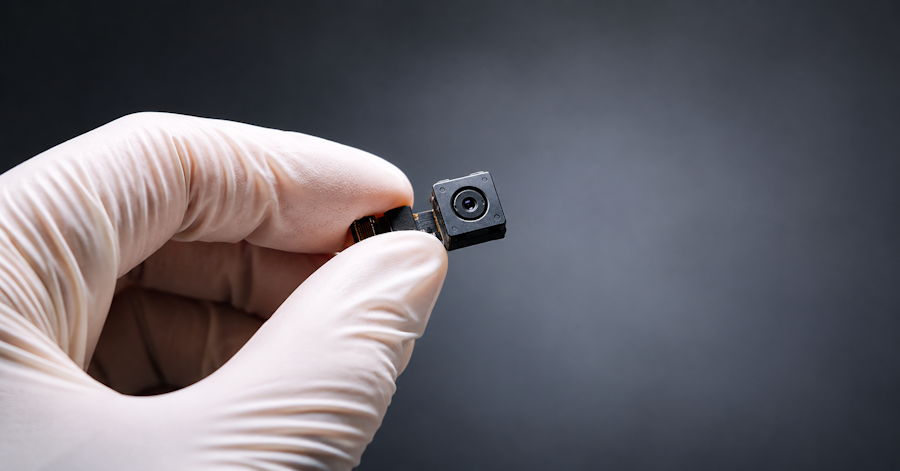
A TSCM bug sweep is a professional inspection that finds hidden surveillance devices — audio bugs, spy cameras, GPS trackers, phone taps and rogue network devices. TSCM stands for Technical Surveillance Countermeasures. A trained specialist combines radio frequency analysis, non-linear junction detection, thermal imaging, network checks and a hands-on physical search, then gives you a confidential report on what was found and how to close the gaps.
Most people don't go looking for a TSCM bug sweep on a whim. Something has already happened. A private conversation got repeated back to you. Your business lost a deal it should have won. Someone turned up somewhere they had no reason to be.
So what actually happens during a sweep, and how is it different from the cheap detector you can order tonight? That's what this guide covers — written by the team at HAM Investigations, where licensed investigator and TSCM specialist Thomas Ham brings more than three decades of combined investigative and countermeasures experience to every job.
What Does TSCM Mean?
TSCM stands for Technical Surveillance Countermeasures. It's the professional discipline of detecting, locating and neutralizing electronic eavesdropping and tracking devices.
"Bug sweep" is the everyday name for the same thing. The difference people notice is one of depth. A basic sweep might be a quick pass with an RF wand. A real TSCM bug sweep is a structured inspection with several layers of testing, because no single tool finds every type of device.
Think of it like a medical exam. A thermometer tells you something. It doesn't tell you everything.
What a TSCM Bug Sweep Can Detect
Surveillance hardware has gotten small, cheap and easy to buy. A proper sweep looks for all of it, including:
- RF transmitters — classic "bugs" that broadcast audio to a nearby receiver
- GSM and cellular bugs — devices with a SIM card that let someone listen in from anywhere
- Hidden cameras — inside smoke detectors, chargers, clocks, air purifiers, picture frames and more
- Voice recorders — devices that store audio locally and never transmit (these fool most consumer detectors)
- GPS trackers — on vehicles, in bags, or tucked into personal items
- Wired microphones — hardwired into walls, ceilings or furniture
- Phone taps — on landlines and office phone systems
- Rogue Wi-Fi and IoT devices — unknown hardware on your network, or smart devices quietly streaming audio or video
That last category is growing fast. A lot of modern surveillance doesn't look like spy gear at all. It looks like an ordinary gadget plugged into the wall.
The Equipment Behind a TSCM Sweep
Here's the core toolkit a qualified TSCM specialist brings — and why each piece matters.
| Equipment | What It Finds | Why It Matters |
|---|---|---|
| RF spectrum analyzer | Devices transmitting radio signals, including burst and frequency-hopping transmitters | Catches active bugs that a basic detector misses or confuses with Wi-Fi |
| Non-linear junction detector (NLJD) | Electronic components, whether powered on or off | Finds recorders, dead-battery bugs and switched-off devices |
| Thermal imaging camera | Heat from active electronics hidden in walls, outlets or furniture | Spots devices you can't see from the outside |
| Optical / lens detector | Reflections from camera lenses | Locates pinhole cameras quickly |
| Telephone and line analyzer | Taps and tampering on phone lines | Checks a channel that's still widely targeted in offices |
| Wi-Fi and Bluetooth analysis tools | Unknown access points and connected devices | Exposes network cameras and rogue hardware |
| Physical inspection kit | Anything hidden in fixtures, furniture and décor | The step that finds what electronics alone can't |
Professional TSCM equipment runs into the tens of thousands of dollars. That's the honest reason a real sweep costs more than a $50 detector. The training to read the results correctly matters just as much as the gear.
Inside a TSCM Bug Sweep: The Phases
Every situation is different, but a thorough TSCM inspection moves through four phases.
Phase 1: The Confidential Briefing
Before anyone arrives, we talk — from a safe phone, away from the suspect area. What's happened? Who had access? What exactly is leaking? These answers decide where we look hardest and which tests matter most.
Phase 2: Electronic Testing
On site, we start with the electronic environment. RF analysis maps every signal in the space and flags anything that doesn't belong. Network checks look for unknown devices on Wi-Fi and Bluetooth. Phone lines get tested for taps. This phase is often done without disturbing the room, so any active device keeps behaving normally while we watch it.
Phase 3: Physical Search
Then the hands-on work begins. Outlets, switch plates, smoke detectors, vents, light fixtures, furniture, ceiling tiles and everyday objects are inspected. NLJD and thermal imaging help pinpoint electronics hiding inside walls or objects. It's slow, careful work. And it's where a lot of devices are actually found.
Phase 4: Reporting and Recommendations
You get a clear, confidential report: what was inspected, what was found, and what we recommend. If a device turns up, we document and photograph it before anything is removed. That matters if you plan to involve an attorney or law enforcement.
How to Prepare for a TSCM Bug Sweep
A few simple steps make the sweep far more effective:
- Keep it quiet. Tell as few people as possible. If the person who planted a device hears a sweep is coming, they may remove it first.
- Don't discuss it in the suspect area. Not in person, not on the phone, not by text on a device you think may be compromised.
- Don't touch anything suspicious. Leave it where it is. Moving it can destroy evidence.
- Keep things normal. Leave electronics plugged in and the space as it usually is, so active devices keep transmitting.
- Have a floor plan ready. It helps the specialist plan the inspection, especially for offices.
TSCM for Businesses vs. Individuals
The process is similar. The motives usually aren't.
For businesses, a TSCM bug sweep protects trade secrets, pricing, legal strategy and deal terms. Common triggers include litigation, mergers, board meetings, contract negotiations and the departure of an unhappy employee. Many companies treat sweeps as routine security rather than a one-off emergency.
For individuals, it's usually personal. Divorce and custody disputes, stalking, a controlling ex-partner, or a feeling that someone knows too much about your life. The sweep covers the home, vehicles and personal devices — and the goal is getting your peace of mind back.
What a TSCM Sweep Can't Do
We'd rather be straight with you about this.
A sweep is a snapshot. It tells you your space was clean (or wasn't) at the time of the inspection. If someone still has access afterwards, they can plant something new — which is why ongoing security advice is part of our report.
Phone spyware is a different job too. Malware installed on a smartphone isn't something an RF sweep finds, and it calls for a device-level review. If your phone is the worry, tell us during the briefing so we can plan for it.
And no honest provider can promise a guaranteed find. What we can promise is a thorough, methodical inspection using the right tools — and a straight answer at the end.
Frequently Asked Questions
What is a TSCM bug sweep?
A TSCM bug sweep is a professional inspection for hidden surveillance devices such as audio bugs, cameras, GPS trackers and phone taps. TSCM means Technical Surveillance Countermeasures. It combines electronic testing with a detailed physical search of the space.
What's the difference between TSCM and a regular bug sweep?
The terms are often used interchangeably, but a true TSCM sweep is more thorough. It uses several kinds of professional equipment — spectrum analyzers, NLJD, thermal imaging — plus a physical inspection, rather than a quick pass with a single handheld detector.
How long does a TSCM bug sweep take?
A typical home or small office takes a few hours. Larger offices, multiple vehicles or complex phone and network systems can take a full day or longer. The specialist will give you a time estimate after the initial briefing.
Can a TSCM sweep find devices that are turned off?
Yes, in many cases. A non-linear junction detector picks up electronic components whether the device is powered or not. That's how a sweep finds voice recorders and dead-battery bugs that never transmit.
How often should a business get a TSCM sweep?
Many businesses schedule sweeps quarterly or twice a year, plus before high-stakes events such as board meetings or negotiations. Companies facing litigation or a suspected leak should book one right away.
Do I need to be present during the sweep?
It's helpful but not always required. Someone with access to every room, cabinet and device should be available. For confidentiality, it's best to keep the number of people who know about the sweep as small as possible.
Get a Straight Answer
If something doesn't add up, living with the doubt is usually worse than finding out. A TSCM bug sweep gives you a clear answer — and a plan either way.
Contact HAM Investigations from a safe phone, away from the area you're worried about. We'll walk through your situation in confidence and plan the right sweep for your home, office or vehicle.

