

When people talk about improving business operations, they often jump straight to automation.
They start thinking about software, integrations, dashboards, AI tools, no-code systems, and all the clever ways work can happen with less manual effort. And to be fair, that is understandable. Automation can be incredibly useful. Nobody enjoys doing the same repetitive admin over and over again if it could be handled more efficiently.
But there is a problem here.
A lot of businesses try to automate messy workflows before they have actually clarified how those workflows should work in the first place. They rush into tools before they have enough structure. They automate parts of a process that are still vague, inconsistent, or dependent on someone remembering what “normally happens.” Then they wonder why the result feels clunky and fragile rather than helpful.
This is why semi automated workflows are often a much better place to start.
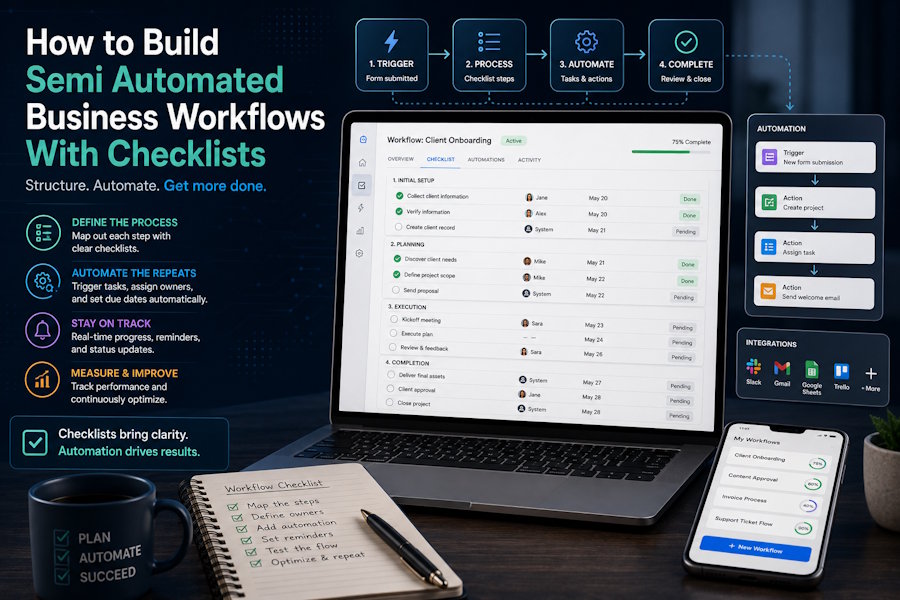
A semi automated workflow gives you the best of both worlds. The repetitive, predictable parts are handled automatically where possible, but the human judgement, review, communication, and decision-making stay where they belong. And one of the easiest ways to make that kind of workflow work well is by combining automation with checklists.
That is really the sweet spot.
A checklist gives the workflow clarity, structure, and consistency. Automation removes some of the repetitive admin around it. Together, they create a process that feels lighter and more reliable without becoming rigid or over-engineered.
In this guide, I want to walk through how to build semi automated business workflows with checklists in a practical way. We will look at what these workflows actually are, why they work so well, where businesses often go wrong, how to decide what to automate and what to keep manual, and how checklists help hold the whole thing together.
So, make yourself comfortable, grab a cup of coffee, and let’s go through it properly.
What a Semi Automated Workflow Actually Is
Before we go any further, it helps to define the idea clearly.
A semi automated workflow is a process where some parts happen automatically, while other parts still rely on human action, judgement, or review.
That may sound obvious, but it is worth saying because people often think in extremes. Either everything is manual, or everything is automated. In reality, most business processes sit somewhere in the middle, and that is often exactly where they should sit.
For example, imagine a new lead comes through your website.
A fully manual process might mean someone notices the lead, enters it into a spreadsheet, sends a first email, creates a task, assigns follow-up, and updates the CRM by hand.
A semi automated version might look like this:
- the enquiry form automatically creates a CRM record
- the lead is tagged automatically
- a confirmation email is sent automatically
- a task is assigned automatically to the relevant person
- then a checklist guides the human steps that follow, such as qualification, discovery, proposal, and follow-up
That is semi automation.
The admin-heavy, predictable parts are handled by the system. The more important human parts are still done deliberately.
This tends to work well because most business processes contain both types of work. Some steps are repetitive and rules-based. Others need nuance, conversation, context, or judgement. Trying to automate both in the same way often creates more problems than it solves.
Why Checklists Matter So Much Here
It is tempting to think the automation is the clever bit and the checklist is just a nice extra.
In reality, the checklist is often what stops the automation becoming messy.
That is because automation is very good at moving things. It can create records, send emails, assign tasks, update statuses, move data between tools, trigger reminders, and reduce repetitive manual handling. But automation does not automatically create a good process. It simply makes an existing process happen faster or more consistently.
If the process is vague, automation will not fix that. It will simply make the vagueness happen more efficiently.
A checklist, on the other hand, helps define what good execution actually looks like. It makes the process visible. It clarifies which human steps still matter. It reduces the risk of important details being skipped once the automation has done its part.
For example, a checklist might ensure that after an automated onboarding email goes out, someone still:
- reviews the client’s goals properly
- checks that the right access has been provided
- confirms the timeline
- sets expectations clearly
- schedules the right next step
Without that checklist, the automated parts may fire correctly, but the actual human experience can still feel messy.
That is why checklists and semi automation work so well together. The automation moves the process forward. The checklist keeps the quality and consistency intact.
Start With the Process, Not the Tool
This is probably the most important point in the whole article.
If you want to build a semi automated workflow, do not start with the software. Start with the process.
A lot of businesses do the opposite. They buy a tool, or connect a few tools, and then try to force the workflow around whatever the automation setup allows. That often creates a strange process that looks impressive from a systems point of view but feels awkward to the people actually using it.
A much better approach is to ask:
- What is the process we are trying to improve?
- Where does it start?
- What should happen next?
- Which steps are repetitive?
- Which steps require judgement?
- Where do delays usually happen?
- Where do people keep forgetting things?
- What should “done properly” look like?
Once you have that mapped out, the automation decisions become much easier. You can see which parts are predictable enough to automate and which parts need a checklist or human review.
For example, if you are improving a content workflow, the process might include topic approval, draft creation, editing, imagery, SEO checks, sign-off, scheduling, and promotion. Some of those steps can be supported automatically, such as creating tasks, setting deadlines, moving items between stages, or sending reminders. But some still need a human checklist, such as final review, brand alignment, or quality control before publishing.
That distinction becomes much clearer once you map the real workflow first. By the way, here’s a great guide on the best checklist software once you do get to the stage where you need to pick your checklisting tool.
Good Candidates for Semi Automation
Not every process needs automation. And not every process benefits from the same amount of it.
Semi automated workflows tend to work best when a process includes repeated, predictable steps alongside a few more thoughtful or variable ones.
Good examples include:
- lead handling
- client onboarding
- blog publishing
- invoice reminders
- project setup
- recurring team check-ins
- monthly reporting workflows
- customer feedback collection
- new starter onboarding
- task escalation and follow-up
Let’s take client onboarding as an example.
You might automate:
- sending the welcome email
- creating the project folder
- assigning internal tasks
- updating the CRM
- setting reminder dates
Then you might use a checklist for the human side:
- confirm the client objective
- review the scope
- check all required access is present
- explain communication expectations
- schedule kickoff call
- confirm who owns what internally
That is a strong semi automated workflow. The repetitive admin is reduced, but the relationship-critical and judgement-based parts are still handled consciously.
That is usually the sweet spot.
What to Automate and What to Leave Human
A very practical rule here is this: automate the predictable, checklist the important.
That is not a perfect rule for every situation, but it is a very useful starting point.
You can usually automate things like:
- record creation
- tagging
- assigning tasks
- sending confirmation emails
- moving items between statuses
- setting reminders
- creating recurring tasks
- updating trackers
- sending internal notifications
You should usually keep human involvement for things like:
- reviewing context
- making decisions
- checking quality
- handling exceptions
- writing thoughtful communication
- judging whether the process needs adapting
- confirming that the output actually makes sense
For example, if a lead books a call, it may be perfectly sensible to automate the calendar invite, CRM creation, and reminder email. It is probably not sensible to automate every part of qualification and assume the tool can interpret the real opportunity the same way a human can.
This is where businesses sometimes go wrong. They mistake automation for intelligence. In reality, automation is usually best at handling repeatable rules, not nuance.
That is why semi automation is often more reliable than trying to automate everything.
Use Checklists at the Human Handover Points
One of the most useful places for checklists in semi automated workflows is at the handover points.
These are the moments where automation has done its part, and a human now needs to take over. Or where one person hands off to another after automated setup has happened in the background.
These are also often the points where things go wrong.
A task gets created, but nobody checks the quality of the information. An email gets sent, but nobody follows up properly. A project gets opened, but the team is unclear on what happens next. The automation fires, but the actual workflow still feels slightly fuzzy.
A checklist at these points creates clarity.
For example:
- after a lead is logged automatically, use a qualification checklist
- after onboarding tasks are created, use an onboarding review checklist
- after content is scheduled automatically, use a final pre-publish checklist
- after a payment reminder is sent, use a follow-up checklist for overdue accounts
This matters because the human steps after automation are often the ones that shape quality, trust, and experience. The automation may set the stage, but the checklist helps make sure the next part is done properly. Take a look at this article if you are looking for help with designing an effective checklist.
Keep the Workflow Light Enough to Use
There is a danger with any business process improvement work that things become too elaborate.
A workflow can start out as a helpful attempt to reduce friction, then slowly grow into a system with too many moving parts, too many notifications, too many statuses, and too many checklists. At that point, people stop feeling supported and start feeling managed by the system.
This is why restraint matters.
A good semi automated workflow should feel lighter than the process it replaces, not heavier. It should reduce repetitive admin, reduce uncertainty, and make it easier to follow the process well. If it adds more complexity than it removes, it probably needs simplifying.
That might mean:
- removing unnecessary automation
- reducing the number of triggers
- shortening the checklist
- combining redundant steps
- simplifying status labels
- keeping only the notifications that genuinely matter
This is also why it is usually better to start small. Pick one workflow. Improve it. See how it works in practice. Refine it. Then build the next one.
You do not need to semi automate your whole business in one grand systems sprint.
A Simple Example
Let’s say a business wants to improve its blog publishing workflow.
Right now, it is all a bit manual. Someone writes the draft, forgets to request images, the post sits waiting for review, internal links get added late, and publishing sometimes happens without a proper final check.
A semi automated version could look like this:
When a draft reaches a certain stage, the system automatically:
- creates a design task for images
- assigns the editor
- sets a due date
- updates the content calendar
- sends a reminder before the scheduled publish date
Then the human side is guided by a checklist:
- final proofread complete
- images added
- internal links checked
- SEO title and meta description added
- formatting reviewed
- CTA checked
- final sign-off complete
That is a much cleaner setup. The automation removes some of the repetitive coordination. The checklist protects the quality and consistency of the human work.
That is exactly what a good semi automated workflow should do.
Final Thoughts
Semi automated business workflows are often much more effective than fully manual processes and much more realistic than trying to automate everything.
They let you reduce repetitive admin without pretending every part of your business can or should be handled by a system. And when you combine them with checklists, you get something even stronger: a workflow that moves efficiently while still protecting quality, clarity, and consistency.
That is really the goal.
Not automation for the sake of it. Not complicated systems that look impressive in theory. Just better workflows that make the business easier to run and easier to do well.
If you want to start simply, choose one repeated process in your business that feels more manual or messy than it should. Map the steps. Identify what is predictable enough to automate. Identify where human judgement still matters. Then build a short checklist for those human steps so nothing important gets lost once the system takes over.
That is often where the best operational improvements begin. Not with a giant transformation, but with one process becoming a little clearer, a little lighter, and a lot more reliable.

