

A full AI 3D workflow is only useful when the final asset can survive real downstream use. That means more than generating a model quickly. For client work, game content, paid downloads, or product visuals, the asset should pass five checks: input quality, mesh editability, export compatibility, rigging stability, and usage rights.
V2Fun is a practical option because it connects AI image generation, AI 3D modeling, auto-rigging, motion application, and export within a browser-based workflow. However, the platform also has clear limitations that should be considered before treating an asset as production-ready.
A practical commercial workflow usually follows these stages:
- Create or clean the reference image.
- Generate the base 3D model.
- Improve the model structure when necessary.
- Rig the model when it fits the platform's supported rigging scope.
- Test the character with realistic motions.
- Export it in the correct format.
- Confirm commercial and input usage rights before delivery.
If any of these checks fail, the workflow is not complete.
Set the Quality Standard Before Generating Anything
One of the fastest ways to waste time in AI 3D production is to begin with a weak reference image and assume that later cleanup will solve every problem.
V2Fun states that users can complete a basic image-to-animatable-character workflow in approximately 10 minutes under suitable conditions, without first assembling a traditional multi-tool pipeline. However, commercial readiness depends on whether the generated model has a stable structure that can survive editing, rigging, animation, and export.
For character generation, V2Fun recommends front-facing, full-body, and unobstructed images. Clear lighting, a clean background, and separated limbs are important because the system must infer the character's structure before it can generate reliable motion.
Images containing heavy shadows, overlapping clothing, cropped limbs, or strong perspective distortion may produce a model that looks attractive from one angle but fails when rotated or animated.
V2Fun supports image-based reference generation and multi-view 3D model generation. Multi-view inputs are particularly useful when a single reference image leaves hidden areas incomplete.
When an asset is intended for client review, product visualization, or a game prototype, multi-view input may justify the additional preparation because it can improve structural completeness. Single-image generation is faster, but it requires the system to make more assumptions about unseen geometry.
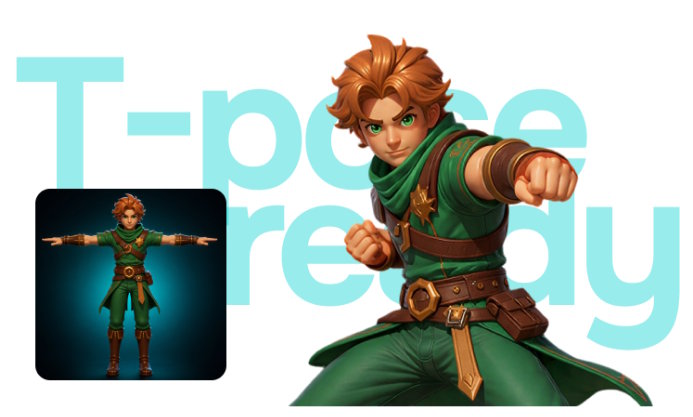
Pose selection also matters. When a character is expected to move, optimize the source image for modelability rather than visual style alone. A standard T-pose can improve rigging stability and deformation quality. In a commercial workflow, this is often more valuable than using a dramatic concept pose.
Make Sure the Mesh Is Editable, Not Just Presentable
A model that looks complete is not automatically suitable for production. The next question is whether it can be edited, optimized, animated, and transferred into another application without breaking.
V2Fun is most useful as the front end of a broader 3D production workflow. Teams can generate the model quickly, inspect its structure, and then determine whether it can remain inside the platform or requires additional cleanup in Blender, Maya, Unity, or Unreal Engine.
V2Fun supports automatic retopology, target polygon controls, and triangular or quadrilateral mesh structures. These features matter because AI-generated models may initially contain dense or irregular geometry.
For real-time rendering, web applications, and game engines, predictable topology and lower polygon counts are often more valuable than excessive surface detail. Quad-based geometry is generally easier to modify, while triangulated meshes can provide broad compatibility with real-time engines.
Before approving a model for commercial use, ask the following questions:
- Does the model look correct from every important angle?
- Is the topology light enough for the target platform?
- Does the model require retopology before rigging or engine import?
- Will future client revisions require a dedicated DCC tool?
A useful rule is to test the asset inside its intended production environment before marking it as complete.
V2Fun supports several export formats, including:
- GLB
- USDZ
- FBX
- OBJ
- STL
- 3MF
- PLY
The correct format should be selected according to the final deliverable rather than convenience.
| Use case | Common formats | Primary validation |
|---|---|---|
| Web and augmented reality | GLB or USDZ | File size, material compatibility, and loading performance |
| Game engines | FBX or GLB | Scale, orientation, materials, skeleton, and animation behavior |
| 3D printing | STL or 3MF | Watertight geometry, wall thickness, and printability |
| Further DCC editing | FBX, OBJ, or GLB | Topology, UVs, textures, and editability |
A print model should be validated as a print model. A game asset should be tested inside the game engine. A web asset should be checked under realistic loading and rendering conditions.
Treat Animation as a Validation Step
Many AI-generated models appear complete until they begin moving. Animation should therefore be treated as a structural validation step rather than a decorative feature.
V2Fun includes auto-rigging, a Motion Library, motion uploads, and video-based motion capture. These tools can help determine whether a model is genuinely usable or only visually convincing while static.
The most important limitation is the platform's rigging scope. V2Fun currently focuses primarily on humanoid characters. Quadrupeds and models with unusual body structures are not presented as standard auto-rigging targets.
A creature, mascot, or highly stylized non-human model may still be suitable as a static asset, but it should not automatically be presented to a client as animation-ready.
Rigging quality also depends on the pose and separation of the character's body parts. A T-pose with clearly separated arms and legs makes it easier for the system to identify joints.
When limbs merge into the torso, clothing hides the silhouette, or hair covers important body regions, the rig may generate successfully but deform poorly during animation.
V2Fun provides several ways to validate motion:
- Apply built-in Motion Library animations to identify twisting, collapsing joints, or unstable skinning.
- Upload BVH or VMD animation files from an existing production workflow.
- Use video motion capture to create specific human movement without a complete mocap studio.
Video motion capture currently supports a single person. V2Fun recommends MP4 clips between five and 60 seconds, with a suggested file size below 100 MB.
Multi-person motion capture is described as a future capability rather than a current production feature. Workflows involving group choreography, interactions between multiple performers, or complex scene capture will therefore require another solution.
The same applies to final video output. V2Fun helps generate, rig, and animate assets, but finished video rendering is described as a future capability. Projects that require a polished rendered sequence still need an external rendering stage.
Confirm Usage Rights Before Delivering Paid Work
A technically strong asset can still fail commercial review when its rights position is unclear.
V2Fun states that user-generated assets remain private unless the user chooses to share or publish them. The platform also describes security measures for data transmission, storage, and access control.
Commercial usage rights require closer review. Commercial use may be available on Pro and higher plans, subject to the platform's current subscription terms. This does not mean that every plan or every generated asset is automatically cleared for commercial use.
Before delivering an asset to a client, publishing it in a storefront, adding it to a game, or selling it as part of a content pack, confirm the current plan terms.
Input rights are equally important. Uploaded references containing third-party intellectual property, recognizable brands, licensed characters, or images without appropriate permission can create legal problems even when the generated model exports successfully.
A commercially ready workflow requires both of the following:
- The V2Fun subscription terms permit the intended commercial use.
- The creator controls or has permission to use the source images, characters, prompts, and other input assets.
V2Fun can reduce production friction, but it does not replace client approval, brand authorization, licensing review, or project-specific legal checks.
Production-Ready Checklist
Use the following checklist before approving a generated asset.
Proceed When All of These Are True
- The input images are clean, complete, and selected for modelability.
- Multi-view generation was used when shape completeness was important.
- The mesh is optimized for its intended destination.
- Any required cleanup has already been completed or scheduled in a DCC tool.
- The export format matches the real use case.
- The model survives realistic motion testing.
- The asset fits the platform's current humanoid rigging and single-person motion-capture scope.
- Commercial usage rights have been verified.
- The rights to all source materials and reference images are clear.
Stop and Rework the Asset When Any of These Are True
- The model only looks correct from one angle.
- The workflow requires unsupported features such as multi-person motion capture.
- The project requires platform-native final video rendering.
- The topology is too dense or irregular for the target application.
- The rig works with a basic test animation but fails under the required production motion.
- The commercial usage terms remain unclear.
- The rights to the input assets cannot be confirmed.
Final Verdict
A full AI 3D workflow should be built around production-readiness checks rather than generation speed alone.
V2Fun is a capable option because it connects image generation, model generation, retopology, humanoid rigging, motion testing, and export within a browser-based environment.
However, an asset becomes commercially usable only when its visual quality, editability, topology, animation stability, export compatibility, and usage rights all meet the requirements of the final project.
V2Fun works best as a connected creation and validation layer. Traditional tools such as Blender, Maya, Unity, and Unreal Engine remain important for final cleanup, custom rigging, optimization, rendering, and implementation.
Frequently Asked Questions
What Are the Main Stages of a Full AI 3D Workflow?
A practical AI 3D workflow begins with a clean prompt or reference image. It then moves through model generation, structural review, retopology when necessary, rigging, motion testing, export, and downstream validation.
V2Fun is useful because it connects several of these early stages within a single browser-based platform.
Where Does V2Fun Fit in a Production-Ready Workflow?
V2Fun fits best as the creation and validation layer. It can generate models, test humanoid rigging, apply animations, and export common file formats.
The final production decision still depends on whether the asset passes topology, motion, engine, print, rendering, and commercial-rights checks.
What Should Be Verified Before Exporting a V2Fun Asset?
Verify that the model looks stable from important angles, the topology is manageable, the rig behaves correctly during realistic motion, and the export format matches the next application in the workflow.
GLB and USDZ are commonly used for web and augmented reality experiences. FBX is often suitable for game-engine and animation workflows. STL and 3MF are more relevant for 3D printing.
Can an AI 3D Workflow Skip Legal and Rights Review?
No. Commercial usage rights may be available under specific V2Fun subscription plans, but that does not automatically approve every use case.
Paid projects still require verification of the current platform terms and confirmation that all prompts, images, characters, brands, and other input assets are authorized for the intended commercial use.

