


Magento ecommerce website owners live with two nagging questions they keep asking their teams: “Is the store stable and fast?” and “Can a real buyer complete a purchase without friction?” They aren’t abstract worries.
The answers to these questions are the doorway into understanding why your Adobe Commerce or Magento Open Source conversion rate is what it is.
But the challenge is that these questions live in two different worlds:
- One is technical. It touches upon code quality, infrastructure, integrations, performance, and security.
- The other is human. It reveals how real buyers experience your catalog, navigation, search, checkout, and post-purchase flows.
Because these worlds operate differently, they require different methods of investigation. Technical issues are uncovered through a technical audit that examines the platform itself. Buyer experience issues surface through a UX audit that focuses on how customers interact with the store.
This article draws a clear distinction between the two audits, shows where they overlap, and provides online store owners with a practical way to decide which audit to run first.
What a Technical Audit Really Looks At
A Magento technical audit is a structured examination of the platform's health, architecture, and risk profile. It answers engineering questions. A thorough Adobe Commerce audit covers four pillars.
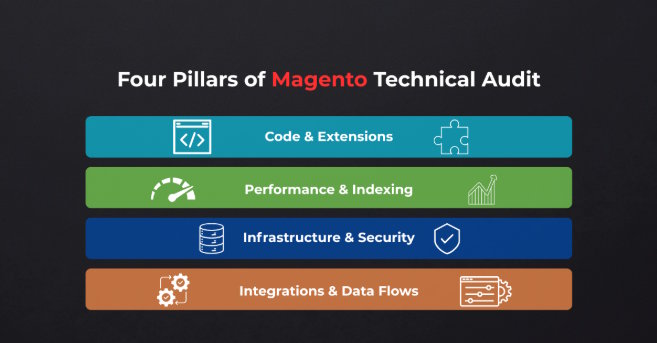
Application Health and Code Quality
This pillar is known as a Magento code audit. It examines the store as a codebase. A reviewer looks at how modules are built, how the theme is implemented, and how exposed the store is to technical debt that will compound over time.
- Custom modules and overrides.
Old Magento 1-era patterns, direct SQL queries that bypass the ORM, and unscoped event observers all surface here. Although they might not break the store today, they can make the next upgrade riskier. The audit also flags direct modifications to Magento core files, which are a common shortcut that breaks with every point release and requires manual re-patching each time.
- Extension conflicts.
Magento stores may run fifteen to forty third-party modules. The audit flags abandoned third-party extensions, conflicting modules, and any direct rewriting of core classes rather than extending them through plugins.
- Upgrade readiness.
How hard the next Magento or Adobe Commerce version upgrade will be is a genuine risk metric. A direct rewrite of Magento_Checkout breaks on every 2.4.x point release and requires manual re-patching each time.
Performance and Scalability
Performance and scalability are the heart of most Magento performance audit work. The audit makes “is the store fast?” measurable rather than subjective.
Here’s what it covers:
- Server-level metrics.
Time to First Byte, Core Web Vitals, full-page cache hit rate, Varnish and Redis configuration, and CDN setup all affect site speed. Even 1 second delay can reduce conversions by about 7%.
- Indexing and background processes.
It checks whether indexers run on schedule or on save, and whether cron jobs execute reliably. A store with five unindexed custom attributes can drag every category page past three seconds without a single line of front-end code changing.
- Database health.
A sales_order_grid table with four years of unarchived data slows every query that touches it. It is one of the most common and most fixable causes of admin panel lag on established stores.
For B2B merchants, performance problems compound fast. A slow quick-order form or a bulk add-to-cart flow that times out under volume creates friction that a busy procurement buyer will not tolerate twice.
Infrastructure and Security
Infrastructure and security are audited together because one often determines the other's exposure.
- Hosting architecture.
During the technical audit process, the reviewer checks the single-server versus auto-scaling setup, the PHP version, and whether the infrastructure is sized for peak B2B order cycles.
- Security posture.
A store running Magento 2.4.3 with no security patches applied is exposed to known security vulnerabilities. The audit checks admin URL exposure, two-factor authentication enforcement, and pub/ directory access.
- Monitoring and logging.
Stores without proper alerting discover problems from buyer complaints. That gap between an incident and detection is itself a risk.
Integrations and Data Flows
This pillar is the most consequential for B2B merchants and the most often omitted from lightweight audits.
It traces how the store communicates with the rest of the business stack, including ERP, CRM, PIM, OMS, WMS, and payment systems, and examines what happens when a sync fails.
It’s meant to identify whether the buyer sees a clear error or whether the failure silently corrupts an order in the background.
Quiet integration failures produce some of the most damaging outcomes. For example, inventory counts that don't match warehouse reality, pricing that differs between the ERP and the storefront, orders that appear confirmed but never reach fulfillment.
A standard technical audit checks infrastructure, crawling, and indexing. For marketing, analytics, or compliance audits, Google Analytics is usually one of the main areas examined.
A Magento technical audit is fundamentally an engineering exercise. It tells you whether the store can run fast, securely, and reliably.
What a Magento UX Audit Reveals
A Magento UX audit involves mapping how real buyers discover, configure, and purchase. It combines qualitative data, such as session recordings, expert walkthroughs, and user interviews, with analytics to find where decisions break down and uncover recurring user pain points that affect conversion..
Where the technical audit treats the store as a system, the UX review treats it as a series of human decisions and looks for everywhere those decisions break down.
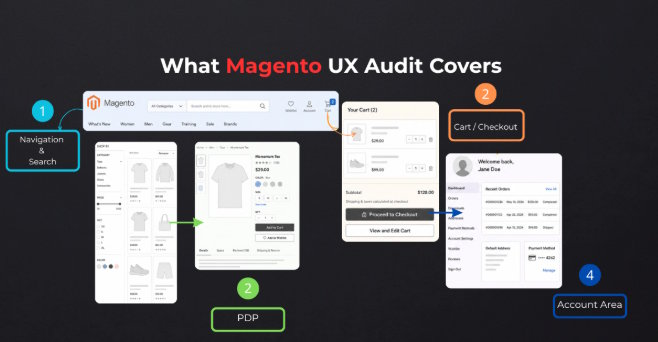
User Journeys and Use Cases
A UX audit on Adobe Commerce starts by mapping who actually uses the store and tracing the key user flows each buyer type follows. B2B storefronts support multiple buyer types at once, each with a different tolerance for confusion.
- New B2B buyers arrive without knowledge of your catalog or terminology. They need clear entry points and product pages that answer questions they haven't yet learned to ask.
- Repeat buyers reordering known SKUs need speed. A quick-order form or reorder button that works in three clicks. Anything more is friction.
- Sales-assisted buyers follow a negotiated quote or custom pricing agreement. They need to find their agreed-upon price without confusion from standard storefront pricing displayed alongside it.
- Mixed-role users, such as procurement, finance, and end-users under the same company account, need clear role boundaries. A finance approver who accidentally submits an order instead of approving one is a UX failure.
Navigation, Search, and Findability
B2B buyers often know exactly what they want. The store's job is to get out of the way.
Most B2B Magento stores organize categories around internal logic, such as product families, vendor lines, and internal SKU structures. Buyers think in terms of application, specification, or industry. A distributor with 8,000 SKUs across forty categories and a default navigation untouched since launch is a common example of that mismatch.
Search may compound the problem here. Elasticsearch returns technically correct results. A user experience audit checks whether those results are useful. A search for “1/4 inch bolt” that returns zero results because the catalog uses the term “M6” is a UX failure. The engine worked exactly as configured.
Thus, the audit surfaces synonym gaps, partial SKU handling, and filter logic that reflects catalog structure rather than actual user behavior.
Product Detail and Decision Support
The PDP (product detail page) is where a buyer decides whether to add to the cart or go back. A user experience audit assesses if the page provides enough information to make a confident decision.
- Information hierarchy.
This type of audit identifies whether specifications, compatibility notes, certifications, pricing tiers, and lead times are in a logical order, or buried under a gallery and marketing copy.
- Complicated configurations.
Bundles, kits, and configurable options need to be readable under real conditions. A logged-in wholesale customer who sees tier pricing correctly, while a new visitor sees no indication that volume discounts exist at all, is a communication failure the technical audit will never catch.
- Trust and decision support.
For B2B buyers purchasing in volume, documentation downloads, certifications, and access to support directly affect add-to-cart decisions.
Cart, Checkout, and Self-Service Account
This is where the question “can a real buyer finish a purchase?” gets answered, and where B2B Magento stores lose the most ground.
- Checkout flow.
At this stage, a reviewer identifies issues like account-required purchasing before shipping costs appear, missing purchase order payment options, and multi-address shipping. For enterprise buyers, each reduces completion rate in measurable ways.
- Self-service account area.
Order history, one-click reorders, requisition lists, saved quotes, credit limit visibility, and approval workflows are all native Adobe Commerce B2B features. The UX audit checks whether buyers can find and use them. A requisition list buried three clicks deep in account settings generates zero value regardless of how well it functions technically.
- Mobile experience.
B2B buyers may research on a desktop and reorder from a phone in a warehouse. The audit evaluates mobile responsiveness and tests whether key workflows remain usable on smaller screens.
A Magento UX audit answers whether the path from the landing page to a confirmed order makes sense to a real buyer and highlights what to fix.
Where Technical and UX Magento Audits Overlap
The phrase technical audit vs UX audit suggests two separate buckets. In practice, the two share some ground.
Page speed is the clearest point of overlap. A slow Time to First Byte is a performance metric. But the frustration a buyer feels while a category page loads is a UX outcome. Both audits will flag the same symptom from different angles.
Largest Contentful Paint works the same way. A technical audit measures it as a Core Web Vital tied to server response and image delivery, a signal that also affects search engine rankings. A UX audit treats it as the moment a buyer either stays or leaves.
Search relevancy sits in the same gray zone. Whether Elasticsearch is configured correctly is a technical matter. Whether the results it returns make sense to a buyer is UX. A store can score well on one and fail on the other.
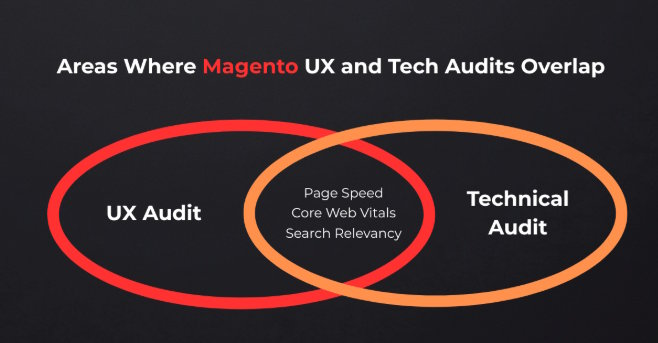
This coincidence is exactly why merchants get confused. An audit scoped purely to performance usually touches a few UX surface issues along the way, then treats the work as complete. The depth never matches what a focused UX audit covers, and the merchant has no way to know that from the outside.
The Blind Spot: What Only a UX Audit Catches
Consider a pattern common across B2B Magento stores. The store passes every technical check with TTFB under 200ms. There are no security issues or console errors. But conversion has dropped two points, and nothing in the technical audit report can explain why.
This is the kind of buyer-side friction a focused UX audit is built to uncover. A structured, step-by-step UX audit guide shows how to identify these issues before they affect conversions. And it often finds the cause within a day.
When You Need Both: A Symptom-to-Audit Triage
Most merchants who search for a Magento site audit want to identify which audit to call first. Comparing the symptom to the audit type below usually helps.
|
Symptom |
Audit to run first |
|
Pages load slowly across the whole catalog |
Technical audit |
|
Site times out or crashes under traffic spikes |
Technical audit |
|
A recent code deploy broke something specific |
Technical audit |
|
Security review flags outdated patches |
Technical audit |
|
Add-to-cart rate is normal, checkout abandonment is high |
UX audit |
|
Customers say they can't find products that exist in the catalog |
UX audit |
|
Mobile traffic is high, mobile conversion is low |
UX audit |
|
Organic traffic is stable, but conversion drops every month |
UX audit |
|
A clean technical report exists, yet revenue has not moved |
UX audit |
Three Signals to Run Both Audits Together
When to audit a Magento store for one issue is usually clear. But three signals below call for both audits together:
- A recent platform migration or major version upgrade.
Code can run perfectly while the new checkout flow confuses repeat buyers who learned the old one.
- A B2B catalog with above a few thousand SKUs.
Complexity at that scale creates technical bottlenecks and navigation problems at the same time, and they tend to compound each other.
- Any store that has never run a UX audit at all.
A store can pass five technical audits in five years and still have a checkout flow nobody has questioned since 2019.
Teams conducting UX audits often work from a detailed Magento audit checklist that covers code quality, infrastructure, integrations, security, search, navigation, and checkout experience.
Conclusion: UX Audit vs Technical Audit
A clean technical audit proves the engine runs well. Whether a buyer enjoys the ride is a separate point, and only an ecommerce UX audit helps identify it.
The two audits measure different things:
- A Magento technical audit checks code, performance, security, and infrastructure.
- A Magento UX audit checks navigation, product pages, search, checkout, and mobile flow.
Real Magento stores often carry problems from both columns at once. And they can be overlooked until conversion data forces the question.
Store owners who run a comprehensive audit covering both dimensions, on a regular basis, catch the kind of revenue loss that never shows up in a server log.
FAQ
How long does a Magento technical audit take?
Most technical audits of a mid-size Adobe Commerce store take 5 to 10 business days, depending on catalog size, integration complexity, and codebase documentation.
How long does a UX audit take?
A focused UX audit typically takes one to two weeks. It takes longer if it includes usability testing, user session recordings, or buyer interviews alongside the expert review.
Do audits require any store downtime?
No. Both audits are read-only reviews of your existing store, code, and analytics data.
How often should a Magento store be audited?
A technical audit once a year is a reasonable baseline. A UX audit makes sense every 3-6 months or after any significant redesign or replatforming, or when conversion metrics shift without an obvious cause.
What should an audit deliverable actually include?
Both audit types should produce a prioritized audit report listing issues. Each issue must be ranked by business impact so the team knows what to fix first.

