

Minecraft players, streamers, and community managers all run into the same wall eventually: a default or generic skin doesn't reflect who they are, but designing a custom one by hand means learning pixel art or hiring someone who already knows how.
Supermaker AI's AI Minecraft Skin Generator removes that skill requirement by turning a reference image into a finished, downloadable skin. As part of the broader Supermaker AI Image Maker lineup, this Minecraft Skin Creator is built specifically for players and creators who want a unique in-game look without touching a pixel editor.
What Is the AI Minecraft Skin Generator?
The AI Minecraft Skin Generator is an image-based feature: a user uploads a reference photo or image, and the tool generates a custom Minecraft skin styled around it. It's built on Supermaker AI's image generation tools, applied specifically to Minecraft skin creation rather than general-purpose image output.
For players, streamers, and educators, that means the design step — usually the hardest part of making a custom skin — is handled by the AI, while the user stays in control of the reference material, size, and number of variations generated.
Traditional Challenges of Making Minecraft Skins
- Manual skin creation requires knowledge of pixel art and Minecraft's specific skin template layout.
- Free skin editors are often clunky and time-consuming for anyone without design experience.
- Getting a skin that matches a specific character, theme, or personal photo usually means a lot of manual trial and error.
- Commissioning a custom skin from an artist takes time and typically costs money.
- Testing multiple design directions before settling on one is slow when every version has to be built by hand.
These friction points are why players and creators increasingly look for an AI-based option. A generator that can take a reference image and produce a usable skin removes the pixel-art learning curve entirely, which matters most for people who care about how their skin looks but have no interest in becoming a pixel artist.
How Supermaker AI Handles Skin Generation
AI Minecraft Skin Generation
The core function uses Supermaker's image generation models to turn an uploaded reference image into a custom skin. Users upload an image for inspiration, and the generator handles the design work — a straightforward exchange of "upload a picture, get a skin" without manual editing required.
Full Customization Suite
Beyond the base generation, users can adjust colors, add patterns, and select accessories, with a live preview before finalizing. The generator supports a range of themes — fantasy, modern, historical, animals, and more — so the result can be shaped around a specific concept rather than left entirely to chance.
Reference Image Integration
Any image can be uploaded as a style reference, and the generator aims to keep the output consistent with that reference. Regeneration is unlimited, so users can keep generating new versions from the same or a different reference image until they land on a result they're happy with.
Output & Usage – Ready for Real Content
Finished skins are downloaded as PNG files, compatible with Java Edition, Bedrock, and Pocket Edition, so the output can be applied directly through the official Minecraft website or game launcher. A free trial covers the core generation features, with a premium tier available for users who want continued or expanded access — general terms rather than a specific plan breakdown.
How to Use It
Step 1 – Prepare Input
Choose one clear, well-lit reference image before starting — a photo, character concept, or design idea you want the skin to reflect. A cleaner reference image tends to give the generator more to work with.
Step 2 – Configure Settings
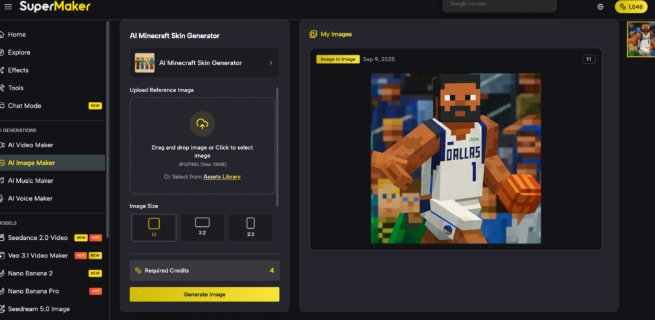
Upload the image, then select the output image size (1:1, 3:2, or 2:3) and how many image variations to generate. This is also where the Turn Image to Minecraft Skin process becomes concrete — the reference and settings chosen here directly shape what the generator produces.
Step 3 – Generate & Export
Click "Generate Image" to produce the skin. Preview the result, and if it's not quite right, regenerate as many times as needed — there's no limit on revisions. Once satisfied, download the PNG file and apply it to a Minecraft account through the official website or game launcher.
Use Cases for Players and Creators
- Personal Gaming Avatars — players turn a favorite photo or character idea into a skin that stands out on multiplayer servers.
- Content Creators & Streamers — streamers build a branded avatar for YouTube, Twitch, or TikTok that matches their on-camera identity.
- Educational Projects — teachers use custom skins for history reenactments or subject-themed classroom activities to make lessons more engaging.
- Community and Server Managers — server owners generate unique skins for community events or to give members a consistent, personalized look.
FAQ
How does the skin generation workflow actually work?
A user uploads a reference image, chooses the output size and number of variations, and clicks generate. The AI produces a skin based on that reference, which can be regenerated as many times as needed before downloading.
What are the usage terms for generated skins?
A free trial gives access to the core generation features, with a premium option available for continued use. Generated skin files are downloaded directly and applied through your own Minecraft account.
Which Minecraft versions are the generated skins compatible with?
Generated skins work across Java Edition, Bedrock, and Pocket Edition, so the same PNG file applies regardless of which version you're playing.
Conclusion
Within Supermaker AI's broader Image Maker lineup, the AI Minecraft Skin Generator solves a specific and common problem: wanting a custom, personal-looking skin without learning pixel art or hiring a designer. Uploading a reference image and letting the AI handle the design work makes that possible in a few clicks rather than hours of manual editing.
If you're a player, streamer, or educator looking for a skin that actually reflects your style or theme, it's worth uploading a reference image and trying a few generations to see what the tool comes up with.

