

On March 31, 2026, axios published version 1.14.1 to npm at 00:21 UTC. The release added a dependency called plain-crypto-js that nothing in the axios source code ever imports. Forty minutes later, version 0.30.4 landed on the legacy branch with the same addition. Both versions stayed up until 03:15 UTC.
That is a three hour window. In it, anyone whose lockfile allowed a fresh resolve of axios pulled down a remote access trojan built for macOS, Windows, and Linux. The package does over 100 million downloads a week. The maintainer had not been careless with a token: attackers got onto the lead maintainer's PC first through a social engineering campaign, installed a RAT, and took the npm credentials from there. Microsoft later attributed the infrastructure to Sapphire Sleet, a North Korean state actor.
Here is the part that should bother you. If you had run npm audit at 02:00 UTC that morning, on a machine that had just installed the malicious version, it would have told you everything was fine.
This post is about closing that gap. Not the theory of supply chain security, but the specific commands and config keys that would have caught the last four npm attacks.
Why npm audit misses this entirely
npm audit compares your dependency tree against a database of known vulnerabilities. That is a useful thing, and you should keep running it, but understand what it means: someone has to find a bug, report it, get a CVE assigned, and get it into the advisory database. Then you get told.
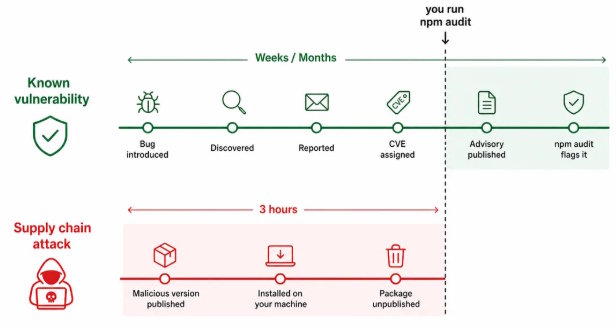
A supply chain attack is not a bug. The code does exactly what its author intended. There is no CVE at install time because nobody has discovered it yet, and by the time an advisory exists the package has usually been unpublished anyway. npm audit is looking for accidents. This is arson.
The 2026 attacks make the point better than I can
- Shai-Hulud 2.0 (November 24, 2025) compromised over 700 packages within hours of detection, created more than 27,000 malicious GitHub repositories, and exposed roughly 14,000 secrets across 487 organizations. If it failed to propagate or exfiltrate, it fell back to recursively shredding files in the user's home directory.
- Mini Shai-Hulud ran two campaigns in April 2026, on the 22nd and the 29th, and took down TanStack on May 11.
- The @redhat-cloud-services compromise (June 1, 2026) hit at least 32 packages averaging about 80,000 weekly downloads.
- A rolling campaign in June 2026 compromised 57 packages across more than 286 malicious versions in under two hours.
Every one of those was malicious code published by a legitimate account. Zero of them would show up in a CVE scan on the day they mattered.
The stages you are actually defending against
These attacks are not improvised. They follow a repeatable sequence, and if you want the general shape of that sequence there is a good breakdown of how cyberattacks work stage by stage that maps to what happens on npm almost one to one.
Compressed to the registry, it looks like this:
- Access. Phish a maintainer, or steal a token from a compromised CI log, or ride a worm that already has both.
- Staging. Publish the payload dependency ahead of time under a boring name. In the axios case, plain-crypto-js went up 18 hours before it was needed, with three platform specific payloads pre-built.
- Delivery. Publish a version bump to the real package that pulls the staged dependency in. Do it on both release branches within 39 minutes so the legacy users get caught too.
- Execution. A postinstall script fires the moment anyone installs. No import required, no application code needs to call it.
- Cleanup. The axios dropper deleted itself and rewrote its own package.json with a clean copy to make forensics harder.
Notice that stage four is the one you can unilaterally shut down. Let's start there.
Step 1: Stop running install scripts
The single highest value change in this entire post is one line.
npm config set ignore-scripts trueAlmost every npm supply chain attack of the last two years has executed through preinstall or postinstall. Shai-Hulud 2.0 ran during preinstall through a setup_bun.js script that dropped an obfuscated payload. The axios RAT ran through postinstall. Neither one needed you to require() anything. Just installing was enough.
Be explicit in CI
For CI, be explicit rather than relying on machine config:
npm ci --ignore-scriptsAllowlist the packages that genuinely build
The obvious objection is that some packages genuinely need to build. esbuild, sharp, and anything wrapping a native binary will break. So allow those specifically instead of allowing everything. pnpm has had this as the default since v10 and gives you a proper allowlist:
# pnpm-workspace.yaml
allowBuilds:
  - esbuild
  - sharp
  - better-sqlite3
Run pnpm approve-builds and it will walk you through which packages in your tree are asking to run scripts. Most projects are surprised by how short the legitimate list is. If yours has forty entries, that is worth knowing on its own.
Step 2: Add a cooldown
This is the defense that would have stopped nearly every recent attack, and it costs you almost nothing.
Malicious versions get caught fast. The axios versions were live for three hours. The September 2025 debug and chalk compromise was resolved in about two and a half hours. Shai-Hulud was detected in roughly twelve. The window between publish and takedown is where all the damage happens, so refuse to install anything that new.
npm
Requires CLI 11.10.0 or later, shipped February 2026. The unit is days.
# .npmrc

min-release-age=1
pnpm
Version 10.16 and later, on by default since 11.0. The unit is minutes. 1440 is one day, which is the v11 default. Set 10080 if you want a full week.
# pnpm-workspace.yaml

minimumReleaseAge: 1440
Yarn
Berry 4.10.0 and later. Minutes again, and use a plain number. Duration strings like "7d" hit parsing bugs.
# .yarnrc.yml

npmMinimalAgeGate: 1440
What the delay buys you
One day of delay would have blocked axios, both Shai-Hulud waves, and the debug/chalk incident. The cost is that you get security patches a day late, which sounds bad until you weigh it against installing a RAT at 00:30 UTC. If a genuine emergency patch drops, bump the specific package by hand and move on.
Step 3: Know what you actually have
You cannot audit a tree you have never looked at. Start with the real shape of it:
npm ls --allMost people run this once and get a shock. A mid sized Express app routinely pulls 900 to 1,400 packages. Those are all authors with publish rights to your CI environment.
Query the tree instead of grepping it
npm query uses CSS style selectors against the tree and is better than grep for this. Find everything that wants to run an install script:
npm query "[scripts.postinstall]" | jq -r '.[].name' | sort -u

npm query "[scripts.preinstall]" | jq -r '.[].name' | sort -u
Find packages that are not coming from the registry, which is how a lot of dependency confusion lands:
npm query "*" | jq -r '.[] | select(.resolved and (.resolved | startswith("https://registry.npmjs.org") | not)) | "\(.name) <- \(.resolved)"'Block exotic subdependencies
pnpm users can shut that category down entirely:
# pnpm-workspace.yaml

blockExoticSubdeps: true
That stops transitive dependencies from resolving to git repos or arbitrary tarball URLs. Your direct dependencies can still do it. The ones you never chose cannot.
Commit your lockfile
Every tool in this post reads it. Without one, none of these results mean anything, because the tree you audited is not the tree your colleague installs.
Step 4: Verify signatures and provenance
npm signs packages, and you can check those signatures against the registry's current and historical public keys:
npm audit signaturesThe output separates verified signature and provenance, verified signature only, signature failure, and missing signature. Provenance is the interesting one: it ties the published artifact back to a specific repository and workflow run through the sigstore transparency log. A package with provenance is one where you can see the CI job that built it.
Run it in CI and fail the build on a signature failure. Do not fail on missing signatures yet, because plenty of older packages still do not have them and you will just train your team to skip the step.
The limit of provenance
Worth being honest about the limit here. Provenance proves a package came from the repo it claims. It does not prove the repo is clean. If an attacker owns the maintainer's machine and pushes a commit, the malicious build gets perfectly valid provenance. Signatures raise the cost of impersonation. They do not detect betrayal.
Step 5: Scan for behavior, not severity scores
CVSS scores are the wrong lens for this problem. A package that quietly reads ~/.aws/credentials in a postinstall script has no CVSS score at all. It is working as designed.
Tools that analyze what a package actually does are more useful here than tools that count known bugs:
- Socket flags install scripts that touch the network or filesystem, obfuscated code, typosquatting, and dependency confusion patterns. The free tier reads your package.json.
- Snyk is the commercial layer, and its value is mostly in reachability analysis, telling you whether a vulnerable path is actually called from your code.
Read the diff yourself
npm diff is free and underused. When a package you depend on jumps a version and you feel uneasy, read the change:
npm diff [email protected] [email protected]That would have shown a new dependency appearing with no code importing it. That is the entire tell. A patch bump that adds a dependency and imports nothing is worth ten minutes of your attention, every time.
You can also check how old a version is before you take it:
npm view axios time --json | tail -20Step 6: Lock down your own publishing
Auditing what you consume is half of it. If you publish anything, you are somebody else's supply chain, and npm changed the rules underneath you this year.
Classic tokens are gone
npm began revoking them on December 9, 2025, and the effective deadline passed on February 3, 2026. Any token you create now with write access expires after 90 days maximum, so rotation is not optional anymore. TOTP is on the way out too: new 2FA setups need WebAuthn or passkeys.
Trusted publishing over OIDC
The replacement for tokens in CI is trusted publishing over OIDC. You tell npm to trust a specific repository, running a specific workflow, in a specific environment, and npm validates the handshake with no long lived secret anywhere in the pipeline. There is nothing in your CI for an attacker to steal, because there is nothing there.
# .github/workflows/publish.yml

permissions:
  id-token: write
  contents: read

steps:
  - name: Check out repository
    uses: actions/checkout@v4

  - name: Set up Node.js
    uses: actions/setup-node@v4
    with:
      node-version: 22
      registry-url: https://registry.npmjs.org

  - name: Install dependencies
    run: npm ci --ignore-scripts

  - name: Publish package
    run: npm publish
No NODE_AUTH_TOKEN. Configure the trusted publisher once in the package settings on npmjs.com, and since February 18, 2026 the npm trust command will do it across multiple packages in one go, which was the thing making adoption painful for anyone maintaining more than a handful.
Step 7: Have an answer for the bad morning
At some point you will find out that something you installed last week was malicious. The axios remediation is a decent template for what that looks like:
- Pin back to a known clean version. Do not just run npm update and hope.
- Delete node_modules and your lockfile entries for the bad package, then reinstall with --ignore-scripts.
- Rotate every credential that existed on the affected machine. Not the ones you think were exposed. All of them. The axios payload was a general purpose RAT, and Shai-Hulud specifically hunted for developer secrets.
- Check outbound network logs for the published indicators. In the axios case that was sfrclak[.]com and 142.11.206.73:8000.
- If it ran on CI, treat every secret in that environment as burned.
Step three is the one people skip because it is genuinely painful. It is also the only step that matters if the payload did its job.
What this actually costs you
Add up the whole list: one config line to stop install scripts, one for a cooldown, npm audit signatures in CI, and a habit of reading the diff when a patch bump adds a dependency. That is maybe an hour of setup and a day of latency on updates.
Against that, a one day cooldown alone would have blocked axios, both Shai-Hulud waves, the debug and chalk compromise, and the Red Hat namespace attack. Not mitigated. Blocked, before the code ever reached your disk.
The attacks are not slowing down. September 2025 to June 2026 went from isolated typosquatting to state actors staging cross platform RATs 18 hours ahead of a coordinated dual branch release. These stories now tend to break on Twitter and in general tech news hours before the formal advisory shows up, which is worth knowing given that the whole game is measured in hours. Set the cooldown, and you get to read about it over coffee instead of at 3am.
Set min-release-age=1 today. It takes ten seconds and it is the best security work you will do all week.

