

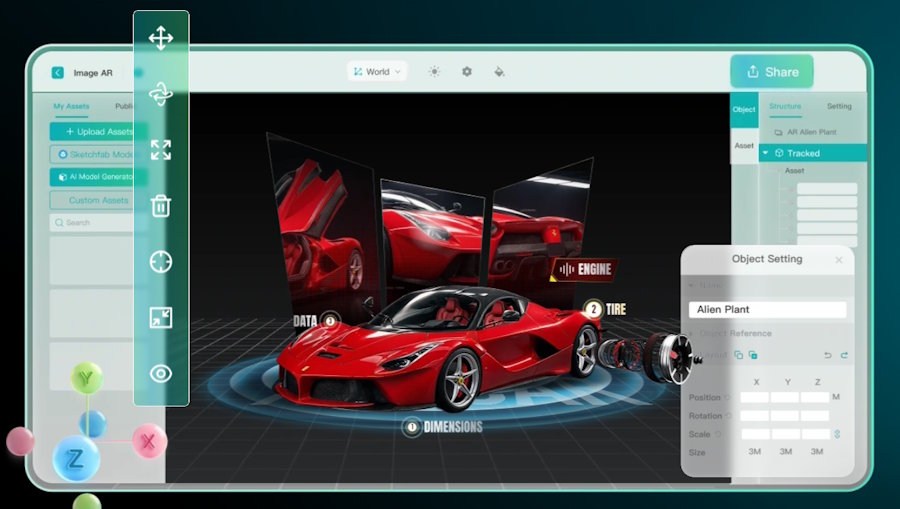
Augmented Reality (AR) has transformed the way businesses, educators, marketers, and creators engage with audiences. However, traditional AR development often requires coding knowledge, expensive software, and dedicated mobile applications. Modern WebAR generators eliminate these barriers by allowing anyone to create immersive AR experiences directly from a web browser.
Kivicube is a browser-based, no-code WebAR platform that enables users to build, customize, and publish AR experiences online within minutes. With drag-and-drop editing, AI-powered asset creation, and instant browser-based publishing, users can create professional AR projects without installing software or writing code.
What Is a WebAR Generator?
WebAR is an online platform provided by Kivicube that enables users to create augmented reality experiences that work directly in a web browser. Unlike traditional AR applications, WebAR does not require users to download a dedicated app. Instead, experiences can be launched instantly through a QR code or a simple URL.
This browser-based approach makes AR more accessible, allowing businesses to reach customers quickly while reducing development time and improving user engagement.
Why Choose Kivicube's WebAR Generator?
Kivicube is designed to simplify AR creation while providing professional-grade features for businesses and creators alike.
Some of its standout advantages include:
- No programming knowledge required
- Fully browser-based editor
- Instant WebAR publishing
- AI-assisted content generation
- High-quality AR rendering
- Multiple AR tracking types supported
- Easy website and eCommerce integration
These capabilities make it suitable for beginners while still offering enough flexibility for professional marketing campaigns and commercial projects.
Create WebAR in Three Simple Steps
1. Start with a Template or Blank Project
Users can register for a free account and either:
- Choose from professionally designed templates
- Start with an empty project for complete creative freedom
Templates help accelerate production while remaining fully customizable.
2. Customize Your AR Scene
Once inside the editor, users can upload:
- Images
- Videos
- Audio
- 3D models
- Animations
Assets can be positioned, resized, rotated, grouped, duplicated, and enhanced with interactive behaviors using simple visual controls.
3. Publish Instantly
After finishing the design, creators can publish their project immediately.
The platform automatically generates:
- QR Codes
- Shareable URLs
Anyone can launch the experience directly from their smartphone browser without downloading an app.
Multiple AR Tracking Technologies
Kivicube supports a wide variety of AR online tracking experiences, making it suitable for different industries and creative projects. Supported AR types include:
- Image AR
- World AR
- Face AR
- Body AR
- Landmark AR
- 3D Object Tracking
- Rotation Tracking
These options allow creators to develop everything from viral social media filters to product demonstrations and virtual try-on experiences.
Practical Applications of WebAR
Kivicube's WebAR generator can be used across numerous industries.
Retail and eCommerce
Businesses can improve online shopping through:
- Virtual try-on
- 3D product visualization
- Interactive product pages
- Furniture placement
These experiences help customers make informed purchasing decisions before buying.
Marketing Campaigns
Brands can create:
- Interactive advertisements
- AR packaging
- Promotional campaigns
- QR-based product experiences
WebAR enables users to engage with branded content instantly from their mobile browser.
Education
Teachers and educational organizations can build immersive learning materials that combine printed content with interactive 3D models, animations, and multimedia resources.
Collaboration and Learning Resources
To help users get started quickly, Kivicube provides:
- Quick-start tutorials
- Documentation
- Video guides
- Template libraries
- Step-by-step learning resources
These materials help both beginners and experienced creators build professional AR projects efficiently.
Conclusion
WebAR has made augmented reality more accessible than ever, allowing creators to build immersive experiences without specialized development skills. Kivicube's WebAR Generator combines a no-code editor, AI-powered content creation, multiple AR tracking technologies, and instant browser-based publishing into a single platform. Whether you're creating interactive marketing campaigns, virtual product demonstrations, educational experiences, or digital business materials, Kivicube provides a fast and flexible way to build, customize, and publish AR online in just a few steps.

