


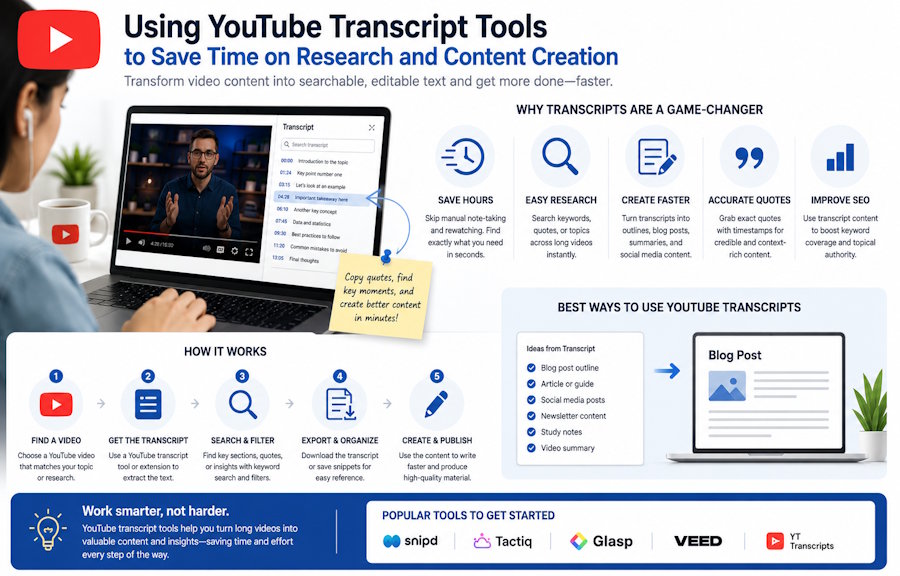
YouTube has become a major source of learning, research, and content inspiration. People use it to watch tutorials, interviews, lectures, product walkthroughs, and industry discussions. But when a video is long, finding one useful point can take more time than expected.
A YouTube Transcript Generator & Summarizer helps turn spoken video content into text that can be searched, reviewed, summarized, and reused. This makes video easier to work with, especially when the goal is not just to watch but to capture useful information.
Why Transcripts Improve Research
A transcript gives researchers a faster way to scan video content. Instead of taking notes while watching, they can read the spoken text, highlight important sections, and compare several videos side by side. This is useful for students, marketers, journalists, analysts, and anyone who studies video sources regularly.
Transcripts also reduce the risk of missing details. A speaker may mention a useful term or example only once. In a transcript, that line can be found quickly. In a video, it may disappear inside a long timeline.
How Creators Can Reuse Video Content
For creators, transcripts solve the blank-page problem. A recorded conversation already contains ideas, examples, and natural phrasing. Once the video becomes text, those ideas can be edited into blog posts, newsletters, captions, scripts, and summaries.
The best approach is to treat the transcript as raw material. Remove filler, group related ideas, add headings, and choose the sections that fit the target format. This keeps the final content polished while preserving the value of the original conversation.
Choosing a Workflow That Fits
Before adopting a tool, users often compare features with HiNoter Pricing to decide whether the workflow matches their needs. Someone who occasionally summarizes a video may need a different setup from a team that processes webinars, meetings, and training videos every week.
The right tool should make the process simple: capture the video content, generate readable text, review the result, and turn it into something useful. If the workflow feels too heavy, people may stop using it. If it fits naturally into daily work, it can save time consistently.
Best Practices for Better Output
After generating a transcript, users should check names, technical terms, numbers, and timestamps. They should also decide the purpose of the final text. A study note, a blog post, a social caption, and an internal summary each need a different structure.
For long videos, it helps to divide the transcript into sections and add short summaries. This makes the document easier to scan and easier to share with someone who does not have time to watch the full video.
From Long Videos to Clear Takeaways
Long videos often contain more value than viewers can capture in one sitting. A transcript makes it easier to identify the main structure of the video. Users can find the introduction, key arguments, examples, and conclusion without replaying every minute.
This is useful for research because it allows several videos to be compared quickly. A marketer can review how different creators explain the same topic. A student can compare definitions from several lectures. A writer can collect examples from interviews and organize them into a stronger draft. Recall’s YouTube transcript generator can make this process easier by summarizing videos into key points, allowing users to quickly review and compare important information without watching every video in full.
The transcript also helps with accuracy. Instead of paraphrasing from memory, users can return to the exact wording and check whether a quote or claim is being represented correctly.
Making the Workflow Worth the Cost
Pricing matters because transcription and summarization can become part of a regular workflow. Someone who works with one video a month may have different needs from a team that processes webinars, customer interviews, and training content every week. The best choice depends on how often the tool will be used and how much time it saves.
Users should also consider the value of the output. If a transcript helps create an article, improve a training document, or speed up research, the benefit may go beyond the time saved during transcription. The tool supports a larger content and knowledge process.
A good workflow should feel lightweight. Users should be able to generate text, review it, organize it, and turn it into a useful asset without adding unnecessary steps. When the process is easy to repeat, video transcripts can become a dependable part of content creation.
Making Transcripts Easier to Share
A transcript is also useful because it can be shared with people who do not have time to watch the full video. A team member can read a summary, check the transcript for details, and only open the video if they need the original context.
This supports faster collaboration. Writers can pull quotes, managers can review the main points, and editors can check whether the final content matches the original discussion. Everyone works from the same source instead of relying on separate notes.
For recurring content work, this shared source becomes important. It keeps the team aligned and makes the editing process more accurate.
Conclusion
YouTube transcript tools make video content easier to research and reuse. They help users find information faster, create written assets from recordings, and build a more organized content workflow. When video becomes text, its value lasts longer than the original viewing session.

