

Voice is no longer a feature that only enterprise products can afford to build. The infrastructure cost of adding text-to-speech output, voice cloning, or speech recognition to an application has dropped significantly — not because the underlying models have gotten simpler, but because the API surface to access them has gotten cleaner and the pricing has moved to usage-based models that scale with actual use rather than requiring large upfront commitments.
For developers, the practical question isn't whether to add voice to an application — it's which API to integrate and what capabilities that integration unlocks. This guide covers the Fish Audio API: what it exposes, how the core features work from an implementation standpoint, and what the architecture looks like for the most common voice-enabled application patterns.
Fish Audio's S2.1 Pro model — the current generation as of June 2026 — is the backend for all API requests. It's worth knowing what the model actually does before you start building around it, because the architecture choices made at the model level affect how you design the application layer. AI text to speech through Fish Audio isn't a simple phoneme-to-audio pipeline; it's a generative model that accepts natural-language delivery instructions inline with the text, responds to tonal and prosodic direction at the word level, and handles 83 languages from a single model endpoint. The API exposes all of that through a clean set of endpoints.
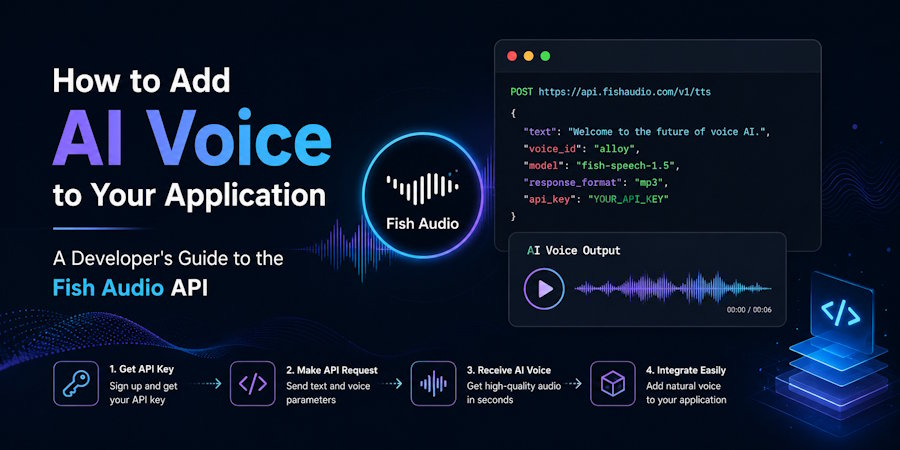
The entry point for most integrations is the TTS endpoint, which accepts a text payload and returns audio. Authentication uses an API key passed as a Bearer token in the Authorization header. The response is a streaming audio binary — by default MP3, with options for WAV, PCM, or Opus depending on your downstream consumer. For a basic integration, that's the full chain: authenticate, POST text, receive audio.
Streaming and Latency Architecture
The choice between buffered and streaming audio response matters significantly depending on your use case. For batch applications — generating an audio file to attach to an email, pre-rendering narration for a video, building a voice library — buffered response is the simpler implementation: wait for the full audio, write the file, done.
For real-time applications — voice agents, conversational IVR, live synthesis pipelines — streaming is what makes the implementation viable. Teams exploring voice assistant development can combine conversational AI with speech-to-text and text-to-speech capabilities to build more natural real-time interactions. Fish Audio's S2.1 Pro posts time-to-first-audio (TTFA) in the 70–100ms range. In practice, this means the first audio chunk is ready to start playing before the full response has been generated. At 70–100ms, the model clears the 200–300ms threshold above which users perceive a noticeable pause in conversational audio — with margin left over for network transit and your application's own processing overhead.
To implement streaming in your application, consume the response as a readable stream and pipe chunks to your audio output or buffer as they arrive. The chunked transfer encoding in the response makes this straightforward in most HTTP client libraries. The practical pattern: open the connection, start buffering the first chunk, hand off to audio output once you have enough to start playback, and continue consuming the stream in parallel. For a voice agent application, this means the turn latency your users experience is dominated by TTFA rather than total generation time — which is what makes real-time conversational voice feel natural.
Emotion and Delivery Control
Standard TTS APIs give you text in, audio out, with optional parameters for speaking rate and pitch. Fish Audio's model uses a different system: open-domain natural-language emotion tags embedded directly in the text payload. These are instructions written in square brackets — placed inline with the script at any point where you want to specify delivery — and interpreted by the model at generation time.
A few examples of how this looks in practice:
`[measured and deliberate — the tone of someone presenting a critical finding] The memory leak occurs specifically during concurrent writes to the cache layer.`
`[building slightly in energy as the list lands] This covers authentication, rate limiting, retry logic, and error handling — [and then, landing it cleanly] all in under 50 lines.`
`[the warm, patient tone of someone explaining something for the second time] Let's walk through that section again.`
For developers building voice agents or narration pipelines, this matters for application design. Rather than managing a separate emotion parameter alongside your text, the delivery direction lives in the same string as the content — which means your text generation step (whether that's an LLM output, a template system, or a static script) can embed delivery context directly, and the TTS API handles the rest. The model was trained on sufficiently diverse data to generalize to novel instructions, so you're not constrained to a preset list of moods. Instructions that are specific, concrete, and contextual tend to produce more reliable results than abstract ones.
Voice Cloning: Creating and Using a Custom Voice
AI voice cloning in the Fish Audio API works in two steps: create a voice model, then reference it in TTS requests. The voice creation endpoint accepts a reference audio file — as short as 15 seconds of clean speech — and returns a voice ID. From that point, you pass the voice ID in your TTS requests as a model parameter, and the output is generated in the cloned voice.
This is particularly useful in applications where voice consistency is a product requirement. A reading app where the narrator sounds different across sessions degrades the user experience. A voice agent where the persona shifts between conversation turns is disorienting. A voice ID acts as a persistent, reusable voice asset: create it once, reference it across every request, and the output stays consistent regardless of how much content is generated or how much time passes.
Programmatically, the cloning flow looks like this: upload the reference audio via a multipart form POST to the voice creation endpoint, receive the voice ID in the response, store that ID in your application's configuration or database, and pass it in subsequent TTS requests. The voice asset persists in your Fish Audio account, so you don't need to re-create it on each application startup.
Commercial use of cloned voices requires a paid plan. The reference audio should be from a speaker who has explicitly consented to their voice being used. These are both worth surfacing in your application's terms of service if you're building a product that allows end users to create voice clones.
Multilingual Output from a Single Endpoint
One of the more practically useful aspects of the S2.1 Pro model for application developers is that language handling is automatic. The model detects the language of the input text and generates audio in that language — no language parameter required, no separate endpoint per language, no different model for non-English content.
The model supports 83 languages. For applications serving multilingual user bases, this removes a category of complexity from the integration: the same TTS endpoint call that handles your English content handles your Spanish, Swahili, Arabic, and Mandarin content with no changes to the request structure. Quality is consistent across the supported language set rather than degrading on lower-resource languages.
If you're building in a context where explicit language control matters — for example, a code-switched input where you want to force a specific output language — you can pass a language hint parameter to disambiguate. But for most applications, the automatic language detection handles the common cases correctly.
Speech-to-Text: The Complementary Endpoint
Fish Audio's ASR (automatic speech recognition) endpoint is the other half of a voice-enabled application stack. It accepts an audio file or stream and returns a transcript with speaker labels, word-level timestamps, and confidence scores. Pricing is $0.36 per audio hour.
For voice agents, ASR is what converts the user's spoken input into text that your application can process. The multi-speaker labeling with diarization is useful for any application processing conversation recordings — customer service calls, interview transcriptions, meeting records. Word-level timestamps let you implement features like audio scrubbing, searchable transcripts, or highlight reels that jump to specific moments in a recording.
The practical integration pattern for a voice agent: stream user audio to the ASR endpoint, receive the transcript, pass it to your processing layer (typically an LLM), generate the response text, POST that to the TTS endpoint with streaming enabled, and pipe the audio output back to the user. The full loop from end of user speech to start of AI audio can run under 200ms when TTFA and network latency are both optimized.
Open-Weights for Self-Hosted Deployments
Fish Audio releases model weights, fine-tuning code, and inference tooling publicly. This is described correctly as open-weights rather than open-source: the weights are downloadable and self-hostable, but commercial deployment requires a paid commercial license. The distinction matters for compliance — if you're building a product where data residency requirements prohibit sending audio or text to external APIs, self-hosting the model within your own infrastructure is the path.
For research or evaluation contexts — assessing model architecture, running ablations, fine-tuning on domain-specific data — the open-weights release gives you access to the full model internals. The fine-tuning tooling is useful for adapting the model's output to specific domains, accents, or content types where out-of-the-box performance isn't sufficient.
Pricing and Rate Limits
API usage is billed per character for TTS at $15 per million characters, with no monthly minimum. Speech recognition runs at $0.36 per audio hour. There's no subscription required to use the API — you can start with a free account and pay for what you use.
For developer context: a 500-word article is roughly 3,000 characters — about $0.045 per generation. A 1,000-word narration script runs approximately $0.09. For applications generating audio at scale — a podcast platform producing dozens of episodes, a content site narrating hundreds of articles — the per-character model is significantly cheaper than alternatives that charge per minute of audio output.
The Plus plan at $11/month covers web interface access with commercial use rights, a monthly generation allowance, and API access. The free tier is limited to personal, non-commercial use — any production application should be operating on a paid plan both for commercial licensing and for the higher rate limits.
Getting Started
The fastest evaluation path: grab an API key from your Fish Audio account, make a POST request to the TTS endpoint with a text string, and listen to the output. The full onboarding from account creation to first audio generation takes under five minutes for a developer familiar with REST APIs.
The more useful evaluation after that first request: run a few real samples from your actual use case through the emotion tag system, test a voice clone with a reference sample, and measure TTFA against your latency budget. Those three tests tell you what you actually need to know before committing to an integration: whether the quality holds up on your content, whether voice consistency meets your product requirements, and whether the latency budget works for your application architecture.

