

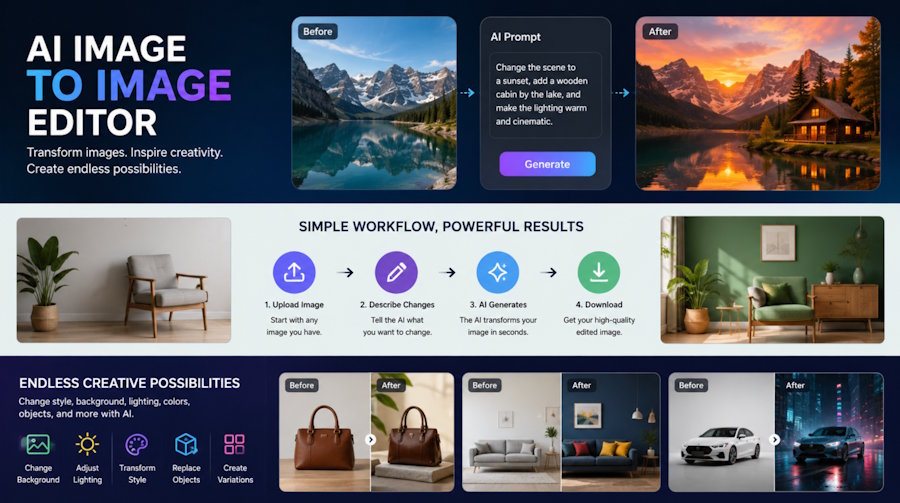
Creating and editing visual content traditionally requires a combination of design skills, editing software, and considerable time. Even a simple change to an existing image can involve removing backgrounds, adjusting colors, changing objects, or creating multiple variations manually.
An AI image to image editor offers a different approach. Instead of creating every visual element from scratch, users can provide an existing image and use artificial intelligence to transform it according to their instructions. This makes it possible to experiment with styles, compositions, backgrounds, and visual details much faster.
For marketers, designers, content creators, and businesses, image-to-image technology can become a practical part of the visual production workflow.
How AI Editors Turn Existing Images into New Designs
An AI image to image editor is a tool that uses artificial intelligence to modify an existing image based on a text prompt, reference image, or combination of both.
Instead of starting with a blank canvas, the system analyzes the original image and generates a modified version while attempting to preserve important elements such as the subject, composition, or overall structure.
For example, a user could upload a product photograph and request:
- A different background
- A new visual style
- Changes to colors or lighting
- Additional objects
- Seasonal variations
- A different environment
- A more polished or professional appearance
The exact capabilities vary between tools, but the basic idea remains the same: use an existing image as the starting point and let AI handle much of the transformation process.
How Image-to-Image AI Editing Works
The process generally begins when the user uploads an image to the AI editor. The system analyzes visual elements such as shapes, objects, colors, textures, and composition. The user then provides instructions describing the desired changes. The AI combines the original visual information with the instructions to generate a new version.
A simplified workflow looks like this:
Upload → Analyze → Describe Changes → Generate → Review → Refine
Some tools allow users to make several iterations. If the first result is not accurate, the prompt can be adjusted and another version can be generated. This iterative approach can be significantly faster than manually recreating an image in traditional editing software.
From Manual Editing to Automated Creation
Traditional image editing gives designers precise control, but it can also require considerable effort. Creating multiple versions of the same visual may involve repeating many of the same steps. An AI image to image editor can automate parts of this process.
For example, imagine a retailer preparing a campaign for the same product across several seasons. Instead of photographing or manually editing the product repeatedly, the team could use the original product image as a reference and generate variations for different environments.
The same concept can be applied to social media graphics, advertising concepts, blog illustrations, product presentations, and other digital content.
AI does not necessarily replace conventional editing. Instead, it can handle repetitive or exploratory tasks while designers focus on decisions that require human judgment.
Practical Uses for AI Image to Image Editing
Image-to-image technology can support a wide range of creative workflows.
Product Visuals
Businesses can create different presentations of an existing product. A single product image could be adapted to different backgrounds, environments, or campaign themes. This can be useful for testing visual concepts before investing in additional photography or design work.
Social Media Content
Social media creators often need multiple variations of visual content. AI image editing can help transform an existing image into different formats, styles, or themes.
For example, one photograph could become several creative variations for different posts while retaining the main subject.
Marketing Campaigns
Marketing teams can use image-to-image generation to explore advertising concepts quickly. Different backgrounds, compositions, and visual directions can be tested before a final design is produced. This makes early-stage creative experimentation more accessible.
Concept Development
Designers can also use AI as a brainstorming tool. An existing sketch, photograph, or rough concept can be transformed into different visual directions. Rather than spending hours manually producing every variation, designers can generate several possibilities and select the most useful ideas for further development.
Content Localization
Businesses operating in different markets may need variations of the same visual. Image-to-image tools can help adapt backgrounds, themes, or visual contexts while maintaining the central subject. Human review remains important, particularly when cultural details or brand guidelines are involved.
Maintaining the Original Image
One of the biggest challenges in image-to-image editing is preserving important elements from the original. For example, when editing a product photograph, users generally want the product's shape, proportions, branding, and important details to remain accurate.
AI-generated transformations can sometimes unintentionally change these elements. A logo may become distorted, a person's facial features may shift, or small product details may be altered. This is why image-to-image editing works best when users review the generated result rather than assuming that every transformation will be perfect.
For commercial work, maintaining brand consistency and factual accuracy is especially important.
AI Image to Image Editor vs. Traditional Editing
Traditional editing software and AI image to image editor tools serve different purposes. Traditional editors provide detailed manual control over individual elements. Designers can precisely adjust layers, masks, colors, typography, and other components.
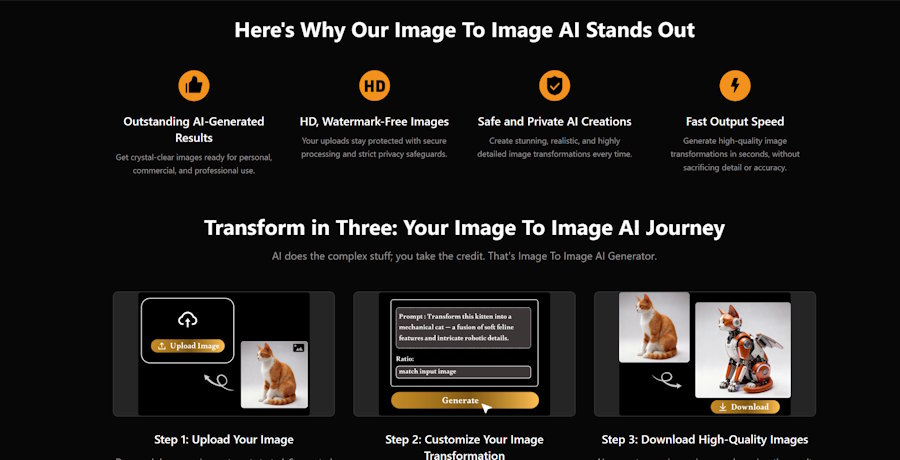
AI editors focus more on natural-language instructions and automated transformation. The two approaches can also work together. A designer might use AI to generate several concepts and then move the selected result into traditional software for precise finishing.
This hybrid workflow can combine the speed of AI with the control of conventional design tools.
Benefits of AI Image-to-Image Workflows
One of the main advantages is speed. Generating several visual concepts can take much less time than creating each variation manually. Another benefit is experimentation. Users can test ideas without committing significant time to every version.
AI can also make certain creative tasks more accessible to people who do not have advanced design skills. Instead of learning complex editing techniques for every task, users can describe the desired transformation in natural language.
Other potential benefits include:
- Faster visual prototyping
- Easier creation of image variations
- Reduced repetitive editing
- More opportunities for experimentation
- Faster campaign concept development
- Greater accessibility for non-designers
However, these benefits depend heavily on the quality of the AI tool and the complexity of the requested transformation.
Limitations to Consider
AI image editing is not perfect. Some transformations can introduce unexpected changes, especially when the original image contains small details or complicated compositions. Common problems can include distorted text, inconsistent objects, altered facial features, incorrect proportions, or changes to details that the user wanted to preserve.
Another limitation is consistency. Generating several versions does not guarantee that every result will maintain exactly the same visual identity. For professional projects, human review is therefore still important.
There are also ethical and legal considerations when editing images of real people, copyrighted material, brands, or other protected content. Users should make sure they have the appropriate rights and permissions before transforming or publishing images.
The Future of Automated Visual Content Creation
Image-to-image AI is part of a broader shift toward more automated creative workflows. Instead of treating image generation and image editing as completely separate activities, modern AI tools increasingly combine them. A creator might begin with a photograph, transform it with AI, animate the result, create several variations, and then adapt those visuals for different platforms.
This workflow can reduce the number of separate tools and manual steps involved in producing content.
At the same time, human creativity remains important. AI can generate possibilities, but deciding which visual communicates the right message still requires context, taste, and judgment.
Conclusion
An AI image to image editor provides a new way to approach visual content creation by using existing images as the starting point for AI-powered transformations. Instead of rebuilding every visual manually, users can describe changes and generate new versions in a much shorter workflow.
The technology can be useful for product visuals, marketing campaigns, social media content, concept development, and creative experimentation. However, it is not a replacement for human review or professional editing in every situation.
The most effective approach is often to combine AI's speed and flexibility with human creativity and quality control. As image-to-image technology continues to improve, this combination could become an increasingly practical way to produce and adapt visual content.

