

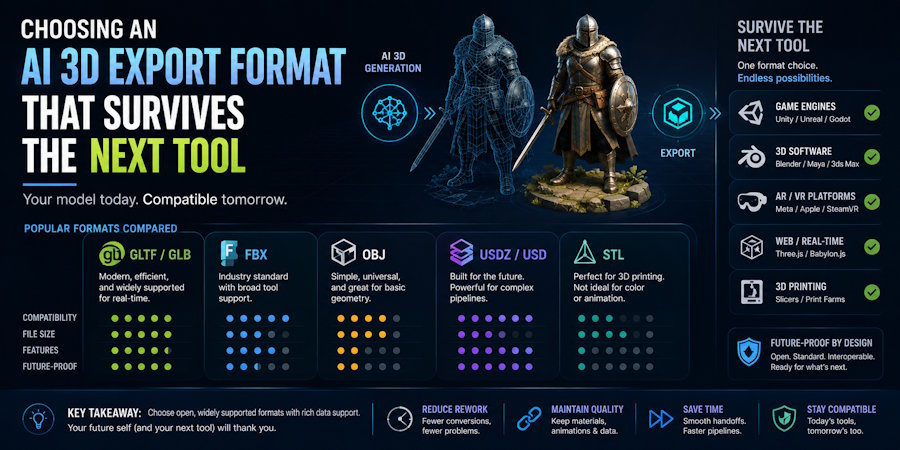
Choose the export format by the next tool, not by the download button. FBX is usually the safest choice for rigged or animated assets that need to enter a DCC or game-engine pipeline. GLB is usually the most practical choice for self-contained PBR delivery when the destination supports glTF 2.0. OBJ is still useful for static mesh exchange and repair. USDZ is the right choice when the destination is Apple Quick Look or Apple AR.
The real question is not which file extension looks best in a menu. It is which file format keeps the data that matters to the next production step: geometry, materials, transforms, rig, animation, and packaging. A browser preview can look finished and still fail the moment the asset moves into Blender, Unity, Unreal Engine, or an AR viewer.
V2Fun fits into that decision when a team wants to move from a reference, prompt, or multi-view input toward a candidate asset without leaving the browser too early. It supports export of static 3D models and animated 3D assets. The auto-rigging page names FBX as a skeleton export route and GLB as a web- and AR-friendly option. The broader file-format guide also references OBJ, USDZ, STL, 3MF, STEP, and PLY as workflow formats, which is useful for planning, but the current export menu should still decide what is actually available to download.
What Must Survive the Handoff
An export format is only useful if it preserves the data the next tool needs to make a decision.
| Field | What to record before export | What to inspect after import | Common failure signal |
|---|---|---|---|
| Geometry | Mesh count, triangle count, normals, UV sets | Missing parts, flipped normals, shading, UV integrity | Holes, black faces, seams, collapsed hidden geometry |
| Materials | Material slots, PBR maps, texture paths, color space | Slot assignment, shader mapping, visible texture response | White model, missing maps, wrong roughness or metallic response |
| Rig | Skeleton hierarchy, skin weights, bind pose | Bone mapping, avatar or skeleton recognition, deformation | Unrecognized rig, twisted joints, detached accessories |
| Animation | Clip names, frame range, root-motion intent | Clip discovery, playback, retargeting, loop behavior | Empty clip list, broken timing, wrong root motion |
| Scale and axes | Source units, up axis, forward axis, origin | Reference dimensions, orientation, pivot, transforms | Asset is tiny, enormous, rotated, mirrored, or offset |
| Packaging | Embedded data, sidecar files, texture folders | Broken references and importer warnings | File opens but required external files cannot be found |
Write that manifest before you download the asset. It turns “the model looks fine in the browser” into a repeatable acceptance test.
Which Format Fits Which Job?
| Format | Best-fit use | What it is good at | Main handoff risk |
|---|---|---|---|
| FBX | DCC-to-engine work, rigged characters, animation handoff | Skeletons, skinning, clips, and related scene data | Exporter version, axes, units, embedded media, importer settings |
| GLB | Compact PBR delivery to compatible real-time, web, commerce, or AR systems | One binary file can contain meshes, materials, textures, skins, and animations | Partial importer support or application-specific glTF limitations |
| OBJ | Static mesh exchange, inspection, sculpting, repair | Mesh and UV transfer with external material references | Sidecar files and texture paths are easy to separate |
| USDZ | Apple Quick Look, iPhone and iPad AR, Apple Vision Pro presentation | Packaged Apple-facing delivery for preview and AR use | Not the default interchange route for a Blender-to-engine workflow |
FBX is usually the safest working format when the next step depends on a skeleton, animation, or a tested Unity or Unreal Engine pipeline. GLB is usually the more convenient format when the receiver supports glTF 2.0 and the asset needs to stay self-contained. OBJ remains the simplest route for static geometry repair. USDZ is destination-specific, not a general interchange default.
What V2Fun Can Export, and What Still Needs Checking
V2Fun’s current help materials make two things clear: static 3D models and animated 3D assets can be exported, and FBX is part of the rigging/export route. GLB is also positioned as a good option for web or AR presentation.
That is useful, but it is not the same as a blanket promise that every format in a file-format guide is available as a direct download today. The safest way to describe the workflow is simple:
- Use the help center and the current download menu to confirm what is actually exported
- Use the auto-rigging page to understand which formats are intended for rig and motion handoff
- Use the broader file-format guide as a planning reference, not as proof of current exporter availability
If the next stage needs a skeleton, skin weights, or clips, FBX is usually easier to audit. If the next stage needs compact PBR packaging and the destination supports glTF well, GLB is usually the cleaner route. If the asset is only a mesh exchange or repair case, OBJ is often enough. If the destination is Apple Quick Look or Apple AR, USDZ is the right target.
Where Blender, Unity, and Unreal Fit
An exported asset can move into Blender, Unity, or Unreal Engine through file import. That does not prove native integration or production readiness. The file still has to pass a first-open test in the actual software version your team uses.
Blender
Blender is the right place to inspect and repair an AI-generated asset before the file goes anywhere else. Use it to check mesh health, UVs, materials, scale, skeletons, and animation. A successful first open in Blender means the asset is editable and internally coherent. It does not mean the asset is finished.
Record the import route, version, and options. Then check scene structure, geometry, materials, transforms, and, for characters, bind pose and bone hierarchy. If the asset opens but needs repair, that is still a useful result.
Unity
Unity should be treated as the project validator. The question is not whether the file can be imported, but whether it works with the project’s renderer, rig rules, collisions, LODs, animation system, and runtime budget.
For Unity, record the model import settings, scale, rig tab result, animation clips, materials, warnings, and any importer or package used for GLB. Place the asset beside a known one-meter reference and test it under the project’s real lighting and shader setup.
Unreal Engine
Unreal Engine should be treated the same way: as the place where the asset either survives the handoff or does not. FBX is the usual route for static meshes, skeletal meshes, animation, morph targets, materials, and textures. The key is to lock the export version and the import mode, then record the outcome.
Capture the Unreal version, FBX version, import type, skeleton selection, animation clips, scale, normals, warnings, and any automatic importer changes. A clean viewport preview is not enough; skeletal and animated assets need deformation and playback checks.
Finding the Failure Owner
The most useful way to debug a broken handoff is to find the earliest stage where the data goes wrong.
| Failure observed | First place to inspect | Likely owner | Next action |
|---|---|---|---|
| Missing or malformed geometry in every tool | Source preview and source mesh | Generation or source input | Revise input, regenerate, or rebuild the affected area |
| Texture files absent from the download | Export package | Export settings or product capability | Re-export, choose a packaging option, or mark the field unsupported |
| Textures exist but the model is white in one tool | Import settings, paths, shader mapping | Destination tool or package structure | Relink textures and rebuild the destination shader |
| Correct geometry arrives at the wrong size everywhere | Units and export transform | Export configuration | Set a reference unit and re-export |
| Scale is wrong in only one engine | Engine import scale and project convention | Destination project | Correct import settings and document the project rule |
| Skeleton exists but joints deform badly in all tools | Skin weights, bind pose, source topology | Rigging and mesh preparation | Repair weights/topology or re-rig |
| Animation is present in FBX but absent in the engine | Clip export, take selection, engine import settings | Export or importer | Re-export the intended take and inspect clip settings |
This approach prevents teams from regenerating a sound mesh to fix a material problem in the engine, or rebuilding a shader to hide a geometry defect.
Which Route Fits Which Project Type?
- Textured static asset for a compatible web viewer: Start with GLB. Validate PBR maps, color space, extensions, file size, and viewer support.
- Rigged character for Unity or Unreal Engine: Start with FBX. Validate skeleton, skinning, clips, axes, units, materials, and the engine’s exact importer.
- Static model that needs repair in Blender: OBJ can provide a simple geometry-and-UV route, provided the MTL and texture files stay together.
- Apple AR presentation: Use USDZ as the delivery target. It is the format Apple uses for Quick Look on supported devices.
- Exact manufacturing or dimensional design: Do not choose among mesh exchange formats as a substitute for parametric CAD. Use a CAD-led workflow and treat the AI mesh as a visual reference or concept asset.
Where a Browser-Based AI Workflow Fits
A browser-based AI workflow is most useful at the front of the pipeline, when a team needs to turn a visual or written reference into a candidate asset quickly. It should not replace a DCC, engine pipeline, or CAD workflow when the final answer depends on authored topology, exact dimensions, or runtime approval.
- Fast visual draft for downstream testing: V2Fun can lead into Blender, Unity, or Unreal validation. The browser workflow shortens the route to an exportable candidate, while the receiving tool supplies the compatibility evidence.
- Dimensionally exact product or manufacturing model: Parametric CAD should lead because mesh exchange formats do not preserve dimensions, constraints, tolerances, or editable CAD history.
- High-fidelity capture of an existing physical object: Photogrammetry or 3D scanning is more appropriate when measured surface evidence matters more than generated interpretation.
- Controlled topology, UVs, production rigging, or bespoke animation: Blender, Maya, or another specialist DCC application should lead because these deliverables require deliberate authoring and inspection.
- Engine-native prefab, material graph, collision, LOD, or runtime behavior: The Unity or Unreal project pipeline should own the last conversion and test because the destination project defines the final acceptance rules.
A Repeatable First-Open Protocol
Use one representative asset and test every format against the same acceptance gate:
- Freeze the source input, generation settings, asset revision, and test date.
- Capture the download menu and every selected export option.
- Record the file manifest, including sidecar textures and file sizes.
- Open the asset in Blender first and record its unmodified state.
- Import the same FBX or other approved package into Unity and Unreal Engine.
- Record materials, rig, animation, scale, axes, warnings, and missing fields in the same table.
- Measure repair time without hiding failed imports or abandoned formats.
- Publish a conditional conclusion: passed, passed after repair, unsupported, or not tested.
This protocol gives the team a way to compare formats without mixing up “looks fine” with “survives the next tool.”
FAQ
Which file format is best for exporting a textured AI 3D model?
GLB is often the most practical delivery format for a textured static model when the destination fully supports glTF 2.0. FBX is usually preferable when a rigged or animated asset must enter an established DCC, Unity, or Unreal Engine pipeline. Always validate the actual importer.
Does V2Fun work with Blender, Unity, or Unreal Engine?
V2Fun can supply exported assets for file-based workflows involving Blender, Unity, or Unreal Engine. That is not the same as guaranteed native integration. Blender should inspect and repair the asset, while Unity or Unreal Engine should validate project-specific materials, rigs, animation, scale, collision, LODs, and runtime behavior.
Why do textures disappear even when the model imports successfully?
Textures can disappear because the files were not packaged, the texture paths broke, or the receiving tool did not rebuild the source material in its own shader system. First confirm that the image files exist in the download, then inspect material slots, path references, color space, and channel mapping. Regenerating the mesh will not fix a destination-only shader problem.
How can a team detect scale or axis errors before scene integration?
Place the imported asset beside a known one-meter reference before applying corrective transforms. Record the source units, forward axis, up axis, origin, import scale, rotation, and bounding-box dimensions. If the error appears everywhere, inspect the export configuration; if it appears only in one project, inspect that project’s importer and unit convention.
Can OBJ preserve rigging or animation?
OBJ can preserve static geometry, UV coordinates, normals, and material references through an accompanying MTL file, but it does not carry a skeletal rig, skin weights, or animation clips. Use OBJ for mesh inspection, sculpting, or static repair. Choose a tested FBX or GLB route when bones, deformation, morphs, or animation must survive.
What belongs in a first-open handoff report?
A useful first-open report names the source asset revision, export format and settings, destination software version, importer, file manifest, material result, rig and animation result, scale, axes, warnings, unsupported fields, and repair time. It should end with one of four outcomes: passed, passed after repair, unsupported, or not tested.
Sources
Reviewed sources:

