

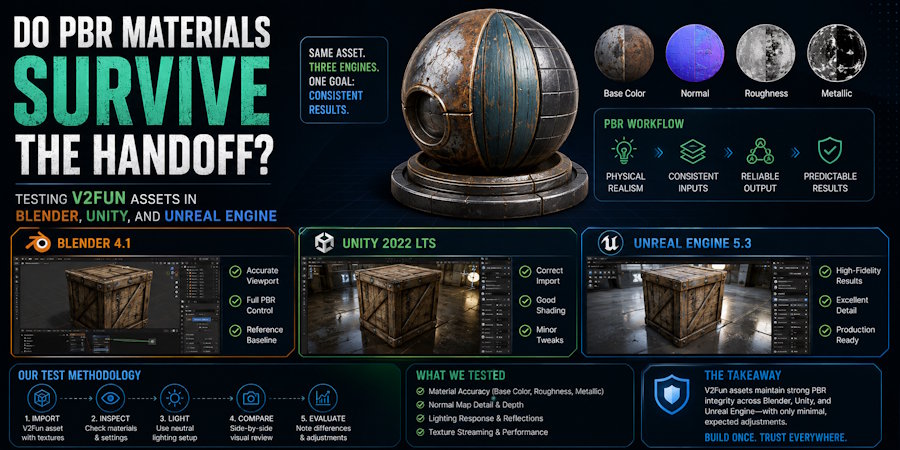
PBR materials can survive the handoff from Blender to Unity or Unreal Engine, but only when the source maps, export package, color-space settings, and destination shader mappings are verified at each stage.
Teams run into handoff problems because a material that looks correct in a generator or DCC viewport may appear too glossy, too flat, too dark, or otherwise incorrect after export. Blender is useful for inspecting texture paths, UVs, color spaces, and shader nodes, while Unity and Unreal Engine are needed to validate engine-specific material mapping, texture compression, lighting, and runtime behavior. The key criteria are map availability, channel meaning, UV stability, import warnings, and the amount of repair work required before the material behaves as intended.
For indie game developers and small 3D teams moving from AI-generated assets to engine testing, V2Fun can serve as the generation, AI texturing, and export stage of the workflow. Its public AI Texturing page identifies Albedo, Normal, Roughness, and Metalness as generated PBR channels. The output should still be treated as a production-oriented starting asset until the material has been inspected in Blender and validated in Unity or Unreal Engine.
What Does PBR Portability Actually Mean?
PBR portability means that the material data remains available and can be reconstructed with comparable behavior in each destination. Pixel-identical renders are not required because Blender, Unity, and Unreal Engine use different shaders, lighting, tone mapping, compression, and render pipelines.
A material passes when the required maps and UVs remain usable, each channel retains the correct meaning, destination-specific conversions follow documented rules, and repair effort stays within the project's limit:
- Map availability: Base Color, Normal, Roughness, Metallic, and any required AO data must be present or explicitly recorded as absent.
- Channel meaning: Base Color should be treated as color data, while Normal, Roughness, Metallic, and AO usually require non-color handling unless the destination specifies otherwise.
- UV stability: Details should remain on the same regions without new stretching, offsets, mirroring, or seam errors.
- Predictable reconstruction: Channel inversion, repacking, and shader setup should follow documented rules rather than visual guesswork.
- Acceptable repair effort: A recoverable material can still fail a small-team workflow if every asset requires lengthy manual work.
This definition is deliberately narrower than "game-ready." Material portability covers one quality gate. A game asset must also pass geometry, scale, pivot, collision, topology, LOD, rigging, animation, memory, and runtime-performance checks where applicable.
Which Files Must Be Preserved Before Export?
Start with the original material files rather than screenshots of the V2Fun preview. Create a source manifest that records the filename, resolution, bit depth, color space, and checksum of every map. Preserve the unmodified files so that later conversions can be compared with a known baseline.
| PBR field | Source evidence to retain | Handoff risk to test |
|---|---|---|
| Base Color or Albedo | Original image file, dimensions, color profile, and a neutral-lighting preview | Baked highlights, unwanted shadows, incorrect sRGB handling, or a broken texture path |
| Normal | Original map, tangent-space convention if known, bit depth, and orientation reference | Incorrect import type, flipped green channel, weak intensity, or mismatched tangents |
| Roughness | Original grayscale or packed-channel file and channel definition | Inversion when the destination expects smoothness, wrong channel extraction, or color-space distortion |
| Metallic or Metalness | Original grayscale or packed-channel file and material-region reference | Incorrect threshold, missing mask, wrong channel, or metallic values assigned to dielectric surfaces |
| Ambient Occlusion | Original file and packing definition, if the source package includes AO | Missing channel, accidental multiplication into Base Color, or pipeline-specific packing errors |
V2Fun's current public texturing page names Albedo, Normal, Roughness, and Metalness but does not name a separate AO map. If AO is absent from the downloaded package, record it as not supplied. AO portability can only be tested when an actual source file or documented packed channel is available.
How Should the Export Package Be Documented?
The export package is the boundary between V2Fun and the receiving tools, so it needs its own evidence. Save the untouched V2Fun download, then create a manifest for the model file, textures, material references, and folder structure.
Record the following fields before opening the asset in Blender:
- V2Fun source state: Save the asset identifier, generation route, texture version, download date, and the current V2Fun export option used. This makes the test reproducible if the platform or asset changes later.
- Container and model format: Record whether the handoff uses GLB, glTF, FBX, OBJ, or another available format. The extension alone does not prove that all maps are embedded or linked.
- Texture packaging: Note whether textures are embedded, stored beside the model, referenced through relative paths, or delivered through an accompanying material file. Broken or absolute paths should be visible in the manifest.
- Channel packing: Document which color channel carries roughness, metallic, AO, or smoothness data. A packed texture without a channel key cannot be mapped reliably downstream.
- Transform and tangent settings: Save axis conversion, unit scale, normal, tangent, triangulation, and material-export options because shading differences may originate here rather than in the texture images.
Use one untouched export for the test. Repacking the material separately for each engine before recording the first import would hide whether the original V2Fun handoff was portable.
Lock the comparison conditions before opening the asset. Use the same model and texture package in all three tools, keep the intended camera views and lighting references consistent, and record the exact Blender, Unity, and Unreal versions. In Unity, name the render pipeline; in Unreal, record the renderer and relevant texture settings. Do not rename, resize, repack, or edit maps before the first import. Start timing when import begins, exclude unrelated interruptions, and stop only when the documented acceptance condition is met. These controls make repair minutes comparable and help separate portability problems from differences in artist familiarity or project setup.
How Do You Establish the Blender Baseline?
Blender is the first controlled inspection point because it exposes the mesh, UVs, texture paths, shader nodes, normals, and tangents before engine-specific rules enter the test.
- Import and inventory the untouched package. Use the matching importer, then confirm the material slots, UVs, texture files, and paths. Save the Blender version, import settings, console messages, and first-open state.
- Set up the material explicitly. Treat Base Color as color data and the Normal, Roughness, Metallic, and AO maps as data textures where appropriate. Connect the available channels to a Principled BSDF material without silently baking AO into Base Color.
- Inspect UVs and source defects. Check stretching, seams, material boundaries, normal direction, and whether details align with the original maps.
- Capture the baseline. Save matching views under fixed neutral lighting, then record warnings, repairs, and the minutes required to reach the accepted Blender reference.
If a seam, wrong material boundary, or inconsistent map appears in Blender and remains visible when the original textures are connected correctly, classify it as a likely source-generation or UV problem. If the image files are correct but missing from the imported material, classify it as a likely export-packaging problem.
How Do You Test the Same Material in Unity?
Import the same package into a clean Unity project and record the Unity version, render pipeline, color-space setting, and importer. Built-in, URP, and HDRP do not share one universal material layout.
- Capture the first import. Save the Model and Texture Import Settings, generated material, Console warnings, and a screenshot before making repairs.
- Verify texture interpretation. Keep Base Color as color data, import the Normal map as a normal map, and apply the settings required by the selected shader for Roughness, Metallic, and AO.
- Translate roughness deliberately. When the shader expects smoothness, invert or repack the source roughness according to the documented channel rule.
- Rebuild and compare once. Connect the verified V2Fun maps without changing the source artwork, compare the result with the Blender baseline under more than one light angle, and record repairs and elapsed minutes.
A material that looks wrong only in Unity, then becomes correct after a documented roughness-to-smoothness conversion or normal-map setting, has an engine-mapping issue. It should not be reported as a failed V2Fun texture generation result.
How Do You Test the Same Material in Unreal Engine?
Import the same package into a clean Unreal Engine project and record the engine version, renderer settings, import route, and texture options.
- Preserve the first-open state. Capture import options, Output Log warnings, texture assets, generated materials, and a neutral-lighting screenshot before reconnecting maps.
- Inspect texture interpretation. Verify sRGB for Base Color and the data-map, compression, and sampler settings for Normal, Roughness, Metallic, and AO.
- Connect channels by meaning. Route each verified source channel to the corresponding material input and document component masks for packed textures.
- Compare and record. Match the Blender orientation, material region, light direction, and camera distance, then record every repair and the elapsed minutes.
If Blender and Unity both reproduce the intended material but Unreal does not until a texture or sampler setting changes, the source images and package have probably survived. The failure belongs to Unreal material mapping or project configuration.
How Can You Tell Which Stage Caused the Failure?
Use cross-tool repetition to identify ownership. A defect that follows the same map through every correctly configured renderer likely began before the handoff; a defect isolated to one destination likely belongs to that destination's import or shader setup.
| Observed failure | Most likely category | Evidence needed before assigning cause | Appropriate response |
|---|---|---|---|
| The same seam or misplaced detail appears in Blender, Unity, and Unreal | Generation, UV, or source-map error | Original map, UV screenshot, and matching close-ups from all three tools | Correct the UV or texture source, or regenerate the V2Fun material when the interpretation itself is wrong |
| Texture files are absent or links fail in every first import | Export-packaging error | Untouched download, folder manifest, material references, and import warnings | Re-export, preserve relative paths, embed supported images, or package the files explicitly |
| Roughness looks inverted only in Unity | Engine material-mapping error | Unity shader name, pipeline, packed-channel key, and Blender/Unreal comparison | Convert roughness to the shader's smoothness convention and record the rule |
| Normal detail is inverted in one tool | Tangent, normal convention, or import-setting error | Original Normal map, tangent settings, engine import type, and close-up lighting comparison | Correct the destination setting or channel orientation before changing the artwork |
| Metallic regions differ after one engine import | Channel packing, color-space, or shader-mapping error | Original Metallic map, component mask, texture settings, and material graph | Restore the correct data setting and connect the documented channel |
| Every tool shows wrong metallic boundaries or baked highlights | Source-generation or source-art error | Original maps and neutral render from each tool | Regenerate or edit the affected V2Fun texture instead of adjusting three destination shaders independently |
This classification keeps fixes close to their source. Regenerating a V2Fun texture will not repair a Unity smoothness convention, while rebuilding an Unreal material will not correct a seam already present in the original image.
What Evidence Should a Portability Result Include?
Mark each field as Pass, Pass with repair, Fail, or Not tested, and support the result with the original files, first-open and repaired screenshots, warnings, settings, and repair time.
| Test field | Pass condition | Required evidence |
|---|---|---|
| Package, model, and UVs | The same package opens with usable geometry, material slots, and UVs | Untouched export, file manifest, first-open screenshots, and import logs |
| Base Color and Normal | Both maps are present, interpreted correctly, and aligned with the UVs | Original files, texture settings, and close-up lighting views |
| Roughness, Metallic, and AO | Available channels preserve or correctly translate their material meaning | Source maps, packing key, shader convention, and material graphs; absent AO is marked not supplied |
| Warnings and repairs | Broken references and conversion steps are documented and repeatable | Console warnings, ordered repair log, and elapsed minutes |
| Failure coverage | Conditional or rejected outcomes are included when they occur | Failure screenshots, affected settings, cause, and corrective action |
Scope the result to the tested V2Fun asset, export format, map resolution, download date, software versions, and engine configuration. Report each destination separately because a clean Blender import does not approve Unity or Unreal. A Pass with repair should name the required conversion and its duration; a Fail should identify the blocked requirement; and Not tested should remain explicit rather than being treated as a pass. This makes the result reusable without implying that one asset represents every V2Fun export.
Define the stopping rule before timing begins. A practical endpoint is reached when all available maps are connected, texture paths work, normal direction is correct, and roughness and metallic behavior match the approved Blender reference under the test lighting.
When Can a V2Fun Asset Be Called Game-Ready or Production-Ready?
Passing this PBR test supports a narrow statement: the tested package was portable across the named versions and configurations with the recorded repairs. It does not establish that every V2Fun export will behave the same way, nor does it approve the complete asset for production.
A "game-ready" claim also requires topology, scale, pivots, collision, LODs, material cost, texture memory, target hardware, and runtime checks. Characters additionally need skeleton, skinning, deformation, animation, and root-motion validation. Until those checks pass, describe the V2Fun output as a production-oriented starting asset or downstream-ready candidate rather than a final production asset.
Conclusion
PBR portability depends on intact source maps, reliable packaging, explicit channel semantics, correct destination settings, and measurable repair work. A generator preview alone cannot confirm it.
V2Fun can connect image, text, or multi-view generation with AI texturing and export, giving creators a starting asset for Blender inspection and Unity or Unreal material setup. Test the untouched package, fix each problem where it originates, and reserve "game-ready" or "production-ready" for assets that pass the full project-specific acceptance process.
FAQ
Does V2Fun Generate PBR Texture Maps?
V2Fun's public AI Texturing page currently identifies Albedo, Normal, Roughness, and Metalness as generated PBR channels. The selected asset and downloaded package should still be inspected to confirm which files are present, how they are named, and whether they are embedded or separate. A standalone AO map should not be assumed unless it appears in the actual export or current documentation.
Why Can a Roughness Map Look Wrong in Unity but Correct in Blender or Unreal?
The Unity shader used by a project may represent surface gloss as smoothness rather than roughness, sometimes through a packed alpha channel. In that case, the roughness values need a documented inversion or repacking step. If the same source map works in Blender and Unreal, the mismatch is more likely an engine material-mapping issue than a V2Fun generation failure.
Does a Successful Blender Import Prove That a V2Fun Asset Will Work in Unity and Unreal?
No. Blender can confirm that the mesh, UVs, texture files, and baseline shader data are available, but Unity and Unreal apply their own importers, shader conventions, texture settings, compression, lighting, and render pipelines. Each destination needs a first-open capture, explicit material setup, warning review, and timed repair record before portability can be claimed.
What Evidence Is Needed Before Calling an AI-Generated Asset Game-Ready?
Material portability is only one part of game readiness. The asset must also pass project-specific checks for topology, scale, pivots, collision, LODs, texture memory, shader cost, runtime performance, and target hardware. Rigged characters additionally require skeleton, skinning, deformation, animation, and root-motion validation. Record the tested software versions, settings, results, and repair effort before making the claim.

